

What’s changing
Earlier this year, we announced dynamic email in Gmail in beta. On July 2, 2019, this feature will become generally available and will launch on by default for all domains. This means that users will be able to access the feature unless you choose to disable it via the Google Admin console.
Who’s impacted
Admins and end users
Why you’d use it
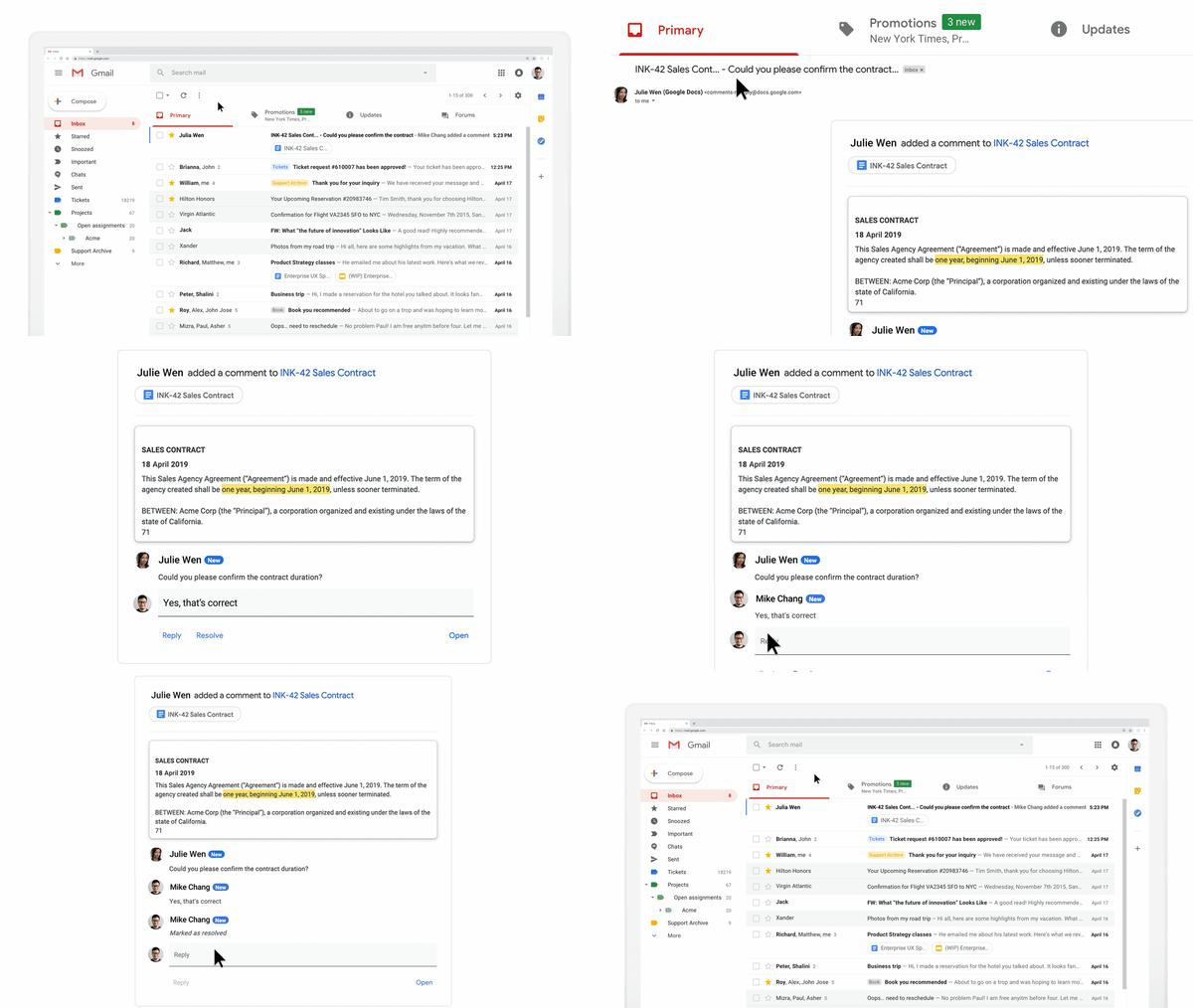
With dynamic email, you can easily take action directly from within the message itself, like RSVP to an event, fill out a questionnaire, browse a catalog or respond to a comment.
Take commenting in Google Docs, for example. Instead of receiving individual email notifications when someone mentions you in a comment, now, you’ll see an up-to-date thread in Gmail where you can easily reply or resolve the comment, right from within the message.
How to get started
Additional details
- Admins: Determine whether your users can use dynamic email by navigating to Apps > G Suite > Settings for Gmail > User settings in the Admin console and selecting from the following options:
- Disable: This option will prevent users in your domain from receiving interactive emails.
- Enable now (beta): This option will enable dynamic email (currently in beta) immediately. The feature will remain enabled when it enters general availability on July 2, 2019.
- Enable when the feature is generally available: This is the default option and will enable dynamic email when this feature becomes generally available on July 2, 2019.
- End users: Once dynamic email in Gmail launches, users will begin seeing dynamic emails from senders who are sending dynamic emails., if you’ve enabled it. Additionally, users can also turn dynamic mail off for their individual account by following the steps in the Help Center. Note: The “display external images” setting must also be enabled in order for dynamic emails to be displayed.
This feature is currently only available in Gmail on the web, with mobile coming soon.
Helpful links
Availability
- Help Center: Assign Gmail settings for users
- Help Center: Supported data types for Vault
- Help Center: Complete tasks without leaving a message
Rollout details
G Suite editions
- Rapid Release domains: Gradual rollout (up to 15 days for feature visibility) starting on July 2, 2019
- Scheduled Release domains: Gradual rollout (up to 15 days for feature visibility) starting on July 2, 2019
Available to all G Suite editions
On/off by default?
This feature will be ON by default beginning on July 2, 2019.
Source: G Suite Updates Blog: Dynamic email in Gmail becoming generally available on July 2, 2019
My Computer
At a glance
64-bit Windows 11 Pro for WorkstationsIntel i7-8700K OC'd to 5 GHz64 GB (4x16GB) G.SKILL TridentZ RGB DDR4 3600...ASUS ROG-STRIX-GTX1080TI-O11G-GAMING
- Computer type
- PC/Desktop
- Computer Manufacturer/Model Number
- Self built custom
- OS
- 64-bit Windows 11 Pro for Workstations
- CPU
- Intel i7-8700K OC'd to 5 GHz
- Motherboard
- ASUS ROG Maximus XI Formula Z390
- Memory
- 64 GB (4x16GB) G.SKILL TridentZ RGB DDR4 3600 MHz
- Graphics Card(s)
- ASUS ROG-STRIX-GTX1080TI-O11G-GAMING
- Sound Card
- Integrated
- Monitor(s) Displays
- 2 x Samsung Odyssey G7 27"
- Screen Resolution
- 2560x1440
- Hard Drives
- 1TB Samsung 990 PRO M.2,
4TB Samsung 990 PRO PRO M.2,
TerraMaster F8 SSD Plus NAS
- PSU
- Seasonic Prime Titanium 850W
- Case
- Thermaltake Core P3
- Cooling
- Corsair Hydro H115i
- Keyboard
- Logitech wireless K800
- Mouse
- Logitech MX Master 4
- Internet Speed
- 2 Gb/s Download and 100 Mb/s Upload
- Antivirus
- Malwarebyte Anti-Malware Premium
- Browser
- Google Chrome
- Other Info
- Logitech Z625 speaker system,
Logitech BRIO 4K Pro webcam,
HP Color LaserJet Pro MFP M477fdn,
APC SMART-UPS RT 1000 XL - SURT1000XLI,
Galaxy S23 Plus phone
