
Dynamic partition

Novel8

OK this is what I am assuming you have - ignoring disk 0

100 MB System drive
122.48 GB Windows 10 Partition Will be C: drive when Win10 is running something else when Win7 Is running
128.18 GB Unallocated space
450MB Windows 10 Win10 Recovery Partition, (Recovery Tools)
122.44 GB Windows 7 Partition Not fully operable at present
92.16 GB Unallocated space

What I would suggest is that you grab yourself a copy of Partition Wizard free and a copy of EasyBCD 2.6 (last free version)

using these tools you should be able to

Move the 450MB partition to sit immediately right of the C: Drive ( Win10) - Partition Wizard

move the 122GB, Win 7 Partition to be immediately right of the 450MB partition - Partition Wizard

Reinitialise the Windows 7 partition to boot from the system partition in a dual boot - Easy BCD ( if the install of Win 7 is too corrupt to re-use you will need to re-install into this partition

Create a new Data partition of 130.34 using the total unallocated space which will be shared access from both Operating systems in the Dual boot - Partition Wizard

Plan.png


If this is what you wish to do I can give further assistance if you require it
 
Last edited:

My Computers

System One System Two

  • Computer type
    PC/Desktop
    Computer Manufacturer/Model Number
    ChillBlast - Custom to my design
    OS
    Windows 11 Pro x64 [Latest Release and Release Preview]
    CPU
    Ryzen 9 5950X, 3.8 - 5.2 MHz
    Motherboard
    Asus Prime X570-Pro
    Memory
    64GB [2 x 32GB] DDR4 3200MHz
    Graphics Card(s)
    4GB NVIDIA GEFORCE GTX 1650 Ti
    Sound Card
    On-board SPDIF to 5.1 System + HDMI [5.1 system]
    Monitor(s) Displays
    32" UHD 32 Bit HDR Monitor + 43" UHD 4K 32Bit HDR TV
    Screen Resolution
    2 x 3840 x 2160 @60Hz
    Hard Drives
    1TB M2 SSD OS, 500GB Fast Access SSD, 2 x 8TB Data + Various Externals from 1TB to 4TB, 10TB NAS
    PSU
    NZXT C750 80 PLUS Gold 750W Modular PSU
    Case
    Workstation Case [Matt Black]
    Cooling
    NZXT Kraken X63 280mm CPU Cooler +2x Quiet Case fans
    Keyboard
    Logitech Wireless MX Keys & K400 + others
    Mouse
    Logitech Wireless MX Master 3S
    Internet Speed
    920 MB Down 50 MB Up
    Antivirus
    BitDefender Total Security Pro
    Browser
    Chrome (always run latest Non-Beta)
    Other Info
    Also run ...
    Laptop - Quad 8GB - Windows 10 Pro x64
    Nexus 7 Android tablet x2
    Samsung 10.2" tablet
    Blackview TAB 8 4G Android Tablet c/w Keyboard
    Wacom Intuos Pro Medium Pen Pad
    Wacom Intuos Pro Small Pen Pad
    Wacom Expresskeys Remote
    Loopdeck+ Graphics Controller
    Shuttle Pro v2 Control
  • Computer type
    Laptop
    System Manufacturer/Model Number
    Dell XPS 17 10750H
    OS
    Windows 11 Pro x64 Latest RP
    CPU
    Intel I7 10750H 5.0GHz
    Motherboard
    Dell XPS
    Memory
    32GB [2x16GB] DDR4 2933 MHz
    Graphics Card(s)
    nVidia GTX1650Ti 4 GB GDDR6
    Sound Card
    Stock [Realtek] 4 Speaker
    Monitor(s) Displays
    17" IPS UHD+ Infinity Edge Touchscreen
    Screen Resolution
    3840 x 2400
    Hard Drives
    2TB M2 NVMe, 4TB External + various 500GB & 1TB External NVMe (also have access to spinner HDD from
    PSU
    Stock
    Case
    Stock XPS Aluminium & Carbon Fibre
    Cooling
    Stock - Active Fan Control
    Keyboard
    Backlit + Various Logitech
    Mouse
    Stock Track Pad + Logitech MX Trackball
    Internet Speed
    72 MB Down 18MB Up
    Browser
    Chrome
    Other Info
    Also run ...
    Laptop - Quad 8GB - Windows 10 Pro x64
    Nexus 7 Android tablet x2
    10.2" tablet
    Sony Z3 Android Smartphone
    Wacom Intuos Pro Medium Pen Pad
    Wacom Intuos Pro Small Pen Pad
    Wacom Expresskeys Remote
    Loopdeck+ Graphics Controller
    Shuttle Pro v2 Control Pad
    10TB NAS
Yes, that sounds and looks cool...I d/l those programs and just hope they are not confusing when I attempt to do what your suggesting....just one thing has me puzzled...you and I seem to agree that portions of my Win 7 is still on this drive and the installation of Win 10, did not overwrite it...you sound sure that win 7 is in that 128 gb unallocated section....how can a OS be in an unallocated partition?
 

My Computer

Computer type
PC/Desktop
Computer Manufacturer/Model Number
Build OEM Desktop
OS
Win 7 x64.Win 10
CPU
AMD A10 7850K
Motherboard
Asus A88X-Pro
Memory
8 gb
Graphics Card(s)
Nil
Sound Card
Nil
Monitor(s) Displays
Insignia
Screen Resolution
1376 x
Hard Drives
500 gb
Case
ABS
Keyboard
Sony
Mouse
OEM
Antivirus
Windows defender, Windows essential, Malware, autospyware
Browser
Firefox,Vivaldi
Lets find out if you still have win 7 and in what partition.
You're not following my instructions!!!!
Have a look at the disk management image on your post #20.
On the half top you have partitions descriptions. You have the Volume, Layout, Type, File system, Status, Capacity, Free Space and % free.

We can't read the status column. You must expand the column so we can read it.
 

My Computers

System One System Two

  • Computer type
    PC/Desktop
    Computer Manufacturer/Model Number
    custom build
    OS
    Windows 7 HP 64
    CPU
    i5 6600K - 800MHz to 4200MHz
    Motherboard
    GA-Z170-HD3P
    Memory
    4+4G GSkill DDR4 3000
    Graphics Card(s)
    IG - Intel 530
    Monitor(s) Displays
    Samsung 226BW
    Screen Resolution
    1680x1050
    Hard Drives
    (1) -1 SM951 – 128GB M.2 AHCI PCIe SSD drive for Windows 7 and Lubuntu
    (2) -1 WD SATA 3 - 1T for Data
    (3) -1 WD SATA 3 - 1T for backup
    PSU
    Thermaltake 450W TR2 gold
    Keyboard
    Old and good Chicony mechanical keyboard
    Mouse
    Logitech mX performance - 9 buttons (had to disable some)
    Internet Speed
    500Mb/s
    Browser
    Firefox 64
    Other Info
    TinyWall firewall
  • Computer type
    Laptop
    System Manufacturer/Model Number
    Asus Q550LF
    OS
    Windows 7 Pro
    CPU
    i7-4500U 800MHz to 3.0GHz
    Motherboard
    Asus Q550LF
    Memory
    (4+4)G DDR3 1600
    Graphics Card(s)
    IG intel 4400 + NVIDIA GeForce GT 745M
    Sound Card
    Realtek
    Monitor(s) Displays
    LG Display LP156WF4-SPH1
    Screen Resolution
    1920 x 1080
    Hard Drives
    BX500 120G SSD for Windows and programs +
    1T HDD for data
    Internet Speed
    500 Mb/s
    Browser
    Firefox
    Other Info
    TinyWall firewall
The Win7 installation is, I believe in the partition directly to the right of the 450Mb Tools partition the windows 10 install has I think gone wring as it should have added the older Win 7 Boot options to the 100MB partition at the far left, but has corrupted it

The two unallocated partitions are exactly that,- spare space but the 144GB partition without any name or drive letter allocated is where I think the Win7 Install is

When you get the programs I've suggested read through the help files - Partition Wizard can be operated by using it's built in Wizards, and can sometimes reboot to it's own "OS" when needed

One thing I have to advise is that although these programs are very reliable I would always make backups of any personal files and other data just in case, When You get to re-activating the boot system it's always a good idea to have a boot disk or USB, again Just in case
 

My Computers

System One System Two

  • Computer type
    PC/Desktop
    Computer Manufacturer/Model Number
    ChillBlast - Custom to my design
    OS
    Windows 11 Pro x64 [Latest Release and Release Preview]
    CPU
    Ryzen 9 5950X, 3.8 - 5.2 MHz
    Motherboard
    Asus Prime X570-Pro
    Memory
    64GB [2 x 32GB] DDR4 3200MHz
    Graphics Card(s)
    4GB NVIDIA GEFORCE GTX 1650 Ti
    Sound Card
    On-board SPDIF to 5.1 System + HDMI [5.1 system]
    Monitor(s) Displays
    32" UHD 32 Bit HDR Monitor + 43" UHD 4K 32Bit HDR TV
    Screen Resolution
    2 x 3840 x 2160 @60Hz
    Hard Drives
    1TB M2 SSD OS, 500GB Fast Access SSD, 2 x 8TB Data + Various Externals from 1TB to 4TB, 10TB NAS
    PSU
    NZXT C750 80 PLUS Gold 750W Modular PSU
    Case
    Workstation Case [Matt Black]
    Cooling
    NZXT Kraken X63 280mm CPU Cooler +2x Quiet Case fans
    Keyboard
    Logitech Wireless MX Keys & K400 + others
    Mouse
    Logitech Wireless MX Master 3S
    Internet Speed
    920 MB Down 50 MB Up
    Antivirus
    BitDefender Total Security Pro
    Browser
    Chrome (always run latest Non-Beta)
    Other Info
    Also run ...
    Laptop - Quad 8GB - Windows 10 Pro x64
    Nexus 7 Android tablet x2
    Samsung 10.2" tablet
    Blackview TAB 8 4G Android Tablet c/w Keyboard
    Wacom Intuos Pro Medium Pen Pad
    Wacom Intuos Pro Small Pen Pad
    Wacom Expresskeys Remote
    Loopdeck+ Graphics Controller
    Shuttle Pro v2 Control
  • Computer type
    Laptop
    System Manufacturer/Model Number
    Dell XPS 17 10750H
    OS
    Windows 11 Pro x64 Latest RP
    CPU
    Intel I7 10750H 5.0GHz
    Motherboard
    Dell XPS
    Memory
    32GB [2x16GB] DDR4 2933 MHz
    Graphics Card(s)
    nVidia GTX1650Ti 4 GB GDDR6
    Sound Card
    Stock [Realtek] 4 Speaker
    Monitor(s) Displays
    17" IPS UHD+ Infinity Edge Touchscreen
    Screen Resolution
    3840 x 2400
    Hard Drives
    2TB M2 NVMe, 4TB External + various 500GB & 1TB External NVMe (also have access to spinner HDD from
    PSU
    Stock
    Case
    Stock XPS Aluminium & Carbon Fibre
    Cooling
    Stock - Active Fan Control
    Keyboard
    Backlit + Various Logitech
    Mouse
    Stock Track Pad + Logitech MX Trackball
    Internet Speed
    72 MB Down 18MB Up
    Browser
    Chrome
    Other Info
    Also run ...
    Laptop - Quad 8GB - Windows 10 Pro x64
    Nexus 7 Android tablet x2
    10.2" tablet
    Sony Z3 Android Smartphone
    Wacom Intuos Pro Medium Pen Pad
    Wacom Intuos Pro Small Pen Pad
    Wacom Expresskeys Remote
    Loopdeck+ Graphics Controller
    Shuttle Pro v2 Control Pad
    10TB NAS
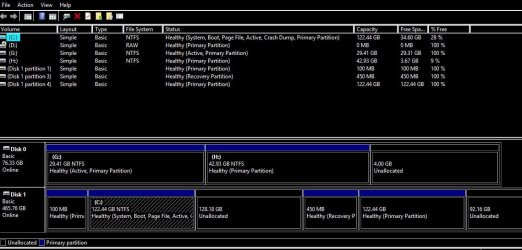
We can't read the status column. You must expand the column so we can read it.[/QUOTE]
 

Attachments

  • Capture3.JPG
    Capture3.JPG
    81.2 KB · Views: 5

My Computer

Computer type
PC/Desktop
Computer Manufacturer/Model Number
Build OEM Desktop
OS
Win 7 x64.Win 10
CPU
AMD A10 7850K
Motherboard
Asus A88X-Pro
Memory
8 gb
Graphics Card(s)
Nil
Sound Card
Nil
Monitor(s) Displays
Insignia
Screen Resolution
1376 x
Hard Drives
500 gb
Case
ABS
Keyboard
Sony
Mouse
OEM
Antivirus
Windows defender, Windows essential, Malware, autospyware
Browser
Firefox,Vivaldi
As Barman wrote, Win 7 probably was on disk 1, partition 4, (122G). As it is now 100% free, there is nothing on it.

You have 3 unallocated partitions, one in disk 0 and two in disk 1.
You can only expand a partition to an unallocated partition on the right.

- With Disk management expand the H: partition to the right to add the 4G to H: . Right click on H: and select Extend Volume.
- With Disk management expand the C: partition to the right to add the 128G to C: . Right click on C: and select Extend Volume.
- With Disk management expand disk 1, partition 4 to the right to add the 92G to it. Right click on partition 4 and select Extend Volume.

Disk 0 will have only two partitions
- G: with 29,41G
- H: with 46,93G

Disk 1 will have only four partitions
- P1 - 100M
- P2 - C: 250G with win 10
- P3 - 450M Recovery Partition
- P4 - 214G (where you will install win 7)

Disk 0, Partition 1 (G: ) is set as Active, so it has a MBR pointing to a boot loader.
Detach disk 0 (take the power or the SATA cable). Power on and see if Win 10 still boots.
- If it boots normally, good.
- If it doesn't boot, the required MBR is on the detached disk 0. Boot with the Win 10 installation disk and do a boot repair.
Once you have win 10 booting normally, you're ready to install win 7.

Boot with Win 7 installation disk, go to install, select Partition 4 - 214G and proceed.

When finished, it may not boot win 10. Don't panic. You may have to set an option to have dual boot.
Under win 7, open Device Manager and install all drivers. There should be no yellow alerts.
For the updates, use the offline updates. MS releases SP2 for Windows 7 - Windows 7 Help Forums
 

My Computers

System One System Two

  • Computer type
    PC/Desktop
    Computer Manufacturer/Model Number
    custom build
    OS
    Windows 7 HP 64
    CPU
    i5 6600K - 800MHz to 4200MHz
    Motherboard
    GA-Z170-HD3P
    Memory
    4+4G GSkill DDR4 3000
    Graphics Card(s)
    IG - Intel 530
    Monitor(s) Displays
    Samsung 226BW
    Screen Resolution
    1680x1050
    Hard Drives
    (1) -1 SM951 – 128GB M.2 AHCI PCIe SSD drive for Windows 7 and Lubuntu
    (2) -1 WD SATA 3 - 1T for Data
    (3) -1 WD SATA 3 - 1T for backup
    PSU
    Thermaltake 450W TR2 gold
    Keyboard
    Old and good Chicony mechanical keyboard
    Mouse
    Logitech mX performance - 9 buttons (had to disable some)
    Internet Speed
    500Mb/s
    Browser
    Firefox 64
    Other Info
    TinyWall firewall
  • Computer type
    Laptop
    System Manufacturer/Model Number
    Asus Q550LF
    OS
    Windows 7 Pro
    CPU
    i7-4500U 800MHz to 3.0GHz
    Motherboard
    Asus Q550LF
    Memory
    (4+4)G DDR3 1600
    Graphics Card(s)
    IG intel 4400 + NVIDIA GeForce GT 745M
    Sound Card
    Realtek
    Monitor(s) Displays
    LG Display LP156WF4-SPH1
    Screen Resolution
    1920 x 1080
    Hard Drives
    BX500 120G SSD for Windows and programs +
    1T HDD for data
    Internet Speed
    500 Mb/s
    Browser
    Firefox
    Other Info
    TinyWall firewall
I got as far as to the last move....Part 4 to 92.16gb, and once i clicked on 'extend volume', it just won't proceed, like the others did. There was no message.
 

My Computer

Computer type
PC/Desktop
Computer Manufacturer/Model Number
Build OEM Desktop
OS
Win 7 x64.Win 10
CPU
AMD A10 7850K
Motherboard
Asus A88X-Pro
Memory
8 gb
Graphics Card(s)
Nil
Sound Card
Nil
Monitor(s) Displays
Insignia
Screen Resolution
1376 x
Hard Drives
500 gb
Case
ABS
Keyboard
Sony
Mouse
OEM
Antivirus
Windows defender, Windows essential, Malware, autospyware
Browser
Firefox,Vivaldi
Lets try another approach.
Right click on disk 1, partition 4 and delete the partition. You will end with a 214G unallocated partition. Then create new, and format as NTFS.
 

My Computers

System One System Two

  • Computer type
    PC/Desktop
    Computer Manufacturer/Model Number
    custom build
    OS
    Windows 7 HP 64
    CPU
    i5 6600K - 800MHz to 4200MHz
    Motherboard
    GA-Z170-HD3P
    Memory
    4+4G GSkill DDR4 3000
    Graphics Card(s)
    IG - Intel 530
    Monitor(s) Displays
    Samsung 226BW
    Screen Resolution
    1680x1050
    Hard Drives
    (1) -1 SM951 – 128GB M.2 AHCI PCIe SSD drive for Windows 7 and Lubuntu
    (2) -1 WD SATA 3 - 1T for Data
    (3) -1 WD SATA 3 - 1T for backup
    PSU
    Thermaltake 450W TR2 gold
    Keyboard
    Old and good Chicony mechanical keyboard
    Mouse
    Logitech mX performance - 9 buttons (had to disable some)
    Internet Speed
    500Mb/s
    Browser
    Firefox 64
    Other Info
    TinyWall firewall
  • Computer type
    Laptop
    System Manufacturer/Model Number
    Asus Q550LF
    OS
    Windows 7 Pro
    CPU
    i7-4500U 800MHz to 3.0GHz
    Motherboard
    Asus Q550LF
    Memory
    (4+4)G DDR3 1600
    Graphics Card(s)
    IG intel 4400 + NVIDIA GeForce GT 745M
    Sound Card
    Realtek
    Monitor(s) Displays
    LG Display LP156WF4-SPH1
    Screen Resolution
    1920 x 1080
    Hard Drives
    BX500 120G SSD for Windows and programs +
    1T HDD for data
    Internet Speed
    500 Mb/s
    Browser
    Firefox
    Other Info
    TinyWall firewall
If you are using windows Built-in disk management then you have to work within it's restrictions (it's a basic tool only). Partition Wizard will allow you to Move a partition and extend (resize) in one operation where ever the partitions and free space are .

I would recommend that one data partition is shares between Multi Boot installations as I lessens the likelihood of Operating systems corrupting each other during Data access. I've had a maximum of five Operating systems on the same disk (including Win7 on a non Primary Partition), sharing a single data store without any issues so it does make sense as you will always find that you create more data in one OS and so need maximum Safe storage available to both.
 

My Computers

System One System Two

  • Computer type
    PC/Desktop
    Computer Manufacturer/Model Number
    ChillBlast - Custom to my design
    OS
    Windows 11 Pro x64 [Latest Release and Release Preview]
    CPU
    Ryzen 9 5950X, 3.8 - 5.2 MHz
    Motherboard
    Asus Prime X570-Pro
    Memory
    64GB [2 x 32GB] DDR4 3200MHz
    Graphics Card(s)
    4GB NVIDIA GEFORCE GTX 1650 Ti
    Sound Card
    On-board SPDIF to 5.1 System + HDMI [5.1 system]
    Monitor(s) Displays
    32" UHD 32 Bit HDR Monitor + 43" UHD 4K 32Bit HDR TV
    Screen Resolution
    2 x 3840 x 2160 @60Hz
    Hard Drives
    1TB M2 SSD OS, 500GB Fast Access SSD, 2 x 8TB Data + Various Externals from 1TB to 4TB, 10TB NAS
    PSU
    NZXT C750 80 PLUS Gold 750W Modular PSU
    Case
    Workstation Case [Matt Black]
    Cooling
    NZXT Kraken X63 280mm CPU Cooler +2x Quiet Case fans
    Keyboard
    Logitech Wireless MX Keys & K400 + others
    Mouse
    Logitech Wireless MX Master 3S
    Internet Speed
    920 MB Down 50 MB Up
    Antivirus
    BitDefender Total Security Pro
    Browser
    Chrome (always run latest Non-Beta)
    Other Info
    Also run ...
    Laptop - Quad 8GB - Windows 10 Pro x64
    Nexus 7 Android tablet x2
    Samsung 10.2" tablet
    Blackview TAB 8 4G Android Tablet c/w Keyboard
    Wacom Intuos Pro Medium Pen Pad
    Wacom Intuos Pro Small Pen Pad
    Wacom Expresskeys Remote
    Loopdeck+ Graphics Controller
    Shuttle Pro v2 Control
  • Computer type
    Laptop
    System Manufacturer/Model Number
    Dell XPS 17 10750H
    OS
    Windows 11 Pro x64 Latest RP
    CPU
    Intel I7 10750H 5.0GHz
    Motherboard
    Dell XPS
    Memory
    32GB [2x16GB] DDR4 2933 MHz
    Graphics Card(s)
    nVidia GTX1650Ti 4 GB GDDR6
    Sound Card
    Stock [Realtek] 4 Speaker
    Monitor(s) Displays
    17" IPS UHD+ Infinity Edge Touchscreen
    Screen Resolution
    3840 x 2400
    Hard Drives
    2TB M2 NVMe, 4TB External + various 500GB & 1TB External NVMe (also have access to spinner HDD from
    PSU
    Stock
    Case
    Stock XPS Aluminium & Carbon Fibre
    Cooling
    Stock - Active Fan Control
    Keyboard
    Backlit + Various Logitech
    Mouse
    Stock Track Pad + Logitech MX Trackball
    Internet Speed
    72 MB Down 18MB Up
    Browser
    Chrome
    Other Info
    Also run ...
    Laptop - Quad 8GB - Windows 10 Pro x64
    Nexus 7 Android tablet x2
    10.2" tablet
    Sony Z3 Android Smartphone
    Wacom Intuos Pro Medium Pen Pad
    Wacom Intuos Pro Small Pen Pad
    Wacom Expresskeys Remote
    Loopdeck+ Graphics Controller
    Shuttle Pro v2 Control Pad
    10TB NAS
Lets try another approach.
Right click on disk 1, partition 4 and delete the partition. You will end with a 214G unallocated partition. Then create new, and format as NTFS.

It seems when i make some progress, another snag appears. I did as you suggested and finally installed Win 7....BUT, by doing that, its obvious i have no network connection and it screwed up my network connection in Win 10. i cannot get into the internet in either OS. i called D-Link, and they were no help at all. i'm hoping i can some guidness here.
 

My Computer

Computer type
PC/Desktop
Computer Manufacturer/Model Number
Build OEM Desktop
OS
Win 7 x64.Win 10
CPU
AMD A10 7850K
Motherboard
Asus A88X-Pro
Memory
8 gb
Graphics Card(s)
Nil
Sound Card
Nil
Monitor(s) Displays
Insignia
Screen Resolution
1376 x
Hard Drives
500 gb
Case
ABS
Keyboard
Sony
Mouse
OEM
Antivirus
Windows defender, Windows essential, Malware, autospyware
Browser
Firefox,Vivaldi
There is no relation with the Win 7 installation and Win 10. They are on different partitions.
Hope you followed my post #26 instructions and disconnected the data drive (drive 0) before installing win 7.
Boot win 10, open device manager and look if there is any yellow alerts. Special look at network adapters.
For Win 7, open device manager and look if there is any yellow alerts. Use the Asus A88X-Pro disk that came with the MB to install all missing drivers.
 

My Computers

System One System Two

  • Computer type
    PC/Desktop
    Computer Manufacturer/Model Number
    custom build
    OS
    Windows 7 HP 64
    CPU
    i5 6600K - 800MHz to 4200MHz
    Motherboard
    GA-Z170-HD3P
    Memory
    4+4G GSkill DDR4 3000
    Graphics Card(s)
    IG - Intel 530
    Monitor(s) Displays
    Samsung 226BW
    Screen Resolution
    1680x1050
    Hard Drives
    (1) -1 SM951 – 128GB M.2 AHCI PCIe SSD drive for Windows 7 and Lubuntu
    (2) -1 WD SATA 3 - 1T for Data
    (3) -1 WD SATA 3 - 1T for backup
    PSU
    Thermaltake 450W TR2 gold
    Keyboard
    Old and good Chicony mechanical keyboard
    Mouse
    Logitech mX performance - 9 buttons (had to disable some)
    Internet Speed
    500Mb/s
    Browser
    Firefox 64
    Other Info
    TinyWall firewall
  • Computer type
    Laptop
    System Manufacturer/Model Number
    Asus Q550LF
    OS
    Windows 7 Pro
    CPU
    i7-4500U 800MHz to 3.0GHz
    Motherboard
    Asus Q550LF
    Memory
    (4+4)G DDR3 1600
    Graphics Card(s)
    IG intel 4400 + NVIDIA GeForce GT 745M
    Sound Card
    Realtek
    Monitor(s) Displays
    LG Display LP156WF4-SPH1
    Screen Resolution
    1920 x 1080
    Hard Drives
    BX500 120G SSD for Windows and programs +
    1T HDD for data
    Internet Speed
    500 Mb/s
    Browser
    Firefox
    Other Info
    TinyWall firewall
This a mess...Win 7 device man. shows ethernet controller,SM Bus controller, (4) universale bus controllers and usb cam.
I am using my very slow Acer notebook,BTW am able to get my network working.only on this pc.,, As for win 10, the drivers disk won't boot, I am able to see it in windows explorer. I tried setup, autorun in the Run command box to no avail. I do have my cd drive as boot #1 in my Bios setup, but won't boot.
 

My Computer

Computer type
PC/Desktop
Computer Manufacturer/Model Number
Build OEM Desktop
OS
Win 7 x64.Win 10
CPU
AMD A10 7850K
Motherboard
Asus A88X-Pro
Memory
8 gb
Graphics Card(s)
Nil
Sound Card
Nil
Monitor(s) Displays
Insignia
Screen Resolution
1376 x
Hard Drives
500 gb
Case
ABS
Keyboard
Sony
Mouse
OEM
Antivirus
Windows defender, Windows essential, Malware, autospyware
Browser
Firefox,Vivaldi
Drivers disk aren't boot able. Under windows, insert it on the CD / DVD drive, open Explorer and run setup.
 

My Computers

System One System Two

  • Computer type
    PC/Desktop
    Computer Manufacturer/Model Number
    custom build
    OS
    Windows 7 HP 64
    CPU
    i5 6600K - 800MHz to 4200MHz
    Motherboard
    GA-Z170-HD3P
    Memory
    4+4G GSkill DDR4 3000
    Graphics Card(s)
    IG - Intel 530
    Monitor(s) Displays
    Samsung 226BW
    Screen Resolution
    1680x1050
    Hard Drives
    (1) -1 SM951 – 128GB M.2 AHCI PCIe SSD drive for Windows 7 and Lubuntu
    (2) -1 WD SATA 3 - 1T for Data
    (3) -1 WD SATA 3 - 1T for backup
    PSU
    Thermaltake 450W TR2 gold
    Keyboard
    Old and good Chicony mechanical keyboard
    Mouse
    Logitech mX performance - 9 buttons (had to disable some)
    Internet Speed
    500Mb/s
    Browser
    Firefox 64
    Other Info
    TinyWall firewall
  • Computer type
    Laptop
    System Manufacturer/Model Number
    Asus Q550LF
    OS
    Windows 7 Pro
    CPU
    i7-4500U 800MHz to 3.0GHz
    Motherboard
    Asus Q550LF
    Memory
    (4+4)G DDR3 1600
    Graphics Card(s)
    IG intel 4400 + NVIDIA GeForce GT 745M
    Sound Card
    Realtek
    Monitor(s) Displays
    LG Display LP156WF4-SPH1
    Screen Resolution
    1920 x 1080
    Hard Drives
    BX500 120G SSD for Windows and programs +
    1T HDD for data
    Internet Speed
    500 Mb/s
    Browser
    Firefox
    Other Info
    TinyWall firewall
Thanks, I did click on setup and it wouldn't work for some reason and then I read your post, so i tried it again and it did work. Win 7 is just fine and up to date. One curious message i get when I tried to open Win 10. It always opens in safe mode. I have done search on it and tried all options and have not been able to get out of safe mode...so i did repair. It did the trick, but now my Cortana has the sound, but it can't hear me or even type in the search box. Aside from that, I found out that i seem to have 2 versions of Win 10. One is corrupt and the other is the one that i am talking about now..and it says its in Volume 2. Needless to say, i do not know where that is by looking at disk manager. I would like to delete it, but hate to think that i may delete the wrong one, even if Cortana doesn't work...and even if I update win 10, it may do it to the corrupt version. I did see both versions shown, one marked default and the other current...so it may be the default one that is corrupt. Win 7 is not even shown this time.I also want to take this moment to thank you for your preserverance in this matter. Happy New Year
 

My Computer

Computer type
PC/Desktop
Computer Manufacturer/Model Number
Build OEM Desktop
OS
Win 7 x64.Win 10
CPU
AMD A10 7850K
Motherboard
Asus A88X-Pro
Memory
8 gb
Graphics Card(s)
Nil
Sound Card
Nil
Monitor(s) Displays
Insignia
Screen Resolution
1376 x
Hard Drives
500 gb
Case
ABS
Keyboard
Sony
Mouse
OEM
Antivirus
Windows defender, Windows essential, Malware, autospyware
Browser
Firefox,Vivaldi
Back
Top