
Dynamic Range Compressor

Lady Fitzgerald

Senioritis Member
Guru
Gold Member
VIP
Local time
6:05 AM
Messages
9,540
Location
AZ, SSA (Squabbling States of America)
I recently had to replace my beloved Corsair SP2500 speakers when the sub died. One thing I really loved about the SP2500 was it had a setting that compressed the dynamic range of music being played. Most of the music I listen to (Classical) has a wide dynamic range that can go from a whisper to ear splitting (and neighbor disturbing) and that dynamic range compression was a Godsend. Sadly, none of the replacements I considered (I chose a pair of self-powered JBL 305P MkII studio speakers) had provisions for dynamic range compression like the SP 2500 did. None of my player software has dynamic range compression. I currently use Media Monkey for music but plan on switching to the Plex Media Server someday for playing all my ripped music and movies.

Does anyone know of a software or hardware solution for getting dynamic range compression that is compatible with both Win 7 and Linux?
 

My Computer

Computer type
PC/Desktop
Computer Manufacturer/Model Number
Custom Build
OS
Win 7 Ultimate 64 bit
CPU
Intel i7-3930K
Motherboard
ASUS P9X79 WS
Memory
Kingston HyperX Genesis 32GB Kit (8x4GB Modules) 1600MHz DDR
Graphics Card(s)
MSI R7850 Twin Frozr 2GD5/OC Radeon HD 7850 2GB 256-bit GDDR
Sound Card
Asus Xonar Essence STX
Monitor(s) Displays
3x Asus VG248QE 24", Vizio 32" TV
Screen Resolution
1920 x 1080, ?
Hard Drives
Samsung 128GB 840 Pro SSD (1),
Samsung 4TB 850 EVO SSDs (4)
Samsung 4TB 850 EVO SSDs (16) external backup drives used in 2.5" hot swap bays in the computer.
PSU
Corsair HX750w
Case
Antec Two Hundred v2 (modified)
Cooling
Cooler Master GeminII S524 120mm (fan replaced with a 140mm)
Keyboard
Logitech G510s
Mouse
Logitech M525 (two in use)
Internet Speed
=< 32Mbps down, 8Mbps up
Antivirus
AVAST!, MBAM, SAS, Spybot S&D (all but MBAM free) Glary Util
Browser
IE11
Other Info
LSI 9211-8i HBA card (8 SATA III ports), 2.5" & 3.5" Hot Swap Bays, HooToo HT-CR001 PCI-E to USB 3.0 Internal Hub + 6 Slot Card Reader, and LG Model CH12LS28 BD-ROM Optical Drive. Also, ScanSnap S1500 ADF duplexing scanner, Canon 9000F flat bed scanner, Corsair SP2500 2.1 speakers, Samsung CLP 415nw laser color printer, Cyberpower PP2200SW UPS
Hi,
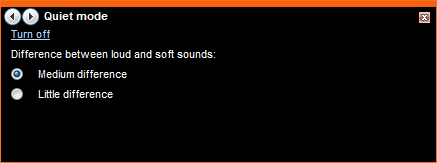
Do you ever use Windows Media Player at all? Media player has some useful Enhancements. One of those Enhancements is called Quiet Mode, and it does just about what you are asking.

By default, Quite mode is switched off. But once it is switched on, you can select between two levels of audio softness.
Quite mode in Windows Media Player:
Quite Mode.PNG

Windows Media Player > Now Playing > Right-mouse click> Enhancements > Quite Mode.

Alternatively, take a look at something like the Edifier Studio S2000 2.0 Speakers. These Speakers include listening Presets (Monitor, Dynamic, Classical and Vocal). That might be more what you are searching for.
 

My Computer

Computer type
PC/Desktop
OS
Windows 7 x64, Vista x64, 8.1 smartphone
CPU
Intel E8400 65W 64-bit
Motherboard
Gigabyte EP45-UD3LR
Memory
DDR2 2 x 2GB, 1GB x 2
Graphics Card(s)
XFX Radeon HD5750
Sound Card
AMD High Definition Audio; Realtek High Definition Audio
Monitor(s) Displays
iiyama prolite X2377HDS
Screen Resolution
1920 x 1080
Hard Drives
500GB 7200 rpm Seagate ST3500413AS 16MB, 500GB 5400 rpm Toshiba MQ02ABF050H 32MB, 200GB 7200 rpm Seagate ST3200820AS 8MB, 2TB 7200 rpm Western Digital WD20EZRX 64MB
PSU
Enermax Liberty Modular
Case
Antec P193 Midi Tower
Keyboard
Mionix ZIBAL 60
Mouse
Razer USB 2.0 Diamondback Mouse or Huion Graphics Tablet
Browser
Internet Explorer, Lunascape, Firefox, Opera, Avast Safezone
Hi,
Do you ever use Windows Media Player at all? Media player has some useful Enhancements. One of those Enhancements is called Quiet Mode, and it does just about what you are asking.

By default, Quite mode is switched off. But once it is switched on, you can select between two levels of audio softness.
Quite mode in Windows Media Player:
View attachment 405335

Windows Media Player > Now Playing > Right-mouse click> Enhancements > Quite Mode.

Alternatively, take a look at something like the Edifier Studio S2000 2.0 Speakers. These Speakers include listening Presets (Monitor, Dynamic, Classical and Vocal). That might be more what you are searching for.

Thanks but, unlike Windows Media Center, I do not like Windows Media Player. I find it's GUI to be clumsy (polite term). Also, since I plan on switching to Linux by 2020, that would be a stopgap solution at best (obviously, I will have to kiss WMC goodbye as well).

I recently shelled out $300 on new speakers so I'm not in the market for any new ones. The Edifiers you suggested have a few issues, the worst one being the sloped front of the case. My speakers are mounted to wall mounts fairly high up on the wall. They are already angled down to the maximum the mounts will allow to properly aim the sweet spot for where my head is when seriously listening to music. The sloped front of the Edifiers would make them impossible to aim correctly.

Weight is another consideration. My speakers only weight a little over 10 lb. each. The weight for the pair of Edifiers is a bit over 43 lb. While the mounts themselves can handle that, the structure the mounts are fastened to also supports the weight of six 24" monitors, a 43" TV, and a bulletin board and is fastened to the wall bridging a window that was in the way of everything. Because of that stupid window, I was able to anchor the structure (I "affectionately" call it The Bridge) to only two 2x4 studs (I live in an older mobile home and the framing is not particularly sturdy). I sweated bullets over cantilevering my two 10 pound speakers onto The Bridge; trying to hang another cantilevered 23 lb. on The Bridge would probably give me a stress induced heart attack unless the structure pulled away from the wall first, in which case it would maim or kill me.

I did download the manual for the Edifiers and it appears the Dynamic setting is to increase dynamic range, not reduce it.

I did some research yesterday and VLC player has the ability to compress dynamic range to a far more acceptable level than no compression. The bonus is VLC has a Linux version. I haven't fooled with it yet because I do not like VLC's GUI for anything other than directly playing DVDs from the ODD. I much prefer the GUI for Media Monkey and, although I have yet to try it, Plex (which also has a Linux version) had an even better GUI, especially for reading menus from my TV screen.

VLC can be reskinned but I have yet to find a skin that I like. However, I found out that there is a program that simplifies designing a custom skin so I may look into that. I still would prefer switching to Plex since it is compatible with my TV tuners for recording OTA TV (sadly, Plex does not offer dynamic range compression). A hardware solution, similar to the Dragonfly Red USB DAC I'm currently using might be a better solution but I haven't been able to find one yet that wasn't too bulky (I simply don't have room to park something like a preamp, for example).

Another option would be to use something Virtual Audio Cable (I think that's what it is called) to internally route sound from whatever player I prefer, such as Plex, to VLC for dynamic range compression which then would output via USB to the DAC. However, Linux equivalents I've seen so far seeem to be dodgy at best, based on what people report about them (it would halp if I learned something about Linux but I have other priorities right now that demand my attention).

I still appreciate the suggestions.
 

My Computer

Computer type
PC/Desktop
Computer Manufacturer/Model Number
Custom Build
OS
Win 7 Ultimate 64 bit
CPU
Intel i7-3930K
Motherboard
ASUS P9X79 WS
Memory
Kingston HyperX Genesis 32GB Kit (8x4GB Modules) 1600MHz DDR
Graphics Card(s)
MSI R7850 Twin Frozr 2GD5/OC Radeon HD 7850 2GB 256-bit GDDR
Sound Card
Asus Xonar Essence STX
Monitor(s) Displays
3x Asus VG248QE 24", Vizio 32" TV
Screen Resolution
1920 x 1080, ?
Hard Drives
Samsung 128GB 840 Pro SSD (1),
Samsung 4TB 850 EVO SSDs (4)
Samsung 4TB 850 EVO SSDs (16) external backup drives used in 2.5" hot swap bays in the computer.
PSU
Corsair HX750w
Case
Antec Two Hundred v2 (modified)
Cooling
Cooler Master GeminII S524 120mm (fan replaced with a 140mm)
Keyboard
Logitech G510s
Mouse
Logitech M525 (two in use)
Internet Speed
=< 32Mbps down, 8Mbps up
Antivirus
AVAST!, MBAM, SAS, Spybot S&D (all but MBAM free) Glary Util
Browser
IE11
Other Info
LSI 9211-8i HBA card (8 SATA III ports), 2.5" & 3.5" Hot Swap Bays, HooToo HT-CR001 PCI-E to USB 3.0 Internal Hub + 6 Slot Card Reader, and LG Model CH12LS28 BD-ROM Optical Drive. Also, ScanSnap S1500 ADF duplexing scanner, Canon 9000F flat bed scanner, Corsair SP2500 2.1 speakers, Samsung CLP 415nw laser color printer, Cyberpower PP2200SW UPS
You should consider using VST's. Here's a top-notch plugin

FabFilter Pro-MB - Multiband Compressor

You don't need any cables to host the VST's for the applications that don't natively support VST's. A simple wrapper would do the trick.
 

My Computer

Computer type
Laptop
Computer Manufacturer/Model Number
HP
OS
Windows 7 Ultimate x64
You should consider using VST's. Here's a top-notch plugin

FabFilter Pro-MB - Multiband Compressor

You don't need any cables to host the VST's for the applications that don't natively support VST's. A simple wrapper would do the trick.

It's not compatible with Linux. It would be obsolete for me in a year and a half or less.
 

My Computer

Computer type
PC/Desktop
Computer Manufacturer/Model Number
Custom Build
OS
Win 7 Ultimate 64 bit
CPU
Intel i7-3930K
Motherboard
ASUS P9X79 WS
Memory
Kingston HyperX Genesis 32GB Kit (8x4GB Modules) 1600MHz DDR
Graphics Card(s)
MSI R7850 Twin Frozr 2GD5/OC Radeon HD 7850 2GB 256-bit GDDR
Sound Card
Asus Xonar Essence STX
Monitor(s) Displays
3x Asus VG248QE 24", Vizio 32" TV
Screen Resolution
1920 x 1080, ?
Hard Drives
Samsung 128GB 840 Pro SSD (1),
Samsung 4TB 850 EVO SSDs (4)
Samsung 4TB 850 EVO SSDs (16) external backup drives used in 2.5" hot swap bays in the computer.
PSU
Corsair HX750w
Case
Antec Two Hundred v2 (modified)
Cooling
Cooler Master GeminII S524 120mm (fan replaced with a 140mm)
Keyboard
Logitech G510s
Mouse
Logitech M525 (two in use)
Internet Speed
=< 32Mbps down, 8Mbps up
Antivirus
AVAST!, MBAM, SAS, Spybot S&D (all but MBAM free) Glary Util
Browser
IE11
Other Info
LSI 9211-8i HBA card (8 SATA III ports), 2.5" & 3.5" Hot Swap Bays, HooToo HT-CR001 PCI-E to USB 3.0 Internal Hub + 6 Slot Card Reader, and LG Model CH12LS28 BD-ROM Optical Drive. Also, ScanSnap S1500 ADF duplexing scanner, Canon 9000F flat bed scanner, Corsair SP2500 2.1 speakers, Samsung CLP 415nw laser color printer, Cyberpower PP2200SW UPS
I recently had to replace my beloved Corsair SP2500 speakers when the sub died. One thing I really loved about the SP2500 was it had a setting that compressed the dynamic range of music being played. Most of the music I listen to (Classical) has a wide dynamic range that can go from a whisper to ear splitting (and neighbor disturbing) and that dynamic range compression was a Godsend. Sadly, none of the replacements I considered (I chose a pair of self-powered JBL 305P MkII studio speakers) had provisions for dynamic range compression like the SP 2500 did. None of my player software has dynamic range compression. I currently use Media Monkey for music but plan on switching to the Plex Media Server someday for playing all my ripped music and movies.

Does anyone know of a software or hardware solution for getting dynamic range compression that is compatible with both Win 7 and Linux?

I haven't found a player yet, but here's some ideas, and a few links:

Maybe a DJ program would be a good choice. Here's an open source one that runs on Win/Lin/Mac: Mixxx - Free DJ Mixing Software App

If you want to try JACK, this page lists some players that support JACK. You'll probably have to deal with a bit of latency. Here's a link to see if you like any of the players:
JACK Audio Connection Kit|Applications

Here's a page on audio player plugins:
Plugins for Audiophile Music Players

As for hardware solutions, the cheapest I can think of is to use a Raspberry Pi as a streaming media player. Should be really easy if you have a router to hook it up to.
 

My Computer

Computer type
PC/Desktop
Computer Manufacturer/Model Number
Custom - Asus P5E
OS
Windows 7 Pro 64
CPU
Q6600
Motherboard
Asus P5E3 Deluxe Wi-Fi AP
Memory
*G
Graphics Card(s)
Evga Gt680FTW
Hard Drives
Corsair Neutron 480G
Back
Top