EAH HD6870 multiple display problem

Marty33

New member
Local time
4:23 PM
Messages
4
Hey. Today I bought a new GPU - ASUS EAH HD6870. Before that I had GeForce 9800. It's running fine, the only problem I have is with multiple displays. I want my primary one to be a 19-inch LCD monitor, and the other one to be my LCD tv. The problem is that it doesn't even detect my LCD TV if I put the cable in the other (bottom one) DVI slot, only when I put it in the first (upper) slot, but then it doesn't detect my monitor. So the cables aren't the problem. Is there something I need to enable before it detects the secondary display device, or what should I do? Thanks.
 

My Computer

OS
Windows 7
Marty33, welcome to the Seven Forums?

How are they both connected? If it is by VGA then the card will only work with one VGA connection via DVI-VGA adapter.
 

My Computer

Computer type
PC/Desktop
Computer Manufacturer/Model Number
Me
OS
Win 7 Ultimate x64
CPU
FX-8350 @ 4.6 GHz so far
Motherboard
Asus M5A97 EVO
Memory
ADATA XPG V1 Series Black 8GB DDR3 1600
Graphics Card(s)
Sapphire R9 270x Dual-X
Sound Card
Xonar DGX w/ Corsair Vengence 1300
Monitor(s) Displays
Acer S232HL Abid
Screen Resolution
1920x1080
Hard Drives
120 GB OCZ Vertex 3
500 GB Seagate 7200.12
PSU
Antec Earthwatts 650W Green
Case
Antec Three Hundred
Cooling
Cooler Master 212 EVO
Keyboard
Logitech G510
Mouse
Logitech G500s
Internet Speed
35000/3000
Both of the cables leading into the actual displaying device are VGA, they just have a VGA-to-DVI reduction attached to them.

edit: Thank you for the welcome, by the way, am in bit of a rush right now so I didn't immediately realize what's proper :)
 

My Computer

OS
Windows 7
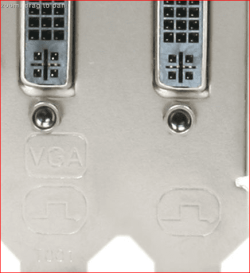
If you can you need to use either a straight DVI cable or a HDMI cable. Reason being as I said only one of the DVI ports on the card supports VGA via adapter. Doesn't help that most of the card makers either don't list this or bury it somewhere in the specs or even better mark the backplate of the card like so,

backplate.PNG

No matter how you slice it though you cannot run two VGA connections via adapter on the card.
 

My Computer

Computer type
PC/Desktop
Computer Manufacturer/Model Number
Me
OS
Win 7 Ultimate x64
CPU
FX-8350 @ 4.6 GHz so far
Motherboard
Asus M5A97 EVO
Memory
ADATA XPG V1 Series Black 8GB DDR3 1600
Graphics Card(s)
Sapphire R9 270x Dual-X
Sound Card
Xonar DGX w/ Corsair Vengence 1300
Monitor(s) Displays
Acer S232HL Abid
Screen Resolution
1920x1080
Hard Drives
120 GB OCZ Vertex 3
500 GB Seagate 7200.12
PSU
Antec Earthwatts 650W Green
Case
Antec Three Hundred
Cooling
Cooler Master 212 EVO
Keyboard
Logitech G510
Mouse
Logitech G500s
Internet Speed
35000/3000
alright, so if I use one VGA-to-DVI cable and one DVI only cable, then it should work? Never had a problem with this on any of my previous GPUs, so I apologize for my confusion :-) THank you.
 

My Computer

OS
Windows 7
Mostly has to do with VGA going the way of the dodo, and how the cards are configured today. All (or almost all) cards made today have two RAMDAC's on then,

RAMDAC - Wikipedia, the free encyclopedia

which can be use to run either VGA, DVI or HDMI, but only one of each at a time. That is why you can use one VGA connection as one of the RAMDAC's on the card is configured to run either a VGA via adapter or DVI connection, and the other RAMDAC is configured to use either the other DVI port or the HDMI port (the same thing would happen if trying to use the "wrong" DVI port at the same time as the HDMI port).
 

My Computer

Computer type
PC/Desktop
Computer Manufacturer/Model Number
Me
OS
Win 7 Ultimate x64
CPU
FX-8350 @ 4.6 GHz so far
Motherboard
Asus M5A97 EVO
Memory
ADATA XPG V1 Series Black 8GB DDR3 1600
Graphics Card(s)
Sapphire R9 270x Dual-X
Sound Card
Xonar DGX w/ Corsair Vengence 1300
Monitor(s) Displays
Acer S232HL Abid
Screen Resolution
1920x1080
Hard Drives
120 GB OCZ Vertex 3
500 GB Seagate 7200.12
PSU
Antec Earthwatts 650W Green
Case
Antec Three Hundred
Cooling
Cooler Master 212 EVO
Keyboard
Logitech G510
Mouse
Logitech G500s
Internet Speed
35000/3000
OK, thank you very much for your help :) Will try hooking it with a DVI cable tomorrow.
 

My Computer

OS
Windows 7
Back
Top