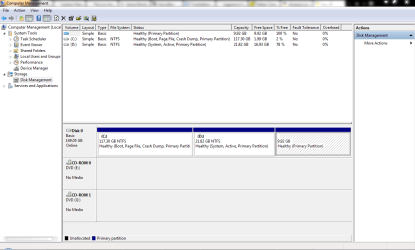
Easy BCD is not writing MBR unless I update it
Hi all,
I am at my wits end trying to solve this so any help greatly appreciate.
On my laptop I had XP Pro and decided to get and instal Win 7 (x64), on restart had the dual boot as expected.
All was working fine until I needed to do a clean install of XP which after I ran Win 7 start up repair 3 times which let me into Win 7 where I installed Easy BCD. I ran it and got my dual boot back.
So all good until I needed to do a clean install of XP again, did the start up repair got into Win 7 ran the previously installed Easy BCD 'add entry' 'write mbr' reboot and no dual boot, so played with settings in Easy BCD and nothing worked so I updated the version I had to 2.1.2 ran it and did 'add entry' 'write mbr' rebooted and voila dual boot.
Should have learned my lesson but needed to clean install XP yet again, did the usual ran start up repair, ran Easy BCD and no dual boot spent ages ticking and unticking the boxes in options on Easy BCD and nothing worked.
Then I remembered last time i did this I updated Easy BCD and it worked so grabbed me 2.2 installed, ran, 'add entry' 'write MBR' reboot, yippee dual boot.
I just reinstalled XP again and now stuck as no new version of Easy BCD. What am I missing here please? Why will only updating Easy BCD let me add the entry? I add it and can see it's there, restart laptop and its gone from the list? Please someone help.
Hi all,
I am at my wits end trying to solve this so any help greatly appreciate.
On my laptop I had XP Pro and decided to get and instal Win 7 (x64), on restart had the dual boot as expected.
All was working fine until I needed to do a clean install of XP which after I ran Win 7 start up repair 3 times which let me into Win 7 where I installed Easy BCD. I ran it and got my dual boot back.
So all good until I needed to do a clean install of XP again, did the start up repair got into Win 7 ran the previously installed Easy BCD 'add entry' 'write mbr' reboot and no dual boot, so played with settings in Easy BCD and nothing worked so I updated the version I had to 2.1.2 ran it and did 'add entry' 'write mbr' rebooted and voila dual boot.
Should have learned my lesson but needed to clean install XP yet again, did the usual ran start up repair, ran Easy BCD and no dual boot spent ages ticking and unticking the boxes in options on Easy BCD and nothing worked.
Then I remembered last time i did this I updated Easy BCD and it worked so grabbed me 2.2 installed, ran, 'add entry' 'write MBR' reboot, yippee dual boot.
I just reinstalled XP again and now stuck as no new version of Easy BCD. What am I missing here please? Why will only updating Easy BCD let me add the entry? I add it and can see it's there, restart laptop and its gone from the list? Please someone help.
Last edited:
My Computer
- OS
- Windows 7 Ultimate x64