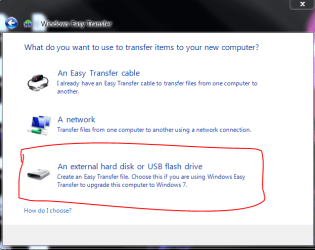
Easy Transfer Error Message

Wideejay

New member
Local time
5:34 PM
Messages
2
I am trying to transfer files from my old computer (OS Windows 7 32 bit) to my new computer (OS Windows 7 32 bit) using Easy File Transfer. I have set up Homegroup on both computers. I am transfering to my ASUS computer(EETOP All In One) has two hard drives on it. One is labeled WIN7 (C) and the other DATA (D) The old computer also runs Windows 7 32 bit. When I attempt to change the Map Drives on the ASUS to the DATA (D) drive and press the "Save" button, I get the error message: "The current drive mapping can't be saved", and below that: "Make sure all drives are mapped and that each drive has enough space for the transfer." I do not understand how to make sure the drives are mapped. I have tried going to "Computer" and then to "Map Network Drive", but there is no "D" drive listed on the dropdown. What must I do to make my file transfer successful?
 

My Computer

OS
Windows 7
Welcome!

Try saving the Easy Transfer file in a shared location. One easy way would be to put the file in C:\Users\Public.

Capture1.PNG

Then make sure Public sharing is on.

Capture.PNG

On the new computer, open up Easy Transfer and tell it you are using your New computer. In the left pane of the next windows, navigate to where the file is stored.
 

My Computer

Computer Manufacturer/Model Number
Custom
OS
Windows 7 Professional x64
CPU
Intel i7 2600K OC'd @ 4620 MHz
Motherboard
Asus P8Z68-V Pro
Memory
16GB GSkill Sniper 2133 Mhz (4x4GB)
Graphics Card(s)
EVGA GeForce GTX 480 SuperClocked+
Sound Card
Realtek High Definition Audio
Monitor(s) Displays
2x Acer S273HLbmii 27"
Screen Resolution
2 x 1920x1080
Hard Drives
64GB Crucial M4 SSD

Storage: Hitachi 1TB 5400RPM, Samsung 1.5TB 5400RPM
PSU
Corsair HW Series 750w (modular)
Case
Cooler Master HAF 932 Advanced Blue Edition
Cooling
CM Hyper 212+ CPU cooler, 3x 230mm + 1x 140mm case fans
Keyboard
Logitech MK320 (wireless)
Mouse
Logitech MK320 (wireless)
Internet Speed
30 Mb/s : 2 Mb/s
Thank you so much. There it was right before my eyes!:confused:
 

My Computer

OS
Windows 7
Back
Top