Easy transfer question.

billberry12

New member
Member
VIP
Local time
10:25 AM
Messages
292
I am installing a retail version of Windows 7 Pro tomorrow to replace the RC version on my laptop. If I use easy tranfer to transfer files and settings, does it effect any registry settings on my new setup, or is it stricly files and setting like favorites, passwords, etc? I have tweaked a few things on the RC setup until I believe I have messed up a few things and I don't want those things carried over to the new setup.

Thanks,
Bill
 

My Computer

Computer type
Laptop
Computer Manufacturer/Model Number
Dell Vostro 3750
OS
Windows 7 Professional
CPU
Core I5
Memory
8GB
Hard Drives
Seagate 600 240GB SSD
Antivirus
MSE
Browser
Chrome, IE, Firfox
Bill,
To what I found, The Easy Transfer transfers things like User accounts, Files and folders, Program data files and settings, E-mail messages, settings, and contacts, Photos, music, and videos, Windows settings, and Internet settings. I also did find that the transfer carries several Windows configuration settings stored in the registry.

I have never used the Easy Transfer personally, I would always just back up my files, to a external hard drive, and then put them back on the recently installed Computer..

Or just do a backup in the built-in Backup feature for your files and folders in RC and you can then restore them in your newly installed Windows 7 computer..

Hope this Helps...
 

My Computer

Computer Manufacturer/Model Number
HP Pavilion dv5 Notebook PC
OS
Windows Seven x64
CPU
2.2 GHz Dual Core
Motherboard
Quanta 3600
Memory
4GB
Graphics Card(s)
ATI Mobility RADEON HD 3470
Sound Card
ATI
Monitor(s) Displays
Laptop
Hard Drives
ATA Hitachi HTS543215 (5400RPM)
Case
Laptop
Cooling
Fan
Internet Speed
Basic DSL 1.5 up and Down
Thanks. Any reason you do not use Easy transfer? I am trying to figure out if it does anything I don't want it to. I am afraid I will miss backing up some files. Is there someway to back up the files only, and know I got them all.
 

My Computer

Computer type
Laptop
Computer Manufacturer/Model Number
Dell Vostro 3750
OS
Windows 7 Professional
CPU
Core I5
Memory
8GB
Hard Drives
Seagate 600 240GB SSD
Antivirus
MSE
Browser
Chrome, IE, Firfox
"Or just do a backup in the built-in Backup feature for your files and folders in RC and you can then restore them in your newly installed Windows 7 computer..

How do I do this if I'm doing a clean install the the hard drive I am using now?
 

My Computer

Computer type
Laptop
Computer Manufacturer/Model Number
Dell Vostro 3750
OS
Windows 7 Professional
CPU
Core I5
Memory
8GB
Hard Drives
Seagate 600 240GB SSD
Antivirus
MSE
Browser
Chrome, IE, Firfox
Bill,
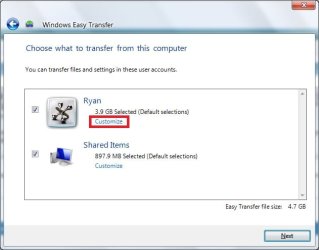
There is no reason that I don't use Easy Transfer, Just never tried it. There is a way just to backup your files, To do that Run the Easy Transfer and let it scan for files to transfer, After it has scanned, You can Customize it by clicking Customize Option, EASY TRAN1.jpg
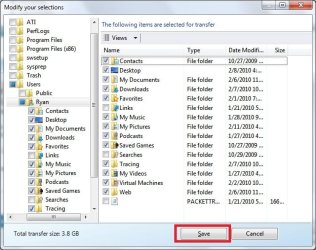
Also click advanced, and select only the files you want..Easy Tran2.jpg

For your next question, You can backup your files on a Jump Drive, or external Hard Drive. To back your files, type Backup and Restore, in the Start Menu. If you have not set up a backup location, you will be prompt to set one up.. You then can follow the easy instructions to set up a backup.

After you re-install Windows 7 you can then Restore the files from your backup location, in the same area (Backup and Restore) and Just click Restore Files from another backup. All your folders and files will then be back on your newly installed machine...

Hope this Helps...
 

My Computer

Computer Manufacturer/Model Number
HP Pavilion dv5 Notebook PC
OS
Windows Seven x64
CPU
2.2 GHz Dual Core
Motherboard
Quanta 3600
Memory
4GB
Graphics Card(s)
ATI Mobility RADEON HD 3470
Sound Card
ATI
Monitor(s) Displays
Laptop
Hard Drives
ATA Hitachi HTS543215 (5400RPM)
Case
Laptop
Cooling
Fan
Internet Speed
Basic DSL 1.5 up and Down
Thanks for the good advice. I think the built in back up and restore in W7 is going to be the way to go.
 

My Computer

Computer type
Laptop
Computer Manufacturer/Model Number
Dell Vostro 3750
OS
Windows 7 Professional
CPU
Core I5
Memory
8GB
Hard Drives
Seagate 600 240GB SSD
Antivirus
MSE
Browser
Chrome, IE, Firfox
Glad I could Help..:)
 

My Computer

Computer Manufacturer/Model Number
HP Pavilion dv5 Notebook PC
OS
Windows Seven x64
CPU
2.2 GHz Dual Core
Motherboard
Quanta 3600
Memory
4GB
Graphics Card(s)
ATI Mobility RADEON HD 3470
Sound Card
ATI
Monitor(s) Displays
Laptop
Hard Drives
ATA Hitachi HTS543215 (5400RPM)
Case
Laptop
Cooling
Fan
Internet Speed
Basic DSL 1.5 up and Down
Back
Top