Eating up more ram than vista

blankojames

New member
Local time
6:20 PM
Messages
48
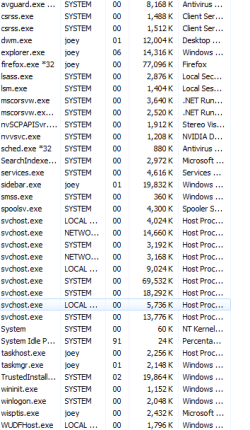
Ok i installed win7 but i did a reformat of vista and removed the trash and bloatware that came with my computer. Before i did this my vista would run at 1.4 to 1.7 gigs of ram. I did what i said and upgraded to win7 and noticed that i was running at 740mb or ram and i was very happy. But after being on for a couple of minutes my ram usage went from 740mb to 2.2 gigs. I looked at what was eating it up and i have 2 svhost that are eating massive amounts. But not everytime i boot only about 80% of the time. I never had this with vista it was a constant 1.4 to 1.7 unless i was gaming. :mad:
 

My Computer My Computer

At a glance

win7/vista both x64Amd Turion II m500/e73004g ddr2radeon hd4200/nvidia 9600gt
Computer Manufacturer/Model Number
laptop/desktop
OS
win7/vista both x64
CPU
Amd Turion II m500/e7300
Memory
4g ddr2
Graphics Card(s)
radeon hd4200/nvidia 9600gt
Sound Card
intergrated
Monitor(s) Displays
intergrated/19 in hd/42 in samsung 1080
Screen Resolution
1280-800/1440-900/1080p
Hard Drives
320gig 7200rpm/640gig 7200rpm
PSU
stock/stock
Case
factory/factory
Cooling
factory/factory
Keyboard
intergrated/logitech wireless
Mouse
touchpad/logitech wireless
Internet Speed
6mbs
What antivirus are you running? And also post what processes you are running.
 

My Computer My Computer

At a glance

Windows 10 Pro (x64)Intel Core i7-3930K (3.2GHz - 4.5GHz)4x Samsung 4GB PC3-12800 DDR3 (16GB 1600MHz)Nvidia Geforce GTX 690
Computer type
PC/Desktop
Computer Manufacturer/Model Number
Alienware Aurora ALX R4
OS
Windows 10 Pro (x64)
CPU
Intel Core i7-3930K (3.2GHz - 4.5GHz)
Motherboard
Alienware Aurora-R4 x79
Memory
4x Samsung 4GB PC3-12800 DDR3 (16GB 1600MHz)
Graphics Card(s)
Nvidia Geforce GTX 690
Sound Card
SteelSeries Siberia Elite
Monitor(s) Displays
Dell UltraSharp U3011
Screen Resolution
2560x1600
Hard Drives
Samsung 850 Pro 256 GB, Seagate 1TB Desktop Hybrid HDD, 2x Western Digital 4TB Green HDD
PSU
875W Some Dell PSU <.<
Case
Alienware Aurora ALX
Cooling
Custom Liquid Cooling (EK CPU & GPU blocks) dual EK 480RAD
Keyboard
Logitech G710+ Mechanical
Mouse
Logitech G700s
Internet Speed
Verizon Fios (50 mbps average)
Other Info
Server: Intel NUC D54250WYK: i5-4250U, 16GB, 256 GB mSATA, Windows Server 2012 R2
Just installed anti virus. This was happening before right after i did the clean install. and after i went through all the updates from MS. right now im at 1.1 gigs from my 740 but that is because i reboot because i was at 2.2gigs and running nothing didnt even install antivirus until reboot. svhost is when that happens eating alot more ram
 

Attachments

  • Capture.PNG
    Capture.PNG
    12 KB · Views: 51

My Computer My Computer

At a glance

win7/vista both x64Amd Turion II m500/e73004g ddr2radeon hd4200/nvidia 9600gt
Computer Manufacturer/Model Number
laptop/desktop
OS
win7/vista both x64
CPU
Amd Turion II m500/e7300
Memory
4g ddr2
Graphics Card(s)
radeon hd4200/nvidia 9600gt
Sound Card
intergrated
Monitor(s) Displays
intergrated/19 in hd/42 in samsung 1080
Screen Resolution
1280-800/1440-900/1080p
Hard Drives
320gig 7200rpm/640gig 7200rpm
PSU
stock/stock
Case
factory/factory
Cooling
factory/factory
Keyboard
intergrated/logitech wireless
Mouse
touchpad/logitech wireless
Internet Speed
6mbs
Since you just installed, just leave it be for now. It is trying to work and get accustomed to your hardware while you are watching paint dry. When it actually becomes a problem then maybe...
 

My Computer My Computer

At a glance

Windows 10 Pro (x64)Intel Core i7-3930K (3.2GHz - 4.5GHz)4x Samsung 4GB PC3-12800 DDR3 (16GB 1600MHz)Nvidia Geforce GTX 690
Computer type
PC/Desktop
Computer Manufacturer/Model Number
Alienware Aurora ALX R4
OS
Windows 10 Pro (x64)
CPU
Intel Core i7-3930K (3.2GHz - 4.5GHz)
Motherboard
Alienware Aurora-R4 x79
Memory
4x Samsung 4GB PC3-12800 DDR3 (16GB 1600MHz)
Graphics Card(s)
Nvidia Geforce GTX 690
Sound Card
SteelSeries Siberia Elite
Monitor(s) Displays
Dell UltraSharp U3011
Screen Resolution
2560x1600
Hard Drives
Samsung 850 Pro 256 GB, Seagate 1TB Desktop Hybrid HDD, 2x Western Digital 4TB Green HDD
PSU
875W Some Dell PSU <.<
Case
Alienware Aurora ALX
Cooling
Custom Liquid Cooling (EK CPU & GPU blocks) dual EK 480RAD
Keyboard
Logitech G710+ Mechanical
Mouse
Logitech G700s
Internet Speed
Verizon Fios (50 mbps average)
Other Info
Server: Intel NUC D54250WYK: i5-4250U, 16GB, 256 GB mSATA, Windows Server 2012 R2
i'd rather that all my ram was being used, so called 'free' ram is ram that is not being used. like noted, unless you have a problem, such as a memory leak that build up till something breaks, or stops something else working, i'd not worry about it. do NOT waste time with one of those utils that supposedly frees up ram every once and a while, they do not work - maybe had a use on older pre winXP/2000 versions, but those and latest ones are much more efficient at managing memory.
 

My Computer My Computer

At a glance

Win 7 ultimate x64 sp1Intel i7 4 core 3770k ivy bridge o/c to 4.2ghz16 GBNvidia geforce GTX650
Computer type
PC/Desktop
Computer Manufacturer/Model Number
Custom build Nanu by 3SX
OS
Win 7 ultimate x64 sp1
CPU
Intel i7 4 core 3770k ivy bridge o/c to 4.2ghz
Motherboard
Asus p8z77-i Deluxe
Memory
16 GB
Graphics Card(s)
Nvidia geforce GTX650
Sound Card
Realtek on mb
Monitor(s) Displays
24in. lcd/led
Screen Resolution
1920x1080
Hard Drives
128GB Kingston SSD
500GB seagate maximus xt hybrid
500GB hitachi HD
500GB external WD Passport usb3
PSU
Silverstone 450 watt
Case
Silverstone FT03 Black Fortress
Cooling
Water cooler
Keyboard
Logitech wireless kbd/mouse mk300
Mouse
Logitech wireless kbd/mouse mk300
Internet Speed
8mb adsl (actuall speed is around 6mb)
Other Info
Asus DSL-N55U wireless router
SONY BC-5850H 6X BLURAY writer
OUTPOST Security Suite
It uses a lot of RAM early on to set up SuperPreFetch which is the genius of Win7.

If this obsesses you, feed the obsession by studying Process Explorer which can examine and sort your processes.

View attachment 39927
 
do NOT waste time with one of those utils that supposedly frees up ram every once and a while, they do not work

Yes, they work alright! They work in removing the good work that Microsoft engineers put into designing the OS. So if you do use, you are putting your faith into a lone coder that doesn't know anything compared to the whole MS team. Not a very tough decision.

Good advice +1 rep.
 

My Computer My Computer

At a glance

7600.20510 x86P4 550 3.4 GHz HT running at 3.5 GHzOCZ 2 GB(2x1GB) DDR400mHz running @ 414 mHzHIS Radeon HD 3850 IceQ 3 Turbo HDMI Dual DL-...
Computer Manufacturer/Model Number
self built
OS
7600.20510 x86
CPU
P4 550 3.4 GHz HT running at 3.5 GHz
Motherboard
MSI PM8M3-V (MS-7211 v1.x) Micro-ATX mainboard
Memory
OCZ 2 GB(2x1GB) DDR400mHz running @ 414 mHz
Graphics Card(s)
HIS Radeon HD 3850 IceQ 3 Turbo HDMI Dual DL-DVI AGP
Sound Card
MOTU Traveler firewire studio interface 192 kHz 24 bit
Monitor(s) Displays
22" widescreen Acer X223W LCD, 17" Compaq P75 CRT
Screen Resolution
1680x1050 and 1280x1024
Hard Drives
SATA I x2 WD, 400 GB and 120 GB, SATA 2 WD Caviar Black 1 TB
PSU
350W generic
Case
Cybertronpc, it glows blue
Cooling
stock cpu fan, Ice-Q 3 gpu and system, many case fans
Keyboard
Logitch Classical Keyboard 200
Mouse
Logitech Mediaplay cordless
Internet Speed
1792/448 kbits/sec
Other Info
SATA II PCI fake RAID adapter, 1 GB Readyboost, original ATI Remote Wonder (even works with WMC perfectly), Logitech Rumblepad 2 game controller x2
Back
Top