Edit Recycle Bin Top Bar

Adamcos

New member
Local time
12:40 PM
Messages
2
Hi all.. My first post on here.
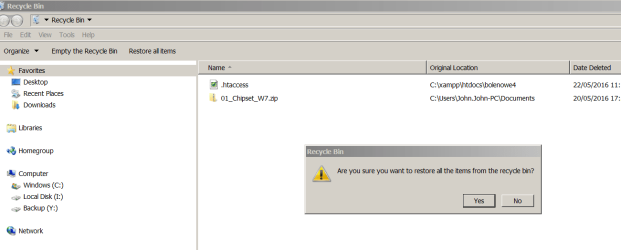
I just want to know is there any way of moving the "Restore All Item" tab that is on the top bar next to "Empty the Recycle Bin" tab? Sometime if my Recycle Bin has a lot of items in it i accidently click the restore button instead of empty. The thing is that if i click on empty it prompts me "Are You Sure You Want To Permanently Delete" But it does not offer such message if i restore items. I want to move the restore tab away from empty tab. Its annoying having to find the rubbish i have just restored back into the recycle bin> :)
Windows 7 Pro
 

My Computer

Computer type
PC/Desktop
Computer Manufacturer/Model Number
Samsung
OS
Windows 7 Pro x64
CPU
AMD Phenom II X6 1100T
Motherboard
Asus
Memory
16GB
Graphics Card(s)
NVIDIA GeForce GTX 970 4GB
Sound Card
ASUS Xonar Essence STX PCIe
Monitor(s) Displays
Samsung LED 24"
Screen Resolution
1080 x 1920
Hard Drives
ST4000DX001-1CE168 ATA Device
ST500LM000-1EJ162 ATA Device
WDC WD10 EADS-11M2B2 USB Device
WDC WD10 EARX-00PASB0 USB Device
WDC WD32 00BEVT-22ZCT0 USB Device
ST320005 42AS USB Device
SAMSUNG HD103SI USB Device
SAMSUNG HD204UI USB Device
PSU
Cronus Modular 800w
Case
Samsung
Cooling
EVO Hyper 212
Keyboard
Generic
Mouse
Logitech MX
Internet Speed
100mps
Antivirus
MSE
Browser
Firefox
Other Info
7x Rear USB 3.0
6x Front USB 3.0
3 Front USB 2.0
6 Rear USB 2.0
1x DVD RW Rom
1x Bluray RW Rom
hi not sure how you can do that maybe a registry fix, but why not try right clicking on recycle bin and choose empty bin.
 

My Computer

Computer type
PC/Desktop
Computer Manufacturer/Model Number
dell xps 9000
OS
win 10
Yeah that what i do now, but sometime one makes mistakes lol.
Thanks for your reply :-)
 

My Computer

Computer type
PC/Desktop
Computer Manufacturer/Model Number
Samsung
OS
Windows 7 Pro x64
CPU
AMD Phenom II X6 1100T
Motherboard
Asus
Memory
16GB
Graphics Card(s)
NVIDIA GeForce GTX 970 4GB
Sound Card
ASUS Xonar Essence STX PCIe
Monitor(s) Displays
Samsung LED 24"
Screen Resolution
1080 x 1920
Hard Drives
ST4000DX001-1CE168 ATA Device
ST500LM000-1EJ162 ATA Device
WDC WD10 EADS-11M2B2 USB Device
WDC WD10 EARX-00PASB0 USB Device
WDC WD32 00BEVT-22ZCT0 USB Device
ST320005 42AS USB Device
SAMSUNG HD103SI USB Device
SAMSUNG HD204UI USB Device
PSU
Cronus Modular 800w
Case
Samsung
Cooling
EVO Hyper 212
Keyboard
Generic
Mouse
Logitech MX
Internet Speed
100mps
Antivirus
MSE
Browser
Firefox
Other Info
7x Rear USB 3.0
6x Front USB 3.0
3 Front USB 2.0
6 Rear USB 2.0
1x DVD RW Rom
1x Bluray RW Rom
your welcome but I have no idea how to remove what you want removed.
 

My Computer

Computer type
PC/Desktop
Computer Manufacturer/Model Number
dell xps 9000
OS
win 10
Modifying Command Bar

Warning
Create a System Restore Point and/or a backup system image before you attempt any modifications.

A few years ago I found a few articles about hiding/removing the "Command Bar":
How to Auto-Hide or Disable Command Bar in Windows Vista and 7 Explorer? - AskVG
Appatic: Windows Command Bar Tweaker: Hide The Command Bar In Windows Explorer

I also found this article about customising the "Command Bar":
How to Customize Command Bar in Windows 7 Explorer? Add Cut, Copy, Paste and Other Useful Buttons - AskVG

I did try these hacks (a few years ago) and they seemed to work, but I can't remember if I tried removing any buttons.

I'm not sure if you can remove the "Restore all items" button, but you may be able to move it by adding other buttons.
 

My Computer

Computer type
PC/Desktop
Computer Manufacturer/Model Number
n/a
OS
W7 Ultimate SP1, LM19.2 MATE, W10 Home 1703, W10 Pro 1703 VM, #All 64 bit
CPU
AMD Phenom II x6 1100T, 3.3 GHz
Motherboard
ASUS M4A88T-M/USB3 (AM3)
Memory
12GB DDR3 1333 G-Skill (4GB x 2), G-Skill (2GB x 2)
Graphics Card(s)
NVIDIA GeForce GTX 660
Sound Card
Realtek?
Monitor(s) Displays
Samsung S23B350
Screen Resolution
1920x1080
Hard Drives
WD Green 2TB (SATA), WD Green 3TB (SATA), WD Blue 4TB (SATA), WD Blue 6TB (SATA)
PSU
Cooler Master
Case
Antec GX300 Tower
Cooling
3x Antec TRICOOL 120mm Fans
Mouse
Wired Optical
Internet Speed
DSL
Antivirus
Avast
Browser
Pale Moon (64 bit)
Other Info
2018-12-27 Upgraded HDDs
2015-12-10 Upgraded case, graphics card, storage
2015-08-15 Upgraded motherboard & RAM
2015-07-15 Upgraded LM17.1 to LM17.2
Hi all.. My first post on here.
I just want to know is there any way of moving the "Restore All Item" tab that is on the top bar next to "Empty the Recycle Bin" tab? Sometime if my Recycle Bin has a lot of items in it i accidently click the restore button instead of empty. The thing is that if i click on empty it prompts me "Are You Sure You Want To Permanently Delete" But it does not offer such message if i restore items. I want to move the restore tab away from empty tab. Its annoying having to find the rubbish i have just restored back into the recycle bin> :)
Windows 7 Pro
When in the Recycle bin if you accidently click the "Restore all items" button then the message should appear like this:
recycle.PNG
If you have seleted one item in the recycle list then you will restore just that one item.
if you don't get he message as shown above then there is something wrong with your settings. Suggest you run sfc /scannow for starters.
 

My Computer

Computer type
PC/Desktop
OS
Microsoft Windows 7 Home Premium 64-bit 7601 Multiprocessor Free Service Pack 1
CPU
Intel(R) Core(TM) i7-3770 CPU @ 3.40GHz
Motherboard
ASUSTeK COMPUTER INC. P8H77-M
Memory
8.00 GB
Graphics Card(s)
Intel(R) HD Graphics 4000
Sound Card
On Board
Monitor(s) Displays
Dell 24"
Screen Resolution
1920 x 1080
Hard Drives
(1) INTEL SSDSC2CT180A3 ATA Device (2) ST500DM002-1BD142 ATA Device (3) WDC WD3200AAKS-75L9A0 ATA Device (4) Generic- Compact Flash USB Device (5) Generic- MS/MS-Pro USB Device (6) Generic- SD/MMC USB Device (7) Generic- SM/xD-Picture USB
PSU
500w Corsair
Case
Cooler Master
Cooling
3 Fans
Keyboard
Logitech MK300
Mouse
Logitech WOM
Internet Speed
75Mb
Antivirus
Norton 360
Browser
Firefox, Opera, IE

My Computer

Computer type
PC/Desktop
Computer Manufacturer/Model Number
Own build (new) Desk1 / Asus ROG Win 7 / Desk2 1st build
OS
Desk1 7 Home Prem / Desk2 10 Pro / Main lap Asus ROG 10 Pro 2 laptop Toshiba 7 Pro Asus P2520 7 & 10
CPU
Desk1 i5 3750K / Laptop i7 GTX 860M / Desk2 i5 2500
Motherboard
Desk1 Asus P877-V / Desk2 Gigabyte H67 UD3H / Laptop ?
Memory
Desk1 8GB (1866) / Desk2 16GB (1333) / Laptop 8Gb DDR3
Graphics Card(s)
Desk 1& 2NVidia GTX 650 & Laptops on board Intel
Sound Card
Desk 1 & 2 -XONAR DG Realtek High Def audio Laptop
Monitor(s) Displays
Desk 1 Benq HD 2450 / Desk2 Philips 24" / Laptop 17.5"
Screen Resolution
1920x1080 D1 & D2 & Laptop 1
Hard Drives
Desk1 Samsung 120GB 830 SSD
Asus ROG 256GB 850 Pro SSD
Desk2 Samsung 840 256 SSD
Toshiba 120GB EVO
PSU
Desk 1 Corsair HX 1050/ Laptop ? / Desk 2 Corsair HX 650
Case
Desk 1 Cooler HAF XM ? Toshiba laptop / Desk2 Coolermaster
Cooling
Fans on all Desk1 -2 Desk2 - all Coolermasters 5 Laptop ?
Keyboard
Desk 1 MS Sidewinder X6 Desk 2 MS Sidewinder X 4
Mouse
Desk 1&2 - Gigabyte MS 900 gamer - laptop - Logitec wireless
Internet Speed
ADSL2+
Other Info
One other Desktop (tester) and spare Toshba laptop both with SSD's
Running Kaspersky 2016 ISS on all machines config'd identically
Logitec audio stereo systems on each machine (x3)
Canon MG5250MFC
Router/modem TP-Link running WPA2SK
Back
Top