Edit theme of window 7

angelraul360

New member
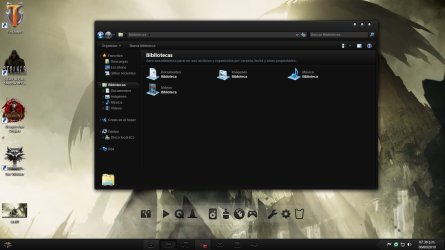
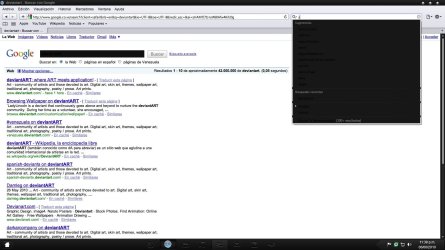
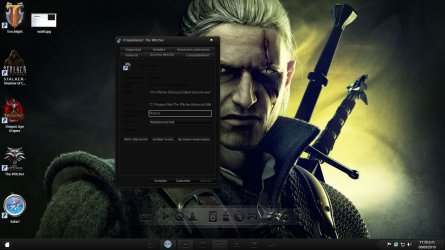
Hi everyone i would like to ask is there a way to just keep the taskabar skin of a theme withoud change everything else

the theme is this Dark soft

Dark Soft - big updates by ~RajTheeban95 on deviantART

in the pics below is the problem, for example in the proprietes of a program, document etc some thing cant be read because is black is there a way for just to keep the taskbar without change all the rest or the change the font color to a white or grey one

Thanks
 

Attachments

  • wall1.jpg
    wall1.jpg
    283.6 KB · Views: 66
  • wall2.jpg
    wall2.jpg
    243.5 KB · Views: 55
  • wall3.jpg
    wall3.jpg
    280.9 KB · Views: 38

My Computer

OS
Windows 7
CPU
Core 2 Duo E6400
Motherboard
Intel D975XBX
Memory
2gb
Graphics Card(s)
Gigabyte Geforce GTX 260
Screen Resolution
1600x900
Hard Drives
300gb
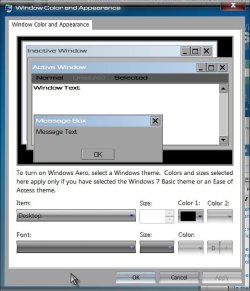
You should be able to change the font color. Here's what you want to try. Make a system restore point before just in case.

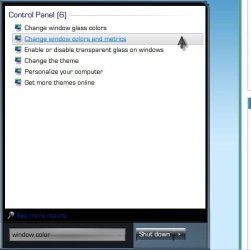
Start> In the search box, type window color, and then click Change window colors and metrics.

Window Color.jpg

Color And Appearance.jpg

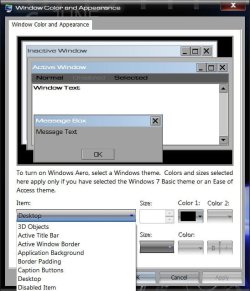
In the Item list, click the part of Windows that you want to change the font for. For example, if you want to change the menu font, click Menu in the list.

Item.jpg

Then, make any of the following changes:

In the Font list, click the font that you want to use.

In the Size list, click the font size that you want.

In the Color list, click the font color that you want.

Repeat these steps for each item that you want to make changes to, and then click OK.

A Guy
 

My Computer

Computer type
PC/Desktop
OS
Windows 10 Home x64
CPU
INTEL Core i5-750 Quad-Core 3.37GHz
Motherboard
ASUS P7P55D
Memory
HyperX Fury Black Series 8GB (2 x 4GB) 1866Mhz
Graphics Card(s)
EVGA GeForce GTX 750 Superclocked 1GB 128-Bit GDDR5
Monitor(s) Displays
LG 32MA68HY 32" IPS
Screen Resolution
1920 x 1080
Hard Drives
Samsung 840 Evo 120GB, SEAGATE 500GB Barracuda® 7200.12, SATA 3 Gb/s, 7200 RPM, 16MB cache
PSU
ANTEC TruePower New TP-550, 80 PLUS, 550W
Case
ANTEC Three Hundred Illusion
Cooling
COOLER MASTER Hyper 212 Plus, 4 x 120mm 1 x 140mm Noctua's
Internet Speed
85 + Mbps
Antivirus
Avast
Browser
Vivaldi
thanks for the answer a guy but i cant find the option to change the font color in the section of proprieties

also safari have a problem with the theme,

is there a free program to edit the themes?
 

Attachments

  • wall4.jpg
    wall4.jpg
    325.8 KB · Views: 23
  • wall5.jpg
    wall5.jpg
    369.7 KB · Views: 31

My Computer

OS
Windows 7
CPU
Core 2 Duo E6400
Motherboard
Intel D975XBX
Memory
2gb
Graphics Card(s)
Gigabyte Geforce GTX 260
Screen Resolution
1600x900
Hard Drives
300gb
The browser problem is not unusual, but I think the customizers use Style Builder to fix such things, and it isn't free. A Guy
 

My Computer

Computer type
PC/Desktop
OS
Windows 10 Home x64
CPU
INTEL Core i5-750 Quad-Core 3.37GHz
Motherboard
ASUS P7P55D
Memory
HyperX Fury Black Series 8GB (2 x 4GB) 1866Mhz
Graphics Card(s)
EVGA GeForce GTX 750 Superclocked 1GB 128-Bit GDDR5
Monitor(s) Displays
LG 32MA68HY 32" IPS
Screen Resolution
1920 x 1080
Hard Drives
Samsung 840 Evo 120GB, SEAGATE 500GB Barracuda® 7200.12, SATA 3 Gb/s, 7200 RPM, 16MB cache
PSU
ANTEC TruePower New TP-550, 80 PLUS, 550W
Case
ANTEC Three Hundred Illusion
Cooling
COOLER MASTER Hyper 212 Plus, 4 x 120mm 1 x 140mm Noctua's
Internet Speed
85 + Mbps
Antivirus
Avast
Browser
Vivaldi
thanks for answer A guy i ask to the theme creator about the navegator and is a problem of the theme, the font of the color the same but he can't changed it

Anyway thanks for the help the thread can be closed now ;)
 

My Computer

OS
Windows 7
CPU
Core 2 Duo E6400
Motherboard
Intel D975XBX
Memory
2gb
Graphics Card(s)
Gigabyte Geforce GTX 260
Screen Resolution
1600x900
Hard Drives
300gb
Back
Top