Editing Custom Theme

NexusMat

New member
Local time
6:41 PM
Messages
5
Hi,

I'm relatively new here (this is a new account) but I have been browsing a couple of threads regarding customization and editing. Currently I just started using a custom theme that I like very much: WP7 Mango VS by ~oliver182 on deviantART

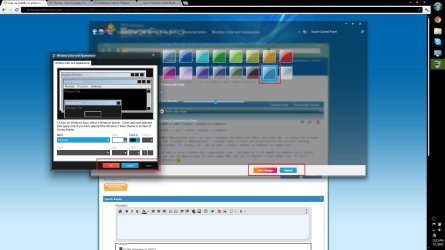
However there are a few things about it that I would like to change. Namely the item selection colours. Is there a way to do this? The editor himself said on deviant art that he is no longer interested in fixing this as he's no longer working on it. So I was wondering if there's a way to do it myself? Here is a list of screenshots of things I'd like to change:
imgur: the simple image sharer (Just go through First Image to Fourth Image).

EDIT: Here are the image links directly
http://i.imgur.com/Zy0T7.jpg
http://i.imgur.com/IPcTx.jpg
http://i.imgur.com/ZAjAD.jpg
http://i.imgur.com/tkhyO.jpg

I'm a novice when it comes to editing custom themes myself so if someone could help me in this field, that would be greatly appreciated.

All I want to do is change the colors to something more monotone. Like grey-ish.
 

My Computer

OS
Windows 7 Ultimate x64
Welcome to the Seven Forums
I will download and look at that theme and I will get back with you later today or tomorrow and see what we can do.
Jerry
 

My Computer

Computer type
Laptop
Computer Manufacturer/Model Number
Sager NP9170
OS
Win 7 Pro x64 / Win 10 Pro
CPU
Intel(R) Core(TM) i7-3630QM CPU @ 2.40GHz
Motherboard
CLEVO P170EM
Memory
12 GB
Graphics Card(s)
(1) Intel(R) HD Graphics 4000 (2) NVIDIA GeForce GTX 675M
Sound Card
(1) Realtek High Definition Audio (2) Intel(R) Display Aud
Monitor(s) Displays
17.3
Screen Resolution
1920x1080
Hard Drives
(1) Samsung 860 EVO 500GB(OS) (1) Samsung 860 EVO 500GB(Data)
Keyboard
Backlite
Antivirus
MSE, Malwarebytes Pro
Browser
Firefox
Other Info
DESKTOP: Custom-built.
OS: Win 10 Pro x64.
CASE: Rosewill R5.
CPU: Intel I5 4670K CPU @ 3.40GHz.
CPU COOLER: Cool Master Hyper 212 EVO.
MOTHERBOARD: Asus Z87-A.
MEMORY: Kingston HyperX 2x4 GB.
GPU: Nvidia Geforce 650 TI.
PSU: Corsair TX750.
DRIVES: (1) Samsung 840 120 GB SSD (2) Western Digital blue 500 GB 7200 RPM.
Thank you Bongo, I appreciate the help!

Also if it can spare you some effort, is there something I can do myself to customize this?
EDIT: If its any help, the specific theme I'm using is the full glass theme. But I doubt this would affect much.
 
Last edited:

My Computer

OS
Windows 7 Ultimate x64
Look at this tutorial it will give you the basic on how to customize a custom theme http://www.sevenforums.com/tutorials/29646-theme-customize-custom-themes.html but did not use the numbers that are there because most times each custom theme has its own set of numbers.

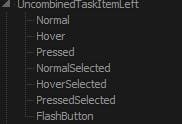
In this first image I have here of yours the buttons are image #508 and it has six different states look at the screenshot to the left your image will show you the six different ones. The highlight in personalization is #s 652 hot, 653 selected, 654 selected non-focus, 655 hot selected they also do the desktop
button.JPG1.jpg


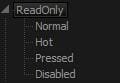
Here in your second image the blue in the drop down menu is #525 and it has four different states look at the image to the left of your image will show you the different ones.
525.JPG2.jpg

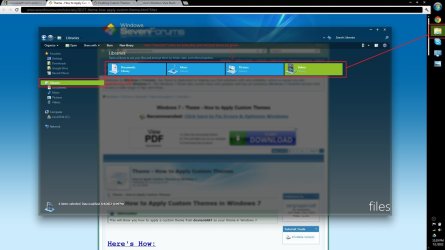
Here in your third image that highlights on the left in the navigation pane are #s 1043 Hot, 1044 Selected, 1045 Selected non-focus, 1046 hot selected.
In the center of Windows Explorer the highlights are #s 656 Hot, 657 Selected, 658 Selected non-focus, 659 hot selected.
Zy0T7.jpg

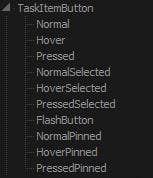
The taskbar buttons are
Horizontally #s 1145 and 1146,1147,1148
Vertical #s 1155 and 1156,1157,1158
The first number in each one has 10 states and all the numbers after the and have seven states look at the screenshots below will tell you what they are.
taskbar button.JPGtaskbar button and.JPG

If you need any more help let me know.
Jerry
 

My Computer

Computer type
Laptop
Computer Manufacturer/Model Number
Sager NP9170
OS
Win 7 Pro x64 / Win 10 Pro
CPU
Intel(R) Core(TM) i7-3630QM CPU @ 2.40GHz
Motherboard
CLEVO P170EM
Memory
12 GB
Graphics Card(s)
(1) Intel(R) HD Graphics 4000 (2) NVIDIA GeForce GTX 675M
Sound Card
(1) Realtek High Definition Audio (2) Intel(R) Display Aud
Monitor(s) Displays
17.3
Screen Resolution
1920x1080
Hard Drives
(1) Samsung 860 EVO 500GB(OS) (1) Samsung 860 EVO 500GB(Data)
Keyboard
Backlite
Antivirus
MSE, Malwarebytes Pro
Browser
Firefox
Other Info
DESKTOP: Custom-built.
OS: Win 10 Pro x64.
CASE: Rosewill R5.
CPU: Intel I5 4670K CPU @ 3.40GHz.
CPU COOLER: Cool Master Hyper 212 EVO.
MOTHERBOARD: Asus Z87-A.
MEMORY: Kingston HyperX 2x4 GB.
GPU: Nvidia Geforce 650 TI.
PSU: Corsair TX750.
DRIVES: (1) Samsung 840 120 GB SSD (2) Western Digital blue 500 GB 7200 RPM.
Thanks a lot Jerry! I was actually looking into that thread, and tried downloading the trial of Restorator 2007. It seems though that when I try to open .msstyle files it tells me it can't. Any ideas if i'm doing something wrong?

edit: just wanted to note how much work you guys put into helping out in this community. its great!

EDIT 2: I figured out what I was doing wrong with the Restorator (I was looking at .theme files, I had to go into folders for the .msstyle files, sorry). I see all the numbers that you're referring to, and this is looking like a much bigger job that I anticipated. Is there a way you categorized them into something like the screenshots you provided?
 

My Computer

OS
Windows 7 Ultimate x64
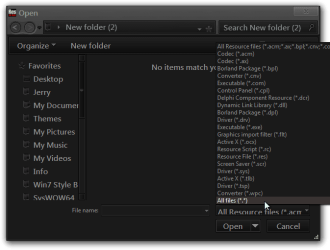
When you open it up are you using the drop-down menu and choosing All Files (*.*) ?
If so what is the warning.
Jerry
Open.png
 

My Computer

Computer type
Laptop
Computer Manufacturer/Model Number
Sager NP9170
OS
Win 7 Pro x64 / Win 10 Pro
CPU
Intel(R) Core(TM) i7-3630QM CPU @ 2.40GHz
Motherboard
CLEVO P170EM
Memory
12 GB
Graphics Card(s)
(1) Intel(R) HD Graphics 4000 (2) NVIDIA GeForce GTX 675M
Sound Card
(1) Realtek High Definition Audio (2) Intel(R) Display Aud
Monitor(s) Displays
17.3
Screen Resolution
1920x1080
Hard Drives
(1) Samsung 860 EVO 500GB(OS) (1) Samsung 860 EVO 500GB(Data)
Keyboard
Backlite
Antivirus
MSE, Malwarebytes Pro
Browser
Firefox
Other Info
DESKTOP: Custom-built.
OS: Win 10 Pro x64.
CASE: Rosewill R5.
CPU: Intel I5 4670K CPU @ 3.40GHz.
CPU COOLER: Cool Master Hyper 212 EVO.
MOTHERBOARD: Asus Z87-A.
MEMORY: Kingston HyperX 2x4 GB.
GPU: Nvidia Geforce 650 TI.
PSU: Corsair TX750.
DRIVES: (1) Samsung 840 120 GB SSD (2) Western Digital blue 500 GB 7200 RPM.
OK good you got it open. As far as categorized them with a resource hacker that would be very hard to do.

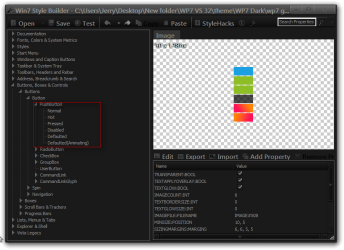
I use Ave's Windows7 Style Builder to edit the .msstyles it's not free it's just a little under $23 US and it puts things in categories and you did not have to go by the numbers.
Here is a screenshot of it opened up to the buttons image #508.
Jerry
Win7 Style Builder - CUsersJerryDesktopNew folderWP7 VS 32themeWP7 Darkwp7 glass.msstyles.png
 

My Computer

Computer type
Laptop
Computer Manufacturer/Model Number
Sager NP9170
OS
Win 7 Pro x64 / Win 10 Pro
CPU
Intel(R) Core(TM) i7-3630QM CPU @ 2.40GHz
Motherboard
CLEVO P170EM
Memory
12 GB
Graphics Card(s)
(1) Intel(R) HD Graphics 4000 (2) NVIDIA GeForce GTX 675M
Sound Card
(1) Realtek High Definition Audio (2) Intel(R) Display Aud
Monitor(s) Displays
17.3
Screen Resolution
1920x1080
Hard Drives
(1) Samsung 860 EVO 500GB(OS) (1) Samsung 860 EVO 500GB(Data)
Keyboard
Backlite
Antivirus
MSE, Malwarebytes Pro
Browser
Firefox
Other Info
DESKTOP: Custom-built.
OS: Win 10 Pro x64.
CASE: Rosewill R5.
CPU: Intel I5 4670K CPU @ 3.40GHz.
CPU COOLER: Cool Master Hyper 212 EVO.
MOTHERBOARD: Asus Z87-A.
MEMORY: Kingston HyperX 2x4 GB.
GPU: Nvidia Geforce 650 TI.
PSU: Corsair TX750.
DRIVES: (1) Samsung 840 120 GB SSD (2) Western Digital blue 500 GB 7200 RPM.
Yup, so I ended up goofing up because I was trying to open .theme files instead of .msstyle files lol :P

Also I was looking into the other asset files and found the ones relevant to these :
Kh5OD.jpg


What would happen if I just deleted these asset files from the visual style? ie. #544 etc. Would deleting these just mean they don't show up, or would it potentially crash the visual style?


EDIT: Ah okay, I'll look into Ave's Style Builder, thanks for the tip.
 

My Computer

OS
Windows 7 Ultimate x64
You do not want to just delete images it probably would make it crash the ideal way is to make the image transparent that way it will not show up.
Jerry
 

My Computer

Computer type
Laptop
Computer Manufacturer/Model Number
Sager NP9170
OS
Win 7 Pro x64 / Win 10 Pro
CPU
Intel(R) Core(TM) i7-3630QM CPU @ 2.40GHz
Motherboard
CLEVO P170EM
Memory
12 GB
Graphics Card(s)
(1) Intel(R) HD Graphics 4000 (2) NVIDIA GeForce GTX 675M
Sound Card
(1) Realtek High Definition Audio (2) Intel(R) Display Aud
Monitor(s) Displays
17.3
Screen Resolution
1920x1080
Hard Drives
(1) Samsung 860 EVO 500GB(OS) (1) Samsung 860 EVO 500GB(Data)
Keyboard
Backlite
Antivirus
MSE, Malwarebytes Pro
Browser
Firefox
Other Info
DESKTOP: Custom-built.
OS: Win 10 Pro x64.
CASE: Rosewill R5.
CPU: Intel I5 4670K CPU @ 3.40GHz.
CPU COOLER: Cool Master Hyper 212 EVO.
MOTHERBOARD: Asus Z87-A.
MEMORY: Kingston HyperX 2x4 GB.
GPU: Nvidia Geforce 650 TI.
PSU: Corsair TX750.
DRIVES: (1) Samsung 840 120 GB SSD (2) Western Digital blue 500 GB 7200 RPM.
Okay, so that's all great. I'll try getting Aves Style Builder, because it looks a lot more organized.

I suppose the last question would be modifying the custom dll's that come with the VS. I remember having to replace explorerframe.dll, shell32.dll and imageres.dll. Will I just have to edit these in the similar fashion as editing the .msstyle files?
 

My Computer

OS
Windows 7 Ultimate x64
If you purchase Window Style Builder they have an excellent forum you can join then using your e-mail and your key to the program to join and they have some tutorials and maps that will really help you out.
For the system files(explorerframe.dll, shell32.dll and imageres.dll) Restorator 2007 works really great for that it is similar but you drag-and-drop icons you have to edit them outside of the .dlls
Jerry
 

My Computer

Computer type
Laptop
Computer Manufacturer/Model Number
Sager NP9170
OS
Win 7 Pro x64 / Win 10 Pro
CPU
Intel(R) Core(TM) i7-3630QM CPU @ 2.40GHz
Motherboard
CLEVO P170EM
Memory
12 GB
Graphics Card(s)
(1) Intel(R) HD Graphics 4000 (2) NVIDIA GeForce GTX 675M
Sound Card
(1) Realtek High Definition Audio (2) Intel(R) Display Aud
Monitor(s) Displays
17.3
Screen Resolution
1920x1080
Hard Drives
(1) Samsung 860 EVO 500GB(OS) (1) Samsung 860 EVO 500GB(Data)
Keyboard
Backlite
Antivirus
MSE, Malwarebytes Pro
Browser
Firefox
Other Info
DESKTOP: Custom-built.
OS: Win 10 Pro x64.
CASE: Rosewill R5.
CPU: Intel I5 4670K CPU @ 3.40GHz.
CPU COOLER: Cool Master Hyper 212 EVO.
MOTHERBOARD: Asus Z87-A.
MEMORY: Kingston HyperX 2x4 GB.
GPU: Nvidia Geforce 650 TI.
PSU: Corsair TX750.
DRIVES: (1) Samsung 840 120 GB SSD (2) Western Digital blue 500 GB 7200 RPM.
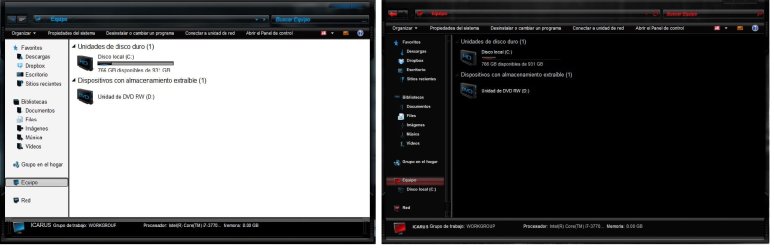
i know this is more than a year old but i just started with customs themes too and i have this theme i really like but there is this just one thing i would like to change. I would like to change the background of the folder windows from white to black including the side panel and the text from black to white the same way the red theme is. I think it should be simple but i have no idea on how to just change that, If someone could help me..

and the links for the themes are
http://www.youtube.com/watch?v=9NgnEO2u6p0 RED
http://www.youtube.com/watch?v=m8mf3PlOs0U Blue
thanks..
 

Attachments

  • Folders.jpg
    Folders.jpg
    188.4 KB · Views: 3

My Computer

Computer type
PC/Desktop
Computer Manufacturer/Model Number
Custom Build
OS
Windows 7 Ultimate x64
CPU
Intel i7 3770k
Memory
8gb
Graphics Card(s)
Nvidia G-610
Antivirus
Bitdenfender Antivirus Plus 2013
Browser
Mozilla Firefox
i know this is more than a year old but i just started with customs themes too and i have this theme i really like but there is this just one thing i would like to change. I would like to change the background of the folder windows from white to black including the side panel and the text from black to white the same way the red theme is. I think it should be simple but i have no idea on how to just change that, If someone could help me..

and the links for the themes are
Windows 7 Theme - Spirit Red - YouTube RED
Windows 7 Theme - Spirit Light - YouTube Blue
thanks..
Welcome to the Seven Forums

You have two choices one is to ask the theme maker to make the changes or purchase Ave's Windows7 Style Builder and then you can change them yourself, I could do for you but it's not cool to change someone else's work.

If you purchase Windows style builder I can help you with the locations on how to change that.

Jerry
 

My Computer

Computer type
Laptop
Computer Manufacturer/Model Number
Sager NP9170
OS
Win 7 Pro x64 / Win 10 Pro
CPU
Intel(R) Core(TM) i7-3630QM CPU @ 2.40GHz
Motherboard
CLEVO P170EM
Memory
12 GB
Graphics Card(s)
(1) Intel(R) HD Graphics 4000 (2) NVIDIA GeForce GTX 675M
Sound Card
(1) Realtek High Definition Audio (2) Intel(R) Display Aud
Monitor(s) Displays
17.3
Screen Resolution
1920x1080
Hard Drives
(1) Samsung 860 EVO 500GB(OS) (1) Samsung 860 EVO 500GB(Data)
Keyboard
Backlite
Antivirus
MSE, Malwarebytes Pro
Browser
Firefox
Other Info
DESKTOP: Custom-built.
OS: Win 10 Pro x64.
CASE: Rosewill R5.
CPU: Intel I5 4670K CPU @ 3.40GHz.
CPU COOLER: Cool Master Hyper 212 EVO.
MOTHERBOARD: Asus Z87-A.
MEMORY: Kingston HyperX 2x4 GB.
GPU: Nvidia Geforce 650 TI.
PSU: Corsair TX750.
DRIVES: (1) Samsung 840 120 GB SSD (2) Western Digital blue 500 GB 7200 RPM.
Newbie wanting to edit 2 pre-existing themes, which program would be the easiest to use? trying to combine elements to make a more personal theme.
 

My Computer

Computer type
PC/Desktop
OS
windows 7 Pro, 64bit
Back
Top