Editing my toolbar

linda3421

New member
Local time
6:14 AM
Messages
32
I can't figure out how to add buttons for EBAY and You Tube and my email accounts to my toolbar so that I only have to click once to access them.
 

My Computer My Computer

Computer type
PC/Desktop
Computer Manufacturer/Model Number
HP
OS
Windows7
Antivirus
malwarebytes
Browser
Firefox
Do you have the Favorites Bar enabled?

If you do, then go to the site you wish to add to the Favorites Bar.
Then select the small Star with green arrow on the far right of the Favorites Bar.
That will add the site to the bar.

If the Favorites Bar is not enabled, right click in the IE browser border and select Favorites Bar
Then follow the instructions above to add to the Bar.
 

My Computer My Computer

Computer type
PC/Desktop
Computer Manufacturer/Model Number
Custom Built
OS
Windows 10 Pro x64, Windows 8.1 Pro x64, Windows 7 Ultimate x64 SP1,
CPU
INTEL i9-7920X LGA 2066
Motherboard
Gigabyte X299-WU8 F3
Memory
64 GB (4 X 16 GB) G-Skill V Series DDR4 3200 Quad Channel
Graphics Card(s)
EVGA GTX 1060 SC 3 GB
Sound Card
Realtek Onboard ALC1220
Monitor(s) Displays
2 x Samsung S27E310
Screen Resolution
1920x1080
Hard Drives
Samsung 2 x 970 EVO Plus 500 GB NVMe
1 x 6TB WD 6003FZBX SATA
1 x 6TB WD 60EFRX SATA
12 x 3TB WD 30EFRX SATA
PSU
Seasonic X-1050
Case
Thermaltake Armor+
Cooling
Corsair H80i V2 Liquid AOI Cooler
Keyboard
Logitech G510s
Mouse
Logitech MX Master 2S
Internet Speed
200 Mb/s
Antivirus
ESET NOD32 13.1
Browser
EDGE (Dev, Canary, Beta), Chrome
Other Info
ASUS RT-AC68U router
Malwarebytes 4.0.4
I assume you are referring to the toolbar in your browser that lets you add your most oft visited websites to it. Which browser are you using?

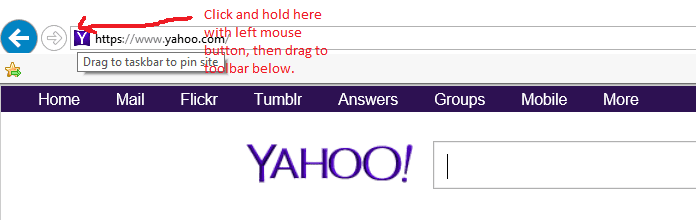
I will assume for the time being that you are using Internet Explorer that comes with Windows 7. In Internet Explorer, the toolbar I believe you are referring to is called the Favorites Bar. Provided you have the Favorites toolbar already displayed at the top of the browser window, it is very easy to add sites to it. While viewing a website that you wish to add to the Favorites toolbar, left-click and hold on the little icon for the site in the address field, then drag it down to the Favorites toolbar and release. The website should be then be added to the toolbar and you should be able to click on it to go directly to that website in the future.

 

Attachments

  • 2016-11-17.png
    2016-11-17.png
    7.3 KB · Views: 17
  • 2016-11-17 (1).png
    2016-11-17 (1).png
    6.1 KB · Views: 17

My Computer My Computer

Computer type
PC/Desktop
Computer Manufacturer/Model Number
Home Built desktop, Dell G15 5511 Gaming laptop,MS Surface Pro 7 tablet
OS
W10 Pro desktop, W11 laptop, W11 Pro tablet (all 64-bit)
CPU
3.7Ghz 8700K i7, i7-11800H, i7-1065G7
Motherboard
ASUS TUF Z370-Pro Gaming in desktop
Memory
16G desktop, 16G laptop, 4G tablet
Graphics Card(s)
AMD Radeon RX580, RTX 3060, Intel Iris Plus
Sound Card
High Definition Audio (Built-in to mobo)
Monitor(s) Displays
Samsung U32J59 32" (2x), 15.6", 12"
Screen Resolution
3840x2160, 3840x2160, 1920x1080, 2160x1440
Hard Drives
500G SSD for OS; 2T, 10T & 15T HDDs for Data on Desktop, 1TB SSD laptop, 128G SSD tablet.
PSU
Corsair CX 750M
Case
Antec 100
Cooling
CM 212+
Keyboard
IBM Model M - used continuously since 1986
Mouse
Microsoft Pro IntelliMouse
Internet Speed
400M down 8M up
Antivirus
Windows Defender
Browser
FireFox
Other Info
Built my first computer (8Mhz 8088cpu, 640K RAM, 20MB HDD, 2 360K floppy drives) in 1985 and have been building them for myself, relatives and friends ever since.
I wasn't using Internet Explorer. For a long time it was messed up. But even when it wasn't I didn't use it. I thought most people had stopped using it for some reason.Are you both saying that you use it as your default browser? I use Firefox and that is the toolbar I was referring to.

The favorites thing sounds like just what I need. Do I have to use IE as my browser or will the favorites carry over to Firefox?

Thanks heaps. I've been miserable having to search for things over and orver.
 

My Computer My Computer

Computer type
PC/Desktop
Computer Manufacturer/Model Number
HP
OS
Windows7
Antivirus
malwarebytes
Browser
Firefox
It works the same way in FireFox (my browser of choice) but the toolbar is referred to as the Bookmarks toolbar.

In both browsers, you can create folders on the toolbar as well in order to organize the websites you put there.
 

My Computer My Computer

Computer type
PC/Desktop
Computer Manufacturer/Model Number
Home Built desktop, Dell G15 5511 Gaming laptop,MS Surface Pro 7 tablet
OS
W10 Pro desktop, W11 laptop, W11 Pro tablet (all 64-bit)
CPU
3.7Ghz 8700K i7, i7-11800H, i7-1065G7
Motherboard
ASUS TUF Z370-Pro Gaming in desktop
Memory
16G desktop, 16G laptop, 4G tablet
Graphics Card(s)
AMD Radeon RX580, RTX 3060, Intel Iris Plus
Sound Card
High Definition Audio (Built-in to mobo)
Monitor(s) Displays
Samsung U32J59 32" (2x), 15.6", 12"
Screen Resolution
3840x2160, 3840x2160, 1920x1080, 2160x1440
Hard Drives
500G SSD for OS; 2T, 10T & 15T HDDs for Data on Desktop, 1TB SSD laptop, 128G SSD tablet.
PSU
Corsair CX 750M
Case
Antec 100
Cooling
CM 212+
Keyboard
IBM Model M - used continuously since 1986
Mouse
Microsoft Pro IntelliMouse
Internet Speed
400M down 8M up
Antivirus
Windows Defender
Browser
FireFox
Other Info
Built my first computer (8Mhz 8088cpu, 640K RAM, 20MB HDD, 2 360K floppy drives) in 1985 and have been building them for myself, relatives and friends ever since.
Back
Top