Hey there,
First of all sorry for my Bad englisch i hope ill be understandable so you can get it right.
Im using a asus 1001px eeepc which is Schützling down randomly, That Problem Startes to began some months ago and Wasnt really frequently. Just 1 or 2 Times a month, if it Shuttles down i Could Start it again After a Few minutes but sometimes After a couple hours.
I tested my Hdd in another pc and it worked like a charm, After some Testing i Decided to install win7, had winxp before, and it worked no shutdowns i thought, but the next Day it shut down again with a bluescreen stop failure. After a couple win repairs it Started in the Os again.
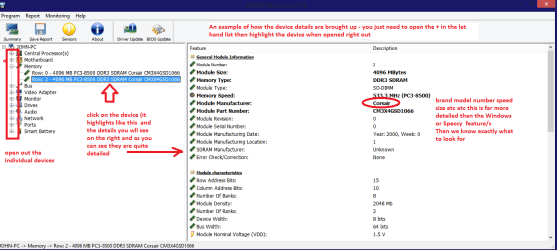
Now i tried to Check the temperatures but i cant find out which motherboard i have. The only Information i Could Gather was a Long Nummer with digits but a google search didntfound anything.
Ill Report These digits in 1or2 hours because im Running some win7 Updates and cant Access These informations.
Cleaned the cleanable Hardware Parts, no difference.
Which Test can i Run to determine the shutdown Cause?
First of all sorry for my Bad englisch i hope ill be understandable so you can get it right.
Im using a asus 1001px eeepc which is Schützling down randomly, That Problem Startes to began some months ago and Wasnt really frequently. Just 1 or 2 Times a month, if it Shuttles down i Could Start it again After a Few minutes but sometimes After a couple hours.
I tested my Hdd in another pc and it worked like a charm, After some Testing i Decided to install win7, had winxp before, and it worked no shutdowns i thought, but the next Day it shut down again with a bluescreen stop failure. After a couple win repairs it Started in the Os again.
Now i tried to Check the temperatures but i cant find out which motherboard i have. The only Information i Could Gather was a Long Nummer with digits but a google search didntfound anything.
Ill Report These digits in 1or2 hours because im Running some win7 Updates and cant Access These informations.
Cleaned the cleanable Hardware Parts, no difference.
Which Test can i Run to determine the shutdown Cause?
Last edited:
My Computer
- Computer type
- PC/Desktop
- Computer Manufacturer/Model Number
- Asus 1001px
- OS
- Win7 sp1
- Motherboard
- Unknown - can just see digits of i Check it
- Memory
- 1gb RAM - 500gb Hdd
- Graphics Card(s)
- Internal in mainboard
- Antivirus
- G Data
- Browser
- Chrome