Elevated Command Prompt Shortcut

How to Create an "Elevated Command Prompt" Shortcut in Windows 7 and Windows 8

   Information
This tutorial will show you how to create a shortcut that will open an elevated command prompt with administrator rights in Windows 7 and Windows 8.

   Note
When you use the elevated command prompt shortcut, you may be prompted to click/tap on Yes or enter the administrator account's password depending on your UAC settings in Windows 7 or Windows 8.

   Warning
You must be logged in as an administrator to be able to use this shortcut.


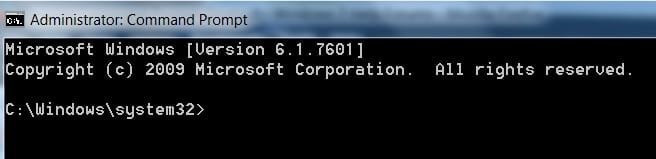
EXAMPLE: Elevated Command Prompt
NOTE: Notice how the elevated command prompt opens to C:\Windows\System32 and not C:\Users\(user name) as the default command prompt without administrator rights.
Elevated_Command_Prompt.jpg


OPTION ONE

To Download an "Elevated Command Prompt" Shortcut


1. Click/tap on the Download button below to download the file below.
Elevated_Command_Prompt.zip

Download


2. Save the ZIP file to your desktop.

3. Open the zip file, and extract (drag and drop) the Elevated Command Prompt shortcut to your desktop.

4. Unblock the Elevated Command Prompt shortcut.
NOTE: If there is not a Unblock button there, then the shortcut is already unblocked. Continue on to step 7.

5. In Windows 7, you can now Pin to Taskbar or Pin to Start Menu, add to Quick Launch, assign a keyboard shortcut to it, or move this shortcut to where you like for easy use.

6. In Windows 8 and 8.1, you can Pin to Taskbar on desktop, Pin to Start screen, add to Quick Launch, assign a keyboard shortcut to it, or move this shortcut to where you like for easy use.

7. When finished, you can delete the downloaded zip file if you like.


OPTION TWO

To Manually Create an "Elevated Command Prompt" Shortcut


1. Right click or press and hold on an empty space on your desktop, and click/tap on New and Shortcut.

2. Copy and paste either location below into the location area, and click/tap on Next. (see screenshot below)
%ComSpec%

OR

%windir%\System32\cmd.exe


Step1.jpg

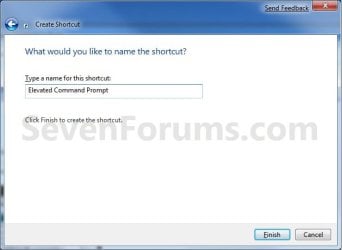
3. Type in the name Elevated Command Prompt, and click/tap on Finish. (see screenshot below)
NOTE: You can type in any name that you would like to use for the shortcut though.
Step2.jpg
4. Right click or press and hold on the Elevated Command Prompt shortcut, and click/tap on Properties.

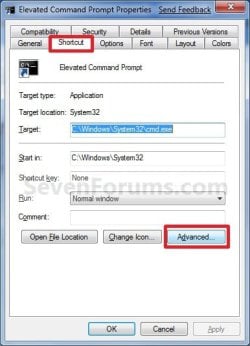
5. Click/tap on the Shortcut tab, and click/tap on the Advanced button. (see screenshot below).
Properties.jpg
6. Check the Run as administrator box, and click/tap on OK. (See screenshot below)
Advanced.jpg
7. Click/tap on OK. (see screenshot below step 5)

8. In Windows 7, you can now Pin to Taskbar or Pin to Start Menu, add to Quick Launch, assign a keyboard shortcut to it, or move this shortcut to where you like for easy use.

9. In Windows 8 and 8.1, you can Pin to Taskbar on desktop, Pin to Start screen, add to Quick Launch, assign a keyboard shortcut to it, or move this shortcut to where you like for easy use.
That's it,
Shawn


Attachments

Last edited:

My Computer

Computer type
PC/Desktop
Computer Manufacturer/Model Number
Custom Build
OS
Windows 7 Ultimate x64 SP1
CPU
AMD Athlon II X4 645 quad core
Memory
6gig DDR3
Graphics Card(s)
Nvidia geforce GT 630
Sound Card
On Board
Monitor(s) Displays
Samsung LED 19"
Screen Resolution
ULTRA HD 1080p 1920 x 1080
Hard Drives
5 x 2tb
ATA Devices x 2
USB x 5
PSU
850 watt something or other forgot name
Case
Custom Build
Cooling
6 fan in out system with cold air blown through the in
Keyboard
Steelseries
Mouse
GM.M6800 optical mouse 5 button model
Internet Speed
80 gig on a good day 60 to 80 on a bad
Antivirus
not disclosed
Browser
not disclosed
Other Info
My Desktop is in a custom built airflow casing over the case. I still have the power button available etc . but the rest is cool controlled cold air going through the in and theoretically hot air out of the out. But it never gets hot enough for hot air to come out :-P
You're most welcome Magikill. Thank you for the kind words. :)
 

My Computer

Computer type
PC/Desktop
Computer Manufacturer/Model Number
Self built custom
OS
64-bit Windows 11 Pro for Workstations
CPU
Intel i7-8700K OC'd to 5 GHz
Motherboard
ASUS ROG Maximus XI Formula Z390
Memory
64 GB (4x16GB) G.SKILL TridentZ RGB DDR4 3600 MHz
Graphics Card(s)
ASUS ROG-STRIX-GTX1080TI-O11G-GAMING
Sound Card
Integrated
Monitor(s) Displays
2 x Samsung Odyssey G7 27"
Screen Resolution
2560x1440
Hard Drives
1TB Samsung 990 PRO M.2,
4TB Samsung 990 PRO PRO M.2,
TerraMaster F8 SSD Plus NAS
PSU
Seasonic Prime Titanium 850W
Case
Thermaltake Core P3
Cooling
Corsair Hydro H115i
Keyboard
Logitech wireless K800
Mouse
Logitech MX Master 4
Internet Speed
2 Gb/s Download and 100 Mb/s Upload
Antivirus
Malwarebyte Anti-Malware Premium
Browser
Google Chrome
Other Info
Logitech Z625 speaker system,
Logitech BRIO 4K Pro webcam,
HP Color LaserJet Pro MFP M477fdn,
APC SMART-UPS RT 1000 XL - SURT1000XLI,
Galaxy S23 Plus phone
I downloaded the short cut and followed all of your instructions but the command prompt still opens with "C:\Windows\System32". I followed you instructions and went into the short cuts tab "advance" but my run as administrator was already checked. Any suggestions
 

My Computer

Computer Manufacturer/Model Number
hp pavilion p633f
OS
windows 7 home premium
CPU
intel cor i3 2.93 ghz
Memory
ddr3 6gb
Graphics Card(s)
intel
Sound Card
stock
Monitor(s) Displays
pe1901
Hard Drives
1tb internal
250gb external
Hello Lartomar,

I'm not sure what you mean. That's what it's suppose to open to in a elevated command prompt. See the example screenshot at the top of the tutorial.

If your's is different, then please post a screenshot of it. :)
 

My Computer

Computer type
PC/Desktop
Computer Manufacturer/Model Number
Self built custom
OS
64-bit Windows 11 Pro for Workstations
CPU
Intel i7-8700K OC'd to 5 GHz
Motherboard
ASUS ROG Maximus XI Formula Z390
Memory
64 GB (4x16GB) G.SKILL TridentZ RGB DDR4 3600 MHz
Graphics Card(s)
ASUS ROG-STRIX-GTX1080TI-O11G-GAMING
Sound Card
Integrated
Monitor(s) Displays
2 x Samsung Odyssey G7 27"
Screen Resolution
2560x1440
Hard Drives
1TB Samsung 990 PRO M.2,
4TB Samsung 990 PRO PRO M.2,
TerraMaster F8 SSD Plus NAS
PSU
Seasonic Prime Titanium 850W
Case
Thermaltake Core P3
Cooling
Corsair Hydro H115i
Keyboard
Logitech wireless K800
Mouse
Logitech MX Master 4
Internet Speed
2 Gb/s Download and 100 Mb/s Upload
Antivirus
Malwarebyte Anti-Malware Premium
Browser
Google Chrome
Other Info
Logitech Z625 speaker system,
Logitech BRIO 4K Pro webcam,
HP Color LaserJet Pro MFP M477fdn,
APC SMART-UPS RT 1000 XL - SURT1000XLI,
Galaxy S23 Plus phone
I thought this was the tutorial I needed, maybe it is not.. I would like for the command prompt to open with "C:\Users\(user name). I am trying to ping a set top box(Boxee Box) that is on my network.
 

My Computer

Computer Manufacturer/Model Number
hp pavilion p633f
OS
windows 7 home premium
CPU
intel cor i3 2.93 ghz
Memory
ddr3 6gb
Graphics Card(s)
intel
Sound Card
stock
Monitor(s) Displays
pe1901
Hard Drives
1tb internal
250gb external
Ah, ok. You can use the same shortcut, but just uncheck the Run as administrator box instead for to have it open unelevated to that location. :)

You should also have one in your Start Menu by default at All Programs -> Accessories.
 

My Computer

Computer type
PC/Desktop
Computer Manufacturer/Model Number
Self built custom
OS
64-bit Windows 11 Pro for Workstations
CPU
Intel i7-8700K OC'd to 5 GHz
Motherboard
ASUS ROG Maximus XI Formula Z390
Memory
64 GB (4x16GB) G.SKILL TridentZ RGB DDR4 3600 MHz
Graphics Card(s)
ASUS ROG-STRIX-GTX1080TI-O11G-GAMING
Sound Card
Integrated
Monitor(s) Displays
2 x Samsung Odyssey G7 27"
Screen Resolution
2560x1440
Hard Drives
1TB Samsung 990 PRO M.2,
4TB Samsung 990 PRO PRO M.2,
TerraMaster F8 SSD Plus NAS
PSU
Seasonic Prime Titanium 850W
Case
Thermaltake Core P3
Cooling
Corsair Hydro H115i
Keyboard
Logitech wireless K800
Mouse
Logitech MX Master 4
Internet Speed
2 Gb/s Download and 100 Mb/s Upload
Antivirus
Malwarebyte Anti-Malware Premium
Browser
Google Chrome
Other Info
Logitech Z625 speaker system,
Logitech BRIO 4K Pro webcam,
HP Color LaserJet Pro MFP M477fdn,
APC SMART-UPS RT 1000 XL - SURT1000XLI,
Galaxy S23 Plus phone
Thanks:)
 

My Computer

Computer Manufacturer/Model Number
hp pavilion p633f
OS
windows 7 home premium
CPU
intel cor i3 2.93 ghz
Memory
ddr3 6gb
Graphics Card(s)
intel
Sound Card
stock
Monitor(s) Displays
pe1901
Hard Drives
1tb internal
250gb external
You're most welcome. :)
 

My Computer

Computer type
PC/Desktop
Computer Manufacturer/Model Number
Self built custom
OS
64-bit Windows 11 Pro for Workstations
CPU
Intel i7-8700K OC'd to 5 GHz
Motherboard
ASUS ROG Maximus XI Formula Z390
Memory
64 GB (4x16GB) G.SKILL TridentZ RGB DDR4 3600 MHz
Graphics Card(s)
ASUS ROG-STRIX-GTX1080TI-O11G-GAMING
Sound Card
Integrated
Monitor(s) Displays
2 x Samsung Odyssey G7 27"
Screen Resolution
2560x1440
Hard Drives
1TB Samsung 990 PRO M.2,
4TB Samsung 990 PRO PRO M.2,
TerraMaster F8 SSD Plus NAS
PSU
Seasonic Prime Titanium 850W
Case
Thermaltake Core P3
Cooling
Corsair Hydro H115i
Keyboard
Logitech wireless K800
Mouse
Logitech MX Master 4
Internet Speed
2 Gb/s Download and 100 Mb/s Upload
Antivirus
Malwarebyte Anti-Malware Premium
Browser
Google Chrome
Other Info
Logitech Z625 speaker system,
Logitech BRIO 4K Pro webcam,
HP Color LaserJet Pro MFP M477fdn,
APC SMART-UPS RT 1000 XL - SURT1000XLI,
Galaxy S23 Plus phone
I took a different approach to this. I created a batch file with the runas command and placed a shortcut named "su" pointing to the batch file in c:\windows so I can now press win + r and type su to get to my admin prompt. It still requires a password so it is totally secure and I set the path to my commands folder that I keep my batch files in so that I can use "su" in the command prompt.
 
Last edited:

My Computer

OS
Windows 7 Professional 64
Command Prompt Shortcut

Thanks for that tip. It was very useful.
Marc
 

My Computer

OS
Windows 7 Home Premium 32bit.
You're welcome Marc. I'm glad it was able to help. :)
 

My Computer

Computer type
PC/Desktop
Computer Manufacturer/Model Number
Self built custom
OS
64-bit Windows 11 Pro for Workstations
CPU
Intel i7-8700K OC'd to 5 GHz
Motherboard
ASUS ROG Maximus XI Formula Z390
Memory
64 GB (4x16GB) G.SKILL TridentZ RGB DDR4 3600 MHz
Graphics Card(s)
ASUS ROG-STRIX-GTX1080TI-O11G-GAMING
Sound Card
Integrated
Monitor(s) Displays
2 x Samsung Odyssey G7 27"
Screen Resolution
2560x1440
Hard Drives
1TB Samsung 990 PRO M.2,
4TB Samsung 990 PRO PRO M.2,
TerraMaster F8 SSD Plus NAS
PSU
Seasonic Prime Titanium 850W
Case
Thermaltake Core P3
Cooling
Corsair Hydro H115i
Keyboard
Logitech wireless K800
Mouse
Logitech MX Master 4
Internet Speed
2 Gb/s Download and 100 Mb/s Upload
Antivirus
Malwarebyte Anti-Malware Premium
Browser
Google Chrome
Other Info
Logitech Z625 speaker system,
Logitech BRIO 4K Pro webcam,
HP Color LaserJet Pro MFP M477fdn,
APC SMART-UPS RT 1000 XL - SURT1000XLI,
Galaxy S23 Plus phone
Mine does not work....

My user account is set to admin and I right clicked on the shortcut in the start menu and set it to open as admin.

When I type cmd in run it still goes to users/account, however the window at the top of the page is titled Administrator: C:\windows\system32\cmd.exe Is this correct?
 

My Computer

OS
Windows 7 Pro 64bit
CPU
Intel Core i7 920
Motherboard
evga x58
Memory
OCZ Gold 6gb
Graphics Card(s)
GTX285
Sound Card
asus xonar st
Monitor(s) Displays
Samsung T240HD
Hard Drives
3xWD black 500gb
PSU
Corsair 850watt
Case
Antec 900
Cooling
Xigmatek Dark Knight and stock Antec 900 fans
Keyboard
Logitech Illuminated
Mouse
Coolermaster Sentinel
Yes, as long as you see system32 whether it is in the command line or the title bar it is an elevated command.

Right clicking on context menu in start menu:
cmd1.jpg

Running cmd in Run:
cmd2.jpg
 

My Computer

Computer type
PC/Desktop
Computer Manufacturer/Model Number
Gateway DX4831-01e (Mid-Tower Desktop)
OS
Originally Win 7 Hm Prem x64 Ver 6.1.7600 Build 7601-SP1 | Upgraded to Windows 10 December 14, 2019
CPU
Intel i3 530 2.93GHz, 2933MHz 2 Cores 4 Logical Processors
Motherboard
Gateway H57M01 133 megahertz
Memory
6GB of 1,333MHz DDR3 SDRAM
Graphics Card(s)
32MB Intel Graphics Media Accelerator HD IGChip
Sound Card
Realtek High Definition Audio
Monitor(s) Displays
Gateway HX2000 20inch TFT active matrix TN
Screen Resolution
1600 x 900 x 59 hertz
Hard Drives
WDC WD10EADS-00M2B0 [HDD] (1000.20 GB) -- drive 0,
HL-DT-ST DVDRAM GH41N [CD-ROM dr]
Four card readers, and Four USB 2.0
PSU
300watts.
Case
Mid-Tower Desktop
Cooling
Stock from Gateway
Keyboard
Natural Ergonomic Keyboard 4000, see Other Info
Mouse
Orig. Gateway wore out now using Insignia USB wired optical
Internet Speed
Vz FIOS 10ms png 57.64Mbps down 65.53Mbps up Speedtest.org
Antivirus
Zamana Anti-logger with Anti-malware, MSE, Windows Firewall,
Browser
IE11.0.9600.19399-Upd ver11.0.135, Firefox 68.0.1 x64
Other Info
System Specs by Belarc.

BIOS: American Megatrends Inc. P01-A0 11/17/2009

Replaced the MS 'Natural' Standard PS/2 Enhanced 101-102 Keyboard with a new Natural Ergonomic Keyboard 4000 on August 1st 2014.

Canon Pixma MG3222 Printer.

Updated to IE11 on 12102015 | Fios Quantum Router g1100

Additional AV: SpywareBlaster, manual Mbam, SAS
When I use the methods in the tutorial, UAC pops up. However, if I uncheck "Run as administrator" it does not-and still gives me an elevated command prompt (I'm not sure why). I also found that I can go to Start & type in cmd, and when it comes up, right click -> drag to desktop and select "create shortcut"--it also gives an elevated command prompt without further modification. Thought this may help someone. Thanks for all of the great tutorials on this site!
 

My Computer

Computer type
PC/Desktop
Computer Manufacturer/Model Number
Custom Build
OS
Windows 7 Pro 64bit
CPU
Ivy Bridge i7-3770k @ 3.5 GHz
Motherboard
Asus P8Z77-V Pro
Memory
16 GB
Graphics Card(s)
AMD Radeon HD 7700 Series
Hard Drives
C:\ Crucial 128 Gb SSD
D:\ Crucial 128 Gb SSD
F:\ Crucial 256 Gb SSD
Antivirus
MSE, MBAM Pro
Browser
IE, FF, Chrome
Hello Electroman,

What type of account is this in?

As a test, type diskpart in the command prompt and press Enter to see if the command prompt is truly running elevated or not. If not, then you will either be prompted by UAC, or get an "Access denied" message.
 

My Computer

Computer type
PC/Desktop
Computer Manufacturer/Model Number
Self built custom
OS
64-bit Windows 11 Pro for Workstations
CPU
Intel i7-8700K OC'd to 5 GHz
Motherboard
ASUS ROG Maximus XI Formula Z390
Memory
64 GB (4x16GB) G.SKILL TridentZ RGB DDR4 3600 MHz
Graphics Card(s)
ASUS ROG-STRIX-GTX1080TI-O11G-GAMING
Sound Card
Integrated
Monitor(s) Displays
2 x Samsung Odyssey G7 27"
Screen Resolution
2560x1440
Hard Drives
1TB Samsung 990 PRO M.2,
4TB Samsung 990 PRO PRO M.2,
TerraMaster F8 SSD Plus NAS
PSU
Seasonic Prime Titanium 850W
Case
Thermaltake Core P3
Cooling
Corsair Hydro H115i
Keyboard
Logitech wireless K800
Mouse
Logitech MX Master 4
Internet Speed
2 Gb/s Download and 100 Mb/s Upload
Antivirus
Malwarebyte Anti-Malware Premium
Browser
Google Chrome
Other Info
Logitech Z625 speaker system,
Logitech BRIO 4K Pro webcam,
HP Color LaserJet Pro MFP M477fdn,
APC SMART-UPS RT 1000 XL - SURT1000XLI,
Galaxy S23 Plus phone
Hello Brink,

I did as you suggested and I do get a UAC prompt. Does this indicate that I don't have a true elevated command prompt? I am in an Administrator account. The shortcut opens at C:\Windows\System32>. Thanks!
 

My Computer

Computer type
PC/Desktop
Computer Manufacturer/Model Number
Custom Build
OS
Windows 7 Pro 64bit
CPU
Ivy Bridge i7-3770k @ 3.5 GHz
Motherboard
Asus P8Z77-V Pro
Memory
16 GB
Graphics Card(s)
AMD Radeon HD 7700 Series
Hard Drives
C:\ Crucial 128 Gb SSD
D:\ Crucial 128 Gb SSD
F:\ Crucial 256 Gb SSD
Antivirus
MSE, MBAM Pro
Browser
IE, FF, Chrome
Hello Electroman,

It sure does. :)
 

My Computer

Computer type
PC/Desktop
Computer Manufacturer/Model Number
Self built custom
OS
64-bit Windows 11 Pro for Workstations
CPU
Intel i7-8700K OC'd to 5 GHz
Motherboard
ASUS ROG Maximus XI Formula Z390
Memory
64 GB (4x16GB) G.SKILL TridentZ RGB DDR4 3600 MHz
Graphics Card(s)
ASUS ROG-STRIX-GTX1080TI-O11G-GAMING
Sound Card
Integrated
Monitor(s) Displays
2 x Samsung Odyssey G7 27"
Screen Resolution
2560x1440
Hard Drives
1TB Samsung 990 PRO M.2,
4TB Samsung 990 PRO PRO M.2,
TerraMaster F8 SSD Plus NAS
PSU
Seasonic Prime Titanium 850W
Case
Thermaltake Core P3
Cooling
Corsair Hydro H115i
Keyboard
Logitech wireless K800
Mouse
Logitech MX Master 4
Internet Speed
2 Gb/s Download and 100 Mb/s Upload
Antivirus
Malwarebyte Anti-Malware Premium
Browser
Google Chrome
Other Info
Logitech Z625 speaker system,
Logitech BRIO 4K Pro webcam,
HP Color LaserJet Pro MFP M477fdn,
APC SMART-UPS RT 1000 XL - SURT1000XLI,
Galaxy S23 Plus phone
Thanks Brink! It makes more sense now :)
 

My Computer

Computer type
PC/Desktop
Computer Manufacturer/Model Number
Custom Build
OS
Windows 7 Pro 64bit
CPU
Ivy Bridge i7-3770k @ 3.5 GHz
Motherboard
Asus P8Z77-V Pro
Memory
16 GB
Graphics Card(s)
AMD Radeon HD 7700 Series
Hard Drives
C:\ Crucial 128 Gb SSD
D:\ Crucial 128 Gb SSD
F:\ Crucial 256 Gb SSD
Antivirus
MSE, MBAM Pro
Browser
IE, FF, Chrome
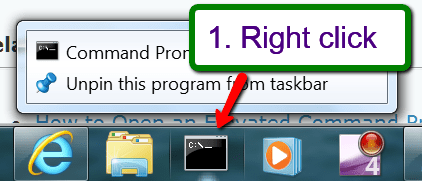
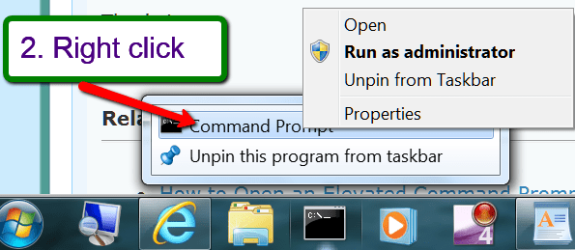
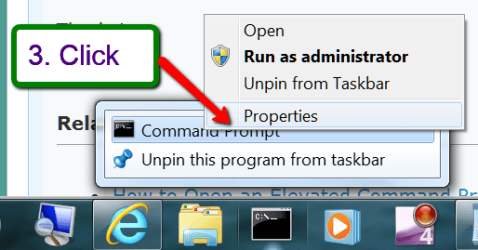
I always pin cmd to the taskbar. From there I have my own quick method:


2014-02-24_2141.png


2014-02-24_2143.png


2014-02-24_2145.png


Then the Advanced button and check the little box followed by OK > Apply > OK.
 

My Computer

Computer Manufacturer/Model Number
HP, Dell, Gateway, Toshiba - 4 laptops and 2 desktops
OS
Vista, Windows7, Mint Mate, Zorin, Windows 8
CPU
from 1.6GHz Duo to i7
Monitor(s) Displays
2x HP w2207
Hard Drives
5x HDD, 7x SSD, 12x Externals
Keyboard
with trackball - no mices
Mouse
Trackball mice
Internet Speed
DSL 6000
Thank you Brink for another excellent tutorial. :)

warnsmall.png
Warning
You must be logged in as an administrator to be able to use this shortcut.

As the :devil:'s advocate ...
With an elevated cmd-prompt shortcut , ie "Run as Administrator" ... why would I need to be logged in as Admin to use the shortcut. ?

Without having experimented with an elevated shortcut, what is the point of an elevated shortcut if it can only be used when logged in as administrator.
If logged in as admin, wouldn't opening the cmd.exe default to Administrator.

I would like to open an elevated cmd-prompt from my user account using the elevated shortcut.

Sorry to be difficult ... I am not questioning the human logic ... but the OS/security logic.

---------------
SPECS:
Toshiba Satellite C665
OS:= Windows 7 Home Premium (32-bit), sp1 (Build 7601) OEM
UI:=Classic Shell Start + Classic Explorer
Windows Indexing = disabled
Security settings for C:\
System ... (full control:=ON)
Administrators (Owner-PC\Administrators) ... (full control:=OFF)
Users (Owner-PC\Users) ... (full control:=OFF)


My Computer

Computer type
PC/Desktop
Computer Manufacturer/Model Number
Toshiba, Lenovo (laptops) + 4 rigs
OS
XP Pro (x86) | 7 HP (x86) & (x64) | 7 Pro (x64)
Back
Top