Eliminating HP Thin Client RDP Certificate warning popups

CBT

New member
Local time
6:12 PM
Messages
3
We are currently attempting to upgrade a large amount of older machines at our facilities to WES7 thin clients, HP models t5740e. The rollout has been going quite well with one nagging complaint; a warning box when trying to connect to the RDP server.

Every time a user clicks the 'connect' button on the HP Connection Manager, we get the following :
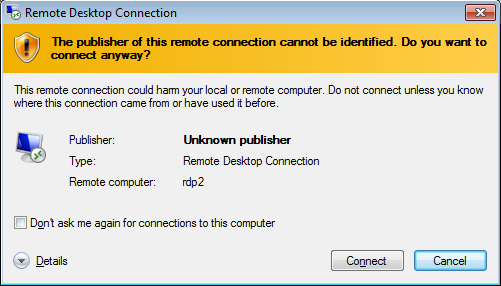
VAAAEgE.png


We have joined the thin clients to the domain, created certificates, and we assigned trusted root CAs via Group Policy, but the warning persists. Going in through IE on the machine shows us the certificate IS being trusted despite the warning box stating otherwise.

The only way we've been able to get the warning to stop showing up is by disabling all the local resource redirections (IE : 'redirect local printers', 'redirect comm ports', and so on). I honestly don't know why that would affect the certificate being trusted or not, but it's not a good fix for us. We need local resource redirections for about half our deployments.

Has anyone here had experience with this or a similar issue?
 

My Computer My Computer

Computer type
PC/Desktop
OS
Win 7 Pro 64-Bit
Hi CBT, welcome to the Seven Forums.

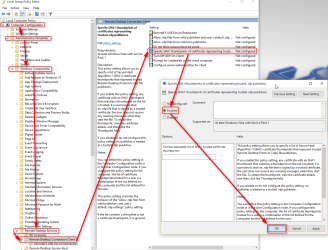
Do this on remote clients, both in Group Policy > Computer Configuration and Group Policy > User Configuration:

2015-07-10_02h31_19.png
(Click to enlarge)​

If it does not resolve your issue, see this article for further information: How to resolve the issue: ?A website wants to start a remote connection. The publisher of this remote connection cannot be identified.? - Remote Desktop Services (Terminal Services) Team Blog - Site Home - MSDN Blogs

Don't let the title fool you; in your case it's not a website making a remote connection but the workaround is the same.

Kari
 
Last edited:

My Computer My Computer

Computer type
Laptop
Computer Manufacturer/Model Number
HP ENVY 17-1150eg
OS
Windows 10 Pro x64 EN-GB
CPU
1.6 GHz Intel Core i7-720QM Processor
Memory
6 GB
Graphics Card(s)
ATI Mobility Radeon HD 5850 Graphics
Sound Card
Beats sound system with integrated subwoofer
Monitor(s) Displays
17" laptop display, 22" LED and 32" Full HD TV through HDMI
Screen Resolution
1600*900 (1), 1920*1080 (2&3)
Hard Drives
Internal: 2 x 500 GB SATA Hard Disk Drive 7200 rpm
External: 2TB for backups, 3TB USB3 network drive for media
Cooling
As Envy runs a bit warm, I have it on a Cooler Master pad
Keyboard
Logitech diNovo Media Desktop Laser (bluetooth)
Mouse
Logitech Performance Mouse MX
Internet Speed
50/10 Mbps VDSL
Antivirus
Windows Defender 4.3.9431.0
Browser
Maxthon 3.5.2., IE11
What happens when you tick that box "don't ask again ..." in the popup window shown in the screenshot?
 

My Computer My Computer

Computer type
PC/Desktop
Computer Manufacturer/Model Number
Custom Build
OS
Windows 7 Ultimate x64 SP1
CPU
AMD Phenom 2 1090T
Motherboard
Gigabyte GA-890FXA-UD5
Memory
2x8GB Kingston HyperX Fury Black 1600Mhz Unganged
Graphics Card(s)
MSI GTX 970 Gaming 4G
Sound Card
Realtek On-Board HD 7.1 Audio / Logitech G35
Monitor(s) Displays
3xAcer GD245HQ
Screen Resolution
1920x1080
Hard Drives
Samsung 850 Pro 512GB SSD - OS /
WD Caviar Black SATA 3 - 1 TBx2 - Dynamic RAID 0 /
WD Caviar Green SATA 2 - 640GBx2 - Dynamic RAID 0 /
WD Caviar Green SATA 2 - 640GB - Internal Backup /
Seagate Barracude SATA 3 - 3TB - External Backup/ Sync
PSU
HighPower 1000W
Case
Cooler Master HAF 932
Cooling
Noctua NH-D14
Keyboard
Logitech G19
Mouse
Logitech G500
Internet Speed
100/4 Mbit Cable (100GB quota)
Antivirus
ZoneAlarm Extreme Security / MBAM Pro / MBAE Free / SAS Free
Browser
IE 11 - Firefox - Chrome
Other Info
Logitech F710/ G27/ G940/ Z5500 // TrackIR 5 // Nvidia 3D Surround Vision
What happens when you tick that box "don't ask again ..." in the popup window shown in the screenshot?

That's not the point; of course then this dialog is no longer shown in consequent connections. The point is how to avoid it in the first place, not showing a single time not even the first time.
 

My Computer My Computer

Computer type
Laptop
Computer Manufacturer/Model Number
HP ENVY 17-1150eg
OS
Windows 10 Pro x64 EN-GB
CPU
1.6 GHz Intel Core i7-720QM Processor
Memory
6 GB
Graphics Card(s)
ATI Mobility Radeon HD 5850 Graphics
Sound Card
Beats sound system with integrated subwoofer
Monitor(s) Displays
17" laptop display, 22" LED and 32" Full HD TV through HDMI
Screen Resolution
1600*900 (1), 1920*1080 (2&3)
Hard Drives
Internal: 2 x 500 GB SATA Hard Disk Drive 7200 rpm
External: 2TB for backups, 3TB USB3 network drive for media
Cooling
As Envy runs a bit warm, I have it on a Cooler Master pad
Keyboard
Logitech diNovo Media Desktop Laser (bluetooth)
Mouse
Logitech Performance Mouse MX
Internet Speed
50/10 Mbps VDSL
Antivirus
Windows Defender 4.3.9431.0
Browser
Maxthon 3.5.2., IE11
What happens when you tick that box "don't ask again ..." in the popup window shown in the screenshot?

Actually? It still pops up. At first I thought it was the write filter but even with EWF disabled the 'don't' ask again' never seems to work.

I'm kind of thinking it's something specific to the HP connection manager though, just because the popup vanishes if we're not choosing any of the local redirection options (Redirect local storage, redirect comm ports, redirect printers, etc). Unfortunately we're using refurbed thin clients due to Administration wanting to save as much $$$ as possible, and HP has refused to help citing 'out of warranty' thin clients.

We did enable SHA1 thumbprint but only on the computer configuration section and not user configuration section. I'll test that out and see what the result is.
 

My Computer My Computer

Computer type
PC/Desktop
OS
Win 7 Pro 64-Bit
Apologies for the tardy response, opening a new building has been crazy busy. Even with the SHA1 thumbprint option turned on, it still gives us the warning error. Any other thoughts as to how we can approach this?
 

My Computer My Computer

Computer type
PC/Desktop
OS
Win 7 Pro 64-Bit
Honestly, I have no idea. Enabling the SHA-1 thumbprint should have taken care of that. I will come back if I find something. Please, if you find a solution come back and post it.
 

My Computer My Computer

Computer type
Laptop
Computer Manufacturer/Model Number
HP ENVY 17-1150eg
OS
Windows 10 Pro x64 EN-GB
CPU
1.6 GHz Intel Core i7-720QM Processor
Memory
6 GB
Graphics Card(s)
ATI Mobility Radeon HD 5850 Graphics
Sound Card
Beats sound system with integrated subwoofer
Monitor(s) Displays
17" laptop display, 22" LED and 32" Full HD TV through HDMI
Screen Resolution
1600*900 (1), 1920*1080 (2&3)
Hard Drives
Internal: 2 x 500 GB SATA Hard Disk Drive 7200 rpm
External: 2TB for backups, 3TB USB3 network drive for media
Cooling
As Envy runs a bit warm, I have it on a Cooler Master pad
Keyboard
Logitech diNovo Media Desktop Laser (bluetooth)
Mouse
Logitech Performance Mouse MX
Internet Speed
50/10 Mbps VDSL
Antivirus
Windows Defender 4.3.9431.0
Browser
Maxthon 3.5.2., IE11
Back
Top