
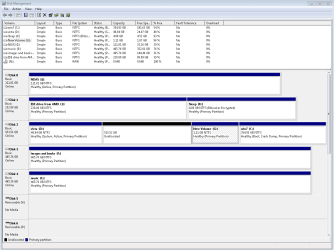
elminating vista partition, disk management screenshot included...

jorpe

New member
Power User
VIP
Local time
1:29 AM
Messages
278
Location
mile high
I'm trying to extend the partition of my windows 7, but that option is grayed out when I do it from a free partition manager bootdisk and also while in windows. I'm done with vista anyways, so I'd like to delete that partition, however it was there first, and I dont want to go through a bootmgr nightmare again.

I've looked through several older threads where the steps include (backup) boot with free boot cd, mark win7 partition as active, delete vista partition, try to reboot a handful of times until it repairs itself. Is this what I should do?

What files do I copy to the win7 partition manually?
 

Attachments
  • diskmanagement.PNG
    diskmanagement.PNG
    20.1 KB · Views: 71

My Computer My Computer

At a glance

7600x64 ultimate, not SP1i7 93012gb ddr3 1600 triple channel Corsair XMS3Radeon 5850 1gb OC edition
OS
7600x64 ultimate, not SP1
CPU
i7 930
Motherboard
Gigabye X58A-ud5
Memory
12gb ddr3 1600 triple channel Corsair XMS3
Graphics Card(s)
Radeon 5850 1gb OC edition
Sound Card
Asus Xonar Essence STX
Monitor(s) Displays
Acer 24'', Dell 23'' display port
Screen Resolution
1920x1200, 1920x1080
Hard Drives
3x64GB Microcenter SSDs RAID0
1tb spinpoint f3 (system)
1tb spinpoint f3 (media)
1tb spinpoint f3 OSX
1x2TB WD green images
1tb 7200.12 (time machine)
2x 500gb western digital green drives for archiving,keeping install files.
PSU
700 modular
Case
Antec 1200
Cooling
Promlimatech Megahalems
Keyboard
logitech 2.4ghz wireless wave something
Mouse
logitech laser wireless mouse.
Internet Speed
50/10
Other Info
4 systems currently:
1. sig rig
2. 930 i7 x64 ultimate (backup, media center PC)
3. c314 2gb ram tablet 7600 ultimate
4. athlon 6000+ home server (still in progress)
5. ipad for on the go
Yes, there is actually an easier way. First, remove the Vista drive from the computer, and then run a startup repair once or twice. If it does not detect any installation, mark the 7 partition as active, and then run a startup repair.

http://www.sevenforums.com/tutorials/681-startup-repair.html

http://www.sevenforums.com/tutorials/71432-partition-mark-active.html

That should write a new boot loader to the 7 partition. You can then reattach the Vista drive, and then change the hard drive boot priority in the BIOS to make sure the drive with the 7 partition on it is first.
 

My Computer My Computer

At a glance

Windows 7 Professional x64Intel i7 2600K OC'd @ 4620 MHz16GB GSkill Sniper 2133 Mhz (4x4GB)EVGA GeForce GTX 480 SuperClocked+
Computer Manufacturer/Model Number
Custom
OS
Windows 7 Professional x64
CPU
Intel i7 2600K OC'd @ 4620 MHz
Motherboard
Asus P8Z68-V Pro
Memory
16GB GSkill Sniper 2133 Mhz (4x4GB)
Graphics Card(s)
EVGA GeForce GTX 480 SuperClocked+
Sound Card
Realtek High Definition Audio
Monitor(s) Displays
2x Acer S273HLbmii 27"
Screen Resolution
2 x 1920x1080
Hard Drives
64GB Crucial M4 SSD

Storage: Hitachi 1TB 5400RPM, Samsung 1.5TB 5400RPM
PSU
Corsair HW Series 750w (modular)
Case
Cooler Master HAF 932 Advanced Blue Edition
Cooling
CM Hyper 212+ CPU cooler, 3x 230mm + 1x 140mm case fans
Keyboard
Logitech MK320 (wireless)
Mouse
Logitech MK320 (wireless)
Internet Speed
30 Mb/s : 2 Mb/s
As both OS's appear to be on the same HD, back up your files, use Free Partition Wizard bootable CD to mark Win7 partition Active, mark Vista and any other besides Win7 partition Inactive, delete Vista partition, then boot Win7 DVD Repair console or Repair CD, click through to Recovery Tools list to run Startup Repair up to 3 separate times with reboots until Win7 starts.

If you want to move Win7 to the preferred lower HD address, then before running Startup Repair use PW to resize the adjacent partition to make the deleted Vista space large enough to Copy Win7 into it, or simply move data off HD temporarily to delete all partitions except Win7, then Resize Win7 to it's left as desired, creating a new data partition to its right.
 
Last edited:
jorpe,

I suggest that BEFORE you change things around,
Use Windows Backup And Restore to make a System Image of your Win 7.

Then either using Windows Backup and Restore or simply with copy/paste backup all the data that you want to keep on that disk with Win7 on it.

You will need to backup to an external usb disk to give you the greatest flexibility.
 

My Computer My Computer

At a glance

MS Windows 7 Ultimate SP1 64-bitAMD A10-4600M6.00 GB Dual-Channel DDR3 @ 798MHz (11-11-12-28)AMD Radeon HD 7660G
Computer Manufacturer/Model Number
Toshiba Satellite S875D-S7239 laptop
OS
MS Windows 7 Ultimate SP1 64-bit
CPU
AMD A10-4600M
Motherboard
AMD Pumori (Socket FT1)
Memory
6.00 GB Dual-Channel DDR3 @ 798MHz (11-11-12-28)
Graphics Card(s)
AMD Radeon HD 7660G
Sound Card
High Definition Audio Device
Monitor(s) Displays
Generic PnP Monitor (1600x900@60Hz)
Screen Resolution
1600x900@60Hz
Hard Drives
SSD 119GB Corsair CSSD-V128GB2 ATA Device
Keyboard
Standard PS/2 Keyboard
Mouse
HP Wireless Optical Mobile Mouse Model FHA-3410
Internet Speed
What the local pub, local coffee shop offers.
Other Info
Optical Drive:MATSHITA BD-CMB UJ160B ATA Device


Also have an Asus ha1002xp netbook with Win 7 Ultimate installed.
As Disk 0, is active, boot files may or may not be on that drive. Where the OS should have been.

What I would do is start a fresh with a clean install to Disk0.
 

My Computer My Computer

At a glance

ME/XP/Vista/Win7
OS
ME/XP/Vista/Win7
Actually, the EasyBCD utility is supposed to be able to "move" the boot loader files from your Vista partition to your Win7 partition at the click of a mouse.

You can get EasyBCD from the NeoSmart Technology website. Be sure to get the latest version (2.0+).
 

My Computer My Computer

At a glance

Win7 Pro 32-bit, Win8 Pro 32-bitAMD Phenom II X6 1090T4GB ddr3 1300AMD HD 4290 onboard
Computer type
PC/Desktop
Computer Manufacturer/Model Number
Custom
OS
Win7 Pro 32-bit, Win8 Pro 32-bit
CPU
AMD Phenom II X6 1090T
Motherboard
Gigabyte
Memory
4GB ddr3 1300
Graphics Card(s)
AMD HD 4290 onboard
Sound Card
Builtin Realtek HD Audio
Monitor(s) Displays
Samsung 24" widescreen, LG 23" widescreen
Screen Resolution
1920x1200/1920x1080
Hard Drives
Kingston 256GB SSD
Keyboard
Logitech Illuminated Keyboard
Mouse
Logitech M705 wireless mouse
Antivirus
Norton Av 2013
Browser
IE v10
As Disk 0, is active, boot files may or may not be on that drive. Where the OS should have been.

What I would do is start a fresh with a clean install to Disk0.

Somehow that ended up as disk 0 after recovering all the files and rebuilding the partition... it's not really important.
 

My Computer My Computer

At a glance

7600x64 ultimate, not SP1i7 93012gb ddr3 1600 triple channel Corsair XMS3Radeon 5850 1gb OC edition
OS
7600x64 ultimate, not SP1
CPU
i7 930
Motherboard
Gigabye X58A-ud5
Memory
12gb ddr3 1600 triple channel Corsair XMS3
Graphics Card(s)
Radeon 5850 1gb OC edition
Sound Card
Asus Xonar Essence STX
Monitor(s) Displays
Acer 24'', Dell 23'' display port
Screen Resolution
1920x1200, 1920x1080
Hard Drives
3x64GB Microcenter SSDs RAID0
1tb spinpoint f3 (system)
1tb spinpoint f3 (media)
1tb spinpoint f3 OSX
1x2TB WD green images
1tb 7200.12 (time machine)
2x 500gb western digital green drives for archiving,keeping install files.
PSU
700 modular
Case
Antec 1200
Cooling
Promlimatech Megahalems
Keyboard
logitech 2.4ghz wireless wave something
Mouse
logitech laser wireless mouse.
Internet Speed
50/10
Other Info
4 systems currently:
1. sig rig
2. 930 i7 x64 ultimate (backup, media center PC)
3. c314 2gb ram tablet 7600 ultimate
4. athlon 6000+ home server (still in progress)
5. ipad for on the go
jorpe,

I suggest that BEFORE you change things around,
Use Windows Backup And Restore to make a System Image of your Win 7.

Then either using Windows Backup and Restore or simply with copy/paste backup all the data that you want to keep on that disk with Win7 on it.

You will need to backup to an external usb disk to give you the greatest flexibility.

is that the same thing as making a drive clone with acronis? I have aronis also
 

My Computer My Computer

At a glance

7600x64 ultimate, not SP1i7 93012gb ddr3 1600 triple channel Corsair XMS3Radeon 5850 1gb OC edition
OS
7600x64 ultimate, not SP1
CPU
i7 930
Motherboard
Gigabye X58A-ud5
Memory
12gb ddr3 1600 triple channel Corsair XMS3
Graphics Card(s)
Radeon 5850 1gb OC edition
Sound Card
Asus Xonar Essence STX
Monitor(s) Displays
Acer 24'', Dell 23'' display port
Screen Resolution
1920x1200, 1920x1080
Hard Drives
3x64GB Microcenter SSDs RAID0
1tb spinpoint f3 (system)
1tb spinpoint f3 (media)
1tb spinpoint f3 OSX
1x2TB WD green images
1tb 7200.12 (time machine)
2x 500gb western digital green drives for archiving,keeping install files.
PSU
700 modular
Case
Antec 1200
Cooling
Promlimatech Megahalems
Keyboard
logitech 2.4ghz wireless wave something
Mouse
logitech laser wireless mouse.
Internet Speed
50/10
Other Info
4 systems currently:
1. sig rig
2. 930 i7 x64 ultimate (backup, media center PC)
3. c314 2gb ram tablet 7600 ultimate
4. athlon 6000+ home server (still in progress)
5. ipad for on the go

My Computer My Computer

At a glance

Windows 7 Professional x64Intel i7 2600K OC'd @ 4620 MHz16GB GSkill Sniper 2133 Mhz (4x4GB)EVGA GeForce GTX 480 SuperClocked+
Computer Manufacturer/Model Number
Custom
OS
Windows 7 Professional x64
CPU
Intel i7 2600K OC'd @ 4620 MHz
Motherboard
Asus P8Z68-V Pro
Memory
16GB GSkill Sniper 2133 Mhz (4x4GB)
Graphics Card(s)
EVGA GeForce GTX 480 SuperClocked+
Sound Card
Realtek High Definition Audio
Monitor(s) Displays
2x Acer S273HLbmii 27"
Screen Resolution
2 x 1920x1080
Hard Drives
64GB Crucial M4 SSD

Storage: Hitachi 1TB 5400RPM, Samsung 1.5TB 5400RPM
PSU
Corsair HW Series 750w (modular)
Case
Cooler Master HAF 932 Advanced Blue Edition
Cooling
CM Hyper 212+ CPU cooler, 3x 230mm + 1x 140mm case fans
Keyboard
Logitech MK320 (wireless)
Mouse
Logitech MK320 (wireless)
Internet Speed
30 Mb/s : 2 Mb/s
Jorpe,
Be sure and follow Jonathan's advice.
 

My Computer My Computer

At a glance

MS Windows 7 Ultimate SP1 64-bitAMD A10-4600M6.00 GB Dual-Channel DDR3 @ 798MHz (11-11-12-28)AMD Radeon HD 7660G
Computer Manufacturer/Model Number
Toshiba Satellite S875D-S7239 laptop
OS
MS Windows 7 Ultimate SP1 64-bit
CPU
AMD A10-4600M
Motherboard
AMD Pumori (Socket FT1)
Memory
6.00 GB Dual-Channel DDR3 @ 798MHz (11-11-12-28)
Graphics Card(s)
AMD Radeon HD 7660G
Sound Card
High Definition Audio Device
Monitor(s) Displays
Generic PnP Monitor (1600x900@60Hz)
Screen Resolution
1600x900@60Hz
Hard Drives
SSD 119GB Corsair CSSD-V128GB2 ATA Device
Keyboard
Standard PS/2 Keyboard
Mouse
HP Wireless Optical Mobile Mouse Model FHA-3410
Internet Speed
What the local pub, local coffee shop offers.
Other Info
Optical Drive:MATSHITA BD-CMB UJ160B ATA Device


Also have an Asus ha1002xp netbook with Win 7 Ultimate installed.
Back
Top