Solved Elusive Desktop Icon

alan

New member
Local time
10:24 PM
Messages
4
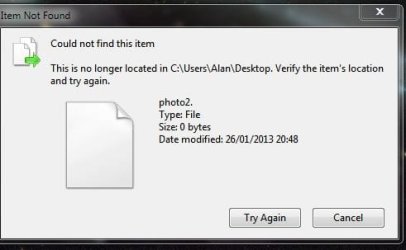
Elusive in the fact I cannot delete it, I received 2 Jpeg photos from a relative, downloaded them to desktop, 1 showed as a Jpeg thumbnail the other this icon, ( both photos displayed in Thunderbird okay ) its properties are zero bytes, system cannot find it if I try to delete it, for all intents and purposes it does not exist but its there laughing at me :D....the icon is a document type icon with the right hand top corner flapped down ( if you get my drift ) its properties are zero bytes / location C: user/alan/desktop / and its just a file ....any ideas folks ? I do not want to re-install just to get shot of this thing ..many thanks for reading :D
 

My Computer

Computer Manufacturer/Model Number
Computer Shop Built
OS
Windows7 Home Premium 32 bit
CPU
AMD Athlon duel core 2.50GHZ
Motherboard
Gigabyte
Memory
3 gig
Graphics Card(s)
Nvidea Geforce GT240
Sound Card
Built in
Monitor(s) Displays
Benq
Hi Alan .

What error do you get when trying to delete it?.
 

My Computer

Computer Manufacturer/Model Number
Cooler Master
OS
Windows 7 Home Premium 64 Bit
CPU
Core I7 1155 3.4GHZ
Memory
8GB DDR 1600
Hard Drives
64 GB SSD - OS
1TB - DATA
PSU
340 Watt Corsair
Case
Cooler Master
Cooling
Cooler Master
Hi Braddersz

No its not a system icon , and this is the "reply" I get when attempting a delete..or moving it to the trashcan or even another folder ..
Hope the attachment of a snip of the window shows...I called the 2 photos from my niece as, photo2 and photo1 when downloading them from T`bird to desktop, prior to saving them out to the pictures folder ..just the way I do it :D

Thanks for getting back to me ...appreciated
 

Attachments

  • Capture.JPG
    Capture.JPG
    21.5 KB · Views: 3

My Computer

Computer Manufacturer/Model Number
Computer Shop Built
OS
Windows7 Home Premium 32 bit
CPU
AMD Athlon duel core 2.50GHZ
Motherboard
Gigabyte
Memory
3 gig
Graphics Card(s)
Nvidea Geforce GT240
Sound Card
Built in
Monitor(s) Displays
Benq
Have you tried rebooting your system?. It could already have been deleted and your desktop has not refreshed.
You can press F5 on the desktop to perform a refresh.
 

My Computer

Computer Manufacturer/Model Number
Cooler Master
OS
Windows 7 Home Premium 64 Bit
CPU
Core I7 1155 3.4GHZ
Memory
8GB DDR 1600
Hard Drives
64 GB SSD - OS
1TB - DATA
PSU
340 Watt Corsair
Case
Cooler Master
Cooling
Cooler Master
Hi Alan,

We can try deleting from command prompt,

click start, in the search box, type CMD then press enter,

A command prompt should open,

Type: DEL C:\Users\Alan\Desktop photo2

and press enter, It might ask you to confirm (Y) or (N)
Press Y and then press enter
 

My Computer

Computer Manufacturer/Model Number
Cooler Master
OS
Windows 7 Home Premium 64 Bit
CPU
Core I7 1155 3.4GHZ
Memory
8GB DDR 1600
Hard Drives
64 GB SSD - OS
1TB - DATA
PSU
340 Watt Corsair
Case
Cooler Master
Cooling
Cooler Master
Hi Alan,

We can try deleting from command prompt,

click start, in the search box, type CMD then press enter,

A command prompt should open,

Type: DEL C:\Users\Alan\Desktop photo2

and press enter, It might ask you to confirm (Y) or (N)
Press Y and then press enter

The command should be;

del C:\users\alan\"desktop photo2"
(note the quote marks around the file name)

I did a test and it worked fine for me?
Desktop is not a part of the file name, its part of the directory that holds the file.
 

My Computer

Computer Manufacturer/Model Number
Cooler Master
OS
Windows 7 Home Premium 64 Bit
CPU
Core I7 1155 3.4GHZ
Memory
8GB DDR 1600
Hard Drives
64 GB SSD - OS
1TB - DATA
PSU
340 Watt Corsair
Case
Cooler Master
Cooling
Cooler Master
Hi Alan,

We can try deleting from command prompt,

click start, in the search box, type CMD then press enter,

A command prompt should open,

Type: DEL C:\Users\Alan\Desktop photo2

and press enter, It might ask you to confirm (Y) or (N)
Press Y and then press enter

Hi Brad
Your an ACE !!! , but first, no a reboot made no difference, a sys restore to an earlier time made no difference..BUT the command entered into the CMD prompt window did, its gone, its no more, its dead :D ..but the funny thing was that the command prompt returned with it saying it could not find the file, but it must have done, also 4 program shortcuts disappeared as well along with that darned ( not so ) elusive now icon ..but all is now restored ..
May I thank you most kindly for your knowledge / time and trouble..it is appreciated muchly !!

Kindest of regards

Alan
 

My Computer

Computer Manufacturer/Model Number
Computer Shop Built
OS
Windows7 Home Premium 32 bit
CPU
AMD Athlon duel core 2.50GHZ
Motherboard
Gigabyte
Memory
3 gig
Graphics Card(s)
Nvidea Geforce GT240
Sound Card
Built in
Monitor(s) Displays
Benq
Hi Alan,

We can try deleting from command prompt,

click start, in the search box, type CMD then press enter,

A command prompt should open,

Type: DEL C:\Users\Alan\Desktop photo2

and press enter, It might ask you to confirm (Y) or (N)
Press Y and then press enter

Hi Brad
Your an ACE !!! , but first, no a reboot made no difference, a sys restore to an earlier time made no difference..BUT the command entered into the CMD prompt window did, its gone, its no more, its dead :D ..but the funny thing was that the command prompt returned with it saying it could not find the file, but it must have done, also 4 program shortcuts disappeared as well along with that darned ( not so ) elusive now icon ..but all is now restored ..
May I thank you most kindly for your knowledge / time and trouble..it is appreciated muchly !!

Kindest of regards

Alan


Excellent. Glad it worked.

The command will return back saying " file xxxxx Can not be found.
Thats because it's deleted it.
 

My Computer

Computer Manufacturer/Model Number
Cooler Master
OS
Windows 7 Home Premium 64 Bit
CPU
Core I7 1155 3.4GHZ
Memory
8GB DDR 1600
Hard Drives
64 GB SSD - OS
1TB - DATA
PSU
340 Watt Corsair
Case
Cooler Master
Cooling
Cooler Master
Hi Alan,

We can try deleting from command prompt,

click start, in the search box, type CMD then press enter,

A command prompt should open,

Type: DEL C:\Users\Alan\Desktop photo2

and press enter, It might ask you to confirm (Y) or (N)
Press Y and then press enter

The command should be;

del C:\users\alan\"desktop photo2"
(note the quote marks around the file name)

I did a test and it worked fine for me?
Desktop is not a part of the file name, its part of the directory that holds the file.

If all else fails, try Unlocker

If it can't delete, it will give you an option to nail it at boot time.
Just download and install, it will add to context menu as an option.
 

My Computer

Computer type
PC/Desktop
Computer Manufacturer/Model Number
Dell Inspiron 560
OS
Windows 7 Ultimate x64
CPU
dual core @3.20ghz
Memory
4GB
Sound Card
Realtek hd & intel hdmi
Monitor(s) Displays
Dell 21.5"
Screen Resolution
1920x1080 (running 1600x900)
Hard Drives
internal 500GB
ext buffalo hd-pntu3 1TB
Keyboard
Dell wireless
Mouse
Dell wireless
Internet Speed
50/25
Antivirus
MSE & SAS
Browser
Chrome
Other Info
Canon Pixma MX410 Printer
Altec Speakers l-center boom-r
Back
Top