
You are using an out of date browser. It may not display this or other websites correctly.
You should upgrade or use an alternative browser.
You should upgrade or use an alternative browser.
Solved Email Alerts No Longer Displaying
- Thread starter Sharon140
- Start date

What email service are you using Sharon? Windows Live Mail? Yahoo Mail? Or what?
My Computer
- Computer Manufacturer/Model Number
- HP Pavillion dv5t (generation 1)
- OS
- Vista 64 bit and 32 bit (SP2)
- CPU
- Intel(R) Core(TM)2 Duo Processor T9400 (2.53 GHz
- Memory
- 4GB DDR2 System Memory (2 Dimm)
- Graphics Card(s)
- 512 MB NVIDIA GeForce 9600M GT
- Monitor(s) Displays
- 15.4" diagonal WSXGA+ High-Definition HP BrightView Widescre
- Screen Resolution
- 1680 x 1050
- Hard Drives
- 320GB 5400RPM SATA Hard Drive with HP ProtectSmart Hard Drive Protection
- Keyboard
- Built-in HP
- Mouse
- Built in - Synaptics TouchPad V6.5 on PS/2 Port
- Internet Speed
- Max
- Other Info
- ~ Intel Next-Gen Wireless-N Mini-card w/Bluetooth ~ Blu-Ray ROM DVD+/-R/RW ~ Integ. HDTV Hybrid Tuner ~ 12 Cell Battery ~ MS Office (Home Premium) 2007 ~

Hello Sharon, and welcome to Seven Forums.
That is only when you also have Windows Live Messenger running along with Windows Live Mail, and only for emails that you get in your Hotmail account.
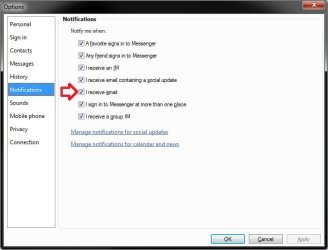
In Messenger, you will need to have the I recieve email option checked.
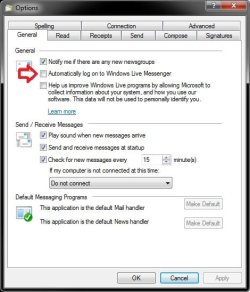
If you like, you can set Windows Live Mail to automatically run Messenger when you open Windows Live Mail by checking the setting below.
Hope this helps,
Shawn
That is only when you also have Windows Live Messenger running along with Windows Live Mail, and only for emails that you get in your Hotmail account.
In Messenger, you will need to have the I recieve email option checked.
Shawn
My Computer
- Computer type
- PC/Desktop
- Computer Manufacturer/Model Number
- Self built custom
- OS
- 64-bit Windows 11 Pro for Workstations
- CPU
- Intel i7-8700K OC'd to 5 GHz
- Motherboard
- ASUS ROG Maximus XI Formula Z390
- Memory
- 64 GB (4x16GB) G.SKILL TridentZ RGB DDR4 3600 MHz
- Graphics Card(s)
- ASUS ROG-STRIX-GTX1080TI-O11G-GAMING
- Sound Card
- Integrated
- Monitor(s) Displays
- 2 x Samsung Odyssey G7 27"
- Screen Resolution
- 2560x1440
- Hard Drives
- 1TB Samsung 990 PRO M.2,
4TB Samsung 990 PRO PRO M.2,
TerraMaster F8 SSD Plus NAS
- PSU
- Seasonic Prime Titanium 850W
- Case
- Thermaltake Core P3
- Cooling
- Corsair Hydro H115i
- Keyboard
- Logitech wireless K800
- Mouse
- Logitech MX Master 4
- Internet Speed
- 2 Gb/s Download and 100 Mb/s Upload
- Antivirus
- Malwarebyte Anti-Malware Premium
- Browser
- Google Chrome
- Other Info
- Logitech Z625 speaker system,
Logitech BRIO 4K Pro webcam,
HP Color LaserJet Pro MFP M477fdn,
APC SMART-UPS RT 1000 XL - SURT1000XLI,
Galaxy S23 Plus phone
Hi Shawn,
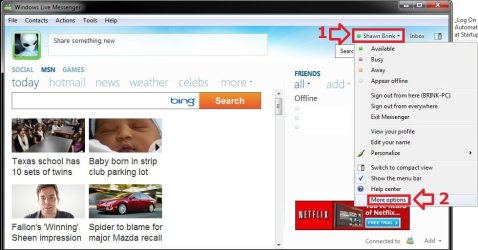
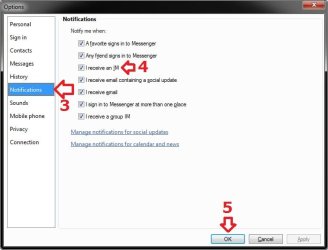
I am signed into messenger and it does start when I open Windows live mail . Could you please tell me how I find the window with the option to check 'I received mail'?
Thank You,
Sharon
I am signed into messenger and it does start when I open Windows live mail . Could you please tell me how I find the window with the option to check 'I received mail'?
Thank You,
Sharon
My Computer
- OS
- Windows 7 Home Premium 64bit
No problem Sharon. Here you go. 
My Computer
- Computer type
- PC/Desktop
- Computer Manufacturer/Model Number
- Self built custom
- OS
- 64-bit Windows 11 Pro for Workstations
- CPU
- Intel i7-8700K OC'd to 5 GHz
- Motherboard
- ASUS ROG Maximus XI Formula Z390
- Memory
- 64 GB (4x16GB) G.SKILL TridentZ RGB DDR4 3600 MHz
- Graphics Card(s)
- ASUS ROG-STRIX-GTX1080TI-O11G-GAMING
- Sound Card
- Integrated
- Monitor(s) Displays
- 2 x Samsung Odyssey G7 27"
- Screen Resolution
- 2560x1440
- Hard Drives
- 1TB Samsung 990 PRO M.2,
4TB Samsung 990 PRO PRO M.2,
TerraMaster F8 SSD Plus NAS
- PSU
- Seasonic Prime Titanium 850W
- Case
- Thermaltake Core P3
- Cooling
- Corsair Hydro H115i
- Keyboard
- Logitech wireless K800
- Mouse
- Logitech MX Master 4
- Internet Speed
- 2 Gb/s Download and 100 Mb/s Upload
- Antivirus
- Malwarebyte Anti-Malware Premium
- Browser
- Google Chrome
- Other Info
- Logitech Z625 speaker system,
Logitech BRIO 4K Pro webcam,
HP Color LaserJet Pro MFP M477fdn,
APC SMART-UPS RT 1000 XL - SURT1000XLI,
Galaxy S23 Plus phone
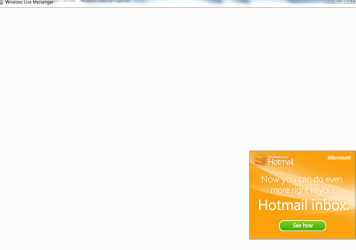
I think there must be a problem with my messenger. When I click on the messenger icon I get a blank window with changing ads. I don't know how to include the image as you did. I tried to to open messenger through the Windows Live website, but I only get a prompt to download messenger. Should I do that or will it mess up my email? I have never actually used messenger, it was just there when I moved from Outlook Express to Windows Live. I really appreciate you help.
Sharon
Sharon
Attachments
My Computer
- OS
- Windows 7 Home Premium 64bit
If you were able to open that window, then it appears that you do have Windows Live Messenger installed.
Close Windows Live Messenger completely, then open Programs and Features in the Control Panel (icons view), click on Windows Live Essentials 2011, then select the Repair all Windows Live Programs option. This will hopefully repair it for you and allow it to work properly afterwards.
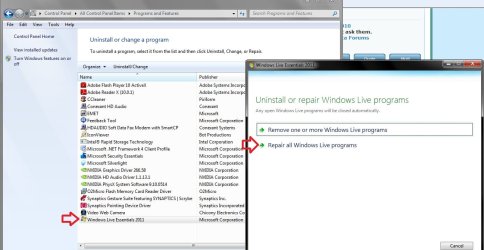
Close Windows Live Messenger completely, then open Programs and Features in the Control Panel (icons view), click on Windows Live Essentials 2011, then select the Repair all Windows Live Programs option. This will hopefully repair it for you and allow it to work properly afterwards.
My Computer
- Computer type
- PC/Desktop
- Computer Manufacturer/Model Number
- Self built custom
- OS
- 64-bit Windows 11 Pro for Workstations
- CPU
- Intel i7-8700K OC'd to 5 GHz
- Motherboard
- ASUS ROG Maximus XI Formula Z390
- Memory
- 64 GB (4x16GB) G.SKILL TridentZ RGB DDR4 3600 MHz
- Graphics Card(s)
- ASUS ROG-STRIX-GTX1080TI-O11G-GAMING
- Sound Card
- Integrated
- Monitor(s) Displays
- 2 x Samsung Odyssey G7 27"
- Screen Resolution
- 2560x1440
- Hard Drives
- 1TB Samsung 990 PRO M.2,
4TB Samsung 990 PRO PRO M.2,
TerraMaster F8 SSD Plus NAS
- PSU
- Seasonic Prime Titanium 850W
- Case
- Thermaltake Core P3
- Cooling
- Corsair Hydro H115i
- Keyboard
- Logitech wireless K800
- Mouse
- Logitech MX Master 4
- Internet Speed
- 2 Gb/s Download and 100 Mb/s Upload
- Antivirus
- Malwarebyte Anti-Malware Premium
- Browser
- Google Chrome
- Other Info
- Logitech Z625 speaker system,
Logitech BRIO 4K Pro webcam,
HP Color LaserJet Pro MFP M477fdn,
APC SMART-UPS RT 1000 XL - SURT1000XLI,
Galaxy S23 Plus phone
Thank you for your help and patience, the repair worked perfectly. My messenge page looks like it used to and I am receiving the notification when an email comes in. Is there some where I should go to mark this as solved or does the moderator do that? Again many thanks for your help.
Sharon
Sharon
My Computer
- OS
- Windows 7 Home Premium 64bit
You're most welcome Sharon. I'm happy to hear that you got it sorted.
Normally, you would just click on the report icon in the upper right corner of a post to report that the thread has been solved. We (admins and mods) will then mark it solved soon afterwards.
Normally, you would just click on the report icon
in the upper right corner of a post to report that the thread has been solved. We (admins and mods) will then mark it solved soon afterwards. My Computer
- Computer type
- PC/Desktop
- Computer Manufacturer/Model Number
- Self built custom
- OS
- 64-bit Windows 11 Pro for Workstations
- CPU
- Intel i7-8700K OC'd to 5 GHz
- Motherboard
- ASUS ROG Maximus XI Formula Z390
- Memory
- 64 GB (4x16GB) G.SKILL TridentZ RGB DDR4 3600 MHz
- Graphics Card(s)
- ASUS ROG-STRIX-GTX1080TI-O11G-GAMING
- Sound Card
- Integrated
- Monitor(s) Displays
- 2 x Samsung Odyssey G7 27"
- Screen Resolution
- 2560x1440
- Hard Drives
- 1TB Samsung 990 PRO M.2,
4TB Samsung 990 PRO PRO M.2,
TerraMaster F8 SSD Plus NAS
- PSU
- Seasonic Prime Titanium 850W
- Case
- Thermaltake Core P3
- Cooling
- Corsair Hydro H115i
- Keyboard
- Logitech wireless K800
- Mouse
- Logitech MX Master 4
- Internet Speed
- 2 Gb/s Download and 100 Mb/s Upload
- Antivirus
- Malwarebyte Anti-Malware Premium
- Browser
- Google Chrome
- Other Info
- Logitech Z625 speaker system,
Logitech BRIO 4K Pro webcam,
HP Color LaserJet Pro MFP M477fdn,
APC SMART-UPS RT 1000 XL - SURT1000XLI,
Galaxy S23 Plus phone
Similar threads


- Replies
- 3
- Views
- 2K

- Replies
- 3
- Views
- 2K


- Replies
- 28
- Views
- 4K
