
Solved Email links problem - Windows Live Mail

Wombat3

New member
Local time
2:30 AM
Messages
12
Location
Bellevue,WA
When I try to open any link from an email, I get an "Application not found" error message. I'm using Windows Live Mail and Windows7 Home 64bit.

I've searched and tried to fix it, but am currently stumped. Any help would be greatly appreciated.
 

My Computer

Computer Manufacturer/Model Number
Dell XPS630i
OS
Windows7 Home 64bit
CPU
IntelCore2 Quad Q9650 3.0GHz
Memory
8GB DDR2 - 4X2
Graphics Card(s)
2X-ATI Radeon 4870 - 2048MB total
Monitor(s) Displays
Triple Samsung 191t's
PSU
750W
Keyboard
Logitech Cordless Wave Pro
Mouse
Logitech MX1100 Cordless Laser Mouse
Hello Wombat,

Welcome to Seven Forums.

Check that Live Mail has all it's default associations. Control Panel\All Control Panel Items\Default Programs\Set Default Programs.

Hope this helps.

Gary
 

My Computer

Computer Manufacturer/Model Number
Dell XPS420
OS
Vista Ult 64 bit Seven Ult RTM x64
CPU
Intel Core2 Quad Q6600 2.40 gigahertz
Memory
Crucial Ballistix 4x2GB PC2 6400
Graphics Card(s)
NVIDIA GeForce 8600 GTS 256 MB
Sound Card
Creative SB X-Fi audio
Monitor(s) Displays
HP w2207 + HPvs15
Screen Resolution
1680x1050 + 1024x768
Hard Drives
2-WD5000AAKS-500 GB
WD5000AAV-500 GB external
Keyboard
Microsoft Comfort Curve
Mouse
MX Revolution
Other Info
Wacom Intuos 2 Graphics Tablet
Experience Index=5.5
When I go to Set default programs, Windows Live Mail isn't listed as a choice.

Under the Set Program Access and Computer Defaults section, it's listed as a choice. However, it won't allow me to change it, even when logged on as an administrator.
 

My Computer

Computer Manufacturer/Model Number
Dell XPS630i
OS
Windows7 Home 64bit
CPU
IntelCore2 Quad Q9650 3.0GHz
Memory
8GB DDR2 - 4X2
Graphics Card(s)
2X-ATI Radeon 4870 - 2048MB total
Monitor(s) Displays
Triple Samsung 191t's
PSU
750W
Keyboard
Logitech Cordless Wave Pro
Mouse
Logitech MX1100 Cordless Laser Mouse
Hello Wombat, and welcome to Seven Forums.

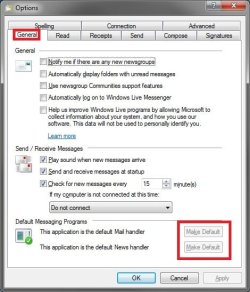
In Windows Live Mail, press Alt+M, click on Tools (menu bar), Options, General tab, then make sure that both Make Default buttons have been clicked on to grey them out. Also check to make sure that Internet Explorer is set as the default program with all of it's associations set to it as well.

Options.jpg

Hope this helps,
Shawn
 

My Computer

Computer type
PC/Desktop
Computer Manufacturer/Model Number
Self built custom
OS
64-bit Windows 11 Pro for Workstations
CPU
Intel i7-8700K OC'd to 5 GHz
Motherboard
ASUS ROG Maximus XI Formula Z390
Memory
64 GB (4x16GB) G.SKILL TridentZ RGB DDR4 3600 MHz
Graphics Card(s)
ASUS ROG-STRIX-GTX1080TI-O11G-GAMING
Sound Card
Integrated
Monitor(s) Displays
2 x Samsung Odyssey G7 27"
Screen Resolution
2560x1440
Hard Drives
1TB Samsung 990 PRO M.2,
4TB Samsung 990 PRO PRO M.2,
TerraMaster F8 SSD Plus NAS
PSU
Seasonic Prime Titanium 850W
Case
Thermaltake Core P3
Cooling
Corsair Hydro H115i
Keyboard
Logitech wireless K800
Mouse
Logitech MX Master 4
Internet Speed
2 Gb/s Download and 100 Mb/s Upload
Antivirus
Malwarebyte Anti-Malware Premium
Browser
Google Chrome
Other Info
Logitech Z625 speaker system,
Logitech BRIO 4K Pro webcam,
HP Color LaserJet Pro MFP M477fdn,
APC SMART-UPS RT 1000 XL - SURT1000XLI,
Galaxy S23 Plus phone
Thanks for your help, this is driving me nuts. In WML, both the default Mail handler and the News handler are greyed out.

When I go to Set your Default Programs there is no Windows Explorer listed.
 

My Computer

Computer Manufacturer/Model Number
Dell XPS630i
OS
Windows7 Home 64bit
CPU
IntelCore2 Quad Q9650 3.0GHz
Memory
8GB DDR2 - 4X2
Graphics Card(s)
2X-ATI Radeon 4870 - 2048MB total
Monitor(s) Displays
Triple Samsung 191t's
PSU
750W
Keyboard
Logitech Cordless Wave Pro
Mouse
Logitech MX1100 Cordless Laser Mouse
It would be Internet Explorer instead. ;)
 

My Computer

Computer type
PC/Desktop
Computer Manufacturer/Model Number
Self built custom
OS
64-bit Windows 11 Pro for Workstations
CPU
Intel i7-8700K OC'd to 5 GHz
Motherboard
ASUS ROG Maximus XI Formula Z390
Memory
64 GB (4x16GB) G.SKILL TridentZ RGB DDR4 3600 MHz
Graphics Card(s)
ASUS ROG-STRIX-GTX1080TI-O11G-GAMING
Sound Card
Integrated
Monitor(s) Displays
2 x Samsung Odyssey G7 27"
Screen Resolution
2560x1440
Hard Drives
1TB Samsung 990 PRO M.2,
4TB Samsung 990 PRO PRO M.2,
TerraMaster F8 SSD Plus NAS
PSU
Seasonic Prime Titanium 850W
Case
Thermaltake Core P3
Cooling
Corsair Hydro H115i
Keyboard
Logitech wireless K800
Mouse
Logitech MX Master 4
Internet Speed
2 Gb/s Download and 100 Mb/s Upload
Antivirus
Malwarebyte Anti-Malware Premium
Browser
Google Chrome
Other Info
Logitech Z625 speaker system,
Logitech BRIO 4K Pro webcam,
HP Color LaserJet Pro MFP M477fdn,
APC SMART-UPS RT 1000 XL - SURT1000XLI,
Galaxy S23 Plus phone
My mistake, but no Internet explorer either.
 

My Computer

Computer Manufacturer/Model Number
Dell XPS630i
OS
Windows7 Home 64bit
CPU
IntelCore2 Quad Q9650 3.0GHz
Memory
8GB DDR2 - 4X2
Graphics Card(s)
2X-ATI Radeon 4870 - 2048MB total
Monitor(s) Displays
Triple Samsung 191t's
PSU
750W
Keyboard
Logitech Cordless Wave Pro
Mouse
Logitech MX1100 Cordless Laser Mouse
Well, it looks like you will need to do a repair install instead then.
 

My Computer

Computer type
PC/Desktop
Computer Manufacturer/Model Number
Self built custom
OS
64-bit Windows 11 Pro for Workstations
CPU
Intel i7-8700K OC'd to 5 GHz
Motherboard
ASUS ROG Maximus XI Formula Z390
Memory
64 GB (4x16GB) G.SKILL TridentZ RGB DDR4 3600 MHz
Graphics Card(s)
ASUS ROG-STRIX-GTX1080TI-O11G-GAMING
Sound Card
Integrated
Monitor(s) Displays
2 x Samsung Odyssey G7 27"
Screen Resolution
2560x1440
Hard Drives
1TB Samsung 990 PRO M.2,
4TB Samsung 990 PRO PRO M.2,
TerraMaster F8 SSD Plus NAS
PSU
Seasonic Prime Titanium 850W
Case
Thermaltake Core P3
Cooling
Corsair Hydro H115i
Keyboard
Logitech wireless K800
Mouse
Logitech MX Master 4
Internet Speed
2 Gb/s Download and 100 Mb/s Upload
Antivirus
Malwarebyte Anti-Malware Premium
Browser
Google Chrome
Other Info
Logitech Z625 speaker system,
Logitech BRIO 4K Pro webcam,
HP Color LaserJet Pro MFP M477fdn,
APC SMART-UPS RT 1000 XL - SURT1000XLI,
Galaxy S23 Plus phone
Go to internet options, then click on the programs tab, then click on the set programs button, and then click the associate a file type option. Go down to the protocols section and look for http, see what is is affiliated with. If it is not set to IE, click the change button located on the top right, and select internet explorer from the list. Hope this helps
 

My Computer

Computer Manufacturer/Model Number
Gigabyte
OS
Windows 7 Ultimate
CPU
Intel Core(TM)2 Quad- Q9550, 2.83GHz
Motherboard
G31M-ES2L
Memory
4GB
Graphics Card(s)
ATI Radeon HD4600
Sound Card
On Board:
Monitor(s) Displays
Acer AL2223W, Acer AL1916
Screen Resolution
1680 x 1050, 1280 x 1024
Hard Drives
160GB
350GB
250GB
250GB
PSU
600W
Case
Cooler Master
Keyboard
Microsoft Laser 6000
Mouse
Logitech Optical Trackman
Internet Speed
1.5MB
Other Info
I am also running a quasar gamatron flux capacitor with twin pulse tronic phasers......jk, I have no such stuff.
There is a section below Set Your Default Programs, called Set Program Access and Computer Defaults. This offers three choices Microsoft, Non-Microsoft and Custom. Under the currently selected Custom, Internet Explorer is listed, but won't allow me to change to it.

Under this Custom section, the "Choose a Default Web Browser" selection is "Use My Current Web Browser". Logged on as an Administrator, I selected Internet Explorer and then it would immediately revert back this setting under Custom.
 

My Computer

Computer Manufacturer/Model Number
Dell XPS630i
OS
Windows7 Home 64bit
CPU
IntelCore2 Quad Q9650 3.0GHz
Memory
8GB DDR2 - 4X2
Graphics Card(s)
2X-ATI Radeon 4870 - 2048MB total
Monitor(s) Displays
Triple Samsung 191t's
PSU
750W
Keyboard
Logitech Cordless Wave Pro
Mouse
Logitech MX1100 Cordless Laser Mouse
My OS version might be slightly different because I can't find any associate a file option.
I'll look into Brink's Repair Install, but I'll start fresh on that tomorrow.

Thanks to both of you for taking your time to deal with my issue. Right now I had enough for one day.
 

My Computer

Computer Manufacturer/Model Number
Dell XPS630i
OS
Windows7 Home 64bit
CPU
IntelCore2 Quad Q9650 3.0GHz
Memory
8GB DDR2 - 4X2
Graphics Card(s)
2X-ATI Radeon 4870 - 2048MB total
Monitor(s) Displays
Triple Samsung 191t's
PSU
750W
Keyboard
Logitech Cordless Wave Pro
Mouse
Logitech MX1100 Cordless Laser Mouse
Thanks for your help, but I going to start up again on this tomorrow.
 

My Computer

Computer Manufacturer/Model Number
Dell XPS630i
OS
Windows7 Home 64bit
CPU
IntelCore2 Quad Q9650 3.0GHz
Memory
8GB DDR2 - 4X2
Graphics Card(s)
2X-ATI Radeon 4870 - 2048MB total
Monitor(s) Displays
Triple Samsung 191t's
PSU
750W
Keyboard
Logitech Cordless Wave Pro
Mouse
Logitech MX1100 Cordless Laser Mouse
You're welcome Wombat. We'll be here when your ready to start up on this again. :)
 

My Computer

Computer type
PC/Desktop
Computer Manufacturer/Model Number
Self built custom
OS
64-bit Windows 11 Pro for Workstations
CPU
Intel i7-8700K OC'd to 5 GHz
Motherboard
ASUS ROG Maximus XI Formula Z390
Memory
64 GB (4x16GB) G.SKILL TridentZ RGB DDR4 3600 MHz
Graphics Card(s)
ASUS ROG-STRIX-GTX1080TI-O11G-GAMING
Sound Card
Integrated
Monitor(s) Displays
2 x Samsung Odyssey G7 27"
Screen Resolution
2560x1440
Hard Drives
1TB Samsung 990 PRO M.2,
4TB Samsung 990 PRO PRO M.2,
TerraMaster F8 SSD Plus NAS
PSU
Seasonic Prime Titanium 850W
Case
Thermaltake Core P3
Cooling
Corsair Hydro H115i
Keyboard
Logitech wireless K800
Mouse
Logitech MX Master 4
Internet Speed
2 Gb/s Download and 100 Mb/s Upload
Antivirus
Malwarebyte Anti-Malware Premium
Browser
Google Chrome
Other Info
Logitech Z625 speaker system,
Logitech BRIO 4K Pro webcam,
HP Color LaserJet Pro MFP M477fdn,
APC SMART-UPS RT 1000 XL - SURT1000XLI,
Galaxy S23 Plus phone
I've been hesitant to try it, but the next step will be to try this Repair Install. Hopefully, all goes well and I'll be back online to report. Wish me well.
 

My Computer

Computer Manufacturer/Model Number
Dell XPS630i
OS
Windows7 Home 64bit
CPU
IntelCore2 Quad Q9650 3.0GHz
Memory
8GB DDR2 - 4X2
Graphics Card(s)
2X-ATI Radeon 4870 - 2048MB total
Monitor(s) Displays
Triple Samsung 191t's
PSU
750W
Keyboard
Logitech Cordless Wave Pro
Mouse
Logitech MX1100 Cordless Laser Mouse
After I selected the Upgrade button and before entering the product key, I was instructed to uninstall some ATI Catalyst features(Install Manager and Control Center). Not wanting to get myself into a much bigger mess, I cancelled.

Currently I use three monitors and two ATI 4870 video cards and it works great. I didn't want to start some other deeper issues/problems with Dell video card and ATI video card software. Is this being too cautious?
 

My Computer

Computer Manufacturer/Model Number
Dell XPS630i
OS
Windows7 Home 64bit
CPU
IntelCore2 Quad Q9650 3.0GHz
Memory
8GB DDR2 - 4X2
Graphics Card(s)
2X-ATI Radeon 4870 - 2048MB total
Monitor(s) Displays
Triple Samsung 191t's
PSU
750W
Keyboard
Logitech Cordless Wave Pro
Mouse
Logitech MX1100 Cordless Laser Mouse
To be safe, you can uninstall the ATi video drivers, do the repair install, then reinstall the ATI drivers. :)
 

My Computer

Computer type
PC/Desktop
Computer Manufacturer/Model Number
Self built custom
OS
64-bit Windows 11 Pro for Workstations
CPU
Intel i7-8700K OC'd to 5 GHz
Motherboard
ASUS ROG Maximus XI Formula Z390
Memory
64 GB (4x16GB) G.SKILL TridentZ RGB DDR4 3600 MHz
Graphics Card(s)
ASUS ROG-STRIX-GTX1080TI-O11G-GAMING
Sound Card
Integrated
Monitor(s) Displays
2 x Samsung Odyssey G7 27"
Screen Resolution
2560x1440
Hard Drives
1TB Samsung 990 PRO M.2,
4TB Samsung 990 PRO PRO M.2,
TerraMaster F8 SSD Plus NAS
PSU
Seasonic Prime Titanium 850W
Case
Thermaltake Core P3
Cooling
Corsair Hydro H115i
Keyboard
Logitech wireless K800
Mouse
Logitech MX Master 4
Internet Speed
2 Gb/s Download and 100 Mb/s Upload
Antivirus
Malwarebyte Anti-Malware Premium
Browser
Google Chrome
Other Info
Logitech Z625 speaker system,
Logitech BRIO 4K Pro webcam,
HP Color LaserJet Pro MFP M477fdn,
APC SMART-UPS RT 1000 XL - SURT1000XLI,
Galaxy S23 Plus phone
That's a wildly quick response. Please help me from overthinking this.

There's an issue with some underlying Dell drivers that complicates it. Others have had major headaches getting the ATI drivers to work on this type of Dell XPS630i. Certain propritary Dell drivers were installed, then deleted, before the ATI drivers could work. Maybe these underlying Dell issues wouldn't be affected.

The programs indicated for Uninstall were ATI Install Manager and ATI Control Center. I wasn't even sure what part of the drivers these are.

Should I just uninstall these programs and try the Repair Install?

I tried ZAY's earlier suggestion at trying to associate a file type. I went down to protocols, found HTTP and the current default was Unknown Application. I went to the Change Program button and no programs are listed in the box.

How can I get Internet Explorer as an option? I couldn't drag anything or type in this box.

Or are we back to a bigger fix?

One other issue that may be related, is that I can't find Internet Explorer 32bit. I thought it would be installed with Windows7 and I wanted to use it to enable Flash content.

Brink,
Thanks for the lightening fast response earlier. Are you still there?

I just got another clue that a major fix is what I need. About two minutes ago, I went to the Bluescreen. I guess it's time for this Repair Install.
 
Last edited by a moderator:

My Computer

Computer Manufacturer/Model Number
Dell XPS630i
OS
Windows7 Home 64bit
CPU
IntelCore2 Quad Q9650 3.0GHz
Memory
8GB DDR2 - 4X2
Graphics Card(s)
2X-ATI Radeon 4870 - 2048MB total
Monitor(s) Displays
Triple Samsung 191t's
PSU
750W
Keyboard
Logitech Cordless Wave Pro
Mouse
Logitech MX1100 Cordless Laser Mouse
Wombat,

Yes, it does seems that a repair or clean install may be in order here. Be sure to backup anything that you do not want to lose first to be safe, and to have all of your driver installation files downloaded and backed up to have them handy to install after installing Windows 7.
 

My Computer

Computer type
PC/Desktop
Computer Manufacturer/Model Number
Self built custom
OS
64-bit Windows 11 Pro for Workstations
CPU
Intel i7-8700K OC'd to 5 GHz
Motherboard
ASUS ROG Maximus XI Formula Z390
Memory
64 GB (4x16GB) G.SKILL TridentZ RGB DDR4 3600 MHz
Graphics Card(s)
ASUS ROG-STRIX-GTX1080TI-O11G-GAMING
Sound Card
Integrated
Monitor(s) Displays
2 x Samsung Odyssey G7 27"
Screen Resolution
2560x1440
Hard Drives
1TB Samsung 990 PRO M.2,
4TB Samsung 990 PRO PRO M.2,
TerraMaster F8 SSD Plus NAS
PSU
Seasonic Prime Titanium 850W
Case
Thermaltake Core P3
Cooling
Corsair Hydro H115i
Keyboard
Logitech wireless K800
Mouse
Logitech MX Master 4
Internet Speed
2 Gb/s Download and 100 Mb/s Upload
Antivirus
Malwarebyte Anti-Malware Premium
Browser
Google Chrome
Other Info
Logitech Z625 speaker system,
Logitech BRIO 4K Pro webcam,
HP Color LaserJet Pro MFP M477fdn,
APC SMART-UPS RT 1000 XL - SURT1000XLI,
Galaxy S23 Plus phone
The Repair Install solved multiple problems. It actually went much more smoothly than I imagined. The email links issue is solved. The new ATI drivers needed to be separately downloaded, but Windows7 did most of the work.

Thanks again for your help and guiding me in the right direction.
 

My Computer

Computer Manufacturer/Model Number
Dell XPS630i
OS
Windows7 Home 64bit
CPU
IntelCore2 Quad Q9650 3.0GHz
Memory
8GB DDR2 - 4X2
Graphics Card(s)
2X-ATI Radeon 4870 - 2048MB total
Monitor(s) Displays
Triple Samsung 191t's
PSU
750W
Keyboard
Logitech Cordless Wave Pro
Mouse
Logitech MX1100 Cordless Laser Mouse
You're most welcome Wombat. I'm happy to hear that you got it all sorted out now. :)
 

My Computer

Computer type
PC/Desktop
Computer Manufacturer/Model Number
Self built custom
OS
64-bit Windows 11 Pro for Workstations
CPU
Intel i7-8700K OC'd to 5 GHz
Motherboard
ASUS ROG Maximus XI Formula Z390
Memory
64 GB (4x16GB) G.SKILL TridentZ RGB DDR4 3600 MHz
Graphics Card(s)
ASUS ROG-STRIX-GTX1080TI-O11G-GAMING
Sound Card
Integrated
Monitor(s) Displays
2 x Samsung Odyssey G7 27"
Screen Resolution
2560x1440
Hard Drives
1TB Samsung 990 PRO M.2,
4TB Samsung 990 PRO PRO M.2,
TerraMaster F8 SSD Plus NAS
PSU
Seasonic Prime Titanium 850W
Case
Thermaltake Core P3
Cooling
Corsair Hydro H115i
Keyboard
Logitech wireless K800
Mouse
Logitech MX Master 4
Internet Speed
2 Gb/s Download and 100 Mb/s Upload
Antivirus
Malwarebyte Anti-Malware Premium
Browser
Google Chrome
Other Info
Logitech Z625 speaker system,
Logitech BRIO 4K Pro webcam,
HP Color LaserJet Pro MFP M477fdn,
APC SMART-UPS RT 1000 XL - SURT1000XLI,
Galaxy S23 Plus phone
Back
Top