Emails being duplicated when sent and recieved

Roders

New member
Local time
12:33 PM
Messages
15
Hi All.
I now have a new desktop PC running win7 pro 64 bit and Office 2010 and Gmail.
When I send and recieve emails via Outlook 2010 everything gets duplicated for some reason.
I have tries to find a cure for this seemingly common occurance with limited success as the pop up screens described during the tweaking process do not match the ones on my computer which I assume is due to differing software somewhere along the line.
If someone in the know could possibly help out with a fully described click by click proceedure to stop this duplication I would be most gratefull.
Many Thanks,
Roders
 

My Computer My Computer

At a glance

Win 7 Pro 64biti3 3220 ivy bridge8 GbOn Board
Computer type
PC/Desktop
Computer Manufacturer/Model Number
custom
OS
Win 7 Pro 64bit
CPU
i3 3220 ivy bridge
Motherboard
Gigabyte B75M D3H
Memory
8 Gb
Graphics Card(s)
On Board
Hi Roders...
I can understand the inconvenience....
If your default email account is either an IMAP account or a Hotmail account accessed directly, you may see two copies of every message in your Inbox.
This happens when you have Outlook Express set to retrieve new mail automatically upon startup and open the default Inbox automatically when you start, too. Both commands download new mail, and if they do it in parallel, you'll see two copies of each message.

For better understanding the issue and quick resolving the same, go for this site : How to remove duplicate imported items in Outlook
 

My Computer My Computer

At a glance

Windows XP,32 bit
Computer type
PC/Desktop
Computer Manufacturer/Model Number
HCL
OS
Windows XP,32 bit
Hi Roders.

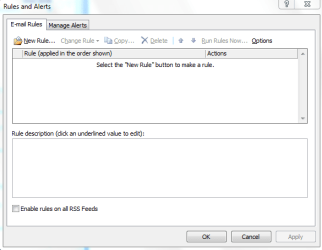
Do you have any rules set up maybe that will cause this? you can get to this by going to Tools - Rules and Alerts
 

My Computer My Computer

At a glance

Windows 7 Ultimate 64-bitIntel Core 2 Duo E6550 @2.33GHz4GB DDR"NVIDIA GeForce 8600 GS
Computer type
PC/Desktop
Computer Manufacturer/Model Number
Dell / Lenovo g550
OS
Windows 7 Ultimate 64-bit
CPU
Intel Core 2 Duo E6550 @2.33GHz
Motherboard
foxconn g33m02
Memory
4GB DDR"
Graphics Card(s)
NVIDIA GeForce 8600 GS
Hard Drives
HDD 1 = 150GB
HDD 2 = 1.5TB
PSU
450W
Cooling
Stock fan
Internet Speed
12Mb
Antivirus
AVG Internet Security
Hi Guys,
Thanks for your replies.
It seems though that the MS ref is to remove the duplicates that allready exist, I may be wrong, what I would like to do if possible is to prevent the duplication in the first place.
I am afraid that re the "rules" settings there is no detailed explanation as to what rules do what and I am loathe to blindly experiment in case I mess things up.
I am sure there must be a detailed description as to how my aims may be achieved somewhere as I have found one that came very close but seemed to fail allmost at the end of the sequence of "clicks" presumably due to a different software version. I.E. The article refered to a tick point line that was simply not there and looking through other "options" failed to find anything similar. Unfortunatly the original poster made no reference to what software it refered to apart from W7.
Please keep it coming.
The truth is out there.
Roders
 

My Computer My Computer

At a glance

Win 7 Pro 64biti3 3220 ivy bridge8 GbOn Board
Computer type
PC/Desktop
Computer Manufacturer/Model Number
custom
OS
Win 7 Pro 64bit
CPU
i3 3220 ivy bridge
Motherboard
Gigabyte B75M D3H
Memory
8 Gb
Graphics Card(s)
On Board
All i want to see is if there are any rules set up? when that box opens, like shown in mine
 

Attachments

  • Capture.PNG
    Capture.PNG
    10.4 KB · Views: 6

My Computer My Computer

At a glance

Windows 7 Ultimate 64-bitIntel Core 2 Duo E6550 @2.33GHz4GB DDR"NVIDIA GeForce 8600 GS
Computer type
PC/Desktop
Computer Manufacturer/Model Number
Dell / Lenovo g550
OS
Windows 7 Ultimate 64-bit
CPU
Intel Core 2 Duo E6550 @2.33GHz
Motherboard
foxconn g33m02
Memory
4GB DDR"
Graphics Card(s)
NVIDIA GeForce 8600 GS
Hard Drives
HDD 1 = 150GB
HDD 2 = 1.5TB
PSU
450W
Cooling
Stock fan
Internet Speed
12Mb
Antivirus
AVG Internet Security
All i want to see is if there are any rules set up? when that box opens, like shown in mine

Hi Benjy,
Under Rules and alerts-
Email rules-
It has a ticked box to "clear catagories on mail (reccommended)".

Is this of any use to you?
It is all pretty meaningless to me I am afraid and I am working completely in the dark on all of this.
Rgds,
Roders
 

My Computer My Computer

At a glance

Win 7 Pro 64biti3 3220 ivy bridge8 GbOn Board
Computer type
PC/Desktop
Computer Manufacturer/Model Number
custom
OS
Win 7 Pro 64bit
CPU
i3 3220 ivy bridge
Motherboard
Gigabyte B75M D3H
Memory
8 Gb
Graphics Card(s)
On Board

My Computer My Computer

At a glance

Windows 7 Ultimate 64-bitIntel Core 2 Duo E6550 @2.33GHz4GB DDR"NVIDIA GeForce 8600 GS
Computer type
PC/Desktop
Computer Manufacturer/Model Number
Dell / Lenovo g550
OS
Windows 7 Ultimate 64-bit
CPU
Intel Core 2 Duo E6550 @2.33GHz
Motherboard
foxconn g33m02
Memory
4GB DDR"
Graphics Card(s)
NVIDIA GeForce 8600 GS
Hard Drives
HDD 1 = 150GB
HDD 2 = 1.5TB
PSU
450W
Cooling
Stock fan
Internet Speed
12Mb
Antivirus
AVG Internet Security

My Computer My Computer

At a glance

Windows 7 Ultimate 64-bitIntel Core 2 Duo E6550 @2.33GHz4GB DDR"NVIDIA GeForce 8600 GS
Computer type
PC/Desktop
Computer Manufacturer/Model Number
Dell / Lenovo g550
OS
Windows 7 Ultimate 64-bit
CPU
Intel Core 2 Duo E6550 @2.33GHz
Motherboard
foxconn g33m02
Memory
4GB DDR"
Graphics Card(s)
NVIDIA GeForce 8600 GS
Hard Drives
HDD 1 = 150GB
HDD 2 = 1.5TB
PSU
450W
Cooling
Stock fan
Internet Speed
12Mb
Antivirus
AVG Internet Security
Could you please post a screenshot of the window up here please. Here is how: http://www.sevenforums.com/tutorials/9733-screenshots-files-upload-post-seven-forums.html

Hi,
Sorry but because of my severe depression and heavy medication I can not do anything like this.
I am ready to drop the whole thing unless someone can quite literally give a click by click list of instructions that a seriously impaired dead head can follow.
Having said that refering to your image of the screen shot in the lower block there are the words -

"Apply this rule after the message arrives"

"assigned to any catagory"

"clear message's catagories"

Then underneath there is an unticked box and the words "Enable rules on all messages downloaded from RSS feed"

Sorry I can not do more.
Unless you have been where I am you will have no idea about what I am struggling with.
Rgds.
 

My Computer My Computer

At a glance

Win 7 Pro 64biti3 3220 ivy bridge8 GbOn Board
Computer type
PC/Desktop
Computer Manufacturer/Model Number
custom
OS
Win 7 Pro 64bit
CPU
i3 3220 ivy bridge
Motherboard
Gigabyte B75M D3H
Memory
8 Gb
Graphics Card(s)
On Board
Back
Top