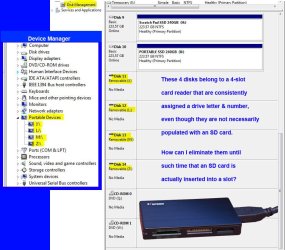
Empty Card Reader appears as four drives?

garuda

New member
Power User
Local time
3:18 AM
Messages
89
My 4-slot card reader displays as four drives whether populated or empty. This once seemed as too minor an issue to post on this forum, until the Disk Mgmt showed only three available drive letters for new drive assignments.

When external spin backups are powered-down, the Mgr still considers those spin drive letters as assigned; leaving only a few drive letters available.

How can I remove these card reader slots (as drives) from DiskMgmt & DeviceMgr when card reader slots are empty? I have two readers, but keep one disconnected for this reason.
 

Attachments

  • Card Reader Issue.jpg
    Card Reader Issue.jpg
    133.6 KB · Views: 2

My Computer My Computer

Computer type
PC/Desktop
Computer Manufacturer/Model Number
Homemade with cube tower
OS
Windows 7 Ultimate x64
CPU
2x - Xeon E5-2687W
Motherboard
ASUS Z9PE-D8 WS
Memory
128GB Kingston - (2ea kits – 4x16GB)
Graphics Card(s)
Gigabyte GTX-680 & EVGA GTX-Titan
Sound Card
Realtek ALC898 8-chan audio
Monitor(s) Displays
2ea - Samsung T260HD 25.5-Inch LCD HDTV / Monitors
Screen Resolution
1920x1200
Hard Drives
8 ea. Crucial & Samsung EVO 2TB SSDs; misc 4ea. 8TB external Seagate spinners.
PSU
Corsair AX-1200
Case
Lian-Li cube custom
Cooling
2x Dynatron R-17 - CPU Air sinks (160watts TDP)
Keyboard
HP slimline wireless
Mouse
Microsoft ARC
Internet Speed
Faster than a speeding bullet.
Antivirus
Norton Security 360 - 2020
By default, Windows does not show these drives in Explorer until you insert the memory card. To display these drives anyway, go to the Folder options, and in the view tab under Hidden Files, select Show hidden files, folders, and drives.

It is recommended that you leave the Hidden Files setting alone, unless you work around with hidden files, or at least until someone else says so when troubleshooting issues with BSODs or malware.
 

My Computer My Computer

Computer type
PC/Desktop
Computer Manufacturer/Model Number
Custom
OS
Microsoft Windows 7 Home Premium 64-bit Service Pack 1
CPU
AMD A10-6800K APU with Radeon(tm)™ HD Graphics 4100
Motherboard
ASRock FM2A85X Extreme4-M
Memory
(2) G.Skill F3-12800CL10-8GBXL
Graphics Card(s)
ASUS R7 250 Series (0x6610)
Sound Card
Realtek High Definition Audio
Monitor(s) Displays
Acer X213H LCD monitor, 21"
Screen Resolution
1920 x 1080 x 32 bits @ 60 Hz
Hard Drives
WD Black, 1.0TB, WDC WD1002FAEX-00Z3A0
PSU
Rosewill Quark-650
Case
Raidmax Comet SECC Steel ATX Mid Tower Computer Case
Cooling
1 x 80mm + 2 x 120mm + Stock cooler
Mouse
Gear Head Wireless Optical 5-button mouse
Internet Speed
FTTx 6000 / 1000
Antivirus
Avast! Free Antivirus 2015.10.0.2208
Browser
Google Chrome Version 40.0.2214.115
Other Info
*AMD Dual-Graphics
*Uses OpenDNS
*Uses Folding@Home
*HP 16x Super-Multi DVD Writer
*Superspeed 74-in-1 Card Reader
*Maximum overclock has not been determined.
..... To display these drives anyway, go to the Folder options......
Thanks for reply, but I may have confused you with my poor description. Sorry. Actually I want to get the O/S to ignore or not recognize these four empty reader slots until I place a drive in them.

In other words, I don't want these empty card slots to be assigned a drive letter in the system unless there is an SD in them; I want to eliminate them being assigned a letter in O/S, Device Mgr and Disk Mgr, etc. I'm running short on available drive letters..... A,B,C,D.......etc.
 

My Computer My Computer

Computer type
PC/Desktop
Computer Manufacturer/Model Number
Homemade with cube tower
OS
Windows 7 Ultimate x64
CPU
2x - Xeon E5-2687W
Motherboard
ASUS Z9PE-D8 WS
Memory
128GB Kingston - (2ea kits – 4x16GB)
Graphics Card(s)
Gigabyte GTX-680 & EVGA GTX-Titan
Sound Card
Realtek ALC898 8-chan audio
Monitor(s) Displays
2ea - Samsung T260HD 25.5-Inch LCD HDTV / Monitors
Screen Resolution
1920x1200
Hard Drives
8 ea. Crucial & Samsung EVO 2TB SSDs; misc 4ea. 8TB external Seagate spinners.
PSU
Corsair AX-1200
Case
Lian-Li cube custom
Cooling
2x Dynatron R-17 - CPU Air sinks (160watts TDP)
Keyboard
HP slimline wireless
Mouse
Microsoft ARC
Internet Speed
Faster than a speeding bullet.
Antivirus
Norton Security 360 - 2020
Actually, to be honest, there's no way. The OS assigns a drive letter to those empty drives, whether there's a memory card or disk in them or not. And, what do you mean by running out of drive letters?

Have you tried disconnecting other drives from the system and then reset the drive letters for everything you MIGHT need (e.g. DVD-RW drives, external HDD/SDDs, etc.)?
 

My Computer My Computer

Computer type
PC/Desktop
Computer Manufacturer/Model Number
Custom
OS
Microsoft Windows 7 Home Premium 64-bit Service Pack 1
CPU
AMD A10-6800K APU with Radeon(tm)™ HD Graphics 4100
Motherboard
ASRock FM2A85X Extreme4-M
Memory
(2) G.Skill F3-12800CL10-8GBXL
Graphics Card(s)
ASUS R7 250 Series (0x6610)
Sound Card
Realtek High Definition Audio
Monitor(s) Displays
Acer X213H LCD monitor, 21"
Screen Resolution
1920 x 1080 x 32 bits @ 60 Hz
Hard Drives
WD Black, 1.0TB, WDC WD1002FAEX-00Z3A0
PSU
Rosewill Quark-650
Case
Raidmax Comet SECC Steel ATX Mid Tower Computer Case
Cooling
1 x 80mm + 2 x 120mm + Stock cooler
Mouse
Gear Head Wireless Optical 5-button mouse
Internet Speed
FTTx 6000 / 1000
Antivirus
Avast! Free Antivirus 2015.10.0.2208
Browser
Google Chrome Version 40.0.2214.115
Other Info
*AMD Dual-Graphics
*Uses OpenDNS
*Uses Folding@Home
*HP 16x Super-Multi DVD Writer
*Superspeed 74-in-1 Card Reader
*Maximum overclock has not been determined.

My Computer My Computer

Computer type
PC/Desktop
Computer Manufacturer/Model Number
Home Built Desktop By DataTech
OS
Windows 7 Ultimate X64 SP1
CPU
Intel i5-2550K, Differing ~4.4-4.8GHz No built in GPU
Motherboard
ASUS P8Z68-V PRO/GEN3
Memory
16GB G.Skill Sniper 1866MHz @ 2133MHz 2x8GB
Graphics Card(s)
ASUS GTX650TIB-DC2OC-2GD5, (650TI Boost)
Sound Card
Onboard Realtek 5-1
Monitor(s) Displays
Samsung P2570HD
Screen Resolution
1920x1080
Hard Drives
Samsung 840 Pro 256GB SSD for OS, 500GB Seagate Constellation (Enterprise drive) for Data
PSU
Corsair HX650W
Case
Inwin Dragon Rider
Cooling
Hyper 212 EVO w/two Noctua fans, push-pull, @1300 RPM
Keyboard
E-Z Eyes, bright yellow keys with large characters
Mouse
steelseries SENSEI Laser Pro Gaming
Internet Speed
48-51Mbs Mbs down, 11 Mbs up Xfinity Cable
Antivirus
Norton Internet Security 2013
Browser
IE 10, Opera, Pale Moon if needed
Other Info
4 case fans, LG BluRay-RE, ASUS DVD-RW, Mr. Fusion power supply, 1.21 gigawatts.
I'm fairly sure they will need a drive letter to function when you do need them……
I checked the “folder option > hide empty” – the box was already checked. You are correct…. The drive must need the letter assignment to be ready to function instantaneously.
I’ll just unplug the card reader when not using it. That’s the simplest. But thanks for your efforts!


Actually, to be honest, there's no way. The OS assigns a drive letter to those empty drives, whether there's a memory card or disk in them or not.
Seems you are correct, thanks!

Have you tried disconnecting other drives from the system and then reset the drive letters for everything you MIGHT need (e.g. DVD-RW drives, external HDD/SDDs, etc.)?
Yes, I’ve tried that.


.... And, what do you mean by running out of drive letters? ...
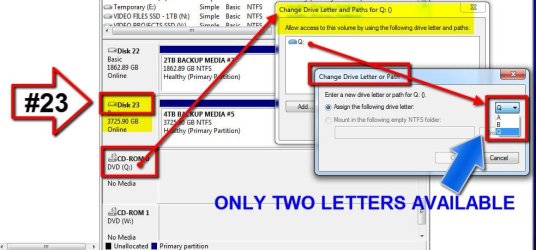
See pic below. Whenever I want to add or change letter/path (in Disk Mgmt) – the drop-down tab options display only 2, 3, or 4 drive letters available….. I KNOW!! IT SPOOKED ME OUT TOO! How can you possibly use up 26 letters.

.
 

Attachments

  • Disk Mgr Photo.JPG
    Disk Mgr Photo.JPG
    72.7 KB · Views: 3

My Computer My Computer

Computer type
PC/Desktop
Computer Manufacturer/Model Number
Homemade with cube tower
OS
Windows 7 Ultimate x64
CPU
2x - Xeon E5-2687W
Motherboard
ASUS Z9PE-D8 WS
Memory
128GB Kingston - (2ea kits – 4x16GB)
Graphics Card(s)
Gigabyte GTX-680 & EVGA GTX-Titan
Sound Card
Realtek ALC898 8-chan audio
Monitor(s) Displays
2ea - Samsung T260HD 25.5-Inch LCD HDTV / Monitors
Screen Resolution
1920x1200
Hard Drives
8 ea. Crucial & Samsung EVO 2TB SSDs; misc 4ea. 8TB external Seagate spinners.
PSU
Corsair AX-1200
Case
Lian-Li cube custom
Cooling
2x Dynatron R-17 - CPU Air sinks (160watts TDP)
Keyboard
HP slimline wireless
Mouse
Microsoft ARC
Internet Speed
Faster than a speeding bullet.
Antivirus
Norton Security 360 - 2020
Well for starters, how many partitions do you have on one drive? Can't you go back and... mount some of those as a mount point?

And what about RAID 0/1/5? There are at least one or more disks with the same capacity in your computer, that you can try to make those "simple disks" as dynamic disks instead. The only issue of going this route is that you may have to format those devices during the setup, meaning that you might want to back up your data.
 

My Computer My Computer

Computer type
PC/Desktop
Computer Manufacturer/Model Number
Custom
OS
Microsoft Windows 7 Home Premium 64-bit Service Pack 1
CPU
AMD A10-6800K APU with Radeon(tm)™ HD Graphics 4100
Motherboard
ASRock FM2A85X Extreme4-M
Memory
(2) G.Skill F3-12800CL10-8GBXL
Graphics Card(s)
ASUS R7 250 Series (0x6610)
Sound Card
Realtek High Definition Audio
Monitor(s) Displays
Acer X213H LCD monitor, 21"
Screen Resolution
1920 x 1080 x 32 bits @ 60 Hz
Hard Drives
WD Black, 1.0TB, WDC WD1002FAEX-00Z3A0
PSU
Rosewill Quark-650
Case
Raidmax Comet SECC Steel ATX Mid Tower Computer Case
Cooling
1 x 80mm + 2 x 120mm + Stock cooler
Mouse
Gear Head Wireless Optical 5-button mouse
Internet Speed
FTTx 6000 / 1000
Antivirus
Avast! Free Antivirus 2015.10.0.2208
Browser
Google Chrome Version 40.0.2214.115
Other Info
*AMD Dual-Graphics
*Uses OpenDNS
*Uses Folding@Home
*HP 16x Super-Multi DVD Writer
*Superspeed 74-in-1 Card Reader
*Maximum overclock has not been determined.
Do you actually have 23 disks/partitions?
 

My Computer My Computer

Computer type
PC/Desktop
Computer Manufacturer/Model Number
Home Built Desktop By DataTech
OS
Windows 7 Ultimate X64 SP1
CPU
Intel i5-2550K, Differing ~4.4-4.8GHz No built in GPU
Motherboard
ASUS P8Z68-V PRO/GEN3
Memory
16GB G.Skill Sniper 1866MHz @ 2133MHz 2x8GB
Graphics Card(s)
ASUS GTX650TIB-DC2OC-2GD5, (650TI Boost)
Sound Card
Onboard Realtek 5-1
Monitor(s) Displays
Samsung P2570HD
Screen Resolution
1920x1080
Hard Drives
Samsung 840 Pro 256GB SSD for OS, 500GB Seagate Constellation (Enterprise drive) for Data
PSU
Corsair HX650W
Case
Inwin Dragon Rider
Cooling
Hyper 212 EVO w/two Noctua fans, push-pull, @1300 RPM
Keyboard
E-Z Eyes, bright yellow keys with large characters
Mouse
steelseries SENSEI Laser Pro Gaming
Internet Speed
48-51Mbs Mbs down, 11 Mbs up Xfinity Cable
Antivirus
Norton Internet Security 2013
Browser
IE 10, Opera, Pale Moon if needed
Other Info
4 case fans, LG BluRay-RE, ASUS DVD-RW, Mr. Fusion power supply, 1.21 gigawatts.
Perhaps the best solution here is simply unplugging the CardReader. When I get too lazy to unplug reader, I’ll know it’s time for the rest home. But I do want to response to your questions briefly.
Well for starters, how many partitions do you have on one drive? Can't you go back and... mount some of those as a mount point?

And what about RAID 0/1/5? There are at least one or more disks with the same capacity in your computer, that you can try to make those "simple disks" as dynamic disks instead. The only issue of going this route is that you may have to format those devices during the setup, meaning that you might want to back up your data.
Honeycomb, you raise valid points. Though RAID would be more expedient, I prefer keeping different media or subject matter on separate drives, each with a planned growth capacity. For example, I confine vid projects to one SSD with enough headroom to never out-grow the capacity of that drive. Whereas, placed on a RAID with other unrelated-subject folders, when those over-grow that drive capacity, then the overgrowth must be moved to another drive, splitting up the subject matter.

Perhaps for irrational reasons, I don’t like RAID configs; perhaps a carryover from my Win2000 (O/S) days when I lost one failed HDD in a RAID config and didn’t know how to recover the data after crash (and too ignorant and frugal back then to do backups). I don’t trust RAIDs --- naïve thinking, I know. Though SSDs are much safer now, I still don’t like RAID and don’t use them, as foolish as that may sound. I try to learn from past mistakes. Whenever I’m killed by an oncoming freight train because of a failed railroad crossing signal, I tend to distrust railroad warning signals thereafter. :shock:

I do appreciate your feedback, but unplugging CardReader seems like the simplest solution. I thought maybe the forum knew of a quick fix, so I posted.

Do you actually have 23 disks/partitions?
Yes, but they are not always powered-on. I have a dozen or so SSDs in cabinet. I have dozens of 1, 2 and 4TB spinners (accumulated over time) mostly externally connected thru several USB3 hubs --- mostly used for recorded movies/TV, large media files, archives, and backups.


But when external HDDs are powered-on for backup, archiving, or are being used to get source media for Adobe programs, then yes there can be nearly26 single-partitioned SSDs/HDDs online at one time. And since backups are boring and run in the background, I also use the other drives (SSDs) for other work simultaneously w/ backups and archiving. Sometimes there are many drives online during a 5-10 hours backup.

Some VIP/critical files get backed up on two different drives for safety; so there are lots of backups going on frequently. (I notice that Honeycomb is shaking his head in frustration and thinking, “Why not simply mirror these files/vols on RAID).:D When external Adobe media HDDs are updated, they too must be backed up. And as we know, HDD to HDD xfers take more time and must stay powered-on longer. Basically, I confine important, critical, and frequently used files to SSDs for safety and speed. Once the rendering, transcoding, etc files are done running on the SSDs, some get xfer’d to slower external spinners. The really fast stuff is done in the RAMDisk drive, then sent to either SSDs or HDDs. Multiple RAM drives also take a separate drive letter.

I admit that my procedures and strategies may not be the most preferred or rational, but they seem the most easy and safest for me. Maybe it’s the "old dog, new tricks" thing. At least I’ve given up my abacus.
 

My Computer My Computer

Computer type
PC/Desktop
Computer Manufacturer/Model Number
Homemade with cube tower
OS
Windows 7 Ultimate x64
CPU
2x - Xeon E5-2687W
Motherboard
ASUS Z9PE-D8 WS
Memory
128GB Kingston - (2ea kits – 4x16GB)
Graphics Card(s)
Gigabyte GTX-680 & EVGA GTX-Titan
Sound Card
Realtek ALC898 8-chan audio
Monitor(s) Displays
2ea - Samsung T260HD 25.5-Inch LCD HDTV / Monitors
Screen Resolution
1920x1200
Hard Drives
8 ea. Crucial & Samsung EVO 2TB SSDs; misc 4ea. 8TB external Seagate spinners.
PSU
Corsair AX-1200
Case
Lian-Li cube custom
Cooling
2x Dynatron R-17 - CPU Air sinks (160watts TDP)
Keyboard
HP slimline wireless
Mouse
Microsoft ARC
Internet Speed
Faster than a speeding bullet.
Antivirus
Norton Security 360 - 2020
Jeez o'criminy that's a load of drive to keep track of and cataloged. :what:

That would explain where all the drive letter assignments went. ;)
 

My Computer My Computer

Computer type
PC/Desktop
Computer Manufacturer/Model Number
Home Built Desktop By DataTech
OS
Windows 7 Ultimate X64 SP1
CPU
Intel i5-2550K, Differing ~4.4-4.8GHz No built in GPU
Motherboard
ASUS P8Z68-V PRO/GEN3
Memory
16GB G.Skill Sniper 1866MHz @ 2133MHz 2x8GB
Graphics Card(s)
ASUS GTX650TIB-DC2OC-2GD5, (650TI Boost)
Sound Card
Onboard Realtek 5-1
Monitor(s) Displays
Samsung P2570HD
Screen Resolution
1920x1080
Hard Drives
Samsung 840 Pro 256GB SSD for OS, 500GB Seagate Constellation (Enterprise drive) for Data
PSU
Corsair HX650W
Case
Inwin Dragon Rider
Cooling
Hyper 212 EVO w/two Noctua fans, push-pull, @1300 RPM
Keyboard
E-Z Eyes, bright yellow keys with large characters
Mouse
steelseries SENSEI Laser Pro Gaming
Internet Speed
48-51Mbs Mbs down, 11 Mbs up Xfinity Cable
Antivirus
Norton Internet Security 2013
Browser
IE 10, Opera, Pale Moon if needed
Other Info
4 case fans, LG BluRay-RE, ASUS DVD-RW, Mr. Fusion power supply, 1.21 gigawatts.
I normally do not advocate RAID for most people but you seem to be an exception to the rule. While I get why you want to keep each type of data on their own drives (I am the same way), it's not the most efficient utilization of your drive space. SSDs are one heck of a lot faster than HDDs for large file transfers but they are not the most cost effective storage medium for large amounts of data; HDDs are the best for that. Also, if you are repeatedly rewriting large chunks of data to an SSD, you could significantly reduce the life of the SSD whereas HDDs are far, far less susceptible to life reduction due to large rewrites.

Using folders in a large single volume (such as can be achieved with RAID 5 or 6 or even JBOD) to keep your various types of files separated instead of using individual drives would reduce the amount of overhead you are now having to allow for each drive since the individual folders can share the same overhead space on the larger volume. Since, right at the moment, 4TB is the largest HDD that is practical right now, you would need a RAID to achieve larger volumes on a single drive letter.

The big issue with RAIDs 5 and 6 or JBOD (spanned drives) is backing them up. While RAID 5 can recover itself when one disk goes down and RAID 6 can survive two disks failing, they are not a true backup because they are still subject to hardware failure (PSU failure, fire, flood, theft, etc.) or file corruption from malware or user error (such as accidental deletion), something many pros have trouble understanding. RAID 0 (mirroring) is also susceptible to the same issues. For a backup to be a true backup, one must have their data stored in two or more completely different places. And 'tis there that RAID creates problems.

Since the volume of a RAID is so large, it would take another RAID to achieve the same volume if one wanted to do a single backup of the entire volume. A NAS would be the easiest way to accomplish that as long as it was actually connected and turned on only during the backup itself.

You hinted at a concern that a failure could occur during a backup (hence, your use of SDDs to reduce the time a backup needs), which is an extremely valid concern. The way to deal with that, of course, is to run more than one consecutive backup. That gets a bit complicated with RAID since all the drives in a RAID have to be kept together but it is doable; just have two or more sets of RAIDed drives and swap them in and out of the NAS when running the backup. You could even keep a set offsite for even more protection from loss.

An even easier way to backup a RAID would be to do file and folder backups with a syncing program. I'm just learning how to do that myself so I can't offer much in the way of details...yet. In a nutshell, however, you would pair up a folder or folders on your computer with an identical folder or folders on a backup drive. You wouldn't have to pair up all the folders on your main volume; only those that will fit on the backup drive. You could then split the entire RAIDed volume amongst multiple smaller drives.

A syncing program, in this case, works by comparing the origin folder with the paired destination folder. Then, it will copy over any new folder/files and replace any changed ones. What you will end up with is essentially an identical copy of the original folder. Since only the new and changed data is being written to the backup drive, fewer writes and rewrites are needed, making the backup much faster (and will reduce SSD degradation). Making multiple backups will be much easier. Also, a syncing program would allow you to use your existing backup drives (RAID sets should always have matched drives). I always recommend a minimum of two backups, one offsite and one onsite, and to update those backups frequently (I'm anal and keep four backup HDDs for each HDD in my computer; that saved my bacon...er...data once).

Something else that would streamline your backups would be to use a dock that connects via e-SATA. While, theoretically, USB 3.0 is almost as fast as SATA III, in actual practice, even SATA II can give USB 3.0 a good run for the money. If your machine doesn't already have an e-SATA port, as long as you have an unused SATA port, you can get PCI covers for the back of the machine that have an e-SATA socket on them and connect the cable from the socket to the unused SATA port.

 
Last edited:

My Computer My Computer

Computer type
PC/Desktop
Computer Manufacturer/Model Number
Custom Build
OS
Win 7 Ultimate 64 bit
CPU
Intel i7-3930K
Motherboard
ASUS P9X79 WS
Memory
Kingston HyperX Genesis 32GB Kit (8x4GB Modules) 1600MHz DDR
Graphics Card(s)
MSI R7850 Twin Frozr 2GD5/OC Radeon HD 7850 2GB 256-bit GDDR
Sound Card
Asus Xonar Essence STX
Monitor(s) Displays
3x Asus VG248QE 24", Vizio 32" TV
Screen Resolution
1920 x 1080, ?
Hard Drives
Samsung 128GB 840 Pro SSD (1),
Samsung 4TB 850 EVO SSDs (4)
Samsung 4TB 850 EVO SSDs (16) external backup drives used in 2.5" hot swap bays in the computer.
PSU
Corsair HX750w
Case
Antec Two Hundred v2 (modified)
Cooling
Cooler Master GeminII S524 120mm (fan replaced with a 140mm)
Keyboard
Logitech G510s
Mouse
Logitech M525 (two in use)
Internet Speed
=< 32Mbps down, 8Mbps up
Antivirus
AVAST!, MBAM, SAS, Spybot S&D (all but MBAM free) Glary Util
Browser
IE11
Other Info
LSI 9211-8i HBA card (8 SATA III ports), 2.5" & 3.5" Hot Swap Bays, HooToo HT-CR001 PCI-E to USB 3.0 Internal Hub + 6 Slot Card Reader, and LG Model CH12LS28 BD-ROM Optical Drive. Also, ScanSnap S1500 ADF duplexing scanner, Canon 9000F flat bed scanner, Corsair SP2500 2.1 speakers, Samsung CLP 415nw laser color printer, Cyberpower PP2200SW UPS
Jeez o'criminy that's a load of drives to keep track of and cataloged.
Tell me about it! Now you know the root cause of my passive-aggressive schizophrenic behavior with features of acute paranoia and delusions of grandeur. :huh:


…. it's not the most efficient utilization of your drive space…. Using folders in a large single volume (such as can be achieved with Raid 5 or 6 or even JBOD) to keep your various types of files separated…. you would need a RAID to achieve larger volumes on a single drive letter…… The way to deal with that, of course, is to run more than one consecutive backup. That gets a bit complicated with RAID since….
An even easier way to backup a RAID would be to do file and folder backups with a syncing program…..
A syncing program…. fewer writes and rewrites are needed, making the backup much faster (and will reduce SSD degradation) Making multiple backups will be much easier…. I always recommend a minimum of two backups, one offsite and one onsite, and to update those backups frequently (I'm anal and keep four backup HDDs for each HDD in my computer although that saved my bacon...er...data once)…..

Something else that would streamline your backups would be to use a dock that connects via e-SATA.…..

With all this good advice in trying to help my situation, you guys (and girl) are pushing me to the wall. Thus forcing me to disclose my real secret and air my dirty laundry. Though I hate whining about problems. However, my little embarrassing little secret begins with: Based on experts’ opinions (the most seasoned video pros), in order to expedite my workload processing, I became convinced to built a vid editing/3D modeling rig with LOTS of core, ram (for ramdrives), SSDs, and cudas, and with double-precision compute GPUs (Titans or Teslas) . Tesla too expensive, so Titan. This combo would theoretically eliminate bottlenecks and streamline rendering/transcoding. My old i7-975 rig simply took years to render/transcode/compile large multi-stream files with complex FXs from AfterEffects. I needed speed, and ability to work on 4-5 projects simultaneously with long rendering, hence more core -- Adobe leverages up to 16 cores/32 threads. So twin Xeons made sense.

But... but the rude problem that eventually surfaced was, that I had made the wrong choice of mobos. On paper, the numbers strongly suggested ASUS Z9PE-D8 WS for the job — both speed, processing agility, expansion, and stability. (Razor-edge OC rigs go fast, but aren’t always stable). However, I discovered later that this board is riddled with issues and buggy drivers, which some might have predicted with having too many features like: a brand-new C602 chipset, high-end Marvell Raids, 4-SLI support, advanced ASUS SSD caching, quad-memory, QuickPath Interconnect, Quick Gate, 7-slot PCIe 3.0, two Xeons, a kitchen sink, two grenade launchers, and one surface-to-air missile. — all complete with an antiquated pre-Civil War BIOS watching over the troops. If it has all these new cutting edge features, then why not put in a newer BIOS???? All this setup likely would have been fine on Z79 board (except for no dual sockets).

All this new technology coupled with an antique BIOS, makes all the boys not want to play well together. I cite this fact because I specifically don’t trust the Marvell RAID with THIS older BIOS along with buggy drivers that make this board unpredictable. This is why I’m reluctant to risk RAID at this time; one more potential brush fire. When I run using only the basic features (with no onboard cache, raid, etc — the board flies thru the work load. When I add too many goodies, the fireworks begin. My chosen niche is artistic creativity/production, not high-tech troubleshooter/firefighter.

Tons of hours on the phone with ASUS trying to put out brush fires. I know every single person in the ASUS motherboard support division by their first name and political bent. Bottom line… I don’t want to risk more smoke (trying RAID or others) until Asus has their drivers de-bugged and updated for this board. Other forums reveal that other Z9PE-D8 users are having the same problems. My recent BSOD stemmed from simply adding a new PCIe SATA card. Part of the reason for doing some of these seemingly irrational things (resisting raid, etc) stem from trying to keep the lid on things until ASUS drivers shape up. Some driver updates have fixed one issue, but also created two new issues. I did one BIOS update, then had to back it out to the older one; the new one created more problems. But enough whining for now, you get the picture.

Britton is familiar with some of these issues I allude to here. ie: when I run large and small sized RAMdisk drives on the ASUS board, I get unexplainable error msgs from the AS-SSD bench — yet the RAMdisk still runs fine and fast (especially at 4K READ/WRITE which is real world stuff). I put the same RAMdisk config on my i7-975 rig and NO errors msg or weird stuff during benches. This ASUS board needs better ASUS drivers. So I wait it out (for better drivers) before opting for cruise altitude. Once things smooth out, RAID will likely be adopted, because it makes sense as you and others point out.

Sorry for this long dissertation. But since you all raised these excellent suggestions, I didn’t want to appear as a TOTAL idiot by not following your rational advice without a reason. I can live with being a moderate idiot, but seeming to be a total idiot was too much to bear. :shock: ..... So I had to explain here the real reason in some detail for resisting RAID at this time. :)

P.S. — Jeannie, your RAID solutions and logic and suggestions are not wasted; I have copied them and will refer to it later when RAID becomes more plausible with an eventual stable system. Also, others reading your post who are not so familiar with RAIDs will also find your words valuable, as do I. Thanks to all who voiced.
 

My Computer My Computer

Computer type
PC/Desktop
Computer Manufacturer/Model Number
Homemade with cube tower
OS
Windows 7 Ultimate x64
CPU
2x - Xeon E5-2687W
Motherboard
ASUS Z9PE-D8 WS
Memory
128GB Kingston - (2ea kits – 4x16GB)
Graphics Card(s)
Gigabyte GTX-680 & EVGA GTX-Titan
Sound Card
Realtek ALC898 8-chan audio
Monitor(s) Displays
2ea - Samsung T260HD 25.5-Inch LCD HDTV / Monitors
Screen Resolution
1920x1200
Hard Drives
8 ea. Crucial & Samsung EVO 2TB SSDs; misc 4ea. 8TB external Seagate spinners.
PSU
Corsair AX-1200
Case
Lian-Li cube custom
Cooling
2x Dynatron R-17 - CPU Air sinks (160watts TDP)
Keyboard
HP slimline wireless
Mouse
Microsoft ARC
Internet Speed
Faster than a speeding bullet.
Antivirus
Norton Security 360 - 2020
This be your board right here? I suspect you don't have your drives connected in their right spots either. There's a difference between being connected on a 3.0 Gbps bus and a 6.0 Gbps bus, by looking at the image of it. You can't RAID if your drives are connected on a different-speed bus.

You also might want to take note, a drive may be certified for SATA-III but will plug into a SATA-II bus and still work, but runs slower. However, as with SATA-II drives, it will not work on a SATA-I bus unless you put something across a jumper block of some kind.
CD/DVD-ROM drives always operate at SATA-I speed. Bluray drives will require a SATA-II bus.
 

My Computer My Computer

Computer type
PC/Desktop
Computer Manufacturer/Model Number
Custom
OS
Microsoft Windows 7 Home Premium 64-bit Service Pack 1
CPU
AMD A10-6800K APU with Radeon(tm)™ HD Graphics 4100
Motherboard
ASRock FM2A85X Extreme4-M
Memory
(2) G.Skill F3-12800CL10-8GBXL
Graphics Card(s)
ASUS R7 250 Series (0x6610)
Sound Card
Realtek High Definition Audio
Monitor(s) Displays
Acer X213H LCD monitor, 21"
Screen Resolution
1920 x 1080 x 32 bits @ 60 Hz
Hard Drives
WD Black, 1.0TB, WDC WD1002FAEX-00Z3A0
PSU
Rosewill Quark-650
Case
Raidmax Comet SECC Steel ATX Mid Tower Computer Case
Cooling
1 x 80mm + 2 x 120mm + Stock cooler
Mouse
Gear Head Wireless Optical 5-button mouse
Internet Speed
FTTx 6000 / 1000
Antivirus
Avast! Free Antivirus 2015.10.0.2208
Browser
Google Chrome Version 40.0.2214.115
Other Info
*AMD Dual-Graphics
*Uses OpenDNS
*Uses Folding@Home
*HP 16x Super-Multi DVD Writer
*Superspeed 74-in-1 Card Reader
*Maximum overclock has not been determined.
WOW! That's a lot of machine! I took a look at the reviews on your board over at NewEgg and saw many similar complaints: faulty bios, unstable RAID, bad user's manual, doesn't always play well with other components, such as GPU cards. etc. Reading Those reviews before buying would have been more than enough to scare me away from that board.

One thing that jumped out at me when I checked you System Specs: 128GB RAM. That's an awful lot of RAM (and I thought I went nuts with 32GB RAM)! The specs on the board at NewEgg also says the board only supports up to 64GB. I checked at ASUS' website and they also said the board supports only 64GB RAM (256GB registered memory—i.e. RDIMM—you don't list a part number for your RAM so I can't check it out). Even with heavy video editing , etc. I have trouble envisioning a need for 128GB of RAM. Have you tried cutting back to 64GB of RAM to see if stability has improved. Also, are you trying to overclock your CPUS and your RAM? Both can contribute to instability. In the case of RAM, overclocking can actually slow a machine down even if the benches look good (benchmarking is good for seeing if system performance has deteriorated over time bit; other than that, it's mostly only good for bragging rights). Very little benefit is gained running RAM much faster than 1600MHz.

Moving on to a different tack, what kind of a backup scheme are you using?
 
Last edited:

My Computer My Computer

Computer type
PC/Desktop
Computer Manufacturer/Model Number
Custom Build
OS
Win 7 Ultimate 64 bit
CPU
Intel i7-3930K
Motherboard
ASUS P9X79 WS
Memory
Kingston HyperX Genesis 32GB Kit (8x4GB Modules) 1600MHz DDR
Graphics Card(s)
MSI R7850 Twin Frozr 2GD5/OC Radeon HD 7850 2GB 256-bit GDDR
Sound Card
Asus Xonar Essence STX
Monitor(s) Displays
3x Asus VG248QE 24", Vizio 32" TV
Screen Resolution
1920 x 1080, ?
Hard Drives
Samsung 128GB 840 Pro SSD (1),
Samsung 4TB 850 EVO SSDs (4)
Samsung 4TB 850 EVO SSDs (16) external backup drives used in 2.5" hot swap bays in the computer.
PSU
Corsair HX750w
Case
Antec Two Hundred v2 (modified)
Cooling
Cooler Master GeminII S524 120mm (fan replaced with a 140mm)
Keyboard
Logitech G510s
Mouse
Logitech M525 (two in use)
Internet Speed
=< 32Mbps down, 8Mbps up
Antivirus
AVAST!, MBAM, SAS, Spybot S&D (all but MBAM free) Glary Util
Browser
IE11
Other Info
LSI 9211-8i HBA card (8 SATA III ports), 2.5" & 3.5" Hot Swap Bays, HooToo HT-CR001 PCI-E to USB 3.0 Internal Hub + 6 Slot Card Reader, and LG Model CH12LS28 BD-ROM Optical Drive. Also, ScanSnap S1500 ADF duplexing scanner, Canon 9000F flat bed scanner, Corsair SP2500 2.1 speakers, Samsung CLP 415nw laser color printer, Cyberpower PP2200SW UPS
Oversight

The specs on the board at NewEgg also says the board only supports up to 64GB.
If you haven't noticed, each CPU has its own RAM bank. It's a dual-processor board. Each one of his cores has 64 GB loaded into it. That makes the grand total amount to 128 GB.
Never heard of "quad-channel" before.

The OP did not make clear about what kind of memory, registered or not, is loaded in there. That part he needs to fix on his own.
 
Last edited:

My Computer My Computer

Computer type
PC/Desktop
Computer Manufacturer/Model Number
Custom
OS
Microsoft Windows 7 Home Premium 64-bit Service Pack 1
CPU
AMD A10-6800K APU with Radeon(tm)™ HD Graphics 4100
Motherboard
ASRock FM2A85X Extreme4-M
Memory
(2) G.Skill F3-12800CL10-8GBXL
Graphics Card(s)
ASUS R7 250 Series (0x6610)
Sound Card
Realtek High Definition Audio
Monitor(s) Displays
Acer X213H LCD monitor, 21"
Screen Resolution
1920 x 1080 x 32 bits @ 60 Hz
Hard Drives
WD Black, 1.0TB, WDC WD1002FAEX-00Z3A0
PSU
Rosewill Quark-650
Case
Raidmax Comet SECC Steel ATX Mid Tower Computer Case
Cooling
1 x 80mm + 2 x 120mm + Stock cooler
Mouse
Gear Head Wireless Optical 5-button mouse
Internet Speed
FTTx 6000 / 1000
Antivirus
Avast! Free Antivirus 2015.10.0.2208
Browser
Google Chrome Version 40.0.2214.115
Other Info
*AMD Dual-Graphics
*Uses OpenDNS
*Uses Folding@Home
*HP 16x Super-Multi DVD Writer
*Superspeed 74-in-1 Card Reader
*Maximum overclock has not been determined.
The specs on the board at NewEgg also says the board only supports up to 64GB.
If you haven't noticed, each CPU has its own RAM bank. It's a dual-processor board. Each one of his cores has 64 GB loaded into it. That makes the grand total amount to 128 GB.
Never heard of "quad-channel" before.

It's physically laid out that way but I'm not so sure that's how the RAM is allocated. Also, I saw nothing in the specs at NewEgg or Asus to indicate the RAM rating is for each CPU. The way it is listed strongly suggests it is the total for the board. This is quote from the specs on the Asus site:

8 x DIMM, Max. 64GB, DDR3 2133(O.C.)/2000(O.C.)/1866/1600/1333/1066 MHz ECC, Non-ECC, Un-buffered Memory

It says a max of 64GB for 8 DIMM, not for 4 DIMM. I tried to download a manual from Asus but, apparently, it's not available anymore.

Most, if not all, X79 boards have quad-channel RAM. My board does.
 

My Computer My Computer

Computer type
PC/Desktop
Computer Manufacturer/Model Number
Custom Build
OS
Win 7 Ultimate 64 bit
CPU
Intel i7-3930K
Motherboard
ASUS P9X79 WS
Memory
Kingston HyperX Genesis 32GB Kit (8x4GB Modules) 1600MHz DDR
Graphics Card(s)
MSI R7850 Twin Frozr 2GD5/OC Radeon HD 7850 2GB 256-bit GDDR
Sound Card
Asus Xonar Essence STX
Monitor(s) Displays
3x Asus VG248QE 24", Vizio 32" TV
Screen Resolution
1920 x 1080, ?
Hard Drives
Samsung 128GB 840 Pro SSD (1),
Samsung 4TB 850 EVO SSDs (4)
Samsung 4TB 850 EVO SSDs (16) external backup drives used in 2.5" hot swap bays in the computer.
PSU
Corsair HX750w
Case
Antec Two Hundred v2 (modified)
Cooling
Cooler Master GeminII S524 120mm (fan replaced with a 140mm)
Keyboard
Logitech G510s
Mouse
Logitech M525 (two in use)
Internet Speed
=< 32Mbps down, 8Mbps up
Antivirus
AVAST!, MBAM, SAS, Spybot S&D (all but MBAM free) Glary Util
Browser
IE11
Other Info
LSI 9211-8i HBA card (8 SATA III ports), 2.5" & 3.5" Hot Swap Bays, HooToo HT-CR001 PCI-E to USB 3.0 Internal Hub + 6 Slot Card Reader, and LG Model CH12LS28 BD-ROM Optical Drive. Also, ScanSnap S1500 ADF duplexing scanner, Canon 9000F flat bed scanner, Corsair SP2500 2.1 speakers, Samsung CLP 415nw laser color printer, Cyberpower PP2200SW UPS
Also core don't have any RAM "loaded into it".

I can't seem to find 16GB RAM DIMMs?
 

My Computer My Computer

Computer type
PC/Desktop
Computer Manufacturer/Model Number
Home Built Desktop By DataTech
OS
Windows 7 Ultimate X64 SP1
CPU
Intel i5-2550K, Differing ~4.4-4.8GHz No built in GPU
Motherboard
ASUS P8Z68-V PRO/GEN3
Memory
16GB G.Skill Sniper 1866MHz @ 2133MHz 2x8GB
Graphics Card(s)
ASUS GTX650TIB-DC2OC-2GD5, (650TI Boost)
Sound Card
Onboard Realtek 5-1
Monitor(s) Displays
Samsung P2570HD
Screen Resolution
1920x1080
Hard Drives
Samsung 840 Pro 256GB SSD for OS, 500GB Seagate Constellation (Enterprise drive) for Data
PSU
Corsair HX650W
Case
Inwin Dragon Rider
Cooling
Hyper 212 EVO w/two Noctua fans, push-pull, @1300 RPM
Keyboard
E-Z Eyes, bright yellow keys with large characters
Mouse
steelseries SENSEI Laser Pro Gaming
Internet Speed
48-51Mbs Mbs down, 11 Mbs up Xfinity Cable
Antivirus
Norton Internet Security 2013
Browser
IE 10, Opera, Pale Moon if needed
Other Info
4 case fans, LG BluRay-RE, ASUS DVD-RW, Mr. Fusion power supply, 1.21 gigawatts.

My Computer My Computer

Computer type
PC/Desktop
Computer Manufacturer/Model Number
Custom Build
OS
Win 7 Ultimate 64 bit
CPU
Intel i7-3930K
Motherboard
ASUS P9X79 WS
Memory
Kingston HyperX Genesis 32GB Kit (8x4GB Modules) 1600MHz DDR
Graphics Card(s)
MSI R7850 Twin Frozr 2GD5/OC Radeon HD 7850 2GB 256-bit GDDR
Sound Card
Asus Xonar Essence STX
Monitor(s) Displays
3x Asus VG248QE 24", Vizio 32" TV
Screen Resolution
1920 x 1080, ?
Hard Drives
Samsung 128GB 840 Pro SSD (1),
Samsung 4TB 850 EVO SSDs (4)
Samsung 4TB 850 EVO SSDs (16) external backup drives used in 2.5" hot swap bays in the computer.
PSU
Corsair HX750w
Case
Antec Two Hundred v2 (modified)
Cooling
Cooler Master GeminII S524 120mm (fan replaced with a 140mm)
Keyboard
Logitech G510s
Mouse
Logitech M525 (two in use)
Internet Speed
=< 32Mbps down, 8Mbps up
Antivirus
AVAST!, MBAM, SAS, Spybot S&D (all but MBAM free) Glary Util
Browser
IE11
Other Info
LSI 9211-8i HBA card (8 SATA III ports), 2.5" & 3.5" Hot Swap Bays, HooToo HT-CR001 PCI-E to USB 3.0 Internal Hub + 6 Slot Card Reader, and LG Model CH12LS28 BD-ROM Optical Drive. Also, ScanSnap S1500 ADF duplexing scanner, Canon 9000F flat bed scanner, Corsair SP2500 2.1 speakers, Samsung CLP 415nw laser color printer, Cyberpower PP2200SW UPS

My Computer My Computer

Computer type
PC/Desktop
Computer Manufacturer/Model Number
Home Built Desktop By DataTech
OS
Windows 7 Ultimate X64 SP1
CPU
Intel i5-2550K, Differing ~4.4-4.8GHz No built in GPU
Motherboard
ASUS P8Z68-V PRO/GEN3
Memory
16GB G.Skill Sniper 1866MHz @ 2133MHz 2x8GB
Graphics Card(s)
ASUS GTX650TIB-DC2OC-2GD5, (650TI Boost)
Sound Card
Onboard Realtek 5-1
Monitor(s) Displays
Samsung P2570HD
Screen Resolution
1920x1080
Hard Drives
Samsung 840 Pro 256GB SSD for OS, 500GB Seagate Constellation (Enterprise drive) for Data
PSU
Corsair HX650W
Case
Inwin Dragon Rider
Cooling
Hyper 212 EVO w/two Noctua fans, push-pull, @1300 RPM
Keyboard
E-Z Eyes, bright yellow keys with large characters
Mouse
steelseries SENSEI Laser Pro Gaming
Internet Speed
48-51Mbs Mbs down, 11 Mbs up Xfinity Cable
Antivirus
Norton Internet Security 2013
Browser
IE 10, Opera, Pale Moon if needed
Other Info
4 case fans, LG BluRay-RE, ASUS DVD-RW, Mr. Fusion power supply, 1.21 gigawatts.

My Computer My Computer

Computer type
PC/Desktop
Computer Manufacturer/Model Number
Custom Build
OS
Win 7 Ultimate 64 bit
CPU
Intel i7-3930K
Motherboard
ASUS P9X79 WS
Memory
Kingston HyperX Genesis 32GB Kit (8x4GB Modules) 1600MHz DDR
Graphics Card(s)
MSI R7850 Twin Frozr 2GD5/OC Radeon HD 7850 2GB 256-bit GDDR
Sound Card
Asus Xonar Essence STX
Monitor(s) Displays
3x Asus VG248QE 24", Vizio 32" TV
Screen Resolution
1920 x 1080, ?
Hard Drives
Samsung 128GB 840 Pro SSD (1),
Samsung 4TB 850 EVO SSDs (4)
Samsung 4TB 850 EVO SSDs (16) external backup drives used in 2.5" hot swap bays in the computer.
PSU
Corsair HX750w
Case
Antec Two Hundred v2 (modified)
Cooling
Cooler Master GeminII S524 120mm (fan replaced with a 140mm)
Keyboard
Logitech G510s
Mouse
Logitech M525 (two in use)
Internet Speed
=< 32Mbps down, 8Mbps up
Antivirus
AVAST!, MBAM, SAS, Spybot S&D (all but MBAM free) Glary Util
Browser
IE11
Other Info
LSI 9211-8i HBA card (8 SATA III ports), 2.5" & 3.5" Hot Swap Bays, HooToo HT-CR001 PCI-E to USB 3.0 Internal Hub + 6 Slot Card Reader, and LG Model CH12LS28 BD-ROM Optical Drive. Also, ScanSnap S1500 ADF duplexing scanner, Canon 9000F flat bed scanner, Corsair SP2500 2.1 speakers, Samsung CLP 415nw laser color printer, Cyberpower PP2200SW UPS
Back
Top