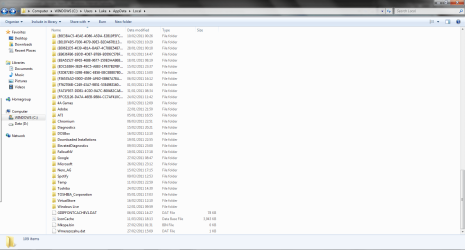
Empty folders in AppData/Local

emuSilk

New member
Local time
3:21 AM
Messages
3
Hello everyone, sorry if this is the wrong place to post this query.

I am seeing a lot of folders with seemingly random names, all of which are empty, appearing in AppData/Local. I check back every few days and there are more and more... Why are these folders appearing and what is their purpose?

Attached is a screenshot of what I'm talking about... if you notice where the scrollbar is, the whole area above is just more empty folders; 87 of them right now.

Thanks
 

Attachments
  • empties.png
    empties.png
    73.1 KB · Views: 2,124

My Computer

OS
Windows 7 Home Premium x64
Hi, welcome to the forums :)

I have seen similar folders appear on machines infected with malware. Are there any strange files in the same folder? (scroll to the bottom).

You may want to download MalwareBytes and perform a full system scan just to be on the safe side. You will find that those folders can be deleted with no issues to your system.


OS
 

My Computer

Computer Manufacturer/Model Number
Compaq Desktop
OS
Windows 7 Ultimate x64
CPU
AMD Sempron Dual Core
Memory
3GB
Graphics Card(s)
NVIDIA GeForce 6150SE nForce 430
Screen Resolution
1024x768
Hard Drives
150GB Sata

My Computer

Computer type
PC/Desktop
Computer Manufacturer/Model Number
Self Built
OS
Windows 8.1 Pro x64
CPU
Intel Core i5-2500K @ 3.30GHz - S1155
Motherboard
Asus P8P67 LE Rev3, Intel P67, S115
Memory
8GB Corsair DDR3 XMS3, PC3-12800
Graphics Card(s)
NVIDIA GeForce GTX 650
Sound Card
On-Board
Monitor(s) Displays
3 x 24" {Extended Display}
Screen Resolution
1920 x 1080
Hard Drives
300GB Seagate Barracuda 7200
PSU
550W Coolermaster GX550
Case
Silverstone Precision PS04B
Cooling
Stock
Keyboard
Logitech K120
Mouse
World of Warcraft Cataclysm MMO Gaming Mouse
Internet Speed
80 MB
Antivirus
MSE / Windows Defender
Browser
Chrome
I get one of those written each day when I open Windows Live Mail. Others have seen it with other Windows Live Essentials programs. The consensus is these folders should be in AppData/Local/Temp but a bug in Windows Live Essentials causes them to be put in the wrong location. I just delete them every week or two. Hopefully MS will correct it with the next update to Windows Live Essentials.

Jim :geek:
 

My Computer

Computer type
PC/Desktop
Computer Manufacturer/Model Number
Home Built
OS
Windows 8.1 Pro w/Media Center 64bit, Windows 7 HP 64bit
CPU
Phenom II X6 1100T
Motherboard
ASUS M5A99X EVO
Memory
Crucial Balistic 8gb DDR3-1866 CL9
Graphics Card(s)
MSI R6850 Cyclone IGD5 PE
Sound Card
On Board
Monitor(s) Displays
ASUS VE258Q 25" LED with DVI-HDMI-DisplayPort
Screen Resolution
1920 x 1080
Hard Drives
Two WD Cavier Black 2TB Sata III, WD My Book Essential 2TB USB 3.0
PSU
Seasonic X650 80 Plus GOLD Modular
Case
Corsair 400R
Cooling
Antec Kuhler H2O 620, Two 120mm and four 140mm
Keyboard
Logitech K120
Mouse
Logitech Marble Mouse USB, Logitech Precision Game Pad
Internet Speed
15MB
Antivirus
Norton IS 2013, Malwarebytes Pro Beta 2
Browser
IE-11, FF-27
Other Info
APC UPS ES 750, Netgear WNR3500L Gigabit & Wireless N Router with SamKnows Test Program, Motorola SB6120 Gigabit Cable Modem. Brother HL-2170W Laser Printer, Epson V300 Scanner
Thanks!

My first thought was malware as well, but I can't seem to find anything. I'm running a full system scan now but I scanned AppData first and found nothing.

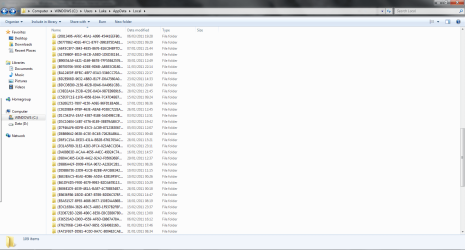
I've attached another screenshot, this time with the files at the bottom; I'm not really familiar with system files so I'm not entirely sure what's strange and what's not but some that seem odd to me are:
  • 'Chromium' (contains only a folder User Data with an empty notepad doc named 'awesomium')
  • 'Downloaded Installations' (contains a folder with the same name format as the empty ones above)
  • The four files at the bottom (I've seen files related to malware with a similar random looking name to Wmerazozahu.dat)
Could it be that they are left over from software updates or something like that?
Thanks for your reply:)
 

Attachments

  • empties2.png
    empties2.png
    62.8 KB · Views: 636

My Computer

OS
Windows 7 Home Premium x64
Thanks JDobbsy1987 and Phone Man! This information clears things up a bit. It's been going on for a while now, hope they fix it soon
 

My Computer

OS
Windows 7 Home Premium x64
I have the same problem.
There is a similar thread running on another forum which has an answer from Microsoft that they are folders created by Windows Live Setup when updating. They should be located in AppData/Local/Temp., and should be deleted automatically when updates are completed. However they are being created in the wrong place and can be deleted safely when they are empty.
Hope this helps.
 

My Computer

OS
Windows 7 Home Premium 32bit
CPU
Intel Core 2 Duo E7500 @2.93GHz
Motherboard
Gigabyte G41MT-D3
Memory
4 Gb
Graphics Card(s)
Nvidia GeForce 9400GT
Sound Card
Realtek HD
Monitor(s) Displays
Asus W222
Screen Resolution
1680 x 1050
Hard Drives
C: ST3250318AS ATA
D: ST3500418AS ATA
F:WD Ext HDD 1021 USB
Have there been found any solution to this? Beside not using Windows Live Essentials?
 

My Computer

OS
Windows 7 Ultimate x64
CPU
Intel Q6600 2,4GHz@3GHz
Motherboard
Asus P5K-E WIFI/AP
Memory
GeIL 4x1024MB
Graphics Card(s)
ATI Radeon HD 4890
Sound Card
Creative X-FI XtremeMusic
Monitor(s) Displays
Benq G2400WD
Screen Resolution
1920x1200
Hard Drives
1xSamsung SpinPoint F1 1TB, WDC 2x500GB
PSU
Corsair TX750w
Case
Lian Li PC-A71
What I know, I posted here - only confirming WL Mail as the suspected culprit. No WL Msgr on my system.

Also note- running newest: Version 2011 (Build 15.4.3555.0308) - as of this post anyway.
 

My Computer

Computer type
Laptop
Computer Manufacturer/Model Number
HP Pavilion dv6-6c10us
OS
x64 (6.3.9600) Win8.1 Pro & soon dual boot x64 (6.1.7601) Win7_SP1 HomePrem
CPU
AMD A6-3420M APU with Radeon(tm) HD Graphics
Motherboard
Hewlett-Packard 1805
Memory
6.00 GB
Graphics Card(s)
AMD Radeon(TM) HD 6520G
Sound Card
(1) AMD High Definition Audio Device (2) IDT High Definiti
Monitor(s) Displays
HP W2072a 20" LCD (1600 x 900) @ 60 Hz
Screen Resolution
1366 x 768 x 32 bits (4294967296 colors) @ 60 Hz
Hard Drives
ST640LM0 00 HM641JI SATA Disk Device
Keyboard
Logitech k520 wireless KB
Mouse
Logitech m320 wireless mouse (bundled with KB)
Internet Speed
15/5 | 54 MB Wireless 'n'
Antivirus
Realtime: Defender or Avast | On-demand: Malwarebytes, ESET
Browser
IE 11 on Win8, IE 10 on win 7
Other Info
Media: [Gimp, Audacity, VLC] || Comm: [WEmail 2012, Skype] || Productivity: [OpenOffice,| Textpad] || Utils: [Sysinternals, cCleaner, Speccy, Defraggler]
Hey - is there a way to give Kudos? I couldn't easily find an answer for this on either Microsoft Answers or Social Technet. Should have joined sevenforums years ago.
thanks
 

My Computer

Computer type
PC/Desktop
Computer Manufacturer/Model Number
Dell XPS 435MT
OS
Windows 7 Ultimate x64
CPU
Intel Core i7-950
Motherboard
Dell 0R849J
Memory
Elpida DDR3 12 Gb 1066
Graphics Card(s)
EVGA nVidia GeForce GTX 760 2GB GDDR5
Sound Card
Syba PCI-e VIA VT1723 Envy24DT
Monitor(s) Displays
Dell 3007WFP-HC, Nixeus Vue 30
Screen Resolution
1920 x 1200
Hard Drives
Crucial M500 240GB
1TB Seagate Barracuda
PSU
Corsair CX500M
Keyboard
Logitech MX 5500 combo
Mouse
Logitech MX 5500
Internet Speed
300Mbps
Antivirus
MSE
Browser
IE11 & Chrome
Other Info
MBAM Premium
I download stuff or my admin makes it read only

I can't retrieve the files, they say they are 0Mg. 0Mg in the files but when I make them not read only, stuff comes back for a second. Can't get my stuff back for long. DOn't have admin rights to keep the stuff for long. Any way to get the stuff back for good?
:mad::mad:
 

My Computer

Computer type
PC/Desktop
Computer Manufacturer/Model Number
Dell
OS
MO
Browser
Windows 7
Back
Top