
You are using an out of date browser. It may not display this or other websites correctly.
You should upgrade or use an alternative browser.
You should upgrade or use an alternative browser.
Empty HDD partition
- Thread starter Marsas
- Start date

Its easy
Just found our Tut on the subject.
http://www.sevenforums.com/tutorials/2668-partition-volume-delete.html
Just found our Tut on the subject.
http://www.sevenforums.com/tutorials/2668-partition-volume-delete.html
Last edited:
My Computer
- Computer type
- PC/Desktop
- Computer Manufacturer/Model Number
- Dell XPS 420
- OS
- Windows 10, Home Clean Install
- CPU
- Intel Core2 processsor Q8200(2.33Ghz 1333FSB) Quad Core Tech
- Motherboard
- Dell
- Memory
- 6 gb
- Graphics Card(s)
- ATI Radeon 256MB HD3650
- Sound Card
- Intergrated 7.1 Channel Audio
- Monitor(s) Displays
- Dell SP2009W 20"
- Hard Drives
- 640 GB Serial ATA Hard drive
- Cooling
- Fan
- Keyboard
- Dell USB Keyboard
- Mouse
- Dell Premium Optical USB
- Internet Speed
- DSL 2.85

- Local time
- 3:53 PM
- Messages
- 50,634
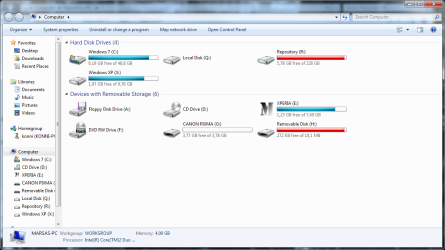
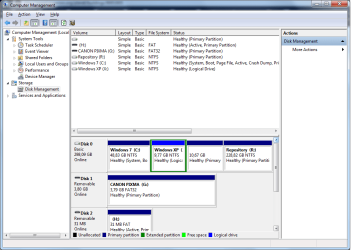
Is the problem you're referring to the fact that the partition is showing up in red because it is too full?
If this is the case, move some data out.
If you'd like to delete or repartition, then please post back a screenshot of Disk Managment drive map and listings (type Disk Management in Start Search box) using the Snipping Tool in Start Menu. Tell us exactly what you would like to do and we will advise you the steps.
If this is the case, move some data out.
If you'd like to delete or repartition, then please post back a screenshot of Disk Managment drive map and listings (type Disk Management in Start Search box) using the Snipping Tool in Start Menu. Tell us exactly what you would like to do and we will advise you the steps.

- Local time
- 11:53 PM
- Messages
- 16,784
I believe that is from MS Office.
There is a thread on this forum about removing it.
There is a thread on this forum about removing it.
My Computers
System One System Two
-
- Computer type
- PC/Desktop
- OS
- 7 X64
- CPU
- i5 8400
- Motherboard
- gigabyte b365m ds3h
- Memory
- 2x8gb 3200mhz
- Hard Drives
- various
- PSU
- pure power 11 400w cm
- Case
- Coolermaster
- Cooling
- cryorig m9i
-
- Computer type
- PC/Desktop
- OS
- 7x64
- CPU
- g5400
- Motherboard
- ga b365m ds3h
- Memory
- 8gb ddr4 2400
- PSU
- xfx pro 450w
jcgriff2
Account closed
My Computer
- OS
- Windows 7 - Vista
- Local time
- 3:53 PM
- Messages
- 50,634
Q drive is mounted if you choose the Click-to-Run method of installing Office 2010.
Click-to-Run: Delivering Office in the 21st Century - Microsoft Office 2010 Engineering - Site Home - TechNet Blogs
Click-to-Run: Delivering Office in the 21st Century - Microsoft Office 2010 Engineering - Site Home - TechNet Blogs