
Emulate (Copy) Windows Aero (borders)
News:
*This tutorial will be done in a video form if it gets popular
*You can apply this tutorial on WINDOWS XP Also
Tut V1.
STEP 1A: Click HERE to download FastAero 1.4. FastAero will change your window borders to Aero-Styled boarders. Look below for a sample picture.
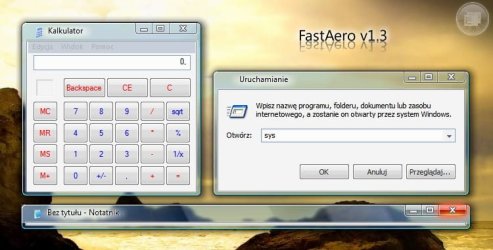
STEP 2A: You'll need to have installed a rar extracting program such as WinRAR or WinZIP to use FastAero.
The program comes default in Polski. To change that to English, either follow the instructions on the picture below, or follow the instructions in text below the picture.
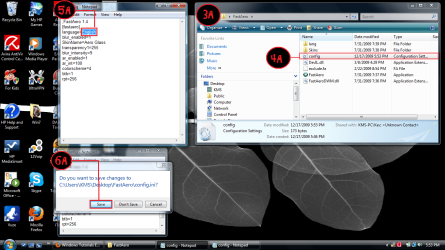
3A. Open the folder where you saved FastAero.
4A. You should see some files in there. Double click the one that says config.
5A. Somewhere in the text it will say language=Polski. Just change Polski to English.
6A. When Notepad (Notepad is default) prompts you; would you like to save the changes?, click yes.
7A. Run FastAero each time you wish to emulate Aero!
EXTRAS:
If you want FastAero to run at startup automatically, (recommended), follow these steps
1E. Go inside your FastAero folder again, copy the FastAero application.
2E. Go to Start > All Programs > Startup.
3E. In the Startup folder, right click, and select PASTE SHORTCUT. If you click just paste IT WILL NOT WORK!
Tutorial Copyright Aero/AeroXL-R
1st Picture Copyright FastAero's creator (NOT ME!)
This tutorial is also available on Instructables & TekDomain. Please click the below links if you wish to see this same tutorial on those different websites
TekDomain (my website)
Instructables
Thanks for reading my tutorial!
How to Emulate Aero Borders
Information
This Windows Tutorial will give you step by step guidance on how to emulate Windows Aero Window Boarders on Windows OS's lower then Vista OR you can use this guide to emulate Windows Aero on machines that have incompatible graphics card (for machines that can only run Windows Basic theme).
Known Glitches:
1) If you have UltraMon and use the "Move Window" & "Maxamize to Desktop" buttons, they will disappear when using this.
2) Games HATE this, as FastAero keep trying to add it's border to your full-screen game; and they fight with each other until one crashes or you end one of the processes. I've found that turning off FastAero when playing a game is my best bet, and turning it on afterwards - but this quickly became a pain in the butt.
3) if you use VNC to remote into PCs, if that PC has FastAero you won't have any buttons whatsoever, so you have to shut down FastAero when you remote in. -Glitches found by ChrisInVT
Known Glitches:
1) If you have UltraMon and use the "Move Window" & "Maxamize to Desktop" buttons, they will disappear when using this.
2) Games HATE this, as FastAero keep trying to add it's border to your full-screen game; and they fight with each other until one crashes or you end one of the processes. I've found that turning off FastAero when playing a game is my best bet, and turning it on afterwards - but this quickly became a pain in the butt.
3) if you use VNC to remote into PCs, if that PC has FastAero you won't have any buttons whatsoever, so you have to shut down FastAero when you remote in. -Glitches found by ChrisInVT
News:
*This tutorial will be done in a video form if it gets popular
*You can apply this tutorial on WINDOWS XP Also
Tut V1.
STEP 1A: Click HERE to download FastAero 1.4. FastAero will change your window borders to Aero-Styled boarders. Look below for a sample picture.
STEP 2A: You'll need to have installed a rar extracting program such as WinRAR or WinZIP to use FastAero.
The program comes default in Polski. To change that to English, either follow the instructions on the picture below, or follow the instructions in text below the picture.
3A. Open the folder where you saved FastAero.
4A. You should see some files in there. Double click the one that says config.
5A. Somewhere in the text it will say language=Polski. Just change Polski to English.
6A. When Notepad (Notepad is default) prompts you; would you like to save the changes?, click yes.
7A. Run FastAero each time you wish to emulate Aero!
EXTRAS:
If you want FastAero to run at startup automatically, (recommended), follow these steps
1E. Go inside your FastAero folder again, copy the FastAero application.
2E. Go to Start > All Programs > Startup.
3E. In the Startup folder, right click, and select PASTE SHORTCUT. If you click just paste IT WILL NOT WORK!
Tutorial Copyright Aero/AeroXL-R
1st Picture Copyright FastAero's creator (NOT ME!)
This tutorial is also available on Instructables & TekDomain. Please click the below links if you wish to see this same tutorial on those different websites
TekDomain (my website
)Instructables
Thanks for reading my tutorial!
Last edited by a moderator:


