

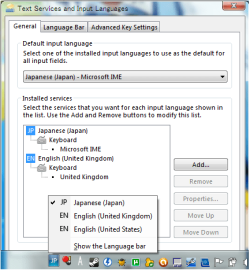
Hi, fellow Windows 7 Users. I have two Keyboard Layouts on my system. EN English (United Kingdom) and JP Japanese (Japan). For no reason, United States pops up there and I cannot remove it in the Keyboard Layouts. This system was bought in the UK and has a UK Keyboard Layout, this has nothing to do with the United States Keyboard Layout. Why does this keep popping up? And how can I stop this? Thanks in advance!
Attachments
My Computer
At a glance
Windows 7 Ultimate x64Celeron(R) Dual-Core CPU T3500 @ 2.10GHz4.00GBMobile Intel® 4 Series Express Chipset Family...
- Computer Manufacturer/Model Number
- Dell Inspiron 1545
- OS
- Windows 7 Ultimate x64
- CPU
- Celeron(R) Dual-Core CPU T3500 @ 2.10GHz
- Motherboard
- Dell Motherboard Model 0G848F
- Memory
- 4.00GB
- Graphics Card(s)
- Mobile Intel® 4 Series Express Chipset Family (4500MHD)
- Sound Card
- IDT Hight Definition Audio
- Monitor(s) Displays
- Generic PnP Monitor
- Screen Resolution
- 1366 x 768
- Hard Drives
- WDCW WD1600BEVT-75ZCT2 150GB ATA Device
- Keyboard
- Standard PS/2 Keyboard
- Mouse
- Wireless Optical Mouse
- Internet Speed
- 48.0Mpbs