Enable desktop composition - setting will not remain enabled

bawldiggle

GrayGhost2 ret.
Pro User
VIP
Local time
6:41 AM
Messages
895
Location
Australia
When I run portable "Oxynger KeyShield" I get this alert ...
Oxynger KeyShield can't start because Desktop Composition is disabled.
Restart Oxynger KeyShield after enabling Desktop Composition.
Desktop Composition will not remain enabled

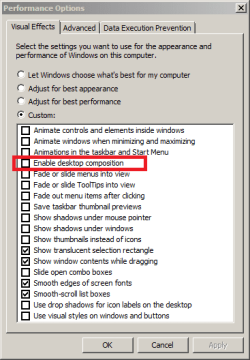
In "Performance Options" ...
I enable check { [x] Enable desktop composition }
Apply (btn) -> OK (btn)
BUT when I reopen "Performance Options" the setting is disabled

Performance Options - desk.comp is disabled.PNG

Would appreciate any help, thank you :)
 

My Computer

Computer type
PC/Desktop
Computer Manufacturer/Model Number
Toshiba, Lenovo (laptops) + 4 rigs
OS
XP Pro (x86) | 7 HP (x86) & (x64) | 7 Pro (x64)

My Computer

Computer type
PC/Desktop
Computer Manufacturer/Model Number
Dell
OS
Linux Mint 18.2 xfce 64-bit (VMWare host) / Windows 8.1 Pro 32-bit (VMWare guest)
CPU
Haswell
Memory
4 GB
Monitor(s) Displays
Acer 23"
Screen Resolution
1920 x 1080
Hard Drives
Two hard drives, 1TB each: One for Linux, one for my data.
Keyboard
IBM Model M
Antivirus
Sophos (Linux), Trend Micro (Windows)
Browser
Firefox, Opera
Other Info
I use Samba to share my data drive with the other computers at my house and with my guest session in VMWare Workstation Player.
not resolved

Just stumbled over my thread 6 years later.
Secure Virtual Keyboard to protect your Passwords
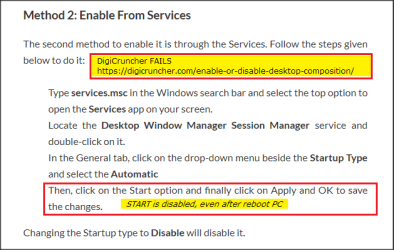
Also wanting to use Oxynger KeyShield 2 but cannot change services value as per ...
FIG: A
Fix Desktop Composition (12mar23).png
What Is Desktop Composition - How To Enable Or Disable It ?
This error alert persists . . . .
---------------------------
Oxynger KeyShield 2 - System Error
---------------------------
Oxynger KeyShield can't start because Desktop Composition is disabled. Restart Oxynger KeyShield after enabling Desktop Composition.
---------------------------
OK
---------------------------

I get the same "System Error" on 2 Win 7 PRO machines.
The second machine is a clean install of 7-PRO (waiting to be put into service)

Brinks tute mentions using atleast TWO methods ... ? what am I missing ?

Would appreciate any help . . . thank you
 
Last edited:

My Computer

Computer type
PC/Desktop
Computer Manufacturer/Model Number
Toshiba, Lenovo (laptops) + 4 rigs
OS
XP Pro (x86) | 7 HP (x86) & (x64) | 7 Pro (x64)
Back
Top