enable sli wont show up in control console

fez04

New member
Local time
6:05 AM
Messages
6
hello all, i have an asus a8n-sli with 2 8800gt zotac , however 1 has 512 mb of memory and the other has a gig.. i have a 3200+ athlon 64 that im running windows 7 ultimate 32 bit... with a gig of ram.. windows runs good i have the updated nvidea drivers, both of my cards show up in device manager and working properly... but when i go into nvidea control panel to enable sli.. there's nothing there to do it.. there should be something that says enable sli correct? under the 3d settings ... i have the 1st 8800gt with the 1 gig in the main slot with the asus connector facing the right way, ez plug is plugged in and the ez selector card is set to dual.. also the the power plugs are connected into the cards.if any1 could help me out im plz! video drivers are 196.21 (8.17.11.9621) direct x 1.0 (6.1.7600.16385)
:cry:
 

My Computer My Computer

At a glance

windows 7 ultimateamd athalon 64 3200+1g corssair buyer selectx2 8800gt zotac
OS
windows 7 ultimate
CPU
amd athalon 64 3200+
Motherboard
a8n-sli
Memory
1g corssair buyer select
Graphics Card(s)
x2 8800gt zotac
Sound Card
on board realteck
Monitor(s) Displays
24 olevia
Hard Drives
1 60 sata
Case
aspire
problem with it is you the video cards are not the sames size in memory

there is a work around for it

How to Enable Coolbits

Click on your Start Menu in the Windows Task Bar and select Run. When the command box opens, type "regedit" (without the quotes) and press OK. With the registry editor open (shown below), go to HKEY_LOCAL_MACHINE \SOFTWARE \NVIDIA Corporation \Global \NVTweak (expand the menu using the "+" expansion buttons to locate this menu item). Click on "NVTweak" in the menu. Next, right-click on the empty space inside right window and choose "New>DWORD value". Name the value "Coolbits" (without the quotes).

aa1b.jpg


Step 2.Within the Registry Editor, right click on Coolbits and choose Modify. Change the Value data to "18" (without the quotes) and click OK. Exit the Registry Editor.
 

My Computer My Computer

At a glance

Windows 7 Ultimate 64-bit (6.1, Build 7600)Intel(R) Core(TM) i7 CPU 920 @ 2.67GHz12 GB Mushkin Enhanced Blackline Frostbyte2-Asus GTX 550 Ti In SLI
OS
Windows 7 Ultimate 64-bit (6.1, Build 7600)
CPU
Intel(R) Core(TM) i7 CPU 920 @ 2.67GHz
Motherboard
EVGA 132-BL-E758-A1 X58 3-Way SLI Core i7 Motherboard
Memory
12 GB Mushkin Enhanced Blackline Frostbyte
Graphics Card(s)
2-Asus GTX 550 Ti In SLI
Sound Card
On Board
Monitor(s) Displays
HP w2207 Wide LCD Monitor
Screen Resolution
1690x1050
Hard Drives
4-OCZ Vertex Plus R2 Series 120GB 2.5in SATA II MLC SSD
running in raid 0
PSU
OCZ / GameXStream / 700-Watt / ATX / 120mm Fan / SATA R
Case
NZXT M59-001BK M59 Gaming Mid Tower Case - ATX, mATX, Baby A
Cooling
Corsair H60
Keyboard
Merc Gaming Keyboard
Mouse
Mini wireless
Internet Speed
25 meg dsl
OK now that I've done that will something show up to enable it... or did i just do it manually and it doesn't have to show? cause i don't see anything :cry: ...even after a reboot.

AND THANK YOU!!!
 

My Computer My Computer

At a glance

windows 7 ultimateamd athalon 64 3200+1g corssair buyer selectx2 8800gt zotac
OS
windows 7 ultimate
CPU
amd athalon 64 3200+
Motherboard
a8n-sli
Memory
1g corssair buyer select
Graphics Card(s)
x2 8800gt zotac
Sound Card
on board realteck
Monitor(s) Displays
24 olevia
Hard Drives
1 60 sata
Case
aspire
hi fez04, in the nvidia control panel, in the left hand pane do you see "3d settings" if you do, expand the list and there you should see " set SLI configuration" hope that helps you :D
 

My Computer My Computer

At a glance

win 7 ultimate32bit, Win8.1pro wmc 32bitamd phenom x4 9600corsair twinxs 2x2gb2x nvidia 1gb 8500gt
Computer type
PC/Desktop
Computer Manufacturer/Model Number
self build
OS
win 7 ultimate32bit, Win8.1pro wmc 32bit
CPU
amd phenom x4 9600
Motherboard
asus m2n32-sli deluxe
Memory
corsair twinxs 2x2gb
Graphics Card(s)
2x nvidia 1gb 8500gt
Sound Card
onboard
Monitor(s) Displays
23" PB Viseo 233d
Screen Resolution
1920x1080
Hard Drives
maxtor sata 500gb
maxtor sata 320gb
fujitsu sata200gb
PSU
oryxx tornado 750w
Case
thermaltake xaser lll
Cooling
artic freezer64 pro + 7 case fans

My Computer My Computer

At a glance

windows 7 ultimateamd athalon 64 3200+1g corssair buyer selectx2 8800gt zotac
OS
windows 7 ultimate
CPU
amd athalon 64 3200+
Motherboard
a8n-sli
Memory
1g corssair buyer select
Graphics Card(s)
x2 8800gt zotac
Sound Card
on board realteck
Monitor(s) Displays
24 olevia
Hard Drives
1 60 sata
Case
aspire
okay 2 questions do you have the sli bridge on both cards
and do you have sli turned on in the bios (if it has this option)
 

My Computer My Computer

At a glance

Windows 7 Ultimate 64-bit (6.1, Build 7600)Intel(R) Core(TM) i7 CPU 920 @ 2.67GHz12 GB Mushkin Enhanced Blackline Frostbyte2-Asus GTX 550 Ti In SLI
OS
Windows 7 Ultimate 64-bit (6.1, Build 7600)
CPU
Intel(R) Core(TM) i7 CPU 920 @ 2.67GHz
Motherboard
EVGA 132-BL-E758-A1 X58 3-Way SLI Core i7 Motherboard
Memory
12 GB Mushkin Enhanced Blackline Frostbyte
Graphics Card(s)
2-Asus GTX 550 Ti In SLI
Sound Card
On Board
Monitor(s) Displays
HP w2207 Wide LCD Monitor
Screen Resolution
1690x1050
Hard Drives
4-OCZ Vertex Plus R2 Series 120GB 2.5in SATA II MLC SSD
running in raid 0
PSU
OCZ / GameXStream / 700-Watt / ATX / 120mm Fan / SATA R
Case
NZXT M59-001BK M59 Gaming Mid Tower Case - ATX, mATX, Baby A
Cooling
Corsair H60
Keyboard
Merc Gaming Keyboard
Mouse
Mini wireless
Internet Speed
25 meg dsl
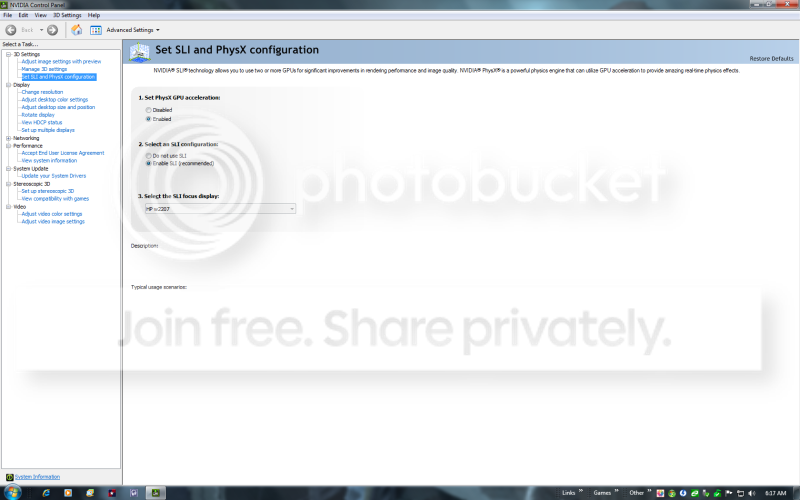
this is what you should see

sli.png
 

My Computer My Computer

At a glance

Windows 7 Ultimate 64-bit (6.1, Build 7600)Intel(R) Core(TM) i7 CPU 920 @ 2.67GHz12 GB Mushkin Enhanced Blackline Frostbyte2-Asus GTX 550 Ti In SLI
OS
Windows 7 Ultimate 64-bit (6.1, Build 7600)
CPU
Intel(R) Core(TM) i7 CPU 920 @ 2.67GHz
Motherboard
EVGA 132-BL-E758-A1 X58 3-Way SLI Core i7 Motherboard
Memory
12 GB Mushkin Enhanced Blackline Frostbyte
Graphics Card(s)
2-Asus GTX 550 Ti In SLI
Sound Card
On Board
Monitor(s) Displays
HP w2207 Wide LCD Monitor
Screen Resolution
1690x1050
Hard Drives
4-OCZ Vertex Plus R2 Series 120GB 2.5in SATA II MLC SSD
running in raid 0
PSU
OCZ / GameXStream / 700-Watt / ATX / 120mm Fan / SATA R
Case
NZXT M59-001BK M59 Gaming Mid Tower Case - ATX, mATX, Baby A
Cooling
Corsair H60
Keyboard
Merc Gaming Keyboard
Mouse
Mini wireless
Internet Speed
25 meg dsl
okay 2 questions do you have the sli bridge on both cards
and do you have sli turned on in the bios (if it has this option)


i do have the bridge on both cards....i have the manual for the board and i have it all set up right.. its facing the right way too.. as far as the bios i don't need to enable it..

 

My Computer My Computer

At a glance

windows 7 ultimateamd athalon 64 3200+1g corssair buyer selectx2 8800gt zotac
OS
windows 7 ultimate
CPU
amd athalon 64 3200+
Motherboard
a8n-sli
Memory
1g corssair buyer select
Graphics Card(s)
x2 8800gt zotac
Sound Card
on board realteck
Monitor(s) Displays
24 olevia
Hard Drives
1 60 sata
Case
aspire

My Computer My Computer

At a glance

windows 7 ultimateamd athalon 64 3200+1g corssair buyer selectx2 8800gt zotac
OS
windows 7 ultimate
CPU
amd athalon 64 3200+
Motherboard
a8n-sli
Memory
1g corssair buyer select
Graphics Card(s)
x2 8800gt zotac
Sound Card
on board realteck
Monitor(s) Displays
24 olevia
Hard Drives
1 60 sata
Case
aspire
FIXED!! thanks every1 ....i had to enable pci express first over just pci... it was set to load video card pci over pci-e in bios...
 

My Computer My Computer

At a glance

windows 7 ultimateamd athalon 64 3200+1g corssair buyer selectx2 8800gt zotac
OS
windows 7 ultimate
CPU
amd athalon 64 3200+
Motherboard
a8n-sli
Memory
1g corssair buyer select
Graphics Card(s)
x2 8800gt zotac
Sound Card
on board realteck
Monitor(s) Displays
24 olevia
Hard Drives
1 60 sata
Case
aspire
okay 2 questions do you have the sli bridge on both cards
and do you have sli turned on in the bios (if it has this option)


i do have the bridge on both cards....i have the manual for the board and i have it all set up right.. its facing the right way too.. as far as the bios i don't need to enable it..


iu am pretty much out of ideas then
you might try posting on the nvidia forums for more info
 

My Computer My Computer

At a glance

Windows 7 Ultimate 64-bit (6.1, Build 7600)Intel(R) Core(TM) i7 CPU 920 @ 2.67GHz12 GB Mushkin Enhanced Blackline Frostbyte2-Asus GTX 550 Ti In SLI
OS
Windows 7 Ultimate 64-bit (6.1, Build 7600)
CPU
Intel(R) Core(TM) i7 CPU 920 @ 2.67GHz
Motherboard
EVGA 132-BL-E758-A1 X58 3-Way SLI Core i7 Motherboard
Memory
12 GB Mushkin Enhanced Blackline Frostbyte
Graphics Card(s)
2-Asus GTX 550 Ti In SLI
Sound Card
On Board
Monitor(s) Displays
HP w2207 Wide LCD Monitor
Screen Resolution
1690x1050
Hard Drives
4-OCZ Vertex Plus R2 Series 120GB 2.5in SATA II MLC SSD
running in raid 0
PSU
OCZ / GameXStream / 700-Watt / ATX / 120mm Fan / SATA R
Case
NZXT M59-001BK M59 Gaming Mid Tower Case - ATX, mATX, Baby A
Cooling
Corsair H60
Keyboard
Merc Gaming Keyboard
Mouse
Mini wireless
Internet Speed
25 meg dsl
Back
Top