
Enabling PS2 Ports (ASUS H97 Plus)

dw85745

New member
Member
VIP
Local time
12:19 PM
Messages
199
---------
PS2
---------

While this MOBO has PS2 ports I could never get them to work.
In re-reviewing the MOBO docs for the BIOS, I find "PS2 Keyboard and Mouse Support" is
listed under "Boot Menu > Fast Boot".
However Fast Boot is not available unless one has UEFI and also a GPT primary partition.
Seems odd that PS2 would be disabled for Legacy.

Questions:
1) Anyone know if I've got this Wrong?
2) It this now common MOBO practice, any reason why?


------------------------
Microsoft Service for PS2
------------------------
My understanding is that "i8042prt.sys" is the PS2 service.
It is NOT included in my list of services.
However, it does exist in the registry for services. Start = 3.


Questions:
1) Is this do to the fact that it requires UEFI ?
2) If I set Start = 1 in the registry will this allow it to work?
 
Last edited:

My Computer My Computer

At a glance

Win 7 Pro x32Intel I5-4690K8 GBOn Board
Computer type
PC/Desktop
Computer Manufacturer/Model Number
build -
OS
Win 7 Pro x32
CPU
Intel I5-4690K
Motherboard
ASUS H-97Plus
Memory
8 GB
Graphics Card(s)
On Board
Sound Card
On Board
Other Info
ASUS MOBO Issues never resolved even by ASUS:
1) MOBO will NOT boot from other than the Default HDD drive.
2) MOBO will NOT boot Most DOS based CDs
Never heard that you must have a GPT disk to have Fast boot. Fast boot normally doesn't enable I/O during startup. It only enable them after OS boot. For Win 7, fast boot should be disabled or you wont have keyboard to enter BIOS.

Regarding PS2, no special drivers are needed,
Open Device manager. Is there any yellow alerts of missing drivers?
 

My Computers My Computers

  • At a glance

    Windows 7 HP 64i5 6600K - 800MHz to 4200MHz4+4G GSkill DDR4 3000IG - Intel 530
    Computer type
    PC/Desktop
    Computer Manufacturer/Model Number
    custom build
    OS
    Windows 7 HP 64
    CPU
    i5 6600K - 800MHz to 4200MHz
    Motherboard
    GA-Z170-HD3P
    Memory
    4+4G GSkill DDR4 3000
    Graphics Card(s)
    IG - Intel 530
    Monitor(s) Displays
    Samsung 226BW
    Screen Resolution
    1680x1050
    Hard Drives
    (1) -1 SM951 – 128GB M.2 AHCI PCIe SSD drive for Windows 7 and Lubuntu
    (2) -1 WD SATA 3 - 1T for Data
    (3) -1 WD SATA 3 - 1T for backup
    PSU
    Thermaltake 450W TR2 gold
    Keyboard
    Old and good Chicony mechanical keyboard
    Mouse
    Logitech mX performance - 9 buttons (had to disable some)
    Internet Speed
    500Mb/s
    Browser
    Firefox 64
    Other Info
    TinyWall firewall
  • At a glance

    Windows 7 Proi7-4500U 800MHz to 3.0GHz(4+4)G DDR3 1600IG intel 4400 + NVIDIA GeForce GT 745M
    Computer type
    Laptop
    System Manufacturer/Model Number
    Asus Q550LF
    OS
    Windows 7 Pro
    CPU
    i7-4500U 800MHz to 3.0GHz
    Motherboard
    Asus Q550LF
    Memory
    (4+4)G DDR3 1600
    Graphics Card(s)
    IG intel 4400 + NVIDIA GeForce GT 745M
    Sound Card
    Realtek
    Monitor(s) Displays
    LG Display LP156WF4-SPH1
    Screen Resolution
    1920 x 1080
    Hard Drives
    BX500 120G SSD for Windows and programs +
    1T HDD for data
    Internet Speed
    500 Mb/s
    Browser
    Firefox
    Other Info
    TinyWall firewall
Megahertz07: Thanks for responding.


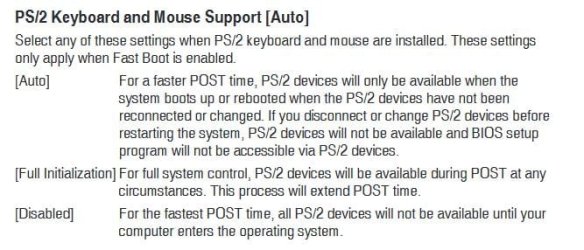
Per Manual on PS2

PS/2 Keyboard and Mouse Support [Auto]
Select any of these settings when PS/2 keyboard and mouse are installed. These settings
only apply when Fast Boot is enabled.
[Auto]
For a faster POST time, PS/2 devices will only be available when the
system boots up or rebooted when the PS/2 devices have not been
reconnected or changed. If you disconnect or change PS/2 devices before
restarting the system, PS/2 devices will not be available and BIOS setup
program will not be accessible via PS/2 devices.
[Full Initialization] For full system control, PS/2 devices will be available during POST at any
circumstances. This process will extend POST time.
[Disabled]
For the fastest POST time, all PS/2 devices will not be available until your
computer enters the operating system
Based on the above, - by my reading - even if Mouse and Keyboard are connected to PS2 they would NOT be
available to manipulate items in the BIOS / UEFI menus. So one would be "SOL"
to manipulate any BIOS / UEFI items unless they had USB Mouse or Keyboard attached.


===========================
No yellow exclamations in device manager.
They don't even show up in Device Manager anywhere I can find.
For example since they are physically tagged by name and color on the MOBO, one would think
they would appear under Keyboard and Mouse. Not there. Also not listed under
Human Interface Devices (HID).


THAT ALSO LEAD to another related question I have.
Initally I thought MS was just providing a different perspective when they listed (in Device Manager)
Keyboard and Mouse separately from HID devices. However when playing with these entries
I find if I Disable a Mouse Entry, that the HID entry associated with that mouse still remains Enabled.
There is a HID Service but non-specifically for Keyboard and Mouse which maybe (???) handled directly by the Kernel so no need for a separate service. PLan to research this after PS2 unless you know answer.
 

My Computer My Computer

At a glance

Win 7 Pro x32Intel I5-4690K8 GBOn Board
Computer type
PC/Desktop
Computer Manufacturer/Model Number
build -
OS
Win 7 Pro x32
CPU
Intel I5-4690K
Motherboard
ASUS H-97Plus
Memory
8 GB
Graphics Card(s)
On Board
Sound Card
On Board
Other Info
ASUS MOBO Issues never resolved even by ASUS:
1) MOBO will NOT boot from other than the Default HDD drive.
2) MOBO will NOT boot Most DOS based CDs
There is a little confusion here.
If fast boot is disabled (recommended) PS2 will be available on all circumstances.

There are 3 scenarios when FAST BOOT = Enabled.
- PS/2 Keyboard and Mouse Support [Default =Auto]
1) Auto - If you disconnect or change PS/2 devices before restarting the system, PS/2 devices will not be available and BIOS setup program will not be accessible via PS/2 devices.
This is a way to enter BIOS via PS2. Very confuse.
2) Full Initialization - For full system control, PS/2 devices will be available during POST at any circumstances.
This is the best way to enter BIOS via PS2 when FAST BOOT = Enabled.
3) Disabled - PS/2 devices will not be available until your computer enters the operating system.
This is the worst option. You won't be able to enter BIOS unless you reset BIOS
 

Attachments

  • FB.JPG
    FB.JPG
    47.4 KB · Views: 24

My Computers My Computers

  • At a glance

    Windows 7 HP 64i5 6600K - 800MHz to 4200MHz4+4G GSkill DDR4 3000IG - Intel 530
    Computer type
    PC/Desktop
    Computer Manufacturer/Model Number
    custom build
    OS
    Windows 7 HP 64
    CPU
    i5 6600K - 800MHz to 4200MHz
    Motherboard
    GA-Z170-HD3P
    Memory
    4+4G GSkill DDR4 3000
    Graphics Card(s)
    IG - Intel 530
    Monitor(s) Displays
    Samsung 226BW
    Screen Resolution
    1680x1050
    Hard Drives
    (1) -1 SM951 – 128GB M.2 AHCI PCIe SSD drive for Windows 7 and Lubuntu
    (2) -1 WD SATA 3 - 1T for Data
    (3) -1 WD SATA 3 - 1T for backup
    PSU
    Thermaltake 450W TR2 gold
    Keyboard
    Old and good Chicony mechanical keyboard
    Mouse
    Logitech mX performance - 9 buttons (had to disable some)
    Internet Speed
    500Mb/s
    Browser
    Firefox 64
    Other Info
    TinyWall firewall
  • At a glance

    Windows 7 Proi7-4500U 800MHz to 3.0GHz(4+4)G DDR3 1600IG intel 4400 + NVIDIA GeForce GT 745M
    Computer type
    Laptop
    System Manufacturer/Model Number
    Asus Q550LF
    OS
    Windows 7 Pro
    CPU
    i7-4500U 800MHz to 3.0GHz
    Motherboard
    Asus Q550LF
    Memory
    (4+4)G DDR3 1600
    Graphics Card(s)
    IG intel 4400 + NVIDIA GeForce GT 745M
    Sound Card
    Realtek
    Monitor(s) Displays
    LG Display LP156WF4-SPH1
    Screen Resolution
    1920 x 1080
    Hard Drives
    BX500 120G SSD for Windows and programs +
    1T HDD for data
    Internet Speed
    500 Mb/s
    Browser
    Firefox
    Other Info
    TinyWall firewall
There is a little confusion here.
If fast boot is disabled (recommended) PS2 will be available on all circumstances.
In my case "Fast Boot" = DISABLED.
However, the PS2 Port does NOT recognize my Keyboard ( Original IBM Model M). Whether that is because of the Keyboard is unknown, but I would think the Original IBM was the basis on which the PS2 was designed - basically same connector only smaller. (however I haven't verified pinouts), hence I'm using a adapter (Model M > PS2). I know the adapter is OK as also using it to go to USB.
(Model M > Adapter > USB Splitter (Key and Mouse))


Since the PS2 is also controlled by a Service (i8042prt), I'm guessing this service allows the PS2 port to be disabled in relationship to the OS. However, this -- IMHO - would not be applicable when manipulating the BIOS/UEFI on the MOBO as the OS hasn't been loaded at this point. The fact this Service is missing in my Services list (though in the Registry) I believe is an independent issue to the PS2 functioning with the BIOS /UEFI.
 

My Computer My Computer

At a glance

Win 7 Pro x32Intel I5-4690K8 GBOn Board
Computer type
PC/Desktop
Computer Manufacturer/Model Number
build -
OS
Win 7 Pro x32
CPU
Intel I5-4690K
Motherboard
ASUS H-97Plus
Memory
8 GB
Graphics Card(s)
On Board
Sound Card
On Board
Other Info
ASUS MOBO Issues never resolved even by ASUS:
1) MOBO will NOT boot from other than the Default HDD drive.
2) MOBO will NOT boot Most DOS based CDs
Megahertz07:


Was able to find an old PS2 Mouse (one with trackball). Plugged it directly into PS2 port with Fast Boot = DISABLED. The mouse worked.


Have to try and find someone with a PS2 keyboard so I can at least check the port.
If the port turns out good, why my Model M keyboard will work running through the large to small PS2 adapter and then to USB andNot function connecting directly to PS2 is a very interesting question.


This clears up two issued for me. PS2 mouse port functionality and the understanding that Fast Boot can be DISABLED and the PS2 Port will work.


Appreciate all your efforts on my behalf.


David
 
Last edited:

My Computer My Computer

At a glance

Win 7 Pro x32Intel I5-4690K8 GBOn Board
Computer type
PC/Desktop
Computer Manufacturer/Model Number
build -
OS
Win 7 Pro x32
CPU
Intel I5-4690K
Motherboard
ASUS H-97Plus
Memory
8 GB
Graphics Card(s)
On Board
Sound Card
On Board
Other Info
ASUS MOBO Issues never resolved even by ASUS:
1) MOBO will NOT boot from other than the Default HDD drive.
2) MOBO will NOT boot Most DOS based CDs
I have found that a USB mouse will work through a PS2 connection when used with a USB to PS2 adapter, but a USB keyboard will not work through the PS2 adapter. Both mouse & keyboard are Logitech brand.

So perhaps if you wish to use the keyboard through the PS2 you might have to buy a PS2 keyboard.
 

My Computer My Computer

At a glance

Windows 7 Home Premium 64 bit sp1Intel i5 3570 3.4Ghz Ivy Bridge SKT 1155 quad...G-Skill Rip Jaws 16Gb (8x2) DDR3 -1600 PC3 12...Gigabyte NVIDIA GT610 1Gb DDR3 810/1200 PCI-E...
Computer type
PC/Desktop
Computer Manufacturer/Model Number
Self built using existing case
OS
Windows 7 Home Premium 64 bit sp1
CPU
Intel i5 3570 3.4Ghz Ivy Bridge SKT 1155 quad core
Motherboard
Gigabyte Z77-HD3 SKT 1155 2xSata 3, 4x USB 3.0
Memory
G-Skill Rip Jaws 16Gb (8x2) DDR3 -1600 PC3 12800 CL 10 red
Graphics Card(s)
Gigabyte NVIDIA GT610 1Gb DDR3 810/1200 PCI-E 2.0 Silent
Sound Card
NVIDIA High Definition & Realtech High Definition Audio
Monitor(s) Displays
2 x Philips 226V4L 16:9 aspect ratio
Screen Resolution
1920 x 1080 HD
Hard Drives
Samsung 840 Pro 256gb SSD, SATA 3.
Hitachi Touro Portable 1tb, USB 3.0 HDD used for image b/ups.
PSU
Corsair VS450
Case
Codeng
Cooling
PSU fan & CPU fan
Keyboard
Logitech
Mouse
Logitech Wireless trackball M570
Internet Speed
Wireless 3G. 3mg down & 550kb up.
Antivirus
Bitdefender Internet Security 2020
Browser
Opera (Current Version) & Firefox
Other Info
MS Office 2013 Pro. Davis weather station software. MGE Nova 600 avr UPS.
Ranger4:


Thanks. Good to know. Be nice if the docs said this somewhere.


Have a Gooday.


David
 

My Computer My Computer

At a glance

Win 7 Pro x32Intel I5-4690K8 GBOn Board
Computer type
PC/Desktop
Computer Manufacturer/Model Number
build -
OS
Win 7 Pro x32
CPU
Intel I5-4690K
Motherboard
ASUS H-97Plus
Memory
8 GB
Graphics Card(s)
On Board
Sound Card
On Board
Other Info
ASUS MOBO Issues never resolved even by ASUS:
1) MOBO will NOT boot from other than the Default HDD drive.
2) MOBO will NOT boot Most DOS based CDs

My Computer My Computer

At a glance

Windows 7 Home Premium 64 bit sp1Intel i5 3570 3.4Ghz Ivy Bridge SKT 1155 quad...G-Skill Rip Jaws 16Gb (8x2) DDR3 -1600 PC3 12...Gigabyte NVIDIA GT610 1Gb DDR3 810/1200 PCI-E...
Computer type
PC/Desktop
Computer Manufacturer/Model Number
Self built using existing case
OS
Windows 7 Home Premium 64 bit sp1
CPU
Intel i5 3570 3.4Ghz Ivy Bridge SKT 1155 quad core
Motherboard
Gigabyte Z77-HD3 SKT 1155 2xSata 3, 4x USB 3.0
Memory
G-Skill Rip Jaws 16Gb (8x2) DDR3 -1600 PC3 12800 CL 10 red
Graphics Card(s)
Gigabyte NVIDIA GT610 1Gb DDR3 810/1200 PCI-E 2.0 Silent
Sound Card
NVIDIA High Definition & Realtech High Definition Audio
Monitor(s) Displays
2 x Philips 226V4L 16:9 aspect ratio
Screen Resolution
1920 x 1080 HD
Hard Drives
Samsung 840 Pro 256gb SSD, SATA 3.
Hitachi Touro Portable 1tb, USB 3.0 HDD used for image b/ups.
PSU
Corsair VS450
Case
Codeng
Cooling
PSU fan & CPU fan
Keyboard
Logitech
Mouse
Logitech Wireless trackball M570
Internet Speed
Wireless 3G. 3mg down & 550kb up.
Antivirus
Bitdefender Internet Security 2020
Browser
Opera (Current Version) & Firefox
Other Info
MS Office 2013 Pro. Davis weather station software. MGE Nova 600 avr UPS.
The keyboard port should be purple, and the mouse port should be green. Does that match the ports you are plugging your keyboard and mouse into? Also, the computer needs to be powered off when you either connect or disconnect the keyboard and mouse.

There is not a more PS/2 keyboard than an IBM Model M. However, it is possible that it is missing one or more pins in the plug. If this is the case, then that could be the reason why the keyboard is not working. There have been times over the years that I have been directed to remove a pin from the Model M keyboard, and that this wouldn't make any difference when the keyboard was plugged into an IBM computer. But could it cause problems for a non-IBM computer? I've always wondered about that.
 

My Computer My Computer

At a glance

Linux Mint 18.2 xfce 64-bit (VMWare host) / W...Haswell4 GB
Computer type
PC/Desktop
Computer Manufacturer/Model Number
Dell
OS
Linux Mint 18.2 xfce 64-bit (VMWare host) / Windows 8.1 Pro 32-bit (VMWare guest)
CPU
Haswell
Memory
4 GB
Monitor(s) Displays
Acer 23"
Screen Resolution
1920 x 1080
Hard Drives
Two hard drives, 1TB each: One for Linux, one for my data.
Keyboard
IBM Model M
Antivirus
Sophos (Linux), Trend Micro (Windows)
Browser
Firefox, Opera
Other Info
I use Samba to share my data drive with the other computers at my house and with my guest session in VMWare Workstation Player.
Back
Top