Understand UEFI and CSM BIOS setting for ASUS H97-Plus

dw85745

New member
Member
VIP
Local time
5:34 AM
Messages
199
I don't know if anyone has tried to contact ASUS support but impossible. FWIW sorry I went with this ASUS board but from reading ASUS now makes about 80 percent of all boards. Hope we can get some competition from the good ole USA and show them how its done.

In discussion with American Megatrends today, found out they sell their base BIOS to MOBO manufacturers and then the BIOS manufacturers modify it to their liking. IMHO, who modified this BIOS for ASUS must of had a nightmare the night before.

I found two numbers for this BIOS.
I "think" they relate to each company as follows:
-- ASUS ver 2202
-- American Megatrends ver. 2.16.1240

=========== My Questons ===================

1) If someone has this board and BIOS can they explain to me when I should set the CSM for UEFI when running Windows 7?
2) My BIOS shows Boot Secure Enabled but I can't figure out how to turn it off and this "Secure Boot" choice cannot be toggled.
Is their some setting elsewhere I need to set in order to toggle "Secure Boot"?

3) Under PCH Storage Configuation they indicate this item will automatically detect between M.2 devices and SATA devices. What are M.2 devices?

4) Under SATA Mode Selection (AHCI)
this has a setting of IDE, AHCI, and RAID. With a SATA boot drive and setting to IDE, Windows 7 will Not load. I iniitally thought that if I had a non-boot IDE drive attached that needed to be set for it (the IDE), obviously Not. Any clarification here would be helpful.

5) Regarding boot device configuration can someone confirm if my interpretation is correct.

-- UEFI and Legacy OpROM.

My guess is UEFI is the "Bios" renamed and is now called UEFI and that the OpROM (whatever that stands for) is the older traditional BIOS prior to UEFI. If I'm correct and this is UEFI "biod"why would you set OpROM in thie Bios itself? Help needed here.

-- Boot from Network Devices. How do you boot from a Network device?

-- Boot from Storage Devices. Again what do they mean by a Storage device and how does one boot from it?

-- Boot from PCIe/PCI Expansion Device. My guess here is if you have a daughter board with an IDE that installed in a PCIe or PCI slot, that one can boot from the IDE drive connected to this daughter board.


Confused and enough for now.
David
 

My Computer My Computer

At a glance

Win 7 Pro x32Intel I5-4690K8 GBOn Board
Computer type
PC/Desktop
Computer Manufacturer/Model Number
build -
OS
Win 7 Pro x32
CPU
Intel I5-4690K
Motherboard
ASUS H-97Plus
Memory
8 GB
Graphics Card(s)
On Board
Sound Card
On Board
Other Info
ASUS MOBO Issues never resolved even by ASUS:
1) MOBO will NOT boot from other than the Default HDD drive.
2) MOBO will NOT boot Most DOS based CDs
Can you take pics of each BIOS screen, particularly Advanced, Security and Boot, then attach using the paper clip in Reply box? This makes it much easier to spot the correct settings. For any related to UEFI, CSM, Legacy anything, please expand them to show all available settings.
 
gregrocker:

Thanks for responding.

Been working on listing with short explanations using Excel. Hopefully will finish today.

This new BIOS is NOT like the old where you could print 6 screens and have all settings.
With the way this GUI works, my guess is it would be about 100+ pics.
Hence my Excel listing.

Will post Excel file or pic of it when done -- hopefully by tonight -- and then we can go from there with pics.

David
 

My Computer My Computer

At a glance

Win 7 Pro x32Intel I5-4690K8 GBOn Board
Computer type
PC/Desktop
Computer Manufacturer/Model Number
build -
OS
Win 7 Pro x32
CPU
Intel I5-4690K
Motherboard
ASUS H-97Plus
Memory
8 GB
Graphics Card(s)
On Board
Sound Card
On Board
Other Info
ASUS MOBO Issues never resolved even by ASUS:
1) MOBO will NOT boot from other than the Default HDD drive.
2) MOBO will NOT boot Most DOS based CDs
We've always been able to see in just a handful of pics the necessary menus with only CSM, Legacy BIOS, Secure Boot settings, and Reset to Defaults choices expanded. Don't expect busy volunteers to go through a spreadsheet. The visual is what is useful.

Often Secure Boot is disabled by an adjacent setting named similarly.

It may also require Reset to Defaults for Win7 or "Other OS."
 
Last edited:
I don't have that board, but do have an Asus.

If your are booting pure EFI mode (have your OS on a GPT disk with EFI boot partition, EFI bootloader, etc), then you want CSM disabled. If you do so however, your hardware has to support GOP/EFI, which means your Video BIOS may need updated.

For the EFI and legacy Oprom - legacy Oprom is the old MBR BIOS way of supporting device firmware. EFI is the new EFI driver way.

If you are doing the good old Master Boot Record (MBR route), then you want CSM enabled, or you won't be able to boot. Figuring out what the CSM options mean is another thing - from their names some seem redundant.

If you are booting windows and want to disable secure boot, select "other OS" for the key stuff.

You can boot from network devices by using the PXE protocol. If you have to ask....

Boot from storage device like USB, CD-ROM.

Boot from PCIe ... I don't know. Maybe a PCIe SSD drive? Or a USB expansion card with a bootable USB device plugged-in.
 

My Computer My Computer

At a glance

Windows 10 Pro. EFI boot partition, full EFI ...i7 4770k 4.4GHz (44-44-43-43 turbo) @ 1.248V16GB (8GBx2) @2200 MHz G.skill Sniper 10-11-1...MSI GTX 970 Gaming 4G
Computer type
PC/Desktop
Computer Manufacturer/Model Number
Home built (GeneO industries)/Model 4
OS
Windows 10 Pro. EFI boot partition, full EFI boot
CPU
i7 4770k 4.4GHz (44-44-43-43 turbo) @ 1.248V
Motherboard
ASUS Maximus VI Hero
Memory
16GB (8GBx2) @2200 MHz G.skill Sniper 10-11-10-30-1, 1.6V
Graphics Card(s)
MSI GTX 970 Gaming 4G
Sound Card
Onboard SupremeFX Audio
Monitor(s) Displays
NEC Spectraview 2490WUXi-SV
Screen Resolution
1920 x 1200
Hard Drives
Samsung 850 Pro 256GB (OS), Samsung 2x 128GB 840 Pro SSD in RAID0, 3x WD Blue 6Gb/s 1TB RAID0, WD 2TB Black external USB 3.0, 2TB WD20EARS Green external USB 3.0, 2x 500GB Seagate and 1 750 GB external USB, 1x 350GB external USB3
PSU
Seasonic X-850 (2012 KM3 model)
Case
Fractal Design Define R4
Cooling
NH-D14, NF-F12, NF-A15; NF-P14, NF-P12,NF-A14, S12A PWM
Keyboard
Cooler Master Storm Quickfire Rapid - Brown
Mouse
Logitech G602
Internet Speed
126.4 Mb/s down, 24.3 Mb/s up
Other Info
USB 3.0 x8 , SATA III x8, eSATA, USB 2.0 x6. Samsung DVD R/W drive.

WEI: CPU 7.8, Memory 7.9, Graphics 7.9, Disk 7.9
gregrocker

Don't expect busy volunteers to go through a spreadsheet

I understand. Doing a spreadsheet to get everything listed in one place and then take a each worksheet so # of pics are greatly reduced. Again as stated, you tier down in this bios so only a small handful of options show on each page.

GeneO:

Thanks for feedback. A lot of new terms and acronyms for me so climbing the learning curve. Hopefully listing things in Excel will not only ID common terms so I can search them but also point out what affects what.
 

My Computer My Computer

At a glance

Win 7 Pro x32Intel I5-4690K8 GBOn Board
Computer type
PC/Desktop
Computer Manufacturer/Model Number
build -
OS
Win 7 Pro x32
CPU
Intel I5-4690K
Motherboard
ASUS H-97Plus
Memory
8 GB
Graphics Card(s)
On Board
Sound Card
On Board
Other Info
ASUS MOBO Issues never resolved even by ASUS:
1) MOBO will NOT boot from other than the Default HDD drive.
2) MOBO will NOT boot Most DOS based CDs
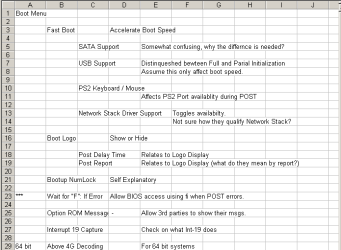
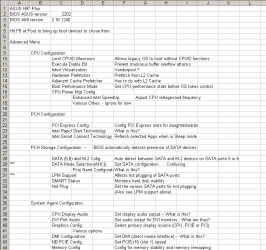
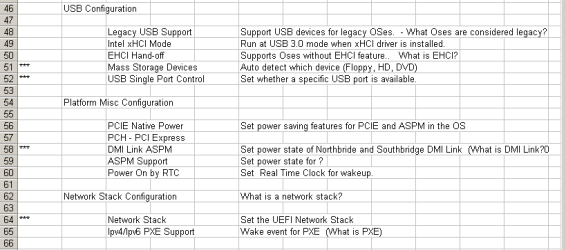
Ok here are the Excel Pictures which detail the Advanced and Boot Options choices. There are two pics of each as had to split them in half. Comments are per manual, with verbage shortened to fit. First column of each sheet is either blank,
****, ???, or KEY. This is my annotation to flag those which may be causing my issues (*** or KEY) or those I need to do research on because I don't yet understand what the acronym used really does and how it affects whatever.
 

Attachments

  • Adv-Pic1.PNG
    Adv-Pic1.PNG
    13.7 KB · Views: 4
  • Adv-Pic2.PNG
    Adv-Pic2.PNG
    6.9 KB · Views: 2
  • Boot-Pic1.PNG
    Boot-Pic1.PNG
    6.8 KB · Views: 81
  • Boot-Pic2.PNG
    Boot-Pic2.PNG
    10.7 KB · Views: 82

My Computer My Computer

At a glance

Win 7 Pro x32Intel I5-4690K8 GBOn Board
Computer type
PC/Desktop
Computer Manufacturer/Model Number
build -
OS
Win 7 Pro x32
CPU
Intel I5-4690K
Motherboard
ASUS H-97Plus
Memory
8 GB
Graphics Card(s)
On Board
Sound Card
On Board
Other Info
ASUS MOBO Issues never resolved even by ASUS:
1) MOBO will NOT boot from other than the Default HDD drive.
2) MOBO will NOT boot Most DOS based CDs
You must disable Secure Boot to install Win7.

Then it often requires some level of CSM to install Win7. It also often requires Other OS setting .

Boot installer as UEFI Device. You may need to disable Fast Boot to access BIOS Boot menu key, or can preset UEFI install media to boot first in BIOS Setup. Stick must be formatted with Option One of UEFI Bootable USB Flash Drive - Create in Windows and unplugged at reboot during installation if preset.

All partitions should be deleted to clear formatting. Report back any failure behavior.

Try installing to UEFI to use all features. Only if its not possible would I settle for Legacy.

Confirm you have latest UEFI firmware.
 
You must disable Secure Boot to install Win7.

Have Win7 installed. Just finished going out to UEFI Committee site and reading their FAQ's. Disabling Secure Boot appears to be a manufacturer decision regarding ability to disable. Mine is read only unless some other option allows it to be toggled on/off. Which one, if any is question?

Attaching a glossary for others on terms I have flagged in pics. Under UEFI you an read the FAQ statement regarding Secure boot.
 

Attachments

My Computer My Computer

At a glance

Win 7 Pro x32Intel I5-4690K8 GBOn Board
Computer type
PC/Desktop
Computer Manufacturer/Model Number
build -
OS
Win 7 Pro x32
CPU
Intel I5-4690K
Motherboard
ASUS H-97Plus
Memory
8 GB
Graphics Card(s)
On Board
Sound Card
On Board
Other Info
ASUS MOBO Issues never resolved even by ASUS:
1) MOBO will NOT boot from other than the Default HDD drive.
2) MOBO will NOT boot Most DOS based CDs
We deal with a dozen of these a day. Every single one gets installed without need for a UEFI committee thus far. Are you writing a guide?

Are you trying to install Win7? Please follow steps given and reply interactively.

There has always been a way to turn off Secure Boot so far. We could spot it if there were pictures?

Read your mobo manual on board's Support Downloads webpage.
 
We deal with a dozen of these a day. Every single one gets installed without need for a UEFI committee thus far. Are you writing a guide?
No. Just trying to figure out the BIOS so I can solve the problem at this link. Both myself and a WD representative can't get a backup drive connected through the USB (NOT the boot drive as its SATA and boots fine) to be OnLine.

http://www.sevenforums.com/hardware...ive-not-appearing-explorer-3.html#post2966676

There has always been a way to turn off Secure Boot so far. We could spot it if there were pictures?
Be glad to send all the pics you want. As previously stated did Excel listing because my estimate will be over 100 pics as each line in the Excel list I provided for the most part shows as a separate page for each line. Can you narrow down where I should focus for pics.

Read your mobo manual on board's Support Downloads webpage.
I have the MOBO user guide sitting in front of me. Will check website to see if any different. MOBO is brand new - bought 12/5/2014.
 

My Computer My Computer

At a glance

Win 7 Pro x32Intel I5-4690K8 GBOn Board
Computer type
PC/Desktop
Computer Manufacturer/Model Number
build -
OS
Win 7 Pro x32
CPU
Intel I5-4690K
Motherboard
ASUS H-97Plus
Memory
8 GB
Graphics Card(s)
On Board
Sound Card
On Board
Other Info
ASUS MOBO Issues never resolved even by ASUS:
1) MOBO will NOT boot from other than the Default HDD drive.
2) MOBO will NOT boot Most DOS based CDs
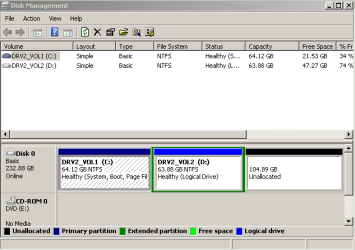
If you're not even trying to install Win7 then there is rarely need to change settings to get USB external recognized. Those settings mainly pertain to booting either via Legacy or UEFI. Which is yours? If in doubt post back screenshot of Disk Mgmt.

If larger than 2tb Format drive GPT and assign a drive letter. Try every USB port. Is drive detected in another PC? Does it pass Data Lifeguard diagnostics - new or not?
 
Those settings mainly pertain to booting either via Legacy or UEFI. Which is yours? If in doubt post back screenshot of Disk Mgmt.
That is one of the things I'm confused about.
From my prior reading UEFI identifies a new boot standard primarily for Windows OSes.
So Linux or BSD would be considered legacy. Regardiings Windows OSes I think UEFI starts with WIndows 8 or 8.1 (not sure on this). witjh Windows 7 and prior being considered legacy.
UEFI committee never specifies where legacy stops and UEFI begins.

Didn't realize the UEFI standard applied to Hard Disks.

Per your statement attaching DiskMgt pic minus USB problem as not connected right now.

If larger than 2tb Format drive GPT and assign a drive letter.?
Problem drive is only 160GB and boot SATA is 250 GB

Try every USB port.
Have NOT done that. Tried two or three and Drive is recognized -- just Offline -- so my guess is USB port OK as sees drive.

Is drive detected in another PC?
Yes. Initially used an internal IDE to SATA connector and could not get drive recognized. Finally went to shop where I bought MOBO and they used another of the same and found one I had was bad out of the box. While there asked them check drive (they used external USB to IDE -- same one I'm using now) and could see drive and directory with their system.
Bought the external USB to IDE connector from them, hooked it to this MOBO when I got home along with the blank (zeroed) SATA

After playing with BIOS finally found a combination (unfortuantely didn't write down) which allowed me to copy the External to the new SATA using the external USB to IDE adapter. After copying both partitions (C & D) to new SATA, I then installed Window 7 on the new SATA using the same Win7 CD I had used wiith the external drive I loaded the SATA from. Next got a new activation code from M$.

After couple days of loading software needed to access the external for some files and this is where I found the external USB to IDE connector showing, but Offline. As I recall -- but NOT sure -- when the SATA was new and blank, I believe secure boot could be toggled, but Not now -- Read Only. Won't swear that it could be toggled at that time but believe so.

All of above plus discussions on thread link I posted has lead me to thinking problem lies with:
1) BIOS
2) Bad Controller Board.

Since little confused over BIOS settings -- Excel list plus glossary has helped a bunch -- thought I would tackle BIOS first.


Does it pass Data Lifeguard diagnostics - new or not?
Have that planned for tomorrow. Planned to boot from CD with SATA boot removed and see if Lifeguard sees drive unless you recommend different configuration?
 

Attachments

  • DiskMgt.PNG
    DiskMgt.PNG
    8.5 KB · Views: 24

My Computer My Computer

At a glance

Win 7 Pro x32Intel I5-4690K8 GBOn Board
Computer type
PC/Desktop
Computer Manufacturer/Model Number
build -
OS
Win 7 Pro x32
CPU
Intel I5-4690K
Motherboard
ASUS H-97Plus
Memory
8 GB
Graphics Card(s)
On Board
Sound Card
On Board
Other Info
ASUS MOBO Issues never resolved even by ASUS:
1) MOBO will NOT boot from other than the Default HDD drive.
2) MOBO will NOT boot Most DOS based CDs

My Computer My Computer

At a glance

Win 7 Pro x32Intel I5-4690K8 GBOn Board
Computer type
PC/Desktop
Computer Manufacturer/Model Number
build -
OS
Win 7 Pro x32
CPU
Intel I5-4690K
Motherboard
ASUS H-97Plus
Memory
8 GB
Graphics Card(s)
On Board
Sound Card
On Board
Other Info
ASUS MOBO Issues never resolved even by ASUS:
1) MOBO will NOT boot from other than the Default HDD drive.
2) MOBO will NOT boot Most DOS based CDs
Can we see a picture now of the BIOS tab?

While you're at it take a picture also of the tab with the CSM settings. Expand choices so we can see them
 
Never thought of it till now, but can't use Windows Snipper of my Screen Grab program for BIOS.
Only way -- unless you know otherwise -- is take an actual picture then upload it.
If that is the only option will have to try and borrow one as I do not own a digital camera nor cell phone with a camera.
 

My Computer My Computer

At a glance

Win 7 Pro x32Intel I5-4690K8 GBOn Board
Computer type
PC/Desktop
Computer Manufacturer/Model Number
build -
OS
Win 7 Pro x32
CPU
Intel I5-4690K
Motherboard
ASUS H-97Plus
Memory
8 GB
Graphics Card(s)
On Board
Sound Card
On Board
Other Info
ASUS MOBO Issues never resolved even by ASUS:
1) MOBO will NOT boot from other than the Default HDD drive.
2) MOBO will NOT boot Most DOS based CDs
Back
Top