Enabling Recovery Partition

whitworth

New member
Local time
8:15 AM
Messages
4
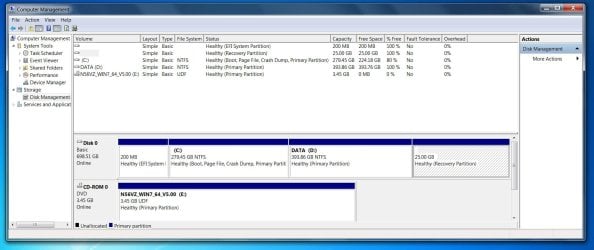
When I first got my laptop it had the following partitions

1. System reserved (200mb)
2. C:
3. D:
4. System Recovery.

Partition C: had the operating system installed to it, as well as a load of bloatware. D: is formatted as a document storage partition. When I reinstalled a clean version of windows I formatted the C: partition and installed windows on there. There was a warning at this point that I didn't recognise, something about GPT? I went ahead and it installed fine.

But now I'd like to use the System Recovery partition to reinstall the factory setup back to C:. The option that is recommended by Asus is to press F9 and select EMS but this has disappeared probably due to my reinstall on the C: partition.

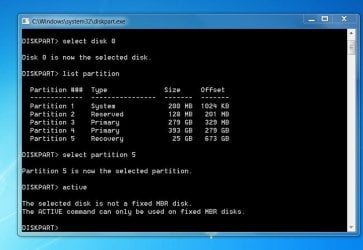
I've had a look at the disk with computer management and with DiskPart and have come up with the attached files, so how do I get it to boot the system recovery partition?
 

Attachments
  • disk.JPG
    disk.JPG
    136.6 KB · Views: 5
  • disk2.JPG
    disk2.JPG
    61.6 KB · Views: 4

My Computer

Computer type
PC/Desktop
OS
Windows 7 Home Premium 64 Bit
Are you trying to reinstall Windows ?
 

My Computer

Computer Manufacturer/Model Number
Custom Built
OS
Windows 7 Ultimate 32-Bit & Windows 7 Ultimate 64-Bit
CPU
Intel Core i7 CPU 950 @ 3.07GHz
Motherboard
ASUS P6T DELUXE V2
Memory
OCZ 6GB (3 x 2GB) 240-Pin DDR3 SDRAM DDR3 1600 OCZ3X1600R2
Graphics Card(s)
ATI Radeon HD 5700 Series
Sound Card
OnBoard
Hard Drives
WD6400AACS-00M3B0 (640GB SATA )
PSU
CORSAIR 850w
Case
NZXT LEXA
Cooling
Intel Stock Heatsink Fan
Keyboard
Microsoft Wireless Laser Keyboard 7000
Mouse
Microsoft Wireless Laser Mouse 7000
In a way, yes. I'm trying to revert the computer back to the way it left the factory by using the recovery partition to reinstall windows + drivers.
 

My Computer

Computer type
PC/Desktop
OS
Windows 7 Home Premium 64 Bit
Have you tried tapping F8 then choose Repair Your Computer and see if there is an option for Factory Reset .
 

My Computer

Computer Manufacturer/Model Number
Custom Built
OS
Windows 7 Ultimate 32-Bit & Windows 7 Ultimate 64-Bit
CPU
Intel Core i7 CPU 950 @ 3.07GHz
Motherboard
ASUS P6T DELUXE V2
Memory
OCZ 6GB (3 x 2GB) 240-Pin DDR3 SDRAM DDR3 1600 OCZ3X1600R2
Graphics Card(s)
ATI Radeon HD 5700 Series
Sound Card
OnBoard
Hard Drives
WD6400AACS-00M3B0 (640GB SATA )
PSU
CORSAIR 850w
Case
NZXT LEXA
Cooling
Intel Stock Heatsink Fan
Keyboard
Microsoft Wireless Laser Keyboard 7000
Mouse
Microsoft Wireless Laser Mouse 7000
Hi VistaKing,

Yes, I have tried that but there isn't an option. I gather that by formatting and installing a new copy of windows on C: that option is often lost due to a change of the MBR.
 

My Computer

Computer type
PC/Desktop
OS
Windows 7 Home Premium 64 Bit

My Computer

Computer Manufacturer/Model Number
Custom Built
OS
Windows 7 Ultimate 32-Bit & Windows 7 Ultimate 64-Bit
CPU
Intel Core i7 CPU 950 @ 3.07GHz
Motherboard
ASUS P6T DELUXE V2
Memory
OCZ 6GB (3 x 2GB) 240-Pin DDR3 SDRAM DDR3 1600 OCZ3X1600R2
Graphics Card(s)
ATI Radeon HD 5700 Series
Sound Card
OnBoard
Hard Drives
WD6400AACS-00M3B0 (640GB SATA )
PSU
CORSAIR 850w
Case
NZXT LEXA
Cooling
Intel Stock Heatsink Fan
Keyboard
Microsoft Wireless Laser Keyboard 7000
Mouse
Microsoft Wireless Laser Mouse 7000
It's as I have said above, I want to boot from the recovery partition to allow me to restore and see my system as it came from the factory (driver settings etc)
 

My Computer

Computer type
PC/Desktop
OS
Windows 7 Home Premium 64 Bit
Code:
diskpart
select disk 0
select part 5
detail part

post output
 

My Computer

Computer type
Laptop
Computer Manufacturer/Model Number
ACER ASPIRE 5742G
OS
Microsoft Windows 7 Home Premium 64-bits 7601 Multiprocessor Free Service Pack 1
CPU
Intel(R) Core(TM) i3 CPU M 370 @ 2.40GHz
Motherboard
Acer Aspire 5742G
Memory
4,00 GB
Graphics Card(s)
ATI Mobility Radeon HD 5400 Series
Sound Card
(1) AMD High Definition Audio Device (2) Realtek High Defi
Screen Resolution
1366 x 768 x 32 bits (4294967296 colors) @ 60 Hz
Hard Drives
WDC WD5000BEVT-22ZAT0
You don't need drivers from the factory image to Clean Reinstall if that's the issue. Win7 is driver-complete in the installer and then when you run all rounds of Important and Optional Windows Updates, after enabling Automatically get recommended drivers and updates for your hardware (Step 3). The few drivers still missing can be found on the Asus Support Downloads webpage for your model.

You should work with us to get a perfect Clean Reinstall - Factory OEM Windows 7 since it's a specialty of these forums, gives you the best possible Win7 install while the Asus Factory Preinstall is one of the worst possible Win7 installs you can have.

If you still want to try to make Factory Recovery run after having reinstalled Win7 which may have broken the hotlink to run Factory Recovery, try again to reboot and tap the F9 key.

If this fails Mark the Recovery Partition Active then reboot and try the F9 key again. If this fails move the Active flag back to C or 100mb SysReserved if that's where it was.

It's also possible you can Boot Recovery Partition using EasyBCD from the current Win7 install.
 
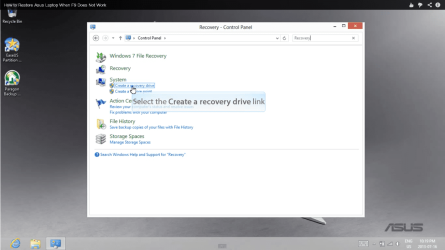
Goto Control panel. In search box type: Recovery
"Create a recovery drive"
Do you see that? Greg's solution is better btw
 

Attachments

  • Naamloos.png
    Naamloos.png
    142.6 KB · Views: 4

My Computer

Computer type
Laptop
Computer Manufacturer/Model Number
ACER ASPIRE 5742G
OS
Microsoft Windows 7 Home Premium 64-bits 7601 Multiprocessor Free Service Pack 1
CPU
Intel(R) Core(TM) i3 CPU M 370 @ 2.40GHz
Motherboard
Acer Aspire 5742G
Memory
4,00 GB
Graphics Card(s)
ATI Mobility Radeon HD 5400 Series
Sound Card
(1) AMD High Definition Audio Device (2) Realtek High Defi
Screen Resolution
1366 x 768 x 32 bits (4294967296 colors) @ 60 Hz
Hard Drives
WDC WD5000BEVT-22ZAT0
Back
Top