Solved Encryption of firefox favorites with a password!

anne1982

New member
Member
VIP
Local time
11:15 AM
Messages
89
Hello all,

At this moment I am using Firefox browser version: 96.0.3 (64 bits) under Win7. With this version I can NOT encrypt the firefox favorites with a password while with the older versions this was possible.
I will appreciate if anyone of you can advise me if this is possible with this version and how.
Kind regards,

Anne
 

My Computer My Computer

At a glance

Windows 7 Ultimate x64
OS
Windows 7 Ultimate x64
You must have been using an add-on to do this because Firefox out of the box has no such core feature. Type about:addons into your address bar to see what's installed. What is the name of this add-on that encrypts the bookmarks ("favorites")? (Favorites is the term used in Internet Explorer).

Here's what seems like a good alternative if you don't already use it. Link Password – Get this Extension for 🦊 Firefox (en-US) Just make sure what ever you have installed now is uninstalled.

Can you access your bookmarks now? If not, don't uninstall the old add-on just yet. I'll need to know the name of it and can help retrieve the encrypted bookmarks if necessary.

If you're super, super into wanting to encrypt and hide data, you'll want to use full disk encryption (FDE). Note that malware can grab your data, so using encrypted bookmarks or FDE and what not might be futile without proper malware mitigation beyond run of the mill, over bloated anti-virus software.

That's just my educated opinion though. Just felt the need to put that out there because you need to know it may be a false sense of security. Plus, what ever encryption is being used with the add-on you use now might be able to be broken. If I know the name of the add-on you use now I could find out. If this add-on is worth it's weight it'll at least use Bcrypt, AES or Blowfish... Even then, the password complexity is key on whether the encryption can be broken or not. Need a damn long and complex password without dorkification? Check out Bitwarden...


An even better approach to the whole thing is to use Veracrypt. You'd create an adequate sized encrypted container with Veracrypt, install portable Firefox into that container, and each time you want to browse the Internet you'd mount the encrypted container containing portable Firefox. Once done, close Firefox and unmount the encrypted container. It's actually not exactly full proof[SUP]1[/SUP], but accomplishes the need to safe guard bookmarks (favorites) as well as the whole "enchilada".

I should do an instructional video on this because it really isn't that difficult.

[SUP]1[/SUP] i.e., a malware infection, hack, etc.
 

My Computer My Computer

At a glance

Windows 7 Ultimate x64
Computer type
PC/Desktop
OS
Windows 7 Ultimate x64
Hello F22 Simpilot,
Thanks for your reply. It is not the idea to have complex security software; I don't have big secrets in this computer. From the other hand I don't like that everybody will look in my own bookmarks. The simple encryption with link password was good but the problem I can't use it to add new site. If I can have it back then my problem will be solved.
Thanks & regards

Anne
 

Attachments

  • ScreenShot002.jpg
    ScreenShot002.jpg
    5.9 KB · Views: 0
  • ScreenShot003.jpg
    ScreenShot003.jpg
    63.2 KB · Views: 0

My Computer My Computer

At a glance

Windows 7 Ultimate x64
OS
Windows 7 Ultimate x64
I installed Link Password in portable Firefox 97 and I see this after installation:


Welcome to Link Password 5.0

Hi and sorry for your inconvenience with Link Password in lately.
Long story short, Firefox recently release it Firefox version 57 that totally break the functionality in Link Password and I (Link Password developer) was forced to rewrite the addon from start to working with Firefox 57.
Unfortunately some functionality that exists early has to be change in Link Password 5.0 (due to Firefox 57 changes). The Link Password is now using ext+linkpassword:// as protocol any exiting encrypted bookmark your have should be updated to ext+linkpassword:// next time Firefox restarts.
Checkout the new icon
icon.svg
for accessing options for encrypt and decrypt bookmarks folders.
Decrypt bookmarks from anywhere at "Link Password - Encrypted Link or wherever you do not have access to Link Password addon.
Please leave any feedback or issue you have on Link Password – Get this Extension for 🦊 Firefox (en-US) and we can see what we can do.
Best Regards Link Password Developer.


It's working for me.


I click the padlock icon and enter a password to encrypt the whole bookmarks folder I want. If I export the bookmarks in JSON format the contents are encrypted. If I go back into the browser and click the padlock and enter the password the bookmarks are now unencrypted in an exported bookmarks backup in JSON format.

So my question: How are you using the extension? What are your expectations beyond what I see here that it's doing? Perhaps the extension got changed form what you were used to?

Two other questions: When did the problem start to occur and what Firefox version are you using?

You can "refresh" Firefox.

Press and hold the SHIFT key and at the same time open Firefox. Chose the option to Refresh. Settings will be reverted!

Sometimes the Prefs.js file can get messed up. This is the file that holds certain browser and add-on settings. Ever change a config/pref in about:config? This is where that setting resides. This Prefs.js file is located in your Firefox profile folder in the AppData directory in Windows. An easy way to find it is with Everything.exe by VoidTools. The Prefs.js file can be opened and edited with a text editor. I use Notepad ++. The Prefs.js file can also be backed up and then the original deleted which will be rebuilt again when you start Firefox.

- - - Updated - - -

Addendum:


On the subject of real security with this add-on, I looked over the code and it uses AES 256, but with an MD5 hash. Also, the salt is derived from a simple JS math calculation derived from your machine. With encryption, true randomness is VERY important. They actually have hardware that plugs into a computer to achieve this. About the MD5 hash. This means your encrypted bookmarks can essentially be decrypted in an instant with something called rainbow lookup tables. If I was to code an add-on like this I'd have an input box for random salt generation from at least two simple sources: A) your random mouse movements in an input box and B) your own text input. Then combine the two with other random data taken from the machine. Then add the hash of the bookmark link which should be at least Bcrypt or even better, Argon2i.

Anyway, just nerding out here. HAHAHA Pretty cool extension none the less in its concept, but its deployment is kinda a false sense of security if someone who knows what they're doing gets a hold of your encrypted bookmarks. I suppose for most people they will never be able to see what you have bookmarked. And for that I guess it serves its intend purpose.

PS:

Ah, something else I see here. Your Private Bookmarks add-on might be interfering with the Link Password add-on.

Also, I wouldn't use Adblock Plus/Adblock, and you have several types installed for certain things. You're far, far better off with the more speeder uBlock Origin. It'll accomplish what Adblock Plus does and more! Check that out, but first disable or uninstall Adblock Plus. All of them. I think you can import an Adblock Plus list into uBlock Origin. Make sure it's the Origin version. All of the documentation is at Github and withen the add-on there are help links that'll take you to Github. If you noticed a slow browser, especially on start, it's probably Adblock doing it.

- - - Updated - - -

And I can't get the Private Bookmarks add-on to work either. Looking at the add-on page the reviews from people say the same thing here and the add-on hasn't been updated in some three years so that may be why. I'm assuming Firefox "updated" something since the last release of Private Bookmarks and now borked the add-on's functionality.

However, the Link Password add-on I linked to above will work. Just note my comments on its real security though. Like you said, you don't have high security in mind so it's a moot point I guess. Just make sure the old, and now appearing to be defunct Private Bookmarks add-on is disabled or uninstalled if you use the Link Password add-on. If you had any private bookmarks you'll need to unencrypt them first with the password before you uninstall the Private Bookmarks add-on and use Link Password add-on.

 

My Computer My Computer

At a glance

Windows 7 Ultimate x64
Computer type
PC/Desktop
OS
Windows 7 Ultimate x64
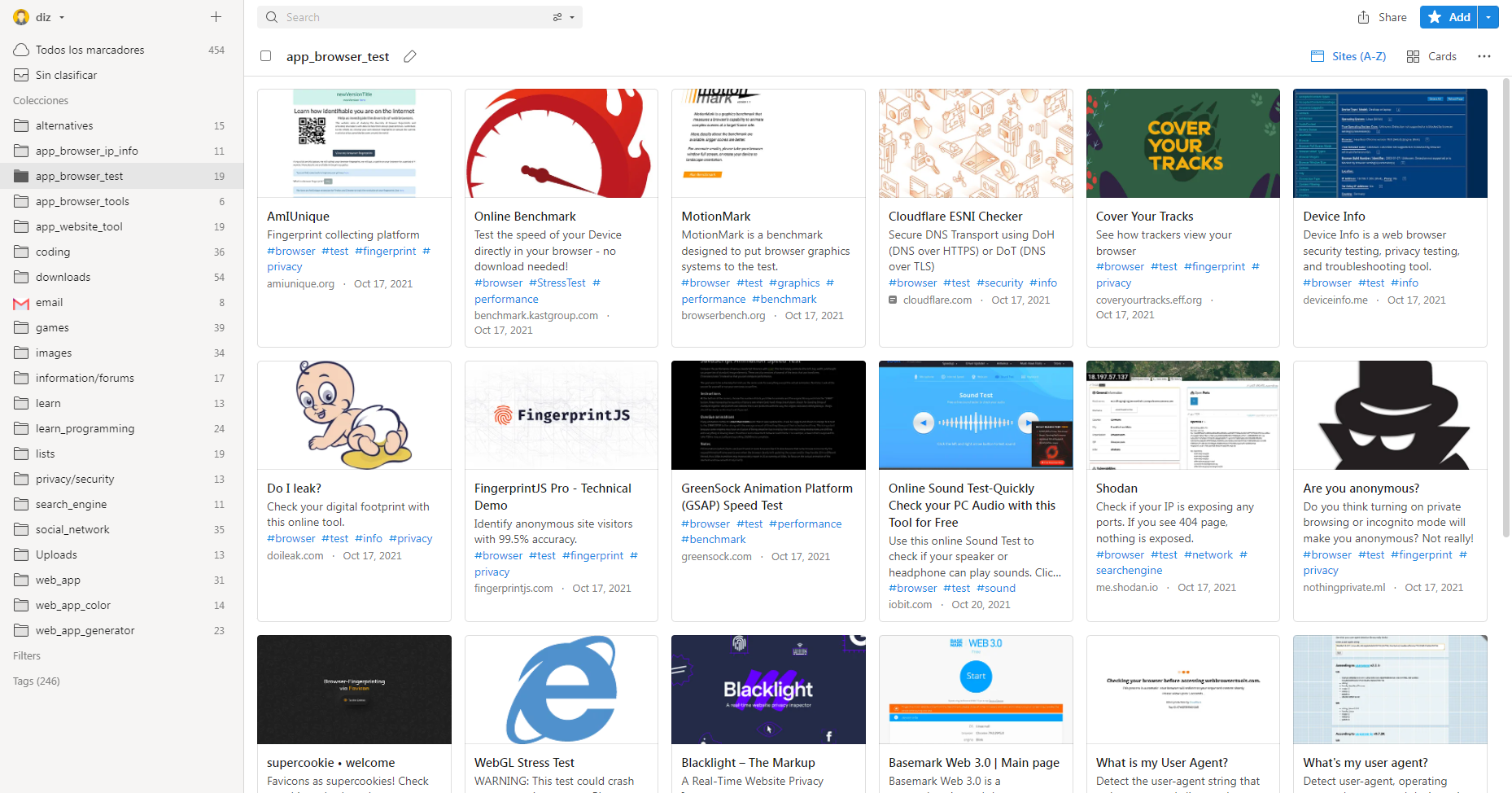
Have you tried raindrop ? It is a web page.

Raindrop.io — All-in-one bookmark manager

It saves your browser bookmarks. If you are concerned about security, don't save the session and it will ask you to log in every time you want to access the page.

The free version does not allow you to nest bookmarks, otherwise it is fully functional.
It works on any device that can open the website.

sVaeWO1.png

https://i.imgur.com/sVaeWO1.png
 

My Computers My Computers

  • At a glance

    Windows 7 Ultimate 64-bit SP1Intel Core 2 Quad Q6700 @ 2.66GHz4.00GB Single-Channel DDR2 @ 399MHz2047MB NVIDIA GeForce GT 710 (ASUStek Compute...
    Computer type
    PC/Desktop
    OS
    Windows 7 Ultimate 64-bit SP1
    CPU
    Intel Core 2 Quad Q6700 @ 2.66GHz
    Motherboard
    ECS MCP73PVT-SM
    Memory
    4.00GB Single-Channel DDR2 @ 399MHz
    Graphics Card(s)
    2047MB NVIDIA GeForce GT 710 (ASUStek Computer Inc)
    Sound Card
    Realtek High Definition Audio
    Monitor(s) Displays
    HP 21kd
    Screen Resolution
    1920x1080@60Hz
    Hard Drives
    149GB Western Digital WDC WD1600AABS-61PRA0 ATA Device (SATA )
    4000GB Seagate ST4000DM004-2U9104 ATA Device (SATA )
    931GB TOSHIBA External USB 3.0 USB Device (USB (SATA) )
    Antivirus
    None. Don't Need it.
    Browser
    Librewolf Portable
    Other Info
    It's a very old system.
  • Computer type
    PC/Desktop
I just went over some of your posts and you sure do recommend a lot of software. Lucky for you I guess I haven't found a commonality between all those websites, yet... Next on the docket is code style. LOL!
 

My Computer My Computer

At a glance

Windows 7 Ultimate x64
Computer type
PC/Desktop
OS
Windows 7 Ultimate x64
Hello F22 Simpilot & Diz,

Thank you for your replies, I appreciate it; Sorry for my late reaction.

First I should tell you that I am not very good in computers, so please be patients with me. F22 Simpilot, the list of the software shown in the previous picture is made by somebody who installs the new Firefox version on my computer, if you think that there is something unnecessary then please let me know then I can delete or uninstall them! Maybe I was not clear enough to describe my problem with the link password; here I will try to make it clearer: Two years ago I had the old version of Firefox and I could use the link password for decryption/encryption of bookmarks. After sometime when Firefox updated to the new version 96.0.3 (64-bits) which I am using now, appears the problem that I can not encrypt anymore new bookmarks. The old bookmarks which I made with the old version of FF can be still encrypted with the same password which I made using the old version.

The question: is there a possibility to make and encrypt new bookmarks in this new version in a simple way without using complex software?

Kind regards,

Anne
 

My Computer My Computer

At a glance

Windows 7 Ultimate x64
OS
Windows 7 Ultimate x64
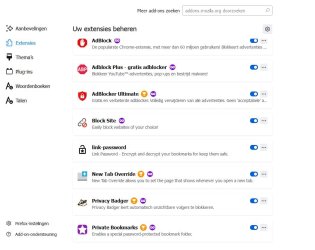
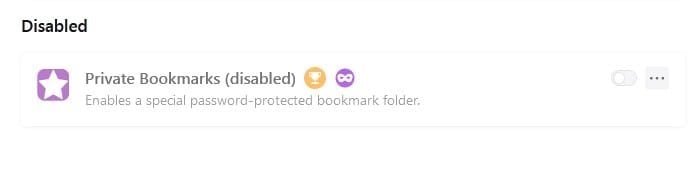
Okay, according to your screenshot, the add-on you have installed now called Private Bookmarks (bottom of the screenshot) won't work. I tested this in Firefox 97. You did note Firefox 96, but I'm sure this add-on won't work in there either. Especially since I noted this add-on hasn't been updated in some three years. I also noted that this add-on (Private Bookmarks) has reviews at the Firefox add-on page from others saying they too are having issues.

Now, the add-on, Link Password does work in my testing in Firefox 97. However, based on your description on how you're encrypting bookmarks, this sounds like a feature of the Private Bookmarks add-on that no longer works, not the Link Password add-on which does work.

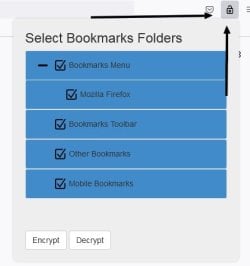
Again, the Link Password add-on WILL work. It just works a little bit differently. Looking at my screenshot you can see that I've selected all bookmark folders to be encrypted. Now every time I bookmark a website that bookmark will automatically be encrypted on the fly without user intervention at all. It's like a retroactive bookmarks encryptor!


link_password.jpg


I have confirmed that indeed the bookmarks are encrypted with the Link Password add-on by looking at the bookmarks backup file in JSON format.


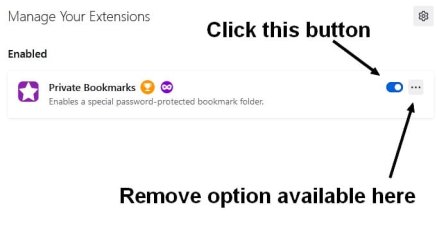
What you need to do is disable or uninstall the add-on Private Bookmarks and just use the Link Password add-on. The use of both add-ons will probably cause issues which is what you have going on now.

To disable an add-on see my screenshot.


fgtdh.jpg

Three ways to access add-ons:

1) Type about:addons in the address bar.

2) At the top of Firefox, if the Menu Bar is shown, go to Tools | Add-ons and Themes.

3) Press and hold the keys, Ctrl + Shift + A.


sdvgbsd.jpg


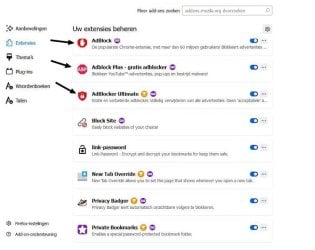
About your other add-ons. You have a multitude of Ad blockers which is very counter-intuitive, and the Adblock add-on in my testing has shown to slow the browser down. The computer centric people out there seem to agree uBlock Origin is what you'd want to use for Ad Blocking. So with that, uninstall these as shown in the screenshot and instead install uBlock Origin.


erygerrere.jpg


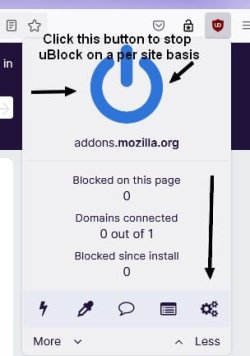
Once uBlock Origin is installed you can access its settings by clicking on the cogs icon. Read all about uBlock's settings here. All of the documentation as well as its Wiki page is here. It can be customized with certain filters beyond its already default settings and can be pretty advanced and powerful. Here's a video: How to use uBlock Origin to protect your online privacy and security | uBlock Origin tutorial 2018 - YouTube

hrrrthjrjt.jpg
 

My Computer My Computer

At a glance

Windows 7 Ultimate x64
Computer type
PC/Desktop
OS
Windows 7 Ultimate x64
Hello F22 Simpilot,

Many thank for your detailed and clear reply, I appreciate it. Now, the add-on, Link Password does work in my computer/FF, thus my biggest problem is solved. As well I deleted some of the unnecessary software from the FF.

Soon I am going to install the uBlock Origin and go further. Again, many thanks for your efforts & patience to help me solve this problem.

Kind regards,

Anne
 

My Computer My Computer

At a glance

Windows 7 Ultimate x64
OS
Windows 7 Ultimate x64
You're welcome.
 

My Computer My Computer

At a glance

Windows 7 Ultimate x64
Computer type
PC/Desktop
OS
Windows 7 Ultimate x64
Back
Top