
Endless reboot loop / chkdsk. Safe mode fails to load.

TSDAdam

New member
Local time
12:15 PM
Messages
8
For some reason, the computer I built a couple of years back has taken to doing an odd reboot loop.

It had been working fine, but now when I turn it on it POSTs as normal, starts to load Windows (7 Home Premium 64bit), but when it gets to the point where it would normally show the login screen it jumps to chkdsk. It goes through the tests, often saying it's fixing things, then restarts. After restarting, it does the same thing again, ad nauseum.

When it starts chkdsk is says 'press any key to skip/cancel', but pressing a key on the keyboard does nothing.

I've tried using the install disc to do a repair, but it doesn't make any difference.

I've run the samsung HDD test tools from the ultimate boot cd which have come back with no errors. I've also run memtest from a flash drive and left it running for over 100 hours. In that whole time it did give two errors, but I don't think that's responsible for causing the constant reboot loop. The worst I ever used to get was an occasional BSOD/reboot.

Someone suggested I try booting into safe mode and trying this - http://www.sevenforums.com/tutorials/56685-check-disk-reset.html

If I boot into safe mode, it takes as long as it would do to get to desktop/login, then immediately reboots without warning.

I noticed that when safe mode was loading, I got some graphical corruption across the top of the screen.
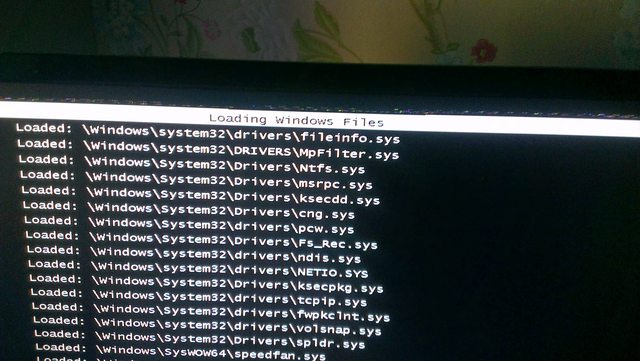


This led me to think that maybe it was a problem with my gpu (GTX460), so I unplugged it, reset the bios and loaded into safe mode with the onboard gfx instead. Exactly the same thing happens, and I get the same corruption/artefacts at the top.

Any more ideas anyone? :(
 

My Computer My Computer

At a glance

Windows 7 Home Premium x64
OS
Windows 7 Home Premium x64

My Computer My Computer

At a glance

Microsoft Windows 7 Home Premium 64-bit 7601 ...Intel(R) Core(TM) i7-3770 CPU @ 3.40GHz8.00 GBIntel(R) HD Graphics 4000
Computer type
PC/Desktop
OS
Microsoft Windows 7 Home Premium 64-bit 7601 Multiprocessor Free Service Pack 1
CPU
Intel(R) Core(TM) i7-3770 CPU @ 3.40GHz
Motherboard
ASUSTeK COMPUTER INC. P8H77-M
Memory
8.00 GB
Graphics Card(s)
Intel(R) HD Graphics 4000
Sound Card
On Board
Monitor(s) Displays
Dell 24"
Screen Resolution
1920 x 1080
Hard Drives
(1) INTEL SSDSC2CT180A3 ATA Device (2) ST500DM002-1BD142 ATA Device (3) WDC WD3200AAKS-75L9A0 ATA Device (4) Generic- Compact Flash USB Device (5) Generic- MS/MS-Pro USB Device (6) Generic- SD/MMC USB Device (7) Generic- SM/xD-Picture USB
PSU
500w Corsair
Case
Cooler Master
Cooling
3 Fans
Keyboard
Logitech MK300
Mouse
Logitech WOM
Internet Speed
75Mb
Antivirus
Norton 360
Browser
Firefox, Opera, IE

My Computer My Computer

At a glance

Windows 7 Ultimate 32-Bit & Windows 7 Ultimat...Intel Core i7 CPU 950 @ 3.07GHzOCZ 6GB (3 x 2GB) 240-Pin DDR3 SDRAM DDR3 160...ATI Radeon HD 5700 Series
Computer Manufacturer/Model Number
Custom Built
OS
Windows 7 Ultimate 32-Bit & Windows 7 Ultimate 64-Bit
CPU
Intel Core i7 CPU 950 @ 3.07GHz
Motherboard
ASUS P6T DELUXE V2
Memory
OCZ 6GB (3 x 2GB) 240-Pin DDR3 SDRAM DDR3 1600 OCZ3X1600R2
Graphics Card(s)
ATI Radeon HD 5700 Series
Sound Card
OnBoard
Hard Drives
WD6400AACS-00M3B0 (640GB SATA )
PSU
CORSAIR 850w
Case
NZXT LEXA
Cooling
Intel Stock Heatsink Fan
Keyboard
Microsoft Wireless Laser Keyboard 7000
Mouse
Microsoft Wireless Laser Mouse 7000
I have two Corsair 2GB DDR3 modules installed. I'm not convinced it's the RAM, although I do acknowledge they could do with replacing. I can replicate this every single time I try now.

I'll try the linked fix the next chance I get, my little boy has just gone to bed so I daren't go up making noise now :)

(nice to see someone else from Cornwall btw :) )
 

My Computer My Computer

At a glance

Windows 7 Home Premium x64
OS
Windows 7 Home Premium x64
Try it with one module removed> If you still get the problem, swop the modules over! Might find one of them iffy. If you stil get the problem then you will need to run memtest with one mod removed, then swop them again!
 

My Computer My Computer

At a glance

Microsoft Windows 7 Home Premium 64-bit 7601 ...Intel(R) Core(TM) i7-3770 CPU @ 3.40GHz8.00 GBIntel(R) HD Graphics 4000
Computer type
PC/Desktop
OS
Microsoft Windows 7 Home Premium 64-bit 7601 Multiprocessor Free Service Pack 1
CPU
Intel(R) Core(TM) i7-3770 CPU @ 3.40GHz
Motherboard
ASUSTeK COMPUTER INC. P8H77-M
Memory
8.00 GB
Graphics Card(s)
Intel(R) HD Graphics 4000
Sound Card
On Board
Monitor(s) Displays
Dell 24"
Screen Resolution
1920 x 1080
Hard Drives
(1) INTEL SSDSC2CT180A3 ATA Device (2) ST500DM002-1BD142 ATA Device (3) WDC WD3200AAKS-75L9A0 ATA Device (4) Generic- Compact Flash USB Device (5) Generic- MS/MS-Pro USB Device (6) Generic- SD/MMC USB Device (7) Generic- SM/xD-Picture USB
PSU
500w Corsair
Case
Cooler Master
Cooling
3 Fans
Keyboard
Logitech MK300
Mouse
Logitech WOM
Internet Speed
75Mb
Antivirus
Norton 360
Browser
Firefox, Opera, IE
Tried all the above, no luck.

chkntfs reports the volume as dirty. If I boot into system repair and use the cmd prompt to run chkdks it ends with an error 50, failed to write to event log.

Tried using one stick of ram (b0th), no difference.

Is there any way to do the equivalent of an in-place upgrade without being able to boot to desktop? :(
 

My Computer My Computer

At a glance

Windows 7 Home Premium x64
OS
Windows 7 Home Premium x64
Can't help with your last question but just in case it comes down to a Clean Install I would make sure your back ups are up to date. If necessary you could download a copy of Ubuntu on another PC if you have access and burn the copy to a CD. Then run Ubuntu from that CD, no need to install Ubuntu, and get access to you data files for backing up preferably to an External HD.
 

My Computer My Computer

At a glance

Microsoft Windows 7 Home Premium 64-bit 7601 ...Intel(R) Core(TM) i7-3770 CPU @ 3.40GHz8.00 GBIntel(R) HD Graphics 4000
Computer type
PC/Desktop
OS
Microsoft Windows 7 Home Premium 64-bit 7601 Multiprocessor Free Service Pack 1
CPU
Intel(R) Core(TM) i7-3770 CPU @ 3.40GHz
Motherboard
ASUSTeK COMPUTER INC. P8H77-M
Memory
8.00 GB
Graphics Card(s)
Intel(R) HD Graphics 4000
Sound Card
On Board
Monitor(s) Displays
Dell 24"
Screen Resolution
1920 x 1080
Hard Drives
(1) INTEL SSDSC2CT180A3 ATA Device (2) ST500DM002-1BD142 ATA Device (3) WDC WD3200AAKS-75L9A0 ATA Device (4) Generic- Compact Flash USB Device (5) Generic- MS/MS-Pro USB Device (6) Generic- SD/MMC USB Device (7) Generic- SM/xD-Picture USB
PSU
500w Corsair
Case
Cooler Master
Cooling
3 Fans
Keyboard
Logitech MK300
Mouse
Logitech WOM
Internet Speed
75Mb
Antivirus
Norton 360
Browser
Firefox, Opera, IE
Yeah I run Mint on my laptop already, I'll just make a flash drive install to pull everything off to an external HDD.

Very annoying :(
 

My Computer My Computer

At a glance

Windows 7 Home Premium x64
OS
Windows 7 Home Premium x64

My Computer My Computer

At a glance

Microsoft Windows 7 Home Premium 64-bit 7601 ...Intel(R) Core(TM) i7-3770 CPU @ 3.40GHz8.00 GBIntel(R) HD Graphics 4000
Computer type
PC/Desktop
OS
Microsoft Windows 7 Home Premium 64-bit 7601 Multiprocessor Free Service Pack 1
CPU
Intel(R) Core(TM) i7-3770 CPU @ 3.40GHz
Motherboard
ASUSTeK COMPUTER INC. P8H77-M
Memory
8.00 GB
Graphics Card(s)
Intel(R) HD Graphics 4000
Sound Card
On Board
Monitor(s) Displays
Dell 24"
Screen Resolution
1920 x 1080
Hard Drives
(1) INTEL SSDSC2CT180A3 ATA Device (2) ST500DM002-1BD142 ATA Device (3) WDC WD3200AAKS-75L9A0 ATA Device (4) Generic- Compact Flash USB Device (5) Generic- MS/MS-Pro USB Device (6) Generic- SD/MMC USB Device (7) Generic- SM/xD-Picture USB
PSU
500w Corsair
Case
Cooler Master
Cooling
3 Fans
Keyboard
Logitech MK300
Mouse
Logitech WOM
Internet Speed
75Mb
Antivirus
Norton 360
Browser
Firefox, Opera, IE
works on windows 10. file sizes of the regback files were different, but at least its not looping in a reboot anymore and just boots! wonderfull, thanks
 

My Computer My Computer

At a glance

Windows 8 Pro 64bitP86004GB DDR2 800Mhz9600m GS 1GB
Computer Manufacturer/Model Number
ASUS M50Vm
OS
Windows 8 Pro 64bit
CPU
P8600
Memory
4GB DDR2 800Mhz
Graphics Card(s)
9600m GS 1GB
Monitor(s) Displays
15.6" 1400x900
Back
Top