ENE Card Reader on Acer Aspire 5050

jonny

New member
Local time
8:59 PM
Messages
8
Location
Toronto
I used to run XP before switching over and have never ran vista. The XP drivers for this device worked great from the Acer website. I have downloaded the Vista drivers now and tried them both in regular mode and then after again in compatibility mode (Vista SP1). This did not work. It is recognizing my card reader but the driver's or something is stopping it from working. When I load in an SD card the sound is not made and no drive appears. Am I missing something? I have google'd and gotten all my other devices to work flawlessly. This is the last one and I will have a working Windows 7 machine. Please help ;)

Edit: I have found out a manual for my lapop and it shows the device as "ENE CB714". Scouring google for drivers but haven't seen a thing yet.
 
Last edited:

My Computer My Computer

At a glance

Windows 7 UltimateAMD TurionTM 64 Mobile Technology MK-36 2.0 GHz1 GB DDR2ATI Radeon® Xpress 1100 chipset
Computer Manufacturer/Model Number
Acer Aspire 5050
OS
Windows 7 Ultimate
CPU
AMD TurionTM 64 Mobile Technology MK-36 2.0 GHz
Memory
1 GB DDR2
Graphics Card(s)
ATI Radeon® Xpress 1100 chipset
Sound Card
Realtek HD
Monitor(s) Displays
14" LCD
Screen Resolution
1280x800
Hard Drives
100 GB
Other Info
Laptop
Insert the card. Go to Explorer.

Right click the drive.

Open as Portable Device

A new window appears.

Can you read/use the disk?

Also, insert a different card to rule out a faulty card.
 
Insert the card. Go to Explorer.

Right click the drive.

Open as Portable Device

A new window appears.

Can you read/use the disk?

Also, insert a different card to rule out a faulty card.

In XP when inserted the SD card it would pop up a new drive. In Win 7 no drive is showing when the SD card is inserted or removed. I get an error when installing the drivers also saying it's not meant for this system only Vista and older. I have 2 SD cards and they work fine everywhere else except for this laptop after upgrading to Windows 7. I am thinking I need to install the drivers differently or get proper Windows 7 drivers. I have looked on the ENE website and it only describes the chip I have and does not provide any links for drivers. Any other suggestions?
 

My Computer My Computer

At a glance

Windows 7 UltimateAMD TurionTM 64 Mobile Technology MK-36 2.0 GHz1 GB DDR2ATI Radeon® Xpress 1100 chipset
Computer Manufacturer/Model Number
Acer Aspire 5050
OS
Windows 7 Ultimate
CPU
AMD TurionTM 64 Mobile Technology MK-36 2.0 GHz
Memory
1 GB DDR2
Graphics Card(s)
ATI Radeon® Xpress 1100 chipset
Sound Card
Realtek HD
Monitor(s) Displays
14" LCD
Screen Resolution
1280x800
Hard Drives
100 GB
Other Info
Laptop
How does the Device appear in Device Manager?

Did you do this...

Insert the card. Go to Explorer.

Right click the drive.

Open as Portable Device

Yes or No.

If yes, Report result.
 
In device manager it shows everything as working properly. And no I did not do that because a drive does not show up when I insert the card. Wish it was. Antman thanks for bearing with me. :geek:
 

My Computer My Computer

At a glance

Windows 7 UltimateAMD TurionTM 64 Mobile Technology MK-36 2.0 GHz1 GB DDR2ATI Radeon® Xpress 1100 chipset
Computer Manufacturer/Model Number
Acer Aspire 5050
OS
Windows 7 Ultimate
CPU
AMD TurionTM 64 Mobile Technology MK-36 2.0 GHz
Memory
1 GB DDR2
Graphics Card(s)
ATI Radeon® Xpress 1100 chipset
Sound Card
Realtek HD
Monitor(s) Displays
14" LCD
Screen Resolution
1280x800
Hard Drives
100 GB
Other Info
Laptop
"It is recognizing my card reader but the driver's or something is stopping it from working."

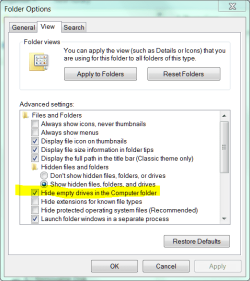
So, this means the device appears in Device Manager? Please provide a screen shot (Start, Search, Snip - use the Snipping Tools).

Disable the setting shown in yellow.


.
 

Attachments

  • Capture.PNG
    Capture.PNG
    20.7 KB · Views: 363
ANTMAN!!! :)

Before I did what you said I wanted to try a few things. Well I went to the setup for the drivers and right clicked the file and had windows 7 search for the best compatibility mode to run the setup. It ended up choosing XP SP2 and installed the drivers without a problem. I wrote this down in case I have to format again in the future. I am so happy now! My laptop is now fully functional in Windows 7. Thanks again Antman for your help. Hopefully this will help others too.
 

My Computer My Computer

At a glance

Windows 7 UltimateAMD TurionTM 64 Mobile Technology MK-36 2.0 GHz1 GB DDR2ATI Radeon® Xpress 1100 chipset
Computer Manufacturer/Model Number
Acer Aspire 5050
OS
Windows 7 Ultimate
CPU
AMD TurionTM 64 Mobile Technology MK-36 2.0 GHz
Memory
1 GB DDR2
Graphics Card(s)
ATI Radeon® Xpress 1100 chipset
Sound Card
Realtek HD
Monitor(s) Displays
14" LCD
Screen Resolution
1280x800
Hard Drives
100 GB
Other Info
Laptop
It is a good thing when our computer works the way we need it to.

If it is any consolation, my drives do not automatically respond (autorun) when I insert the cards. I know how to fix it, but I never know what one of the children might stick in there.

The plumber's faucet drips?
 
I ran the Win7 upgrade advisor and the only negative result I recieved was, " ENE Card Reader drivers are not compatible with Win7".

I've searched the web, went to ENE's site, which has no driver support and could find nothing !

Good luck !

Guess I'll buy a new card reader !
 

My Computer My Computer

At a glance

VISTA 64CORE 2 DUO 2.14 GBNVIDIA 9800 GTS
Computer Manufacturer/Model Number
SAGER 5793
OS
VISTA 64
CPU
CORE 2 DUO 2.1
Motherboard
NA
Memory
4 GB
Graphics Card(s)
NVIDIA 9800 GTS
I ran the Win7 upgrade advisor and the only negative result I recieved was, " ENE Card Reader drivers are not compatible with Win7".

I've searched the web, went to ENE's site, which has no driver support and could find nothing !

Good luck !

Guess I'll buy a new card reader !
Hi! :)
You don't need to buy a new card reader. I've experienced Windows 7 installations in multiple Acer notebooks and everything went well with ENE card readers using Vista drivers, even when Windows 7 was in a beta.
Try installing manually your Vista driver from http://support.acer.com (choose the same edition of Vista from the list that you have now in Windows 7).
Good luck! ;)
 

My Computer My Computer

At a glance

@Home/Work: Windows 8.1 Enterprise x64@Home: Core [email protected] GHz / @Work: Core i3-...@Home: 8 GB. DDR3-1333 CL9 / @Work: 12 GB. DD...@Home: MSI N560GTX-Ti Twin Frozr II / @Work: ...
Computer type
PC/Desktop
Computer Manufacturer/Model Number
@Home: Built by me / @Work: Banghó Extrema
OS
@Home/Work: Windows 8.1 Enterprise x64
CPU
@Home: Core [email protected] GHz / @Work: Core [email protected] GHz
Motherboard
@Home: Gigabyte GA-Z87-D3HP / @Work: ASRock H61M-VG3
Memory
@Home: 8 GB. DDR3-1333 CL9 / @Work: 12 GB. DDR3-1333 CL9
Graphics Card(s)
@Home: MSI N560GTX-Ti Twin Frozr II / @Work: Intel HD 2500
Sound Card
@Home/Work: Realtek HD Audio
Monitor(s) Displays
@Home: Samsung T260 LCD via DVI-D / @Work: Acer AL1714 (VGA)
Screen Resolution
@Home: 1920x1200x32@60h / @Work: 1280x1024x32@60h
Hard Drives
@Home: 4 disks that results in ~4.3 TB. of usable space.
@Work: Western Digital WD10EARS (1 TB.)
PSU
@Home: Topower 650W / @Work: Shark Net 600W
Case
@Home: Euro Case Generic / @Work: Banghó Extrema
Keyboard
@Home: Genius (Spa) / @Work: Noga Net (Spa)
Mouse
@Home: HP Laser 2.4G Xa965 / @Work: Genius Optical generic
Internet Speed
@Home/Work: Fibertel 7Mbps/512kbps
Antivirus
@Home/Work: Windows Defender+Spybot 2+AdwCleaner
Browser
@Home/Work: Google Chrome (Dev)+Mozilla Firefox (Aurora)
Other Info
@Home:
Microsoft Xbox 360 wireless gamepad+USB receiver.
Microsoft Xbox 360 wired gamepad.
Logitech C910 Full HD webcam.
Generic 5.1 analog Home Theater.

@Work:
2-Way electronic keyboard/mouse/monitor switch.
64-bit drivers

On Acer site there only option to choose 32-bit OS, can anyone help with 64-bit
 

My Computer My Computer

At a glance

Windows 7 64-bit
OS
Windows 7 64-bit

My Computer My Computer

At a glance

@Home/Work: Windows 8.1 Enterprise x64@Home: Core [email protected] GHz / @Work: Core i3-...@Home: 8 GB. DDR3-1333 CL9 / @Work: 12 GB. DD...@Home: MSI N560GTX-Ti Twin Frozr II / @Work: ...
Computer type
PC/Desktop
Computer Manufacturer/Model Number
@Home: Built by me / @Work: Banghó Extrema
OS
@Home/Work: Windows 8.1 Enterprise x64
CPU
@Home: Core [email protected] GHz / @Work: Core [email protected] GHz
Motherboard
@Home: Gigabyte GA-Z87-D3HP / @Work: ASRock H61M-VG3
Memory
@Home: 8 GB. DDR3-1333 CL9 / @Work: 12 GB. DDR3-1333 CL9
Graphics Card(s)
@Home: MSI N560GTX-Ti Twin Frozr II / @Work: Intel HD 2500
Sound Card
@Home/Work: Realtek HD Audio
Monitor(s) Displays
@Home: Samsung T260 LCD via DVI-D / @Work: Acer AL1714 (VGA)
Screen Resolution
@Home: 1920x1200x32@60h / @Work: 1280x1024x32@60h
Hard Drives
@Home: 4 disks that results in ~4.3 TB. of usable space.
@Work: Western Digital WD10EARS (1 TB.)
PSU
@Home: Topower 650W / @Work: Shark Net 600W
Case
@Home: Euro Case Generic / @Work: Banghó Extrema
Keyboard
@Home: Genius (Spa) / @Work: Noga Net (Spa)
Mouse
@Home: HP Laser 2.4G Xa965 / @Work: Genius Optical generic
Internet Speed
@Home/Work: Fibertel 7Mbps/512kbps
Antivirus
@Home/Work: Windows Defender+Spybot 2+AdwCleaner
Browser
@Home/Work: Google Chrome (Dev)+Mozilla Firefox (Aurora)
Other Info
@Home:
Microsoft Xbox 360 wireless gamepad+USB receiver.
Microsoft Xbox 360 wired gamepad.
Logitech C910 Full HD webcam.
Generic 5.1 analog Home Theater.

@Work:
2-Way electronic keyboard/mouse/monitor switch.
I too had trouble finding a working driver but, if you are running the 64-bit Windows 7, then I found that this driver works like a charm. It was pointed out to me in another thread, so I figured I'd just pass it along:

64-Bit ENE Card Reader driver

Should work for you, let me know! :D
 

My Computer My Computer

At a glance

Windows 7 Ultimate x64Athlon64x2
Computer Manufacturer/Model Number
Acer Aspire 5050
OS
Windows 7 Ultimate x64
CPU
Athlon64x2
If my memory is not tricking me, this driver works for you:
http://global-download.acer.com/GDF...tep3=Aspire 5310&OS=V01&LC=en&BC=Acer&SC=PA_7
It's the 64 bits driver for ENE Card Reader & CardBus from Aspire 5310 that is in Acer's support page.

Hope it helps you! :)

Just for anyone wishing to try this, i did, and although after installation, and restart, when I inserted an SD card, it prompted me to format it before use, then failed to format, then crashed my whole system.
 

My Computer My Computer

At a glance

Windows 7AMD
Computer Manufacturer/Model Number
Acer Aspire 5110
OS
Windows 7
CPU
AMD
Tried a second time, and again, although the SD Card icon shows in "My Computer" after canceling the format recommendation, it freezes my system, and the only way to get functionality back is to force close.

I will try the second link next posted by Saubha82, and report back.
 

My Computer My Computer

At a glance

Windows 7AMD
Computer Manufacturer/Model Number
Acer Aspire 5110
OS
Windows 7
CPU
AMD
Ok, the second one didn't help me. So Im still back to square one, although at least I am not getting the SD icon when I insert my SD Card into my Acer Aspire 5110
 

My Computer My Computer

At a glance

Windows 7AMD
Computer Manufacturer/Model Number
Acer Aspire 5110
OS
Windows 7
CPU
AMD
Back
Top