Have IE8 32bit and 64bit versions on both machines and getting IE8 pop ups intemittently for (and I should have taken a snip of it I know) I think it is called "Readyness Toolkit" is this just bloat or worth it?
Plus have downloaded chrome as well as the standard Google - wasn't overly keen on bing - this going to cause any conflicts? or should I just delete the standard one and only have Chrome. Can't make up my mind as the Chrome doesn't seem any faster but it does say it's safer as the default browser.
My Computer
Computer type
PC/Desktop
Computer Manufacturer/Model Number
Own build (new) Desk1 / Asus ROG Win 7 / Desk2 1st build
OS
Desk1 7 Home Prem / Desk2 10 Pro / Main lap Asus ROG 10 Pro 2 laptop Toshiba 7 Pro Asus P2520 7 & 10
One other Desktop (tester) and spare Toshba laptop both with SSD's
Running Kaspersky 2016 ISS on all machines config'd identically
Logitec audio stereo systems on each machine (x3)
Canon MG5250MFC
Router/modem TP-Link running WPA2SK
Have IE8 32bit and 64bit versions on both machines and getting IE8 pop ups intemittently for (and I should have taken a snip of it I know) I think it is called "Readyness Toolkit" is this just bloat or worth it?
Plus have downloaded chrome as well as the standard Google - wasn't overly keen on bing - this going to cause any conflicts? or should I just delete the standard one and only have Chrome. Can't make up my mind as the Chrome doesn't seem any faster but it does say it's safer as the default browser.
Shouldn't cause any conflict, just means you have an extra avenue to search with. For now it is safer because usage isn't up with the big boys and the mal-writers don't consider it profitable.
My Computer
Computer type
PC/Desktop
Computer Manufacturer/Model Number
Gateway DX4831-01e (Mid-Tower Desktop)
OS
Originally Win 7 Hm Prem x64 Ver 6.1.7600 Build 7601-SP1 | Upgraded to Windows 10 December 14, 2019
As far as I can tell the Readiness Toolkit is just a website with a lot of help links for different purposes: Internet Explorer 8 Readiness Toolkit . I can't help but wonder, if you are getting pop-ups with that name, whether it (the popups) might be some sort of malware.
My Computer
Computer type
PC/Desktop
Computer Manufacturer/Model Number
OQO 2+
OS
Windows 8 Pro w/MC 32-bit
CPU
Intel Atom 1.86 GHz
Motherboard
OQO 2+
Memory
2 GB
Graphics Card(s)
Intel GMA 500
Sound Card
IDT
Monitor(s) Displays
LCD
Screen Resolution
800 x 480 (portable) 1280 x 1024 (docked)
Hard Drives
64 GB SSD
PSU
9 Ah Battery (portable) or OQO Brick (docked)
Case
Shirt Pocket Sized
Cooling
Tiny Fan
Keyboard
Slide out (portable) DiNovo Edge (docked)
Mouse
Eraser head (portable) Logitech Bluetooth (docked)
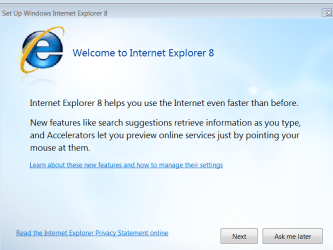
Hiyya Anak and Ron have got this puppy again this am and got some snips. It doesn't seem to be that tools thing I thought it was rather it looks to be thinking I haven't got 8 on board.
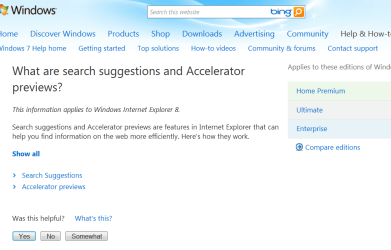
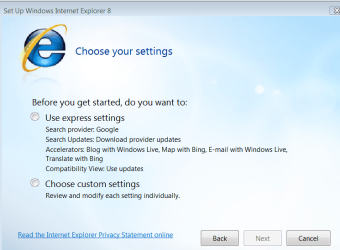
Am including snips of the windows as you go through them except the last which is their feedback - I didn't download anything after seeing what was in that choose the settings window, I am defintely not going there. The feedback one I sent why am I gettings this - not that I expect any answer of course.
Attachments
CaptureIE8POPUP.PNG
95.2 KB
· Views: 4
CaptureIE8POPUP2.PNG
37.2 KB
· Views: 3
CaptureIE84.PNG
94.9 KB
· Views: 3
Last edited:
My Computer
Computer type
PC/Desktop
Computer Manufacturer/Model Number
Own build (new) Desk1 / Asus ROG Win 7 / Desk2 1st build
OS
Desk1 7 Home Prem / Desk2 10 Pro / Main lap Asus ROG 10 Pro 2 laptop Toshiba 7 Pro Asus P2520 7 & 10
One other Desktop (tester) and spare Toshba laptop both with SSD's
Running Kaspersky 2016 ISS on all machines config'd identically
Logitec audio stereo systems on each machine (x3)
Canon MG5250MFC
Router/modem TP-Link running WPA2SK
Hiyya Anak no mate the IE8 came with both machines on 7 OEM's - home / desktop and pro / laptop.
Hmm didn't think to look at the address bar as they popped up when I went ot yours and Ron's answer email link. So the add bar would probably have been this forum's address.
It's no problem just annoying and it has only been doing it for the last month.
My Computer
Computer type
PC/Desktop
Computer Manufacturer/Model Number
Own build (new) Desk1 / Asus ROG Win 7 / Desk2 1st build
OS
Desk1 7 Home Prem / Desk2 10 Pro / Main lap Asus ROG 10 Pro 2 laptop Toshiba 7 Pro Asus P2520 7 & 10
One other Desktop (tester) and spare Toshba laptop both with SSD's
Running Kaspersky 2016 ISS on all machines config'd identically
Logitec audio stereo systems on each machine (x3)
Canon MG5250MFC
Router/modem TP-Link running WPA2SK
Notice the button in the lower right corner "Ask me Later". Perhaps at some point you pressed it since you wanted to start using the browser right away. Now it's getting around to asking you later.
My Computer
Computer type
PC/Desktop
Computer Manufacturer/Model Number
OQO 2+
OS
Windows 8 Pro w/MC 32-bit
CPU
Intel Atom 1.86 GHz
Motherboard
OQO 2+
Memory
2 GB
Graphics Card(s)
Intel GMA 500
Sound Card
IDT
Monitor(s) Displays
LCD
Screen Resolution
800 x 480 (portable) 1280 x 1024 (docked)
Hard Drives
64 GB SSD
PSU
9 Ah Battery (portable) or OQO Brick (docked)
Case
Shirt Pocket Sized
Cooling
Tiny Fan
Keyboard
Slide out (portable) DiNovo Edge (docked)
Mouse
Eraser head (portable) Logitech Bluetooth (docked)
I've never seen this Readiness Toolkit pop-up in IE8 before, so I'm inclined to take roncerr's view and wonder if that may be malware. Take the safe view and scan your PC to at least give you some piece of mind. In addition to any security software you may have, try this on-line scanner too:
1*Samsung 840 EVO 120GB SSD;
1*OCZ Vertex 2 60GB SSD;
2*Samsung F3 SpinPoint 1TB in RAID0;
1*Samsung F1 SpinPoint 1TB;
2*Western Digital 1TB External USB 3.0
1*Western Digital 500GB External USB 3.0
1*Seagate 500GB External USB 2.0
PSU
Thermaltake ToughPower QFan 750W
Case
Thermaltake Element S VK60001W2Z
Cooling
Corsair H60 Water Cooling, 2*230mm and 2*80mm case fans
No you blokes it wasn't the Readtness one it came up today and I found since it was just saying that it has new eatures like accelerators and multiple search engines - don't know why because the thing had accelarators already in it.
Anyway am checking out IE9 now and it seems to be working out once you get used to the new interface (narrower toolbar is nice though).
Somebody said it was quicker but I can't see much appreciable change in that area myself but will plug on.
Thanks for your input anyhow.
IC
My Computer
Computer type
PC/Desktop
Computer Manufacturer/Model Number
Own build (new) Desk1 / Asus ROG Win 7 / Desk2 1st build
OS
Desk1 7 Home Prem / Desk2 10 Pro / Main lap Asus ROG 10 Pro 2 laptop Toshiba 7 Pro Asus P2520 7 & 10
One other Desktop (tester) and spare Toshba laptop both with SSD's
Running Kaspersky 2016 ISS on all machines config'd identically
Logitec audio stereo systems on each machine (x3)
Canon MG5250MFC
Router/modem TP-Link running WPA2SK
One other Desktop (tester) and spare Toshba laptop both with SSD's
Running Kaspersky 2016 ISS on all machines config'd identically
Logitec audio stereo systems on each machine (x3)
Canon MG5250MFC
Router/modem TP-Link running WPA2SK