Enter Network PW

Madwand

New member
Member
Local time
6:32 PM
Messages
50
I was happily running a shared network with a few laptops and desktops when one day they all started wanting a user name and PW to share stuff. I've managed to find the PW under Network Sharing|View or Print PW, but I have no clue what the user name is that it wants. :mad: I have entered every name in the house from everyone's PCs but that doesn't work. Is there a way to reset this mess or turn it off? I don't even want PWs on here and don't know how they got assigned, even though it IS my personal PW being used.
 

My Computer

OS
Windows 7 Home Premium
CPU
i7
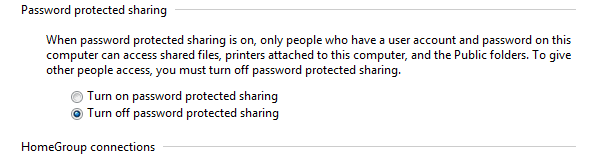
you need to:

control panel >> network and internet >> choose homegroup and sharing options (even if you don't use homegroups) >> change advanced sharing settings... >> home or work >> scroll down a bit.

you'll need to do it for all your machines.
 

Attachments

  • shr.PNG
    shr.PNG
    3.8 KB · Views: 8

My Computer

Computer Manufacturer/Model Number
mickey megabyte 1234
OS
ultimate 64 sp1
CPU
i5 2500K [email protected]
Motherboard
MSI P67A-GD53
Memory
8 gigs GSkill Ripjaws 1600
Graphics Card(s)
amd hd6950
Sound Card
creative x-fi gamer
Monitor(s) Displays
samsung 24"
Screen Resolution
1920x1080
Hard Drives
ocz vertex 2e 60 gig, samsung f3 1tb, buffalo 2tb ext
PSU
antec 550
Case
antec three hundred
Cooling
i'm a cooling fan
Keyboard
saitek eclipse ii
Mouse
logitech g3
Internet Speed
about 4 Mbps
Other Info
i love win7
Where do I find that on a Vista PC?
 

My Computer

OS
Windows 7 Home Premium
CPU
i7
Open Network & Sharing Centre and go to Change Advanced Sharing Settings
 

My Computer

Computer Manufacturer/Model Number
tw33k
OS
Windows 7 Ultimate (x64) SP1
CPU
Intel 3770k 4.6GHz
Motherboard
ASUS Maximus V Formula
Memory
8GB (2x 4GB) Crucial Ballistix
Graphics Card(s)
Sapphire 7950 (1060/1600)
Sound Card
On Board Realtek HD Audio
Monitor(s) Displays
27" Acer B273HU (via HDMI)
Screen Resolution
2048 x 1152
Hard Drives
Crucial M4 128GB
2TB WD Black
1TB Samsung F3 SATA
1TB WD Elite External
2TB WD USB 3.0
PSU
Corsair AX750 Gold
Case
Corsair Obsidian 800DW
Cooling
Corsair H100 (2x AP-121/2x UK-3000 push/pull)
Keyboard
Microsoft Wireless 5000
Mouse
Microsoft Wireless 5000
Internet Speed
5mb/s
Other Info
Logitech z-2300 2.1 speakers
Lamptron FC-5 v2
Thanks. I actually found it after posting that and then I edited my message to say thanks for the help, but it apparently didn't stick.

I wonder why tho did the girlfriend's laptop have PW set when she wouldn't have set it and it was actually the PW I use...and I don't think I set it up on her laptop to use my PW. Doesn't make sense, but it works now.
 

My Computer

OS
Windows 7 Home Premium
CPU
i7
Ok, now can anyone tell me why it keeps resetting itself to ON after I turn it off? I turn it off and it works fine, then today it's back on again, wanting a PW and I had to go turn it off again and it stopped asking. WHY???
 

My Computer

OS
Windows 7 Home Premium
CPU
i7
Ok, now can anyone tell me why it keeps resetting itself to ON after I turn it off? I turn it off and it works fine, then today it's back on again, wanting a PW and I had to go turn it off again and it stopped asking. WHY???

This behavior can be caused by certain anti-viruses and firewall programs. Please temporary disable the security programs, and then try to turn off Password Protected again.

If the issue persists, please let me know if you have enabled The Guest account. If it is already enabled, but has a password set, then Guest account doesn't play the guest account role consequently, which can cause Password Protected Sharing fail to turn off.

To resolve this issue, try following the steps to ensure no password has been set.

1. Right-click Computer and click Manage.
2. Under Local Users and Groups, click Users.
3. Right-click Guest, click Set Password, and then click Proceed.
4. Leave the Password fields blank and click Ok. This will ensure no password has been set.
5. After that, try turning off Password Protected Sharing and see if it works then.

Or you can try.
Go to Start –> Run –> compmgmt.msc
From the left hand pane, select Local Users And Groups –> Users
In the right hand pane, right click Guest and go to properties.
Check “Account is disabled” option.
 

My Computer

Computer type
PC/Desktop
Computer Manufacturer/Model Number
Home built
OS
Windows 7 Ult, Windows 8.1 Pro,
CPU
Q9650-4.275GHz, E8600 4.5GHz, E6750-3.8GHz
Motherboard
Evga 780i FTW
Memory
G.Skill PC2 9600 1200Mhz 5 5 5 15 2T
Graphics Card(s)
GTX480
Sound Card
Asus Xonar D2
Monitor(s) Displays
HannsG
Screen Resolution
1680X1050
Hard Drives
GSkill Phoenix Pro 120GB SSD
PSU
ThermalTake Toughpower 1000Watt modular
Case
ThermalTake XaserV
Cooling
Xigmatek S1283
Keyboard
Logitech G15
Mouse
Logitech G9
Internet Speed
T1
Back
Top