JavaScript is disabled. For a better experience, please enable JavaScript in your browser before proceeding.
You are using an out of date browser. It may not display this or other websites correctly.
You should upgrade or use an
alternative browser .
Enviroment variables problem
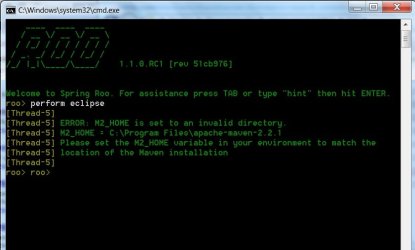
I am having this problem in the image:
error.jpg
38.7 KB
· Views: 59
New member
Guru
Gold Member
VIP
Open a Command Prompt , type set Enter . Paste the results here please.
Computer type PC/Desktop Computer Manufacturer/Model Number Lenovo IdeaCenter 450 OS Windows 10 Pro X64 CPU Intel Quad Core i7-4770 @ 3.4Ghz Memory 16.0GB PC3-12800 DDR3 SDRAM 1600 MHz Graphics Card(s) Intel Integrated HD Graphics Sound Card Realtek HD Audio Monitor(s) Displays HP 22" LCD Screen Resolution 1680 x 1050 Hard Drives 250GB Samsung EVO SATA-3 SSD Keyboard Dell USB Mouse Lenovo USB Internet Speed Cable via Road Runner 3MB Upload, 30MB Download Antivirus Windows Defender, MBAM Pro, MBAE Browser Seamonkey Other Info UEFI/GPT
New member
Thread Starter
ALLUSERSPROFILE=C:\ProgramData
New member
Guru
Gold Member
VIP
environmental variables look set as instructedInstead of "Program Files"
Last edited: Nov 21, 2010
Computer type PC/Desktop Computer Manufacturer/Model Number Own build OS Windows 7x64 Home Premium SP1 CPU Intel i7 2600k Motherboard ASUS P8Z68 Deluxe Memory G.Skill Ripjaws (DDR3-1600) 2x4GB Graphics Card(s) Nvidia GeForce GTS 450; Intel HD Graphics 3000(GT2+) Monitor(s) Displays Dell Ultrasharp IPS panel U2311H, Samsung SyncMaster P2350 Screen Resolution 1920x1080 Hard Drives Samsung 850 Pro SSD 256GB, Samsung SSD 840 120GB, Seagates 1TB Barracuda ST31000528AS x2 PSU Seasonic M12II 520W Case Lian Li Lancool PC-K60 Cooling Case: 1x120mm, 3x140mm CPU: Hyper 212+ Keyboard Logitech MK520 (wireless) Mouse Logitech MK520 Internet Speed 6-7 Mbps Antivirus Norton Security Premium, Malwarebytes on 2 (MSE on 3rd PC) Browser FireFox Other Info Audio: Logitech Z523 2.1
New member
Thread Starter
But how to change that?? I think I don't understand properly your answer.
Last edited: Nov 21, 2010
New member
Guru
Gold Member
VIP
On looking again at your environmental variable set list, it looks like you're running a 32 bit system. In which case the advice I gave is not your solution.
Computer type PC/Desktop Computer Manufacturer/Model Number Own build OS Windows 7x64 Home Premium SP1 CPU Intel i7 2600k Motherboard ASUS P8Z68 Deluxe Memory G.Skill Ripjaws (DDR3-1600) 2x4GB Graphics Card(s) Nvidia GeForce GTS 450; Intel HD Graphics 3000(GT2+) Monitor(s) Displays Dell Ultrasharp IPS panel U2311H, Samsung SyncMaster P2350 Screen Resolution 1920x1080 Hard Drives Samsung 850 Pro SSD 256GB, Samsung SSD 840 120GB, Seagates 1TB Barracuda ST31000528AS x2 PSU Seasonic M12II 520W Case Lian Li Lancool PC-K60 Cooling Case: 1x120mm, 3x140mm CPU: Hyper 212+ Keyboard Logitech MK520 (wireless) Mouse Logitech MK520 Internet Speed 6-7 Mbps Antivirus Norton Security Premium, Malwarebytes on 2 (MSE on 3rd PC) Browser FireFox Other Info Audio: Logitech Z523 2.1
New member
Guru
Gold Member
VIP
The Apache-Maven FAQ has some good info and links to places to look for and ask questions.
Getting help
Computer type PC/Desktop Computer Manufacturer/Model Number Lenovo IdeaCenter 450 OS Windows 10 Pro X64 CPU Intel Quad Core i7-4770 @ 3.4Ghz Memory 16.0GB PC3-12800 DDR3 SDRAM 1600 MHz Graphics Card(s) Intel Integrated HD Graphics Sound Card Realtek HD Audio Monitor(s) Displays HP 22" LCD Screen Resolution 1680 x 1050 Hard Drives 250GB Samsung EVO SATA-3 SSD Keyboard Dell USB Mouse Lenovo USB Internet Speed Cable via Road Runner 3MB Upload, 30MB Download Antivirus Windows Defender, MBAM Pro, MBAE Browser Seamonkey Other Info UEFI/GPT
New member
Thread Starter
Thanks, I asked already there.