Epson CX5800F won't print thru computer

Bily

New member
Member
Local time
12:02 PM
Messages
30
Strange problem: when I first installed Win 7 the printer was able to print thru native Win 7 drivers; I installed the Epson Win7 drivers from Epson web site and the printer worked for about a month. Now in the last week, the printer suddenly won't print through the computer...copy/print works; print through sd card works, but even a test page won't print from the computer.
The printer works fine when I connect it to a Toshiba laptop with XP installed.
Tearing my hair out...have tried:
1. Change usb cables - change usb slots
P.S. Hooked up an old Epson Stylus 860 via usb cable to same desktop computer and it prints fine. Thing must be 10 years old but my much newer CX5800F just won't work. Very frustrating.
2. Uninstall reinstall drivers and software
3. Tried restore points from a few weeks ago - no joy
4. Stop and restart print spool
Any ideas of what else I could try?? Scanner and scanner software work fine. Printer works fine with XP. :cry:
 

My Computer My Computer

OS
Windows 7
Did you delete the documents that caused the printer to not print? I had an issue where I could print even after restarting the print spooler.

Try this if you did not delete those files:

Delete contents of the C:\Windows\System32\spool\printers folder
Restart your computer and install printer again

Windows 7 Help Tips and How-to: print spooler service is not running
 

My Computer My Computer

OS
Windows 7 64-bit
CPU
AMD Athlon II X4 620 Propus @ 2.6ghz
Motherboard
GIGABYTE GA-MA785GM-US2H
Memory
OCZ Platinum 4GB (2 x 2GB) 240-Pin DDR2 SDRAM DDR2 1066 (PC2
Graphics Card(s)
ATI Radeon HD 4200 [on board]
Sound Card
Realtek ALC889A [on board]
Case
APEVIA X-QPACK-NW-BK/420 Black Aluminum
Tried this 3 or 4 times and it did not work work for me.
Thanks, raf051888, that was a good idea, and may help someone else.
I'm going to give up...been working on this for 2 or 3 days. I think it's a lost cause. :sick:
 

My Computer My Computer

OS
Windows 7
You sure? I'm willing to help as long as it takes. Did you actually have items in that folder?
 

My Computer My Computer

OS
Windows 7 64-bit
CPU
AMD Athlon II X4 620 Propus @ 2.6ghz
Motherboard
GIGABYTE GA-MA785GM-US2H
Memory
OCZ Platinum 4GB (2 x 2GB) 240-Pin DDR2 SDRAM DDR2 1066 (PC2
Graphics Card(s)
ATI Radeon HD 4200 [on board]
Sound Card
Realtek ALC889A [on board]
Case
APEVIA X-QPACK-NW-BK/420 Black Aluminum
Yes, there were items in the folder.
The only thing I have done to the computer in the way of major changes is: uninstalled Avast and installed Microsoft Security Essentials and have started having my old Vista installation vhd file automatically "attach" at boot up.
Could either of those events have affected the printer drivers?? ....or communication through usb (although my Epson 860 is connected via usb and printing fine).
I made a backup and am ready to try anything. This is an expensive piece of equipment and I refuse to replace it; will go back to Vista if I have to.
Thanks for your offer to help.
 

My Computer My Computer

OS
Windows 7
As long as there are not in items in the folder: C:\Windows\System32\spool\printers folder. Proceed with the following steps:

1. Uninstall the printer. This is done by going to Devices and Printers, then right click on the specific printer and hit remove device.
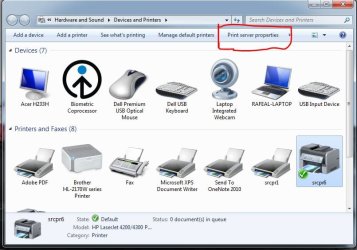
2. Uninstall the drivers. This is done in the Devices and Printers, then clicking Print Server properties at the top. [See attached screenshot] Then remove the drivers for that printer.
Printer Issue.jpg
3. Restart, then re-install the printer. Do that by installing the drivers first.
 

Attachments

  • Printer Issue.JPG
    Printer Issue.JPG
    66.9 KB · Views: 186

My Computer My Computer

OS
Windows 7 64-bit
CPU
AMD Athlon II X4 620 Propus @ 2.6ghz
Motherboard
GIGABYTE GA-MA785GM-US2H
Memory
OCZ Platinum 4GB (2 x 2GB) 240-Pin DDR2 SDRAM DDR2 1066 (PC2
Graphics Card(s)
ATI Radeon HD 4200 [on board]
Sound Card
Realtek ALC889A [on board]
Case
APEVIA X-QPACK-NW-BK/420 Black Aluminum
@raf051888
Did all that, and still does not work. I did get an animation with ink levels showing that it was printing but it does not actually print.
 

My Computer My Computer

OS
Windows 7
What exactly are you trying to print?
 

My Computer My Computer

OS
Windows 7 64-bit
CPU
AMD Athlon II X4 620 Propus @ 2.6ghz
Motherboard
GIGABYTE GA-MA785GM-US2H
Memory
OCZ Platinum 4GB (2 x 2GB) 240-Pin DDR2 SDRAM DDR2 1066 (PC2
Graphics Card(s)
ATI Radeon HD 4200 [on board]
Sound Card
Realtek ALC889A [on board]
Case
APEVIA X-QPACK-NW-BK/420 Black Aluminum
What I am trying to print:
The test page in properties, a few paragraphs from these message boards copied and pasted to Notepad, Microsoft Word, Write, one of my camera pictures to Microsoft Photo, a picture from Adobe Photoshop Elements, a couple of pages from a walkthrough from a game in Notepad, then in Microsoft 2007 Word and more....:D
 

My Computer My Computer

OS
Windows 7
Did you get any errors when you re-installed the printer?
 

My Computer My Computer

OS
Windows 7 64-bit
CPU
AMD Athlon II X4 620 Propus @ 2.6ghz
Motherboard
GIGABYTE GA-MA785GM-US2H
Memory
OCZ Platinum 4GB (2 x 2GB) 240-Pin DDR2 SDRAM DDR2 1066 (PC2
Graphics Card(s)
ATI Radeon HD 4200 [on board]
Sound Card
Realtek ALC889A [on board]
Case
APEVIA X-QPACK-NW-BK/420 Black Aluminum
Tried your uninstall/install instructions with my old Vista printer drivers for the cx5800f just because I am getting desperate and noticed the animation of installing drivers in the taskbar and clicked on it. It indicated that it was going ONLINE to windows update to fetch the drivers so...now I'm thinking there's something wrong with the drivers that Windows is "sending" to my Windows 7 Ultimate 32 bit desktop for this printer...maybe???
No error messages during installation. It ALWAYS says that the installation succeeded, but then goes and fetches some kind of update. I'm going to try again from scratch using the Windows 7 drivers from Epson.com and disconnect the internet while I am installing the drivers.
 

My Computer My Computer

OS
Windows 7
Good idea. I'll be waiting for the results.
 

My Computer My Computer

OS
Windows 7 64-bit
CPU
AMD Athlon II X4 620 Propus @ 2.6ghz
Motherboard
GIGABYTE GA-MA785GM-US2H
Memory
OCZ Platinum 4GB (2 x 2GB) 240-Pin DDR2 SDRAM DDR2 1066 (PC2
Graphics Card(s)
ATI Radeon HD 4200 [on board]
Sound Card
Realtek ALC889A [on board]
Case
APEVIA X-QPACK-NW-BK/420 Black Aluminum
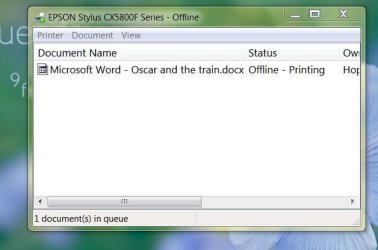
Okay, that did not work either. Here are some screenshots and I am quitting for the day. I may have to just live with the Epson 860 or go back to Vista. :cry: I get no error messages during installation and when I try to print, just nothing happens except a few times the print ink monitor has popped up and either shows the ink levels OR says there is a communication problem.
 

Attachments

  • printing.JPG
    printing.JPG
    32.7 KB · Views: 5
  • print2.JPG
    print2.JPG
    88 KB · Views: 7

My Computer My Computer

OS
Windows 7
Back
Top