
I upgraded to a new PC with Windows 7 pro 64 bit.
My Epson GT-S50 document scanner did not work so I tried
to use the install CD and that hung. Finally checked the Epson site
and found new drivers for Win 7.
The drivers I installed were;
epson13441.exe
epson14155.exe
The scanner now scans but is really slow. I tried removing all
drivers/programs, then ran a reg clean, rebooted and installed the
drivers again. Same issue.
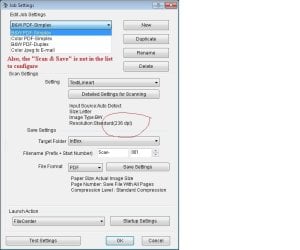
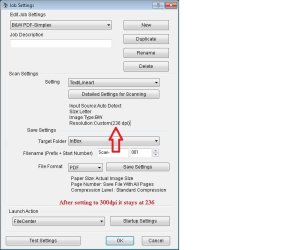
Not only is the scanner slow, I can not set the dpi in the Event Manager.
It defaults back to 236dpi everytime.
I opened a case with Epson but so far the only answer is to remove/re-install the drivers. I also tried setting the compatibility mode in properties to Windows 7 before installing the drivers. Same result.
IMHO the problem is with the Event Manager.
Has anyone elese seen this ?
Ideas ?
Thanks, Gregg
My Epson GT-S50 document scanner did not work so I tried
to use the install CD and that hung. Finally checked the Epson site
and found new drivers for Win 7.
The drivers I installed were;
epson13441.exe
epson14155.exe
The scanner now scans but is really slow. I tried removing all
drivers/programs, then ran a reg clean, rebooted and installed the
drivers again. Same issue.
Not only is the scanner slow, I can not set the dpi in the Event Manager.
It defaults back to 236dpi everytime.
I opened a case with Epson but so far the only answer is to remove/re-install the drivers. I also tried setting the compatibility mode in properties to Windows 7 before installing the drivers. Same result.
IMHO the problem is with the Event Manager.
Has anyone elese seen this ?
Ideas ?
Thanks, Gregg
Attachments
My Computer
- Computer Manufacturer/Model Number
- Gateway DX4320=19
- OS
- Windows 7 Professional 64 Bit
- CPU
- AMD 6 core 2.6Ghz
- Memory
- 8Gb
- Graphics Card(s)
- ATI Radeon 5750 1Gb
- Hard Drives
- Kingston 128SSD
- Internet Speed
- 10Mb

