Solved Equalizer

Dynentan

New member
Member
VIP
Local time
2:13 AM
Messages
329
Hello

I have installed the realtek HD audio drivers, and my sound works. However, when using the equalizer, it works the first time you calibrate it, however as soon as you play a song, a video on youtube or launch a game, the equalizer seems to disable by itself ( you can clearly hear it on the sound as clarity is lost) even though the equalizer still shows the same settings. I'm not sure who is responsible for programming such lousy software... help?

Solved by using dfx instead of realteks program.
 
Last edited:

My Computer

Computer type
PC/Desktop
OS
Windows 7 home premium
CPU
Intel core i5 4440
Motherboard
Asus h81m-k
Memory
Samsung 8gb ddr3
Graphics Card(s)
Asus gtx 1050
Monitor(s) Displays
Lg 27ea33
Hard Drives
Teamgroup gx2 512gb
PSU
Lenovo 400 watt
Case
Bitfenix nova
Browser
Microsoft edge
Youtube uses Adobe Flash and it sounds like that is disabling the EQ. Games are another that can set up their own sound parameters.

What happens if you set it and then use Windows Media Player?
 

My Computer

Computer type
PC/Desktop
Computer Manufacturer/Model Number
My Own Build
OS
Windows 10 64 bit
CPU
Intel i7 6700K
Motherboard
ASUS ROG Maximus VIII Hero
Memory
16GB Corsair Dominator
Graphics Card(s)
Intel CPU Graphics
Sound Card
RealTek
Monitor(s) Displays
27" Dell S2719dgf
Screen Resolution
2560X1440
Hard Drives
1 TB Samsung 850 EVO SSD for Win 10 Pro
500GB Samsung 850 EVO SSD for Win 10 Insider
2 TB drive for backup
PSU
EVGA Supernova 750G2
Case
BeQuiet Silent Base 600
Cooling
Deepcool Captain 120EX
Keyboard
Microsoft Wireless 2000
Mouse
Microsoft wireless
Internet Speed
100 MB/sec (Cable)
Antivirus
Microsoft Defender and Malwarebytes
Browser
Edge/Firefox
Other Info
Cakewalk (Sonar) by BandLab and Studio One 4.1 Pro recording studio software. MOTU 896Mk3 Hybrid recording interface, Frontier Tranzport wireless control unit, Behringer X-Touch Control Surface.
Five USB connected optical drives for CD Audio production using Nero BurningROM
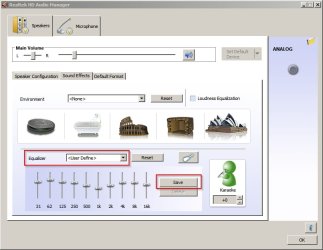
Your screenshot shows general settings. What happens if you try <user define> settings? Do they stick?

Realtek HD Audio Manager.jpg
 

My Computer

Computer type
Laptop
Computer Manufacturer/Model Number
ASUS
OS
Microsoft Windows 7 Home Premium 64-bit 7601 Multiprocessor Free Service Pack 1
CPU
AMD C-60 APU with Radeon(tm) HD Graphics
Motherboard
ASUSTeK COMPUTER INC. X501U
Memory
4.00 GB
Graphics Card(s)
AMD Radeon HD 6290 Graphics
Sound Card
(1) AMD High Definition Audio Device (2) Realtek High Defi
Screen Resolution
1366 x 768 x 32 bits (4294967296 colors) @ 60 Hz
Hard Drives
Hitachi HTS545050A7E380 SATA Disk Device
Antivirus
Comodo CIS & FW, SecureAplus App Whitelisting, Threatfire
Browser
Cyberfox 64bit, Opera 64bit, Airfox
Other Info
Spy-The-Spy, HitmanPro.Alert, Norton Connect Safe, MJRegWatcher, BitDefender TrafficLight, Voodoo Shield, Zemana AntiMalware
Yes, I have tried using my own user defined settings, and the result is the same.

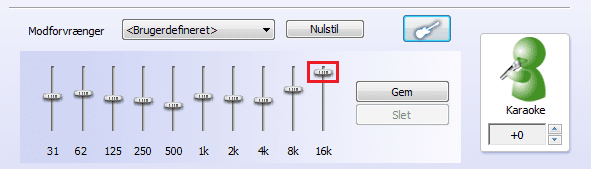
It appears that the only way to activate the equalizer (after it deactivates by itself) is by sliding the marker that adjusts the 16k frequency up and down, this seems to refresh the equalizer as the sound changes back to the way it is supposed to sound when the equalizer is enabled.

I have to do this several times on a daily basis, everytime I play a video game, watch a video on youtube or play a song.
 

Attachments

  • Equalizer.png
    Equalizer.png
    14.4 KB · Views: 52

My Computer

Computer type
PC/Desktop
OS
Windows 7 home premium
CPU
Intel core i5 4440
Motherboard
Asus h81m-k
Memory
Samsung 8gb ddr3
Graphics Card(s)
Asus gtx 1050
Monitor(s) Displays
Lg 27ea33
Hard Drives
Teamgroup gx2 512gb
PSU
Lenovo 400 watt
Case
Bitfenix nova
Browser
Microsoft edge
Reinstall the driver

Suggest: Removing the driver - rebooting, then downloading and installing the latest driver. Ask for help with finding the correct driver here:

http://www.sevenforums.com/drivers/
 

My Computer

Computer type
Laptop
Computer Manufacturer/Model Number
ASUS
OS
Microsoft Windows 7 Home Premium 64-bit 7601 Multiprocessor Free Service Pack 1
CPU
AMD C-60 APU with Radeon(tm) HD Graphics
Motherboard
ASUSTeK COMPUTER INC. X501U
Memory
4.00 GB
Graphics Card(s)
AMD Radeon HD 6290 Graphics
Sound Card
(1) AMD High Definition Audio Device (2) Realtek High Defi
Screen Resolution
1366 x 768 x 32 bits (4294967296 colors) @ 60 Hz
Hard Drives
Hitachi HTS545050A7E380 SATA Disk Device
Antivirus
Comodo CIS & FW, SecureAplus App Whitelisting, Threatfire
Browser
Cyberfox 64bit, Opera 64bit, Airfox
Other Info
Spy-The-Spy, HitmanPro.Alert, Norton Connect Safe, MJRegWatcher, BitDefender TrafficLight, Voodoo Shield, Zemana AntiMalware
I have now uninstalled the driver and downloaded the newest one from realteks website and the result is the same.

P.S: when i install the drivers and start the program it appears with the name Lenovo HD Audio Configuration, which is strange since the drivers are download from realteks official website.
 
Last edited:

My Computer

Computer type
PC/Desktop
OS
Windows 7 home premium
CPU
Intel core i5 4440
Motherboard
Asus h81m-k
Memory
Samsung 8gb ddr3
Graphics Card(s)
Asus gtx 1050
Monitor(s) Displays
Lg 27ea33
Hard Drives
Teamgroup gx2 512gb
PSU
Lenovo 400 watt
Case
Bitfenix nova
Browser
Microsoft edge
Realtek Audio Driver

I have no uninstalled the driver and downloaded the newest one from realteks website and the result is the same.

P.S: when i install the drivers and start the program it appears with the name Lenovo HD Audio Configuration, which is strange since the drivers are download from realteks official website.

Well you're supposed to download the driver from your system/motherboard manufacturer's website rather than the Realtek website.

See: http://www.sevenforums.com/drivers/...e-i-want-realtek-post2327523.html#post2327523

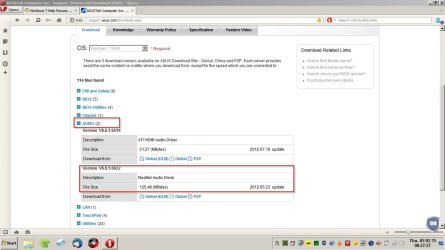
So for my ASUS machine it's this download that's required rather than anything from the Realtek website:

Driver.jpg
 

My Computer

Computer type
Laptop
Computer Manufacturer/Model Number
ASUS
OS
Microsoft Windows 7 Home Premium 64-bit 7601 Multiprocessor Free Service Pack 1
CPU
AMD C-60 APU with Radeon(tm) HD Graphics
Motherboard
ASUSTeK COMPUTER INC. X501U
Memory
4.00 GB
Graphics Card(s)
AMD Radeon HD 6290 Graphics
Sound Card
(1) AMD High Definition Audio Device (2) Realtek High Defi
Screen Resolution
1366 x 768 x 32 bits (4294967296 colors) @ 60 Hz
Hard Drives
Hitachi HTS545050A7E380 SATA Disk Device
Antivirus
Comodo CIS & FW, SecureAplus App Whitelisting, Threatfire
Browser
Cyberfox 64bit, Opera 64bit, Airfox
Other Info
Spy-The-Spy, HitmanPro.Alert, Norton Connect Safe, MJRegWatcher, BitDefender TrafficLight, Voodoo Shield, Zemana AntiMalware
I am going to reinstall the drivers using the drivers directly from lenovos official website, and after some testing I am going to return with the results.
 

My Computer

Computer type
PC/Desktop
OS
Windows 7 home premium
CPU
Intel core i5 4440
Motherboard
Asus h81m-k
Memory
Samsung 8gb ddr3
Graphics Card(s)
Asus gtx 1050
Monitor(s) Displays
Lg 27ea33
Hard Drives
Teamgroup gx2 512gb
PSU
Lenovo 400 watt
Case
Bitfenix nova
Browser
Microsoft edge
On both my Gigabyte and ASUS motherboards, even though I use the R2.75 RealTek driver direct from RealTek, it still shows up as Gigabyte and ASUS on the RealTek HD Audio Manager. That is not a problem.

I also have my default format at 16 bits 44.1Khz (CD Audio Quality). No need for higher bits/bitrates.
 

My Computer

Computer type
PC/Desktop
Computer Manufacturer/Model Number
My Own Build
OS
Windows 10 64 bit
CPU
Intel i7 6700K
Motherboard
ASUS ROG Maximus VIII Hero
Memory
16GB Corsair Dominator
Graphics Card(s)
Intel CPU Graphics
Sound Card
RealTek
Monitor(s) Displays
27" Dell S2719dgf
Screen Resolution
2560X1440
Hard Drives
1 TB Samsung 850 EVO SSD for Win 10 Pro
500GB Samsung 850 EVO SSD for Win 10 Insider
2 TB drive for backup
PSU
EVGA Supernova 750G2
Case
BeQuiet Silent Base 600
Cooling
Deepcool Captain 120EX
Keyboard
Microsoft Wireless 2000
Mouse
Microsoft wireless
Internet Speed
100 MB/sec (Cable)
Antivirus
Microsoft Defender and Malwarebytes
Browser
Edge/Firefox
Other Info
Cakewalk (Sonar) by BandLab and Studio One 4.1 Pro recording studio software. MOTU 896Mk3 Hybrid recording interface, Frontier Tranzport wireless control unit, Behringer X-Touch Control Surface.
Five USB connected optical drives for CD Audio production using Nero BurningROM
I have now download the drivers directly from Lenovo's website and it did not solve the problem, the equalizer still resets everytime I play a song or a game, and I have to use the method described in post #4 to activate it again.
 

My Computer

Computer type
PC/Desktop
OS
Windows 7 home premium
CPU
Intel core i5 4440
Motherboard
Asus h81m-k
Memory
Samsung 8gb ddr3
Graphics Card(s)
Asus gtx 1050
Monitor(s) Displays
Lg 27ea33
Hard Drives
Teamgroup gx2 512gb
PSU
Lenovo 400 watt
Case
Bitfenix nova
Browser
Microsoft edge
Downloaded realtek drivers?

I have now download the drivers directly from Lenovo's website and it did not solve the problem, the equalizer still resets everytime I play a song or a game, and I have to use the method described in post #4 to activate it again.

Did you uninstall the sound card driver using device manager then reboot before downloading and installing the new driver?

If that's what you did then I'm out of ideas.
 

My Computer

Computer type
Laptop
Computer Manufacturer/Model Number
ASUS
OS
Microsoft Windows 7 Home Premium 64-bit 7601 Multiprocessor Free Service Pack 1
CPU
AMD C-60 APU with Radeon(tm) HD Graphics
Motherboard
ASUSTeK COMPUTER INC. X501U
Memory
4.00 GB
Graphics Card(s)
AMD Radeon HD 6290 Graphics
Sound Card
(1) AMD High Definition Audio Device (2) Realtek High Defi
Screen Resolution
1366 x 768 x 32 bits (4294967296 colors) @ 60 Hz
Hard Drives
Hitachi HTS545050A7E380 SATA Disk Device
Antivirus
Comodo CIS & FW, SecureAplus App Whitelisting, Threatfire
Browser
Cyberfox 64bit, Opera 64bit, Airfox
Other Info
Spy-The-Spy, HitmanPro.Alert, Norton Connect Safe, MJRegWatcher, BitDefender TrafficLight, Voodoo Shield, Zemana AntiMalware
More thoughts

Well I've just remembered that I've seen settings fail to stick in the past when running other software. That's usually a permissions issue and running an application with admin rights usually sorts it out. However in the case of sound card drivers - it's unclear to me. Did you use an admin account to install the driver? Or do you have any software restriction policies in place? Did you install the driver from a file downloaded to your desktop or did you download it and run the installer from somewhere else?
 

My Computer

Computer type
Laptop
Computer Manufacturer/Model Number
ASUS
OS
Microsoft Windows 7 Home Premium 64-bit 7601 Multiprocessor Free Service Pack 1
CPU
AMD C-60 APU with Radeon(tm) HD Graphics
Motherboard
ASUSTeK COMPUTER INC. X501U
Memory
4.00 GB
Graphics Card(s)
AMD Radeon HD 6290 Graphics
Sound Card
(1) AMD High Definition Audio Device (2) Realtek High Defi
Screen Resolution
1366 x 768 x 32 bits (4294967296 colors) @ 60 Hz
Hard Drives
Hitachi HTS545050A7E380 SATA Disk Device
Antivirus
Comodo CIS & FW, SecureAplus App Whitelisting, Threatfire
Browser
Cyberfox 64bit, Opera 64bit, Airfox
Other Info
Spy-The-Spy, HitmanPro.Alert, Norton Connect Safe, MJRegWatcher, BitDefender TrafficLight, Voodoo Shield, Zemana AntiMalware
Are you talking about the build in administrator account in windows 7?
 

My Computer

Computer type
PC/Desktop
OS
Windows 7 home premium
CPU
Intel core i5 4440
Motherboard
Asus h81m-k
Memory
Samsung 8gb ddr3
Graphics Card(s)
Asus gtx 1050
Monitor(s) Displays
Lg 27ea33
Hard Drives
Teamgroup gx2 512gb
PSU
Lenovo 400 watt
Case
Bitfenix nova
Browser
Microsoft edge
No. I'm talking about right clicking on the driver installer and choosing "Run as administrator" assuming that you have admin rights or else know the password.
 

My Computer

Computer type
Laptop
Computer Manufacturer/Model Number
ASUS
OS
Microsoft Windows 7 Home Premium 64-bit 7601 Multiprocessor Free Service Pack 1
CPU
AMD C-60 APU with Radeon(tm) HD Graphics
Motherboard
ASUSTeK COMPUTER INC. X501U
Memory
4.00 GB
Graphics Card(s)
AMD Radeon HD 6290 Graphics
Sound Card
(1) AMD High Definition Audio Device (2) Realtek High Defi
Screen Resolution
1366 x 768 x 32 bits (4294967296 colors) @ 60 Hz
Hard Drives
Hitachi HTS545050A7E380 SATA Disk Device
Antivirus
Comodo CIS & FW, SecureAplus App Whitelisting, Threatfire
Browser
Cyberfox 64bit, Opera 64bit, Airfox
Other Info
Spy-The-Spy, HitmanPro.Alert, Norton Connect Safe, MJRegWatcher, BitDefender TrafficLight, Voodoo Shield, Zemana AntiMalware
2 different systems, same problem... Realtek drivers suck. :mad:
 

My Computer

Computer type
PC/Desktop
OS
Windows 7 Ultimate x64
CPU
i3-4160
Motherboard
Gigabyte GA-H81M-DS2 rev3.0
Memory
Kingston 8GB 1600mhz
Graphics Card(s)
GTX750Ti
Screen Resolution
1920x1080
Hard Drives
1Tb
PSU
Integra M 450w
Case
Zalman ZM-T4
Antivirus
NOD32
I managed to solve this by uninstalling the realtek drivers completely from my system. I have installed DFX instead, and the sound quality is superior to realtek and it works regardless of whether I am playing games, listening to music or watching a movie.

2 different systems, same problem... Realtek drivers suck. :mad:

Yes.. to be avoided at all costs.
 

My Computer

Computer type
PC/Desktop
OS
Windows 7 home premium
CPU
Intel core i5 4440
Motherboard
Asus h81m-k
Memory
Samsung 8gb ddr3
Graphics Card(s)
Asus gtx 1050
Monitor(s) Displays
Lg 27ea33
Hard Drives
Teamgroup gx2 512gb
PSU
Lenovo 400 watt
Case
Bitfenix nova
Browser
Microsoft edge
I managed to solve this by uninstalling the realtek drivers completely from my system. I have installed DFX instead, and the sound quality is superior to realtek and it works regardless of whether I am playing games, listening to music or watching a movie.

2 different systems, same problem... Realtek drivers suck. :mad:

Yes.. to be avoided at all costs.

realtek is not that bad tho im using 8k instead of 16k now, seems fine music, games etc..
 

My Computer

Computer type
PC/Desktop
OS
Windows 7 Ultimate x64
CPU
i3-4160
Motherboard
Gigabyte GA-H81M-DS2 rev3.0
Memory
Kingston 8GB 1600mhz
Graphics Card(s)
GTX750Ti
Screen Resolution
1920x1080
Hard Drives
1Tb
PSU
Integra M 450w
Case
Zalman ZM-T4
Antivirus
NOD32
Back
Top