Error 0x80070002 ... verifying known folder

soho1

New member
Power User
Local time
4:59 PM
Messages
458
Location
Earth, Mostly Chicago and London
Hi, I have had this Gateway DX4831-01e for a couple weeks now and see warning messages in the event log like this:


Error 0x80070002 occurred while verifying known folder {fdd39ad0-238f-46af-adb4-6c85480369c7} with path 'C:\Windows\system32\config\systemprofile\Documents'.
  • The messages occur often.
  • They occur even for files that I have never visited, although the Index Manger or some other system component may be looking at.
  • They messages occur back when the system was setup at the OEM prior to shipment and availabilty for sale at the retail store.
Gateway support :mad: seems to be of no use. I can only reach a typical first tier technician who laughably wanted to blame viruses. They do not seem to comprehend that the errors started in the OEM install, prior to shipping the PC for sale. (See the attached log)

At the Gateway support site, I self-downloaded all of the currently available hardware drivers and made sure that the system was updated.

All Windows updates have been applied.

I have attached a copy of the events to this post.

So, what is Windows Home Premium 64-bit really complaining about and how do I fix this?
 

Attachments

Last edited:

My Computer

Computer type
Laptop
Computer Manufacturer/Model Number
Dell Insprion 7559 next to a Toshiba Portege
OS
Win 7 Pro 64-bit
CPU
Intel Core i5
Motherboard
Intel
Memory
16 GB Dell, 6 GB Toshiba
Graphics Card(s)
Intel crap on both but Dell also has nVidia GeForce GTX960M
Sound Card
RealTek
Monitor(s) Displays
internal and external ACER KA270H 27"
Screen Resolution
1920x1080
Hard Drives
SSD 256 GB plus numerous WD Red or Purple on USB3 docks. Used to buy a lot of Seagate but tossed them the second time I got unrecoverable disc corruption in the midst of use.
Keyboard
Garage Mouse SW and some cheap Amazon China made USB device
Mouse
Garage Mouse and some cheap Amazon China made USB device
Internet Speed
50 Mbps (allegedly, depends on server)
Antivirus
Defender, Malwarebytes Premium and Kaspersky
Browser
IE 11, and Chrome something

My Computer

Computer type
PC/Desktop
Computer Manufacturer/Model Number
self build
OS
win 7 ultimate32bit, Win8.1pro wmc 32bit
CPU
amd phenom x4 9600
Motherboard
asus m2n32-sli deluxe
Memory
corsair twinxs 2x2gb
Graphics Card(s)
2x nvidia 1gb 8500gt
Sound Card
onboard
Monitor(s) Displays
23" PB Viseo 233d
Screen Resolution
1920x1080
Hard Drives
maxtor sata 500gb
maxtor sata 320gb
fujitsu sata200gb
PSU
oryxx tornado 750w
Case
thermaltake xaser lll
Cooling
artic freezer64 pro + 7 case fans
Trying that out. I will report back with results.
 

My Computer

Computer type
Laptop
Computer Manufacturer/Model Number
Dell Insprion 7559 next to a Toshiba Portege
OS
Win 7 Pro 64-bit
CPU
Intel Core i5
Motherboard
Intel
Memory
16 GB Dell, 6 GB Toshiba
Graphics Card(s)
Intel crap on both but Dell also has nVidia GeForce GTX960M
Sound Card
RealTek
Monitor(s) Displays
internal and external ACER KA270H 27"
Screen Resolution
1920x1080
Hard Drives
SSD 256 GB plus numerous WD Red or Purple on USB3 docks. Used to buy a lot of Seagate but tossed them the second time I got unrecoverable disc corruption in the midst of use.
Keyboard
Garage Mouse SW and some cheap Amazon China made USB device
Mouse
Garage Mouse and some cheap Amazon China made USB device
Internet Speed
50 Mbps (allegedly, depends on server)
Antivirus
Defender, Malwarebytes Premium and Kaspersky
Browser
IE 11, and Chrome something
Still getting those errors since the FixIt (non-agressive):

Error 0x80070002 occurred while verifying known folder {b4bfcc3a-db2c-424c-b029-7fe99a87c641} with path 'C:\Windows\system32\config\systemprofile\Desktop'.
Error 0x80070002 occurred while verifying known folder {fdd39ad0-238f-46af-adb4-6c85480369c7} with path 'C:\Windows\system32\config\systemprofile\Documents'.
Error 0x80070002 occurred while verifying known folder {625b53c3-ab48-4ec1-ba1f-a1ef4146fc19} with path 'C:\Windows\system32\config\systemprofile\AppData\Roaming\Microsoft\Windows\Start Menu'.


Going to try the non-recommended agressive mode now:
 

My Computer

Computer type
Laptop
Computer Manufacturer/Model Number
Dell Insprion 7559 next to a Toshiba Portege
OS
Win 7 Pro 64-bit
CPU
Intel Core i5
Motherboard
Intel
Memory
16 GB Dell, 6 GB Toshiba
Graphics Card(s)
Intel crap on both but Dell also has nVidia GeForce GTX960M
Sound Card
RealTek
Monitor(s) Displays
internal and external ACER KA270H 27"
Screen Resolution
1920x1080
Hard Drives
SSD 256 GB plus numerous WD Red or Purple on USB3 docks. Used to buy a lot of Seagate but tossed them the second time I got unrecoverable disc corruption in the midst of use.
Keyboard
Garage Mouse SW and some cheap Amazon China made USB device
Mouse
Garage Mouse and some cheap Amazon China made USB device
Internet Speed
50 Mbps (allegedly, depends on server)
Antivirus
Defender, Malwarebytes Premium and Kaspersky
Browser
IE 11, and Chrome something
Still getting those errors since the FixIt (non-agressive):

Error 0x80070002 occurred while verifying known folder {b4bfcc3a-db2c-424c-b029-7fe99a87c641} with path 'C:\Windows\system32\config\systemprofile\Desktop'.
Error 0x80070002 occurred while verifying known folder {fdd39ad0-238f-46af-adb4-6c85480369c7} with path 'C:\Windows\system32\config\systemprofile\Documents'.
Error 0x80070002 occurred while verifying known folder {625b53c3-ab48-4ec1-ba1f-a1ef4146fc19} with path 'C:\Windows\system32\config\systemprofile\AppData\Roaming\Microsoft\Windows\Start Menu'.


Going to try the non-recommended agressive mode now:

good luck wth that soho1 , hope it works out for you ;)
 

My Computer

Computer type
PC/Desktop
Computer Manufacturer/Model Number
self build
OS
win 7 ultimate32bit, Win8.1pro wmc 32bit
CPU
amd phenom x4 9600
Motherboard
asus m2n32-sli deluxe
Memory
corsair twinxs 2x2gb
Graphics Card(s)
2x nvidia 1gb 8500gt
Sound Card
onboard
Monitor(s) Displays
23" PB Viseo 233d
Screen Resolution
1920x1080
Hard Drives
maxtor sata 500gb
maxtor sata 320gb
fujitsu sata200gb
PSU
oryxx tornado 750w
Case
thermaltake xaser lll
Cooling
artic freezer64 pro + 7 case fans
No good. Even after agressive mode, I am still getting these errors.
 

My Computer

Computer type
Laptop
Computer Manufacturer/Model Number
Dell Insprion 7559 next to a Toshiba Portege
OS
Win 7 Pro 64-bit
CPU
Intel Core i5
Motherboard
Intel
Memory
16 GB Dell, 6 GB Toshiba
Graphics Card(s)
Intel crap on both but Dell also has nVidia GeForce GTX960M
Sound Card
RealTek
Monitor(s) Displays
internal and external ACER KA270H 27"
Screen Resolution
1920x1080
Hard Drives
SSD 256 GB plus numerous WD Red or Purple on USB3 docks. Used to buy a lot of Seagate but tossed them the second time I got unrecoverable disc corruption in the midst of use.
Keyboard
Garage Mouse SW and some cheap Amazon China made USB device
Mouse
Garage Mouse and some cheap Amazon China made USB device
Internet Speed
50 Mbps (allegedly, depends on server)
Antivirus
Defender, Malwarebytes Premium and Kaspersky
Browser
IE 11, and Chrome something
Old post, but issue is still prevalent, and not marked as solved...

If this works, credit is due to myurkus and DOrzx

(quicktip: computer management > local users > users > YOU > properties > Profile 'home folder' local path = c:\users\you

Assume religious position > pray
 

My Computer

Computer type
Laptop
Computer Manufacturer/Model Number
Dell
OS
Windows 7 Ultimate 64bit
CPU
2.2
Memory
8Gb
Graphics Card(s)
NVIDIA
Screen Resolution
1280/762
Mouse
built in pad || iphone || MS wireless
Internet Speed
100MB
Antivirus
Avast
Browser
Chrome, Chrome portable
re Error 0x80070002 occurred while verifying known folder {b4bfcc3a-db2c-424c-b029-7fe99a87c641} with path 'C:\Windows\system32\config\systemprofile\Desktop'.

UPDATE: for me, adding the profile home path as recommended did not stop folder verification issues re desktop @

C:\Windows\system32\config\systemprofile\Desktop.

Manually attempting resolution.

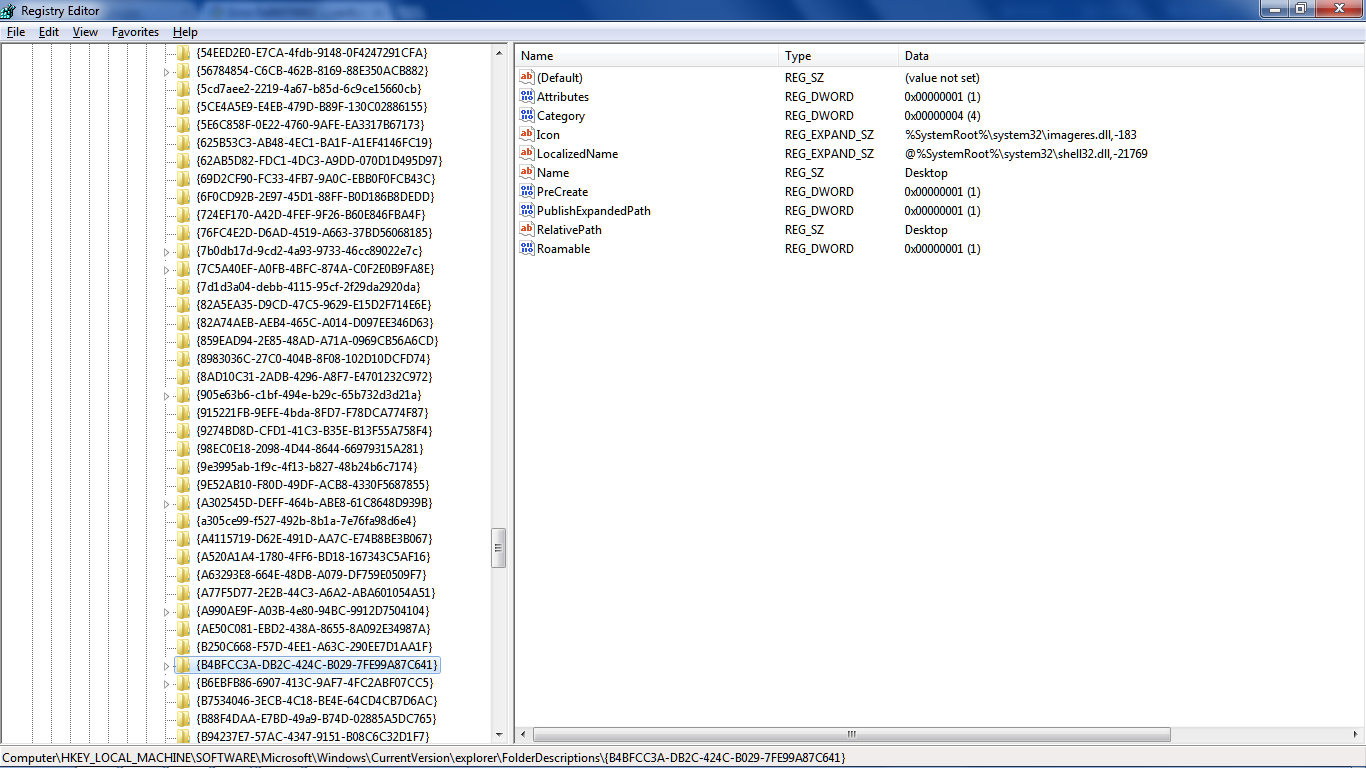
the culprit
F9UJhll.png


Notice the absence of a parent.

Glanced at other GUIDs, noticed recent's parent ({3EB685DB-65F9-4CF6-A03A-E3EF65729F3D}, a candidate for our orphaned Desktop)

A quick peek at Nirsoft's SpecialFoldersView shows a few familiar faces, everything looks hunky dory.

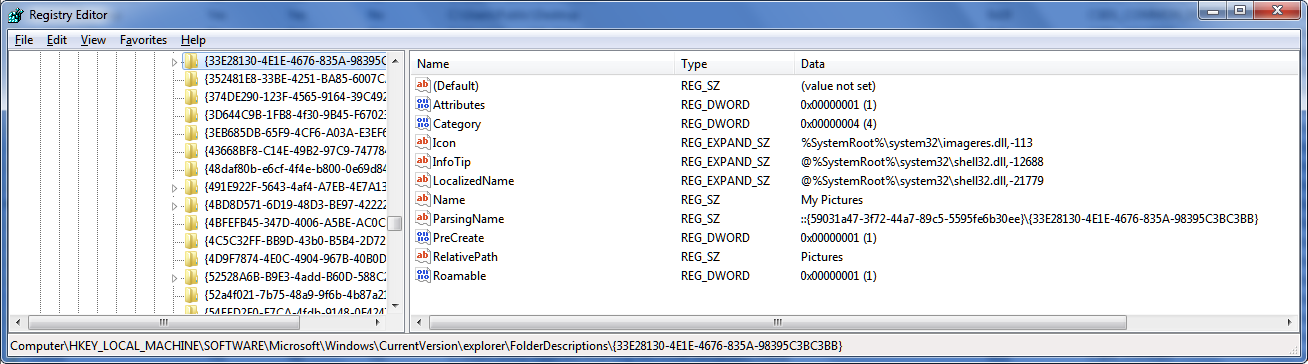
In comparison, here's my pictures

8v1asAF.png


notice no parent, and also the parsing name...

My Music ::{59031a47-3f72-44a7-89c5-5595fe6b30ee}\{4BD8D571-6D19-48D3-BE97-422220080E43}
My Pictures ::{59031a47-3f72-44a7-89c5-5595fe6b30ee}\{33E28130-4E1E-4676-835A-98395C3BC3BB}
My Videos ::{59031a47-3f72-44a7-89c5-5595fe6b30ee}\{18989B1D-99B5-455B-841C-AB7C74E4DDFC}
Documents ::{59031a47-3f72-44a7-89c5-5595fe6b30ee}\{FDD39AD0-238F-46AF-ADB4-6C85480369C7}
*Downloads + Favorites break the mould (no parsing parent)

Proposal #1: Change (add) Desktop's parsingname to

::{59031a47-3f72-44a7-89c5-5595fe6b30ee}\{B4BFCC3A-DB2C-424C-B029-7FE99A87C641}

I really wish I knew when to expect the event, re debugging... opening explorer, visiting desktop et al does NOT generate folder verification error. PID? SearchIndexer?! Now that's interesting...
 

My Computer

Computer type
Laptop
Computer Manufacturer/Model Number
Dell
OS
Windows 7 Ultimate 64bit
CPU
2.2
Memory
8Gb
Graphics Card(s)
NVIDIA
Screen Resolution
1280/762
Mouse
built in pad || iphone || MS wireless
Internet Speed
100MB
Antivirus
Avast
Browser
Chrome, Chrome portable
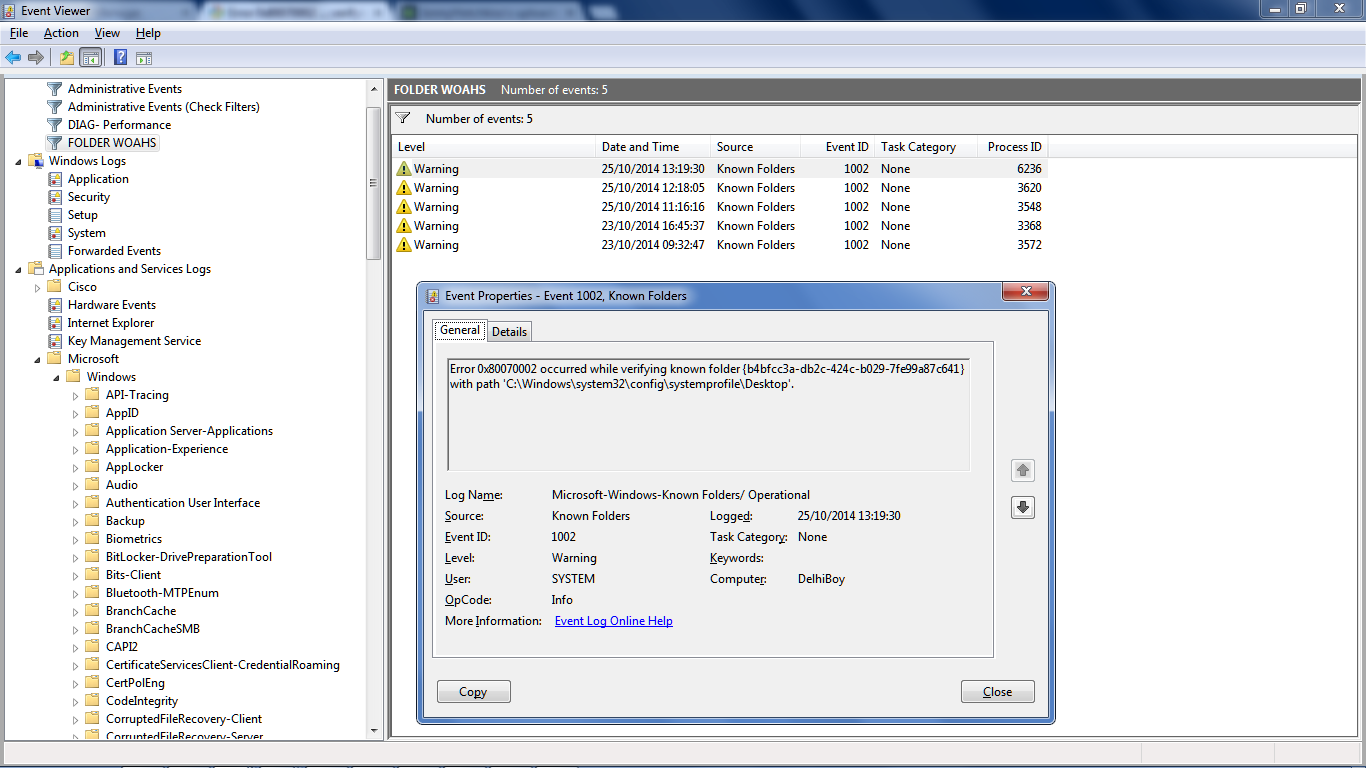
OK so I've got windows search set to manual. I stopped it. I was looking at other stuff MS gets wrong (parked CPUs, WLAN AUTOConfig "warning" re a service successfully stopping, event 37 The speed of processor 0 in group 0 is being limited by system firmware. The processor has been in this reduced performance state for 20 seconds since the last report....) and then and then out of nowhere the event occurred.

SGWpw1f.png


5CFR4Kj.png


Sadly, this suggests the nice clean cause/fix of setting the user's home profile path is debunked, as it were.

One really interesting thing I've only just noticed for the first time today looking at all this is that it SEEMS that, to get the CAUSE, ie a Process ID, you have to add the Process ID column. That info does not seem to appear elsewhere in event summary.

UPDATE - also under "friendly", ie

Execution

[ ProcessID] 6236
[ ThreadID] 7880

So I could just stop windows search, ie disable the service...

keen to learn what others are experiencing, ie which paths/GUIDs, if only in 64-bit windows... if service packed...
 

My Computer

Computer type
Laptop
Computer Manufacturer/Model Number
Dell
OS
Windows 7 Ultimate 64bit
CPU
2.2
Memory
8Gb
Graphics Card(s)
NVIDIA
Screen Resolution
1280/762
Mouse
built in pad || iphone || MS wireless
Internet Speed
100MB
Antivirus
Avast
Browser
Chrome, Chrome portable
OK, so I've booted up my other "clean build". The goal: to reduce event errors and warnings to an "acceptable" threshold*.

First thing is to see what paths I've previously created in attempted to resolve this.

bzM6l9q.png

I've added the date accessed column, which suggests none are needed, but let's not go breaking bad yet.

Windows Search is started (manual), Service Pack 1 is installed (the only known significant difference between this build "crash", and it's sister-with-the-bad-known-folders, "crash 2")
 

My Computer

Computer type
Laptop
Computer Manufacturer/Model Number
Dell
OS
Windows 7 Ultimate 64bit
CPU
2.2
Memory
8Gb
Graphics Card(s)
NVIDIA
Screen Resolution
1280/762
Mouse
built in pad || iphone || MS wireless
Internet Speed
100MB
Antivirus
Avast
Browser
Chrome, Chrome portable
apologies to all internet users googling this, trying to find solutions, only to discover the litter I've left everywhere.

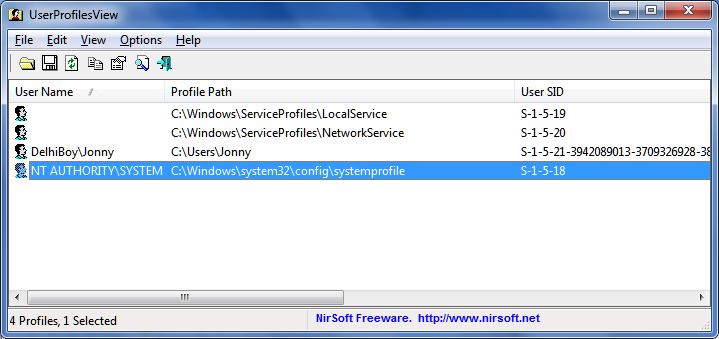
If it's any consolation, I think it's caused by a suspect user profile path. Adding the "Process ID" column gives a quick glimpse of which process invoked the error-event, ie Windows Search (compare with the PID in Task Manager).

The root cause appears to be this, the NT Authority User Profile
4UP7FOg.png


I don't feel like messing with this right now though, so for the time being, created dummy folders, disabling windows search, or just ignoring the errors all sound like good ideas :)
 

My Computer

Computer type
Laptop
Computer Manufacturer/Model Number
Dell
OS
Windows 7 Ultimate 64bit
CPU
2.2
Memory
8Gb
Graphics Card(s)
NVIDIA
Screen Resolution
1280/762
Mouse
built in pad || iphone || MS wireless
Internet Speed
100MB
Antivirus
Avast
Browser
Chrome, Chrome portable
Back
Top