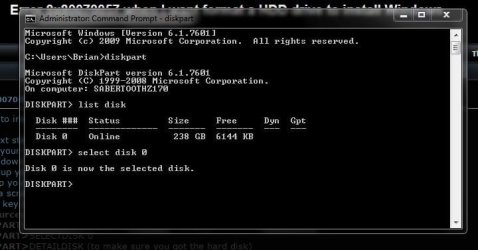
I wanted to install Win 7 and I received the error message ”Error 0x80070057”
I tried next steps:
1. Insert your Win 7 DVD or Win 7 USB
2. Power down your computer.
3. Power up your computer.
4. Boot up your computer from the Win 7 DVD/USB stick.
5. When a screen is displayed asking for the Language to Install,
press the key combo of SHIFT + F10.
6. X:\Sources>DISKPART
7. DISKPART>LISTDISK
8. DISKPART>SELECTDISK 0
9. DISKPART>DETAILDISK (to make sure you got the hard disk)
10. DISKPART>CLEAN
11. DISKPART>EXIT
12. DISKPART>EXIT(this one gets you back into the install program.
When I wrote command CLEAN the answer was ”DiskPart has encounteredan error: The request could not be performed because of an I/O device error.See the System Event Log for mor Information.” and when I wanted to installWindows 7 it did not work.
Please help and thank you very much
I tried next steps:
1. Insert your Win 7 DVD or Win 7 USB
2. Power down your computer.
3. Power up your computer.
4. Boot up your computer from the Win 7 DVD/USB stick.
5. When a screen is displayed asking for the Language to Install,
press the key combo of SHIFT + F10.
6. X:\Sources>DISKPART
7. DISKPART>LISTDISK
8. DISKPART>SELECTDISK 0
9. DISKPART>DETAILDISK (to make sure you got the hard disk)
10. DISKPART>CLEAN
11. DISKPART>EXIT
12. DISKPART>EXIT(this one gets you back into the install program.
When I wrote command CLEAN the answer was ”DiskPart has encounteredan error: The request could not be performed because of an I/O device error.See the System Event Log for mor Information.” and when I wanted to installWindows 7 it did not work.
Please help and thank you very much
My Computer
At a glance
Windows 7 Ultimate x64
- Computer type
- Laptop
- Computer Manufacturer/Model Number
- ASUS
- OS
- Windows 7 Ultimate x64