
Error:0x8007045d during the creation of partition

UserOfDell

New member
Local time
12:50 AM
Messages
3
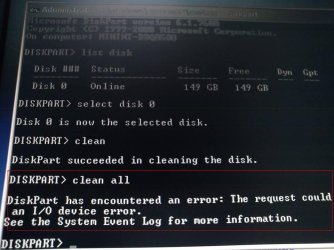
Could you guys please teach me how to fix the problem ? I've tried the " Clean and Clean All with

Diskpart Command '' method but it didn't work at ' clean all ' ( Refer to the pic shown below ) . 111.jpg
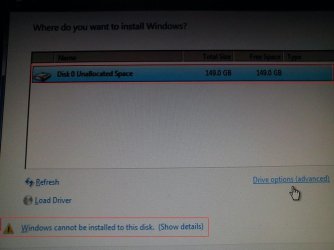
222.jpg

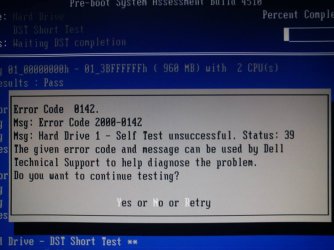
After diagnostic done , this poped out .
1377325_10201394868866764_1189546138_n.jpg
 
Last edited:

My Computer My Computer

At a glance

Window Xp , Window 7 Professional 32bit / 64bit
Computer type
PC/Desktop
Computer Manufacturer/Model Number
Dell
OS
Window Xp , Window 7 Professional 32bit / 64bit
The error code means the HD is likely failing. I would back up the data on it now.

Reboot into the PC and tap the F12 key to run Dell Diagnostics full test if you haven't: Dell Diagnostics Utility - How to Run the

If it confirms the error then you can also run the HD maker's HD Diagnostic extended CD scan to confirm this and possibly make repairs. But I would not trust the drive again if either of the tests say its failing.
 
I've added 2 photo . So , do u have any suggestion ?
 

My Computer My Computer

At a glance

Window Xp , Window 7 Professional 32bit / 64bit
Computer type
PC/Desktop
Computer Manufacturer/Model Number
Dell
OS
Window Xp , Window 7 Professional 32bit / 64bit
I gave you several suggestions! Did you not see them?

The way things work here is we give you steps and you report back the results, then we give you more steps.
 
Copy that . I will try them soon and report back the result :D
 

My Computer My Computer

At a glance

Window Xp , Window 7 Professional 32bit / 64bit
Computer type
PC/Desktop
Computer Manufacturer/Model Number
Dell
OS
Window Xp , Window 7 Professional 32bit / 64bit
Could you guys please teach me how to fix the problem ? I've tried the " Clean and Clean All with

Diskpart Command '' method but it didn't work at ' clean all ' ( Refer to the pic shown below ) . View attachment 288176
View attachment 288177

After diagnostic done , this poped out .
View attachment 288079

Hi UserOfDell,

This diagnostic results means harddrive has failed and you need to get it replaced on the system to resolve this issue.

If the system is under warranty then please contact me through a private message and provide me your service tag and contact information so I may access your system records.

And, if the system is out of warranty then you contact our Expired Warranty Support at the link below:

http://dell.to/12LmNBq

If you have any further queries please feel free to contact us.
 

My Computer My Computer

At a glance

Winndows 7 32 bit
Computer type
PC/Desktop
OS
Winndows 7 32 bit
Back
Top