Error (0x80300024) please help

SharkysRacing

New member
Local time
10:12 AM
Messages
14
I have read threw SOME of the threads regarding this error.. But mine is slightly different.. I see where others had more than one drive in there system... I only have the one... I am getting Error (0x80300024)... " Windows is unable to install to the selected location "

Disk 0 unallocated space

I bought this computer second hand and the previous owner reformated it so none of there info was on it. but never re installed a OS.. So i bought a Windows and this is what im getting during setup.

Again i only have the one 500gb drive

System info

HP Omni 100 pc AIO


Please help
 

My Computer

Computer type
PC/Desktop
Computer Manufacturer/Model Number
hp
OS
Windows 7 Home premium x64
Memory
4gb
Hard Drives
500gb
Browser
firefox

My Computer

Computer type
PC/Desktop
Computer Manufacturer/Model Number
Skylake Special #666
OS
Windows 10 Pro x64
CPU
Intel Core i7 6700K
Motherboard
Asus Sabertooth Z170 Mark 1
Memory
GSkill TridentZ RGB 16GB 3600 16-16-16-36
Graphics Card(s)
EVGA GTX 980 Ti SC x2
Sound Card
Realtek High Definition
Monitor(s) Displays
AOC G2460PG
Screen Resolution
1920 x 1080 144Hz
Hard Drives
Samsung 860 Pro 256GB, Seagate Barracuda 4TB x2
PSU
EVGA 1000 P2, EVGA White Custom Braided Cables
Case
Corsair Vengeance C70 Gunmetal Black
Cooling
Corsair H100i v2, Corsair ML120 x2, Thermal Grizzly Kryonaut
Keyboard
Logitech G910 Orion Spectrum
Mouse
Logitech G700s
Internet Speed
Verizon Fios Quantum Gateway 75/75
Antivirus
Windows Defender, Malwarebytes Free 3.8.3
Browser
Chrome
Other Info
Corsair SP120 x4, LG Blu-ray Drive, Durabrand HT-395 100 Watt Dolby Digital Amp, Corsair H2100 Wireless 7.1 Headset
That was so easy. Thank you so very much!!!
 

My Computer

Computer type
PC/Desktop
Computer Manufacturer/Model Number
hp
OS
Windows 7 Home premium x64
Memory
4gb
Hard Drives
500gb
Browser
firefox
i got windows loaded. but now it just boots to a black screen
 
Last edited:

My Computer

Computer type
PC/Desktop
Computer Manufacturer/Model Number
hp
OS
Windows 7 Home premium x64
Memory
4gb
Hard Drives
500gb
Browser
firefox
thank you
 

My Computer

Computer type
PC/Desktop
Computer Manufacturer/Model Number
hp
OS
Windows 7 Home premium x64
Memory
4gb
Hard Drives
500gb
Browser
firefox
Glad to help :)
 

My Computer

Computer type
PC/Desktop
Computer Manufacturer/Model Number
Skylake Special #666
OS
Windows 10 Pro x64
CPU
Intel Core i7 6700K
Motherboard
Asus Sabertooth Z170 Mark 1
Memory
GSkill TridentZ RGB 16GB 3600 16-16-16-36
Graphics Card(s)
EVGA GTX 980 Ti SC x2
Sound Card
Realtek High Definition
Monitor(s) Displays
AOC G2460PG
Screen Resolution
1920 x 1080 144Hz
Hard Drives
Samsung 860 Pro 256GB, Seagate Barracuda 4TB x2
PSU
EVGA 1000 P2, EVGA White Custom Braided Cables
Case
Corsair Vengeance C70 Gunmetal Black
Cooling
Corsair H100i v2, Corsair ML120 x2, Thermal Grizzly Kryonaut
Keyboard
Logitech G910 Orion Spectrum
Mouse
Logitech G700s
Internet Speed
Verizon Fios Quantum Gateway 75/75
Antivirus
Windows Defender, Malwarebytes Free 3.8.3
Browser
Chrome
Other Info
Corsair SP120 x4, LG Blu-ray Drive, Durabrand HT-395 100 Watt Dolby Digital Amp, Corsair H2100 Wireless 7.1 Headset
i have windows loaded, but it gets to the "set up windows" page and it will NOT let me type in a computer name.. i thought maybe it was the keyboard, but when i let it sit for awhile it goes to the black screen. i press the space bar the screen comes back on... So its going into stand by. and it come back out using the keyboard.. But i am not able to type anything.. any ideas now??
 

My Computer

Computer type
PC/Desktop
Computer Manufacturer/Model Number
hp
OS
Windows 7 Home premium x64
Memory
4gb
Hard Drives
500gb
Browser
firefox
Try another keyboard anyway.

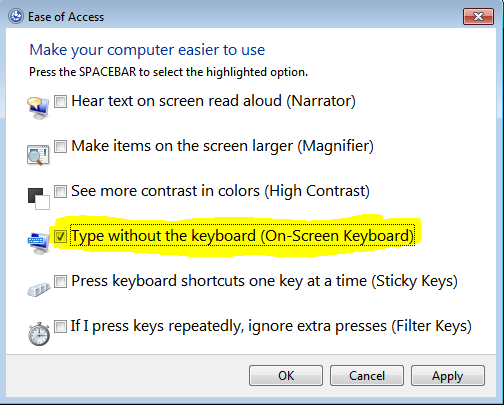
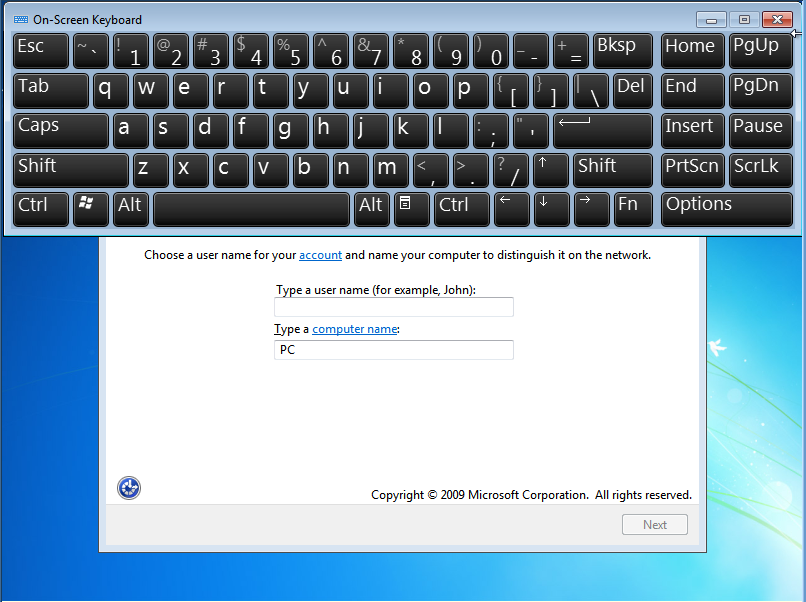
Look for onscreen tools prompt for onscreen keyboard.
 
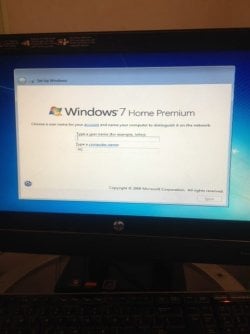
This is the screen it is stuck on.. again if i leave it alone it will go into stand by, if i hit ANY key it will go back to this screen
 

Attachments

  • IMG_0957.JPG
    IMG_0957.JPG
    38.3 KB · Views: 11

My Computer

Computer type
PC/Desktop
Computer Manufacturer/Model Number
hp
OS
Windows 7 Home premium x64
Memory
4gb
Hard Drives
500gb
Browser
firefox
So your response is to just repeat the problem? Did you read what I wrote?

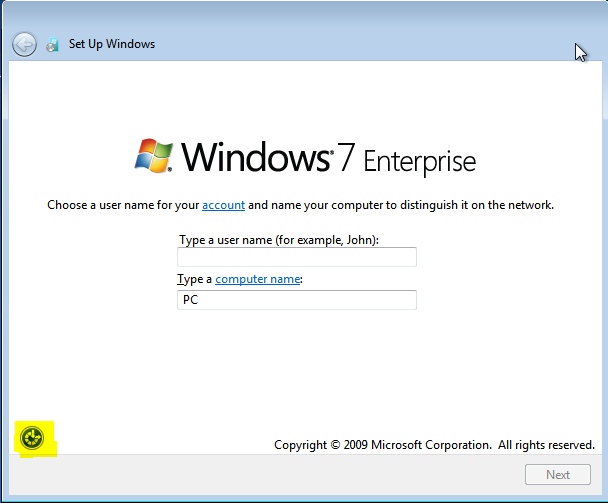
Click the icon shown at bottom left.
 
Use a PS2 keyboard if the motherboard has a PS2 port.

I don`t see why it would work through the entire install, then quit working, that makes no sense.

As Greg has ALREADY stated, try another keyboard, you can reboot the pc and it will come right back to the same screen.
 

My Computer

Computer type
PC/Desktop
Computer Manufacturer/Model Number
Skylake Special #666
OS
Windows 10 Pro x64
CPU
Intel Core i7 6700K
Motherboard
Asus Sabertooth Z170 Mark 1
Memory
GSkill TridentZ RGB 16GB 3600 16-16-16-36
Graphics Card(s)
EVGA GTX 980 Ti SC x2
Sound Card
Realtek High Definition
Monitor(s) Displays
AOC G2460PG
Screen Resolution
1920 x 1080 144Hz
Hard Drives
Samsung 860 Pro 256GB, Seagate Barracuda 4TB x2
PSU
EVGA 1000 P2, EVGA White Custom Braided Cables
Case
Corsair Vengeance C70 Gunmetal Black
Cooling
Corsair H100i v2, Corsair ML120 x2, Thermal Grizzly Kryonaut
Keyboard
Logitech G910 Orion Spectrum
Mouse
Logitech G700s
Internet Speed
Verizon Fios Quantum Gateway 75/75
Antivirus
Windows Defender, Malwarebytes Free 3.8.3
Browser
Chrome
Other Info
Corsair SP120 x4, LG Blu-ray Drive, Durabrand HT-395 100 Watt Dolby Digital Amp, Corsair H2100 Wireless 7.1 Headset
Greg.. I am not able to click anything. No mouse No keyboard .. ( Both are USB) .. I did read what you wrote. the black screen sat for about 5 min. then it said "Windows is preparing to load for the first time" So i did not click the link, Figured i was past that part..

I do not have a PS2 port.. only 6 usb ports.. The only other keyboard i have is wireless, I did try it but nothing.. figured it wouldnt have the drivers.. I guess ill go buy another keyboard tomorrow and see it...
 

My Computer

Computer type
PC/Desktop
Computer Manufacturer/Model Number
hp
OS
Windows 7 Home premium x64
Memory
4gb
Hard Drives
500gb
Browser
firefox
Make sure you're using USB2 ports as Win7 installer doesn't have USB3 drivers in it. USB2 ports are black, USB3 ports are blue.

Enter BIOS setup to check if you have UEFI BIOS. If so report back settings choices for CSM, Legacy BIOS, UEFI, EFI and Secure Boot.

Also in BIOS setup Disable USB3 support for install.

Enable Legacy USB in BIOS setup.
 
Last edited:
Could you break it down a little bit?? Im computer savey but not sure on all the correct words... Bios= F10 at boot right? shows "Main,advanced,power,boot,exit" Or you mean the black screen with the command prompt?
 

My Computer

Computer type
PC/Desktop
Computer Manufacturer/Model Number
hp
OS
Windows 7 Home premium x64
Memory
4gb
Hard Drives
500gb
Browser
firefox
It sounds like you entered BIOS setup. Why didn't you look around for the settings I mentioned above?

What about the USB ports?
 
it only has USB 2 ( the black ones) all of them are available

Bios Revision 6.04


I dont see "UEFI BIOS" anywhere
and dont see anything that says "Legacy USB"
 

My Computer

Computer type
PC/Desktop
Computer Manufacturer/Model Number
hp
OS
Windows 7 Home premium x64
Memory
4gb
Hard Drives
500gb
Browser
firefox
OK then you have the keyboard in the right place, still, I can not understand why it works all the way through, until you get to the desktop, then it quits:picnic:
 

My Computer

Computer type
PC/Desktop
Computer Manufacturer/Model Number
Skylake Special #666
OS
Windows 10 Pro x64
CPU
Intel Core i7 6700K
Motherboard
Asus Sabertooth Z170 Mark 1
Memory
GSkill TridentZ RGB 16GB 3600 16-16-16-36
Graphics Card(s)
EVGA GTX 980 Ti SC x2
Sound Card
Realtek High Definition
Monitor(s) Displays
AOC G2460PG
Screen Resolution
1920 x 1080 144Hz
Hard Drives
Samsung 860 Pro 256GB, Seagate Barracuda 4TB x2
PSU
EVGA 1000 P2, EVGA White Custom Braided Cables
Case
Corsair Vengeance C70 Gunmetal Black
Cooling
Corsair H100i v2, Corsair ML120 x2, Thermal Grizzly Kryonaut
Keyboard
Logitech G910 Orion Spectrum
Mouse
Logitech G700s
Internet Speed
Verizon Fios Quantum Gateway 75/75
Antivirus
Windows Defender, Malwarebytes Free 3.8.3
Browser
Chrome
Other Info
Corsair SP120 x4, LG Blu-ray Drive, Durabrand HT-395 100 Watt Dolby Digital Amp, Corsair H2100 Wireless 7.1 Headset
I have tried i in every usb port on the machine. Have even tried to restart it each time i changed the ports and still nothing. its even a HP keyboard.. its the one that came with the machine..
 

My Computer

Computer type
PC/Desktop
Computer Manufacturer/Model Number
hp
OS
Windows 7 Home premium x64
Memory
4gb
Hard Drives
500gb
Browser
firefox
Can you Tab to the link on the screen which offers access to the on-screen keyboard? Try Tab and Enter:

Tihhl.png


rzjxJ.png


NbOSw.png


If this won't work then reset the BIOS to defaults, Save and Exit.

Scour every BIOS setting for Legacy USB or any USB settings in BIOS setup whatsoever.
 
Back
Top