
JackSparrow25
New member
- Local time
- 11:06 AM
- Messages
- 2
Hey there,
I’m facing the following problem:
I'm trying to install windows 8 Pro x64 onto a virtual hard disk using the method outlined here:
Guide to Installing and Booting Windows 8 Developer Preview off a VHD (Virtual Hard Disk) - Scott Hanselman
I created a bootable Windows 8 installation USB disk (Windows 7 to USB Tool), opened diskpart during the windows 8 installation, created a vhd, attached it and tried to install the new OS on it.
Really simple, until I got the error “0x80300024” when I tried to put Windows 8 on my virtual disk: "We couldn't install Windows in the location you chose."
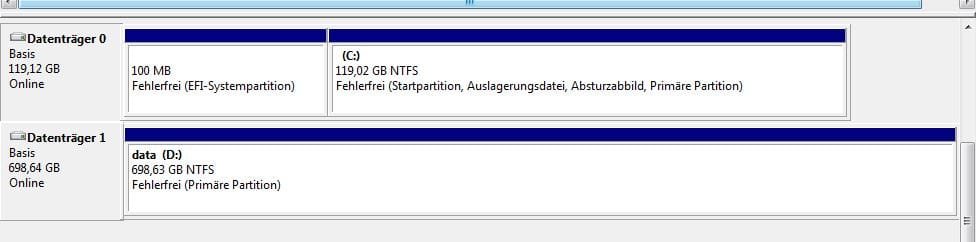
Here is my hard disk/vhd configuration (see attachment):
- Disk 0 = mSATA SSD with Windows 7 Pro x64 OS, bootable, GPT EFI
- Disk 1 = HDD, MBR Basic, with data (photos/videos/documents etc…)
I am storing my vhd on my OS drive (root), Disk 0. I have made an expandable volume (50GB). I have leaved it unformatted (RAW), as well as formatted it to MBR + NTFS + Basic, before attaching it in windows 8 setup.
The main problem with this error (from the hours of reading other threads in here) seems to be partitioning difficulties. Here are some of the things I've tried that I have seen advised on this forum:
- I have tried unplugging all my other drives (Disk 1, my HDD) from the Motherboard, leaving only the target drive there.
- I have moved my vhd to Disk 1 (data Disk).
- I have changed the vhd to a fixed size
- I have changed the size of the vhd
Is it possible, that the GPT/EFI partition is causing that problem (partition table)?
If you have any suggestions, or I have overlooked anything, please feel free to post your ideas!
Thank you kindly guys, I really appreciate any help I can get.
I’m facing the following problem:
I'm trying to install windows 8 Pro x64 onto a virtual hard disk using the method outlined here:
Guide to Installing and Booting Windows 8 Developer Preview off a VHD (Virtual Hard Disk) - Scott Hanselman
I created a bootable Windows 8 installation USB disk (Windows 7 to USB Tool), opened diskpart during the windows 8 installation, created a vhd, attached it and tried to install the new OS on it.
Really simple, until I got the error “0x80300024” when I tried to put Windows 8 on my virtual disk: "We couldn't install Windows in the location you chose."
Here is my hard disk/vhd configuration (see attachment):
- Disk 0 = mSATA SSD with Windows 7 Pro x64 OS, bootable, GPT EFI
- Disk 1 = HDD, MBR Basic, with data (photos/videos/documents etc…)
I am storing my vhd on my OS drive (root), Disk 0. I have made an expandable volume (50GB). I have leaved it unformatted (RAW), as well as formatted it to MBR + NTFS + Basic, before attaching it in windows 8 setup.
The main problem with this error (from the hours of reading other threads in here) seems to be partitioning difficulties. Here are some of the things I've tried that I have seen advised on this forum:
- I have tried unplugging all my other drives (Disk 1, my HDD) from the Motherboard, leaving only the target drive there.
- I have moved my vhd to Disk 1 (data Disk).
- I have changed the vhd to a fixed size
- I have changed the size of the vhd
Is it possible, that the GPT/EFI partition is causing that problem (partition table)?
If you have any suggestions, or I have overlooked anything, please feel free to post your ideas!
Thank you kindly guys, I really appreciate any help I can get.
Attachments
My Computer
- Computer type
- Laptop
- Computer Manufacturer/Model Number
- Lenovo Y580
- OS
- Windows 7 Professional x64
- CPU
- Intel Core i7-3610QM 2.3Ghz
- Memory
- Corsair Vengeance 8GB (CMSX8GX3M1) 1600Mhz CL10
- Graphics Card(s)
- GeForce GTX660m
- Hard Drives
- Crucial M4 mSATA 120GB SSD - System
Seagate Momentus 1 TB 5400 U/min - Data
- Mouse
- Logitech G500
- Antivirus
- Kaspersky Internet Security 2013
