
Error 0xC0000098

tarapapa

New member
Local time
7:51 AM
Messages
6
HI All,

Appreciate if anybody can help me here. I just bought a Toshiba Satellite L640 running on Intl Core i3 350M with 4Gb RAM. I'm currently using Windows 7 pro 32 bit.

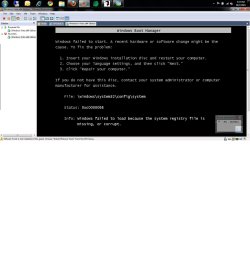
I'm trying to clean install Windows 7 pro 64 bit but face error as attached after booting up on the DVD and Windows has finish loading files. I simulate the error using VMWare to show the snapshot here. Does anyone have any clue on why this happened?

Thanks in advance.

Rgds
 

Attachments
  • error.jpg
    error.jpg
    97.1 KB · Views: 318
Last edited:

My Computer

Computer Manufacturer/Model Number
Toshiba Satellit L640
OS
7 pro
CPU
Intel i3 M350
Motherboard
Intel
Memory
4 GB
Graphics Card(s)
Intel HD
Hard Drives
320 GB
Hello tarapapa, welcome to Seven Forums!


I'm not sure if this will help or not but it can't hurt as you're doing a clean install; have a look at the tutorial at the link below to see if it changes anything; be sure to post back with the outcome.


SSD / HDD : Optimize for Windows Reinstallation
 

My Computer

Computer Manufacturer/Model Number
* BFK Customs *
OS
W 7 64-bit Ultimate
CPU
Intel Q9550 Yorkfield
Motherboard
ASUS P5Q Pro
Memory
8GB Dominator 8500C5D
Graphics Card(s)
ATI : XFX 5870
Sound Card
Realtek HD Audio 7-1
Monitor(s) Displays
1x 47" LCD HDMI & 3x 26" LCD HDMI
Screen Resolution
1920x1080P & 1920x1200
Hard Drives
1x 80GB Intel X25-M G2 SSD : 1x 500GB & 1x 640GB WD Caviar Black(s)
PSU
Corsair 620HX
Case
Cooler Master RC-690
Cooling
Tuniq Tower 120, 2x 140mm and 3x 120mm case fans
Keyboard
Microsoft 500
Mouse
Razer Diamondback 3G
Internet Speed
14 Mb/s
Other Info
1x Koutech 3Gb/s SATA HDD Hot Swap Rack
Thanks for the help,

But i dont think this will work. Firstly, I can boot using the disk but the error would come out before the 'Install Now' screen. Secondly, I already tried doing the same thing on a VMWare environment but the same error came out. So, i don't think it will work.

Any other tips?

Regards
 

My Computer

Computer Manufacturer/Model Number
Toshiba Satellit L640
OS
7 pro
CPU
Intel i3 M350
Motherboard
Intel
Memory
4 GB
Graphics Card(s)
Intel HD
Hard Drives
320 GB
I don't remember if my problem was exactly same, but at least very similar:
unable to install windows despite original DVD.

THe problem was a defective ram stick, so windows crashes as soon second memory stick was required...

I ran a Memtest, discovered the problem, changed the defective stick, then all went fine.

I hope that helps, sorry if it is not related to your issue.
 

My Computer

Computer Manufacturer/Model Number
Home made
OS
Win7 pro 64
CPU
Core i5-750
Motherboard
GA-P55M-UD4
Memory
4GB Patriot DDR3
Graphics Card(s)
ATI RADEON HD5450
Hard Drives
SSD Crucial CT250BX100SSD1 ATA
Internet Speed
DSL
Antivirus
Avast free
Thanks man for the reply. I also read somewhere that it could be the RAM. ACtually, when i got the laptop, i add in another 2GB of RAM. I'm going to try to remove the ram and see what happens. I'll update this thread with the result soon..
 

My Computer

Computer Manufacturer/Model Number
Toshiba Satellit L640
OS
7 pro
CPU
Intel i3 M350
Motherboard
Intel
Memory
4 GB
Graphics Card(s)
Intel HD
Hard Drives
320 GB
Just to update,

I actually take out my 2GB RAM and just use the original 2GB RAM that came with the laptop but still facing same problem.

Currently I'm downloading the iso image of windows 7 pro 32 bit and try to run the 'Repair' as the error message wanted and see what happens. From the attached error message, it seems that my registry have been corrupt somehow.

Does anybody have any more ideas?
 

My Computer

Computer Manufacturer/Model Number
Toshiba Satellit L640
OS
7 pro
CPU
Intel i3 M350
Motherboard
Intel
Memory
4 GB
Graphics Card(s)
Intel HD
Hard Drives
320 GB
to be sure it is not your first RAM stick, I would recommend you to perform a Memtest.
 

My Computer

Computer Manufacturer/Model Number
Home made
OS
Win7 pro 64
CPU
Core i5-750
Motherboard
GA-P55M-UD4
Memory
4GB Patriot DDR3
Graphics Card(s)
ATI RADEON HD5450
Hard Drives
SSD Crucial CT250BX100SSD1 ATA
Internet Speed
DSL
Antivirus
Avast free
Should i do the basic or the extended? I tried the basic after 2nd test still no errors
 

My Computer

Computer Manufacturer/Model Number
Toshiba Satellit L640
OS
7 pro
CPU
Intel i3 M350
Motherboard
Intel
Memory
4 GB
Graphics Card(s)
Intel HD
Hard Drives
320 GB
well if it is not a ram issue, I am speachless. SOrry.
 

My Computer

Computer Manufacturer/Model Number
Home made
OS
Win7 pro 64
CPU
Core i5-750
Motherboard
GA-P55M-UD4
Memory
4GB Patriot DDR3
Graphics Card(s)
ATI RADEON HD5450
Hard Drives
SSD Crucial CT250BX100SSD1 ATA
Internet Speed
DSL
Antivirus
Avast free
A guy from another forum recommend me to run the repair function from the dvd or delete the partition. I'm gonna try both and see. I'll update here later
 

My Computer

Computer Manufacturer/Model Number
Toshiba Satellit L640
OS
7 pro
CPU
Intel i3 M350
Motherboard
Intel
Memory
4 GB
Graphics Card(s)
Intel HD
Hard Drives
320 GB
You have no install to run a Repair on, correct?

Boot the Win7 DVD, press Shift F10 at the first screen, opens a Command line, use Diskpart to Wipe HD to clean off factory code which is interfering with install. Follow steps in BarefootKid's link posted in #2.
 
Back
Top