Error 1606. Could not access network location %APPDATA%\.

DeeJay0018

New member
Local time
2:39 PM
Messages
9
Error 1606. Could not access network location %APPDATA%\.

That is the message I received when I tried to install Microsoft Office 2010. I went to their website and used the Fixit tool, but it did not work. Any ideas? :geek:
 

My Computer

Computer Manufacturer/Model Number
Toshiba Satellite C655
OS
Windows 7 Home Premium x64
CPU
AMD V120 2.20 GHz
More info would help.

Are you installing MS Office over the network? What type of setup is that (disc, exe, msi, etc)?
Is installation being done under Administrator privileges?
 

My Computer

Computer type
PC/Desktop
OS
Windows 8.1 ; Windows 7 x86 (Dec2008-Jan2013)
Other Info
"The scale icon at the top right of a post or tutorial is how you can give rep to the member."
This might help:
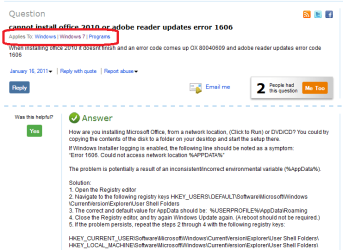
cannot install office 2010 or adobe reader updates error 1606 - Microsoft Answers

If Windows Installer logging is enabled, the following line should be noted as a symptom:
“Error 1606. Could not access network location %APPDATA%”

The problem is potentially a result of an inconsistent/incorrect environmental variable (%AppData%).

Solution:
1. Open the Registry editor
2. Navigate to the following registry keys HKEY_USERS\.DEFAULT\Software\Microsoft\Windows\CurrentVersion\Explorer\User Shell Folders
3. The correct and default value for AppData should be: %USERPROFILE%\AppData\Roaming
4. Close the Registry editor, and try again Windows Update again. (A reboot should not be required.)
5. If the problem persists, repeat the steps 2 through 4 with the following registry keys:

HKEY_CURRENT_USER\Software\Microsoft\Windows\CurrentVersion\Explorer\User Shell Folders\
HKEY_LOCAL_MACHINE\Software\Microsoft\Windows\CurrentVersion\Explorer\User Shell Folders\
However, if changing the registry, please take a backup first:
http://www.sevenforums.com/tutorials/4230-registry-backup-restore.html
 

My Computer

Computer type
PC/Desktop
Computer Manufacturer/Model Number
Packard Bell
OS
Windows 7 Home Premium 64bit
CPU
Intel(R) Core(TM) i3-2120 CPU @ 3.30GHz
Motherboard
Packard Bell IPISB-AG
Memory
3.00 GB
Graphics Card(s)
(1) Intel(R) HD Graphics (2) VNC Mirror Driver
Sound Card
Realtek High Definition Audio
Monitor(s) Displays
AIO LCD
Screen Resolution
1920 x 1080
Hard Drives
WDC WD10EADX-22TDHB0 ATA Device
Fixed hard disk media
4 partitions
931.51 GB
Keyboard
Wireless
Mouse
Wireless
Antivirus
Microsoft Security Essentials
Browser
IE; Firefox
Other Info
Also:
Samsung N220 Plus Netbook - Windows 7 Home
HP laptop
iPad 5
Error 1606

In your solution you state;

The correct and default value for AppData should be: %USERPROFILE%\AppData\Roaming

In the 3 forth Key, all keys start out with Common, I.E., Common AppData & has %ProgramData%. Nothing else.

is this correct for win7?
 

My Computer

Computer Manufacturer/Model Number
Home Built
OS
Win 7 Home Pro 64 Bit
CPU
I5 2.66 ghz quad
Motherboard
ASUS p7p55d
Memory
4GB III 1332 Kit
Graphics Card(s)
Gainward GTX260 896GB
Sound Card
onboard
Monitor(s) Displays
1- Samung SyncMaster 2333S 2- Samsung T200HD PC/TV
Screen Resolution
I 1920 X 1080 2 1024 X 720
Hard Drives
Segate 500GB SATA II (3)
PSU
FSP Group Inc.
Case
Generic Tower
Cooling
AIR
Keyboard
Microsoft Wireless Multimedia Keyboard 1.1
Mouse
Microsoft Wireless Optical 2.0
Internet Speed
2.0
Other Info
I am 81 years old & started with Radio Shack TRs 80
(Trash 80) 2 -5 1/4 " Floppies, 640 KB mem, cassette drive, basic language.

My first work desktop was a PDP 8E with high speed tape reader & punch. Teletype input, no monitor.
The solution quoted above states that it applies to Windows 7:
.
.
 

Attachments

  • error 1606.PNG
    error 1606.PNG
    60.8 KB · Views: 212

My Computer

Computer type
PC/Desktop
Computer Manufacturer/Model Number
Packard Bell
OS
Windows 7 Home Premium 64bit
CPU
Intel(R) Core(TM) i3-2120 CPU @ 3.30GHz
Motherboard
Packard Bell IPISB-AG
Memory
3.00 GB
Graphics Card(s)
(1) Intel(R) HD Graphics (2) VNC Mirror Driver
Sound Card
Realtek High Definition Audio
Monitor(s) Displays
AIO LCD
Screen Resolution
1920 x 1080
Hard Drives
WDC WD10EADX-22TDHB0 ATA Device
Fixed hard disk media
4 partitions
931.51 GB
Keyboard
Wireless
Mouse
Wireless
Antivirus
Microsoft Security Essentials
Browser
IE; Firefox
Other Info
Also:
Samsung N220 Plus Netbook - Windows 7 Home
HP laptop
iPad 5
Thanks

I see that you are a "Young Pensoner"!

Today at 82 I feel like an old pensoner!

I was into computers before they were called "Computers"!

My first work comouter was a PDP 8E. made by Digital Equipment Co. It had punched tape input & output. No Monitor, no keyboard & no mouse. The boot loader was entered with eight toggle switches.

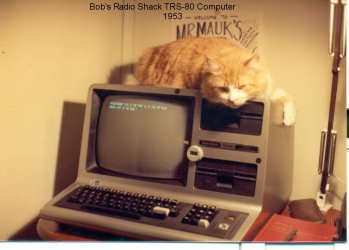
My first Home computer was a Radio Shack TRS 80 (Trash 80). It had 2 - 5 1/4" floppy drives. See Pic.

This is the first time I have admitted defeat by a computer problem!!

I must really be getting old!

Tully:geek:
 

Attachments

  • scan0119.jpg
    scan0119.jpg
    225.5 KB · Views: 20

My Computer

Computer Manufacturer/Model Number
Home Built
OS
Win 7 Home Pro 64 Bit
CPU
I5 2.66 ghz quad
Motherboard
ASUS p7p55d
Memory
4GB III 1332 Kit
Graphics Card(s)
Gainward GTX260 896GB
Sound Card
onboard
Monitor(s) Displays
1- Samung SyncMaster 2333S 2- Samsung T200HD PC/TV
Screen Resolution
I 1920 X 1080 2 1024 X 720
Hard Drives
Segate 500GB SATA II (3)
PSU
FSP Group Inc.
Case
Generic Tower
Cooling
AIR
Keyboard
Microsoft Wireless Multimedia Keyboard 1.1
Mouse
Microsoft Wireless Optical 2.0
Internet Speed
2.0
Other Info
I am 81 years old & started with Radio Shack TRs 80
(Trash 80) 2 -5 1/4 " Floppies, 640 KB mem, cassette drive, basic language.

My first work desktop was a PDP 8E with high speed tape reader & punch. Teletype input, no monitor.
I see that you are a "Young Pensoner"!
Today at 82 I feel like an old pensoner!

This is the first time I have admitted defeat by a computer problem!!
I must really be getting old!

At least you're still willing to tinkle the keyboard. ;)
 

My Computer

Computer type
PC/Desktop
Computer Manufacturer/Model Number
Packard Bell
OS
Windows 7 Home Premium 64bit
CPU
Intel(R) Core(TM) i3-2120 CPU @ 3.30GHz
Motherboard
Packard Bell IPISB-AG
Memory
3.00 GB
Graphics Card(s)
(1) Intel(R) HD Graphics (2) VNC Mirror Driver
Sound Card
Realtek High Definition Audio
Monitor(s) Displays
AIO LCD
Screen Resolution
1920 x 1080
Hard Drives
WDC WD10EADX-22TDHB0 ATA Device
Fixed hard disk media
4 partitions
931.51 GB
Keyboard
Wireless
Mouse
Wireless
Antivirus
Microsoft Security Essentials
Browser
IE; Firefox
Other Info
Also:
Samsung N220 Plus Netbook - Windows 7 Home
HP laptop
iPad 5
Tully

Did you say "Tinkle The Keyboard" or "Tinkle ON the keyboard"?

I lost my password to my account. I went through the "NewPassword" routine &
kept sending me those "Sqiggles" to type in. They had to send me about 6 before I rceived one that I could decipher!!

After going through that I think I gained a year & now am83! :sarc:

I think I finally got rid of the 1606 error by buying Office 2010. I don't like it because it has too many "Features" I won't use & didn't want.

Tully
 

My Computer

Computer Manufacturer/Model Number
Home Built
OS
Win 7 Home Pro 64 Bit
CPU
I5 2.66 ghz quad
Motherboard
ASUS p7p55d
Memory
4GB III 1332 Kit
Graphics Card(s)
Gainward GTX260 896GB
Sound Card
onboard
Monitor(s) Displays
1- Samung SyncMaster 2333S 2- Samsung T200HD PC/TV
Screen Resolution
I 1920 X 1080 2 1024 X 720
Hard Drives
Segate 500GB SATA II (3)
PSU
FSP Group Inc.
Case
Generic Tower
Cooling
AIR
Keyboard
Microsoft Wireless Multimedia Keyboard 1.1
Mouse
Microsoft Wireless Optical 2.0
Internet Speed
2.0
Other Info
I am 81 years old & started with Radio Shack TRs 80
(Trash 80) 2 -5 1/4 " Floppies, 640 KB mem, cassette drive, basic language.

My first work desktop was a PDP 8E with high speed tape reader & punch. Teletype input, no monitor.
Back
Top