
CelestialScribe
New member
- Local time
- 1:35 AM
- Messages
- 35
I am having a huge problem. I really need some help on this, every other source I've looked for for help has not worked, and I really, really, really don't want to re-install Windows 7. Please, ANY help would be appreciated.
I use Seagate Manager software for backing up my files to an external hard drive. When I went to click on the "Custom Backup" utility today, it gave me a "paramter not accessible" error.
I then went to reinstall the Seagate Manager software. But when I went to uninstall it, it keeps giving me an "Error 1606: Could Not Access Network Location %PUBLIC%\Desktop\"
I have tried doing everything I can think of. I have followed instructions from people including but not limited to:
1. Deleting all the Seagate files in Program Files. They are no longer there, but the problem still persists.
2. Changing some registry values, although I haven't changed much and the problem still persists.
3. I have followed all the instructions on the Microsoft site for fixing this problem, including running their automated "Fix Me" tool, or whatever it's called. That hasn't worked either.
4. I have also followed the instructions of several different uninstalling utilities including CCleaner. None have worked.
Here is a screenshot of the error:
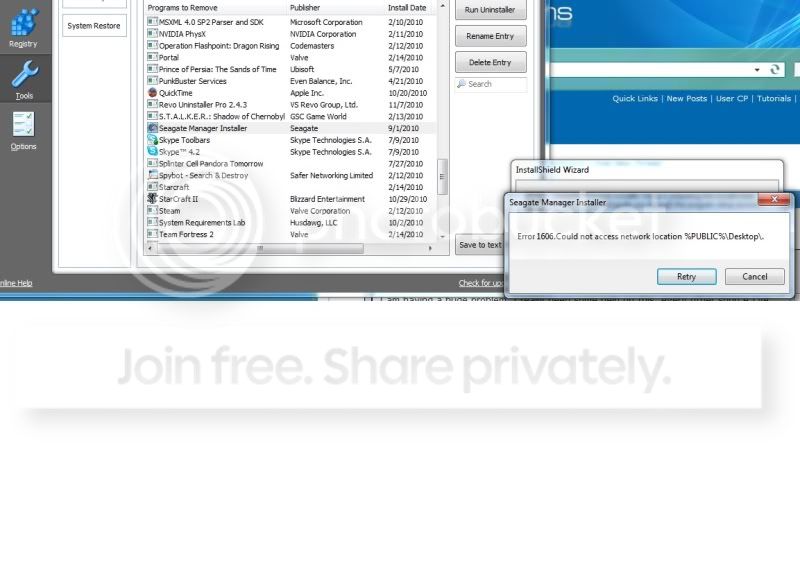
Please...I repeat PLEASE help me with this. I simply do not have the time to be reinstalling Windows and all my other programs because of a stupid error that probably has a really simple fix. PLEASE, PLEASE help.
Thank you.
I use Seagate Manager software for backing up my files to an external hard drive. When I went to click on the "Custom Backup" utility today, it gave me a "paramter not accessible" error.
I then went to reinstall the Seagate Manager software. But when I went to uninstall it, it keeps giving me an "Error 1606: Could Not Access Network Location %PUBLIC%\Desktop\"
I have tried doing everything I can think of. I have followed instructions from people including but not limited to:
1. Deleting all the Seagate files in Program Files. They are no longer there, but the problem still persists.
2. Changing some registry values, although I haven't changed much and the problem still persists.
3. I have followed all the instructions on the Microsoft site for fixing this problem, including running their automated "Fix Me" tool, or whatever it's called. That hasn't worked either.
4. I have also followed the instructions of several different uninstalling utilities including CCleaner. None have worked.
Here is a screenshot of the error:
Please...I repeat PLEASE help me with this. I simply do not have the time to be reinstalling Windows and all my other programs because of a stupid error that probably has a really simple fix. PLEASE, PLEASE help.
Thank you.
My Computer
- OS
- Windows 7
- CPU
- Intel Core i5-750
- Motherboard
- Intel DP55WG
- Memory
- 4GB G-Skills Ripjaw 1333
- Graphics Card(s)
- Gigabyte HD4850
- Monitor(s) Displays
- Samsung SW2333, Samsung SW2233
- Hard Drives
- Seagate 500GB
Seagate 360GB
- PSU
- Antec
- Case
- Coolermaster

