Solved Error 80070490 With 5 Failed Updates

quatre

New member
Local time
7:25 AM
Messages
7
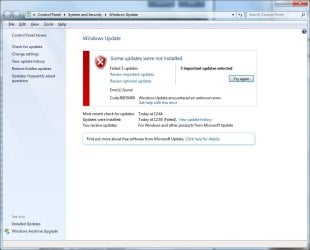
The failed updates are 3004375, 3031432, 3033929, 3035131, and 3046049.

The .cab files all had to be removed from CBS.zip to come under the upload size limit. I can send them separately if needed.

I'd be grateful for any help. Thanks!
 

Attachments
  • error.jpg
    error.jpg
    58.5 KB · Views: 2
  • sfc results.jpg
    sfc results.jpg
    24.9 KB · Views: 41

My Computer

Computer type
Laptop
Computer Manufacturer/Model Number
Lenovo T510
OS
Windows 7 Professional x64

My Computer

Computer type
PC/Desktop
Computer Manufacturer/Model Number
me!
OS
Windows 10 Pro x64
CPU
AMD Ryzen 5 1600 @ [email protected]
Motherboard
ASUS B350 PRIME-PLUS
Memory
G.Skill Flare X 16GB (2x8GB) DDR4-2400 @ 2666MHz
Graphics Card(s)
Sapphire Radeon Vega 56 NITRO+
Sound Card
None
Monitor(s) Displays
ASUS VG248QZ
Screen Resolution
1920x1080
Hard Drives
Samsung 850 EVO 250GB*, 1TB Seagate Constellation ES, 2x Samsung 840 250GB in RAID0*

*Thanks ICIT2LOL for supplying me with all of these drives!
PSU
Corsair VS550
Case
Corsair Crystal 460X
Cooling
AMD Wraith Spire
Keyboard
Ducky Shine 6 w/ MX Browns and PBT keycaps
Mouse
Xtrfy M1-Ice
Internet Speed
100MBit/s down, 20MBit/s up
Antivirus
Bitdefender
Browser
Google Chrome
Thanks for the reply! I have an OEM installation of Windows 7 Professional x64. It's currently activated and has never had an activation issue.

Since it's the updates that are failing, I followed Windows Update Posting Instructions. Did I confuse something and follow the wrong steps?
 

My Computer

Computer type
Laptop
Computer Manufacturer/Model Number
Lenovo T510
OS
Windows 7 Professional x64

My Computer

Computer type
PC/Desktop
Computer Manufacturer/Model Number
me!
OS
Windows 10 Pro x64
CPU
AMD Ryzen 5 1600 @ [email protected]
Motherboard
ASUS B350 PRIME-PLUS
Memory
G.Skill Flare X 16GB (2x8GB) DDR4-2400 @ 2666MHz
Graphics Card(s)
Sapphire Radeon Vega 56 NITRO+
Sound Card
None
Monitor(s) Displays
ASUS VG248QZ
Screen Resolution
1920x1080
Hard Drives
Samsung 850 EVO 250GB*, 1TB Seagate Constellation ES, 2x Samsung 840 250GB in RAID0*

*Thanks ICIT2LOL for supplying me with all of these drives!
PSU
Corsair VS550
Case
Corsair Crystal 460X
Cooling
AMD Wraith Spire
Keyboard
Ducky Shine 6 w/ MX Browns and PBT keycaps
Mouse
Xtrfy M1-Ice
Internet Speed
100MBit/s down, 20MBit/s up
Antivirus
Bitdefender
Browser
Google Chrome
Thanks again for your help!

Can you re-install Windows?
I would like to avoid that if at all possible. It's an OEM install, so I don't have installation media. I've read the tutorial on this forum for an OEM clean-install and it's not trivial, plus I would have to reinstall all the other programs. Some posters here seem to have success with custom fixes for missing/corrupted Windows Update files, so I was hoping that this would work for me as well.

Before doing that run chkdsk /r and sfc /scannow
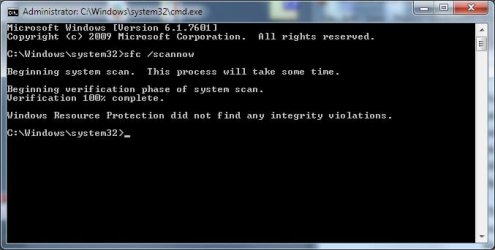
I ran sfc /scannow before creating this thread. Its completion screenshot is the second image in the original post. (I hope the images are showing up.)

Windows Update Posting Instructions didn't mention chkdsk, so I'm a bit perplexed as to that suggestion. Did I miss something?
 

My Computer

Computer type
Laptop
Computer Manufacturer/Model Number
Lenovo T510
OS
Windows 7 Professional x64

My Computer

Computer type
PC/Desktop
Computer Manufacturer/Model Number
me!
OS
Windows 10 Pro x64
CPU
AMD Ryzen 5 1600 @ [email protected]
Motherboard
ASUS B350 PRIME-PLUS
Memory
G.Skill Flare X 16GB (2x8GB) DDR4-2400 @ 2666MHz
Graphics Card(s)
Sapphire Radeon Vega 56 NITRO+
Sound Card
None
Monitor(s) Displays
ASUS VG248QZ
Screen Resolution
1920x1080
Hard Drives
Samsung 850 EVO 250GB*, 1TB Seagate Constellation ES, 2x Samsung 840 250GB in RAID0*

*Thanks ICIT2LOL for supplying me with all of these drives!
PSU
Corsair VS550
Case
Corsair Crystal 460X
Cooling
AMD Wraith Spire
Keyboard
Ducky Shine 6 w/ MX Browns and PBT keycaps
Mouse
Xtrfy M1-Ice
Internet Speed
100MBit/s down, 20MBit/s up
Antivirus
Bitdefender
Browser
Google Chrome
Thanks for the reply.

Installing in safe mode failed as well. No error code was given, but it's probably the same underlying issue.

An aside for others who might want to try this anyway: Windows Update service is not enabled by default in safe mode (with networking.) Wuauserv can be enabled manually by adding a key to the registry, but the UI will not show up, so the updates have to be downloaded manually.

I'm stumped at this point. Is it possible for to look at the CBS.zip attached to the opening post and fix the corrupted/missing files etc?
 

My Computer

Computer type
Laptop
Computer Manufacturer/Model Number
Lenovo T510
OS
Windows 7 Professional x64

My Computer

Computer type
PC/Desktop
Computer Manufacturer/Model Number
me!
OS
Windows 10 Pro x64
CPU
AMD Ryzen 5 1600 @ [email protected]
Motherboard
ASUS B350 PRIME-PLUS
Memory
G.Skill Flare X 16GB (2x8GB) DDR4-2400 @ 2666MHz
Graphics Card(s)
Sapphire Radeon Vega 56 NITRO+
Sound Card
None
Monitor(s) Displays
ASUS VG248QZ
Screen Resolution
1920x1080
Hard Drives
Samsung 850 EVO 250GB*, 1TB Seagate Constellation ES, 2x Samsung 840 250GB in RAID0*

*Thanks ICIT2LOL for supplying me with all of these drives!
PSU
Corsair VS550
Case
Corsair Crystal 460X
Cooling
AMD Wraith Spire
Keyboard
Ducky Shine 6 w/ MX Browns and PBT keycaps
Mouse
Xtrfy M1-Ice
Internet Speed
100MBit/s down, 20MBit/s up
Antivirus
Bitdefender
Browser
Google Chrome
Hi, Laith. Thanks for the reply. That has already been done. In fact, it's the first thing I did because it's the first step in Windows Update Posting Instructions. The CheckSUR log is in the CBS.zip file attached to the opening post. Are the attachments in the original post not showing up? Please let me know if that's happening.

I would really appreciate it if someone can look at the logs generated by SURT and Windows Update. Thanks!
 

My Computer

Computer type
Laptop
Computer Manufacturer/Model Number
Lenovo T510
OS
Windows 7 Professional x64
Here's the summary from your CheckSUR scan.

Code:
Summary:
Seconds executed: 1616
 Found 19507 errors
  CBS Registry Error Total count: 1
  CBS Watchlist Package Missing Total count: 17689
  CBS Watchlist Component Missing Total count: 1817

As you can see, there is massive corruption in the registry.
I can really only recommend a repair install - or a clean one, should the repair fail.
 

My Computer

Computer type
Laptop
Computer Manufacturer/Model Number
Asus K52F or Lenovo B51-80
OS
Win 7 x64 Home Premium (and x86 VirtualBox VM)/Win10
CPU
i3 370M/i7 6500U
Motherboard
Asus/Lenovo
Memory
8GB - finally :)/8GB
Graphics Card(s)
it's an i3, dude!/dual Intel&nVidia
Sound Card
onboard
Monitor(s) Displays
15.6" built-in
Screen Resolution
1366x768/1920x1080
Hard Drives
750GB Seagate internal
Sundry external drives attached to other computers on the local network
1TB SSD on the Lenovo
PSU
n/a
Internet Speed
as much as I can get - usually on a dongle/phone, so <1MB/s
Antivirus
MSE/Defender
Browser
IE11/12/Edge/Chrome/FF(if I must)
Thanks for looking in on this! Looks like I will have to reinstall.

I'd like to avoid a recurrence of this after the reinstall; is there a way to know what cause the corruption? I always install the "important" updates and WU has worked smoothly for years. I don't use IE and so have not updated it from 8 since the IE9/10/11 updates are marked optional. A couple of months ago, I thought it'd be good to have a backup browser, and so chose in WU to install IE 11. That was the first update to fail (with the same error.) I didn't think much of it at the time and just hid the update, but obviously additional failures are occurring. What did I mess up? :confused:

Thanks again for your help! :)
 

My Computer

Computer type
Laptop
Computer Manufacturer/Model Number
Lenovo T510
OS
Windows 7 Professional x64
Anyone has an idea?
 

My Computer

Computer type
Laptop
Computer Manufacturer/Model Number
Lenovo T510
OS
Windows 7 Professional x64
I have a great idea.
Follow the suggestion in post #10 by Noel.
 

My Computer

Computer type
PC/Desktop
Computer Manufacturer/Model Number
Home made Desktop
OS
Windows 10 Pro. 64/ version 1709 Windows 7 Pro/64
CPU
Intel i7-6800K @ 4.3
Motherboard
ASUS X-99 Deluxe II
Memory
Corsair Platinum 16 gig @2400
Graphics Card(s)
EVGA GTX 1070 OC
Monitor(s) Displays
Asus 27" LED LCD/VE278Q
Screen Resolution
1920-1080 or 1280-720 HDMI
Hard Drives
INTEL SSD 730-240 Gb Sata 3.0/
PSU
EVGA Platium 1200W
Case
Phanteks Luxe Tempered Glass 8 fans/ one radiator
Cooling
XSPC/ Water Cooled CPU
Keyboard
Das 4 Professional
Mouse
Logitech M705/MX Anywhere 2-S
Internet Speed
100 mbits
Antivirus
Microsoft Security Essentials/ Malwarebytes Premium 3.0/ SAS
Browser
I.E. 11 default/Firefox/ ISP Time Warner Cable/Spectrum
Other Info
LG BluRay Burner/
Sound system-KLipsch-THX/
Icy Dock ssd Hot Swap bays.
Back
Top