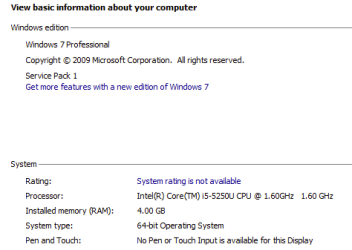
I am running Win 7 Pro SP1 x64 on my 2015 Macbook Air using Parallels 10. One VM is working perfectly and is accepting all updates, the other suddenly stopped accepting updates starting July13.
I have checked Seven Forums, Microsoft and Googled and tried all the suggested things. NoelDP seems to be successful at helping folks resolve their issues:
I've run SURT a number of time in different combinations (restart, no restart).
SFC scan did not return any problems.
I cleared the updates and the downloaded files.
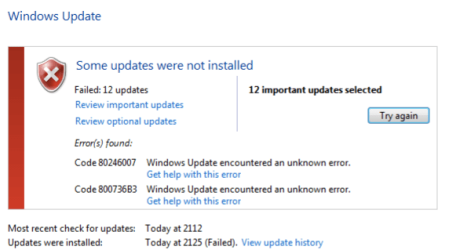
The error codes are all 800736B3 (there were a few others that have disappeared since I tried the different methods to resolve, see screen shot from 7/22).
My CBS.zip file is 90 MB and to big to upload.
I will attach a log file that I copied 7/27/2015.
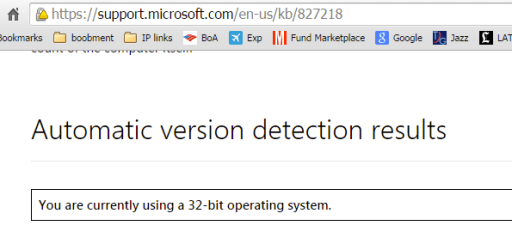
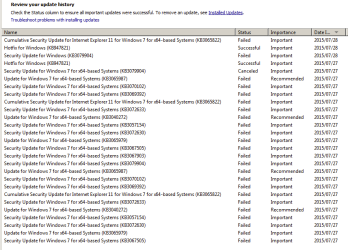
I noticed that some of the KB in the list of pending updates are for x32 but that does not seem completely unusual. I manually downloaded and installed and X64 and it failed too (KB30658220
There is a screenshot of update history included.
I will gladly post all the links that I used if desired. Your help is appreciated because I must have spent 40 hours configuring this VM of Windows 7 before it started failing the updates.
I have checked Seven Forums, Microsoft and Googled and tried all the suggested things. NoelDP seems to be successful at helping folks resolve their issues:
I've run SURT a number of time in different combinations (restart, no restart).
SFC scan did not return any problems.
I cleared the updates and the downloaded files.
The error codes are all 800736B3 (there were a few others that have disappeared since I tried the different methods to resolve, see screen shot from 7/22).
My CBS.zip file is 90 MB and to big to upload.
I will attach a log file that I copied 7/27/2015.
I noticed that some of the KB in the list of pending updates are for x32 but that does not seem completely unusual. I manually downloaded and installed and X64 and it failed too (KB30658220
There is a screenshot of update history included.
I will gladly post all the links that I used if desired. Your help is appreciated because I must have spent 40 hours configuring this VM of Windows 7 before it started failing the updates.
Attachments

My Computer
- Computer type
- Laptop
- Computer Manufacturer/Model Number
- Virtual machine running in Parallels 10
- OS
- Win 7 Pro SP1 64 bit
- CPU
- Core i5
- Motherboard
- Macbook Air 2015
- Memory
- 8 GB, 4 GB for VM
- Hard Drives
- 500 GB SSD
- Antivirus
- Avira
- Browser
- IE 11, Chrome