error 800f0816 and SP1 win Ultimate 32bit

please attach a full copy of the report produced by the MGADiag tool (download and save to desktop - http://go.microsoft.com/fwlink/?linkid=52012 )
Once saved, run the tool.
Click on the Continue button, which will produce the report.
To copy the report to your response, click on the Copy button in the tool (ignore any error messages at this point), and then paste (using either r-click/Paste, or Ctrl+V ) into your response.
- **in your own thread**, please
Please also state the Version and Edition of Windows quoted on your COA sticker (if you have one) on the case of your machine, but do NOT quote the Key on the sticker!
How to Tell - Home


Please also attach a copy of your C:\Windows\logs\CBS.log file
- it may not tell us much - but there is very little
 

My Computer My Computer

Computer type
Laptop
Computer Manufacturer/Model Number
Asus K52F or Lenovo B51-80
OS
Win 7 x64 Home Premium (and x86 VirtualBox VM)/Win10
CPU
i3 370M/i7 6500U
Motherboard
Asus/Lenovo
Memory
8GB - finally :)/8GB
Graphics Card(s)
it's an i3, dude!/dual Intel&nVidia
Sound Card
onboard
Monitor(s) Displays
15.6" built-in
Screen Resolution
1366x768/1920x1080
Hard Drives
750GB Seagate internal
Sundry external drives attached to other computers on the local network
1TB SSD on the Lenovo
PSU
n/a
Internet Speed
as much as I can get - usually on a dongle/phone, so <1MB/s
Antivirus
MSE/Defender
Browser
IE11/12/Edge/Chrome/FF(if I must)
Diagnostic Report (1.9.0027.0):
-----------------------------------------
Windows Validation Data-->
Validation Code: 0
Cached Online Validation Code: N/A, hr = 0xc004f012
Windows Product Key: *****-*****-Q6MMK-KYK6X-VKM6G
Windows Product Key Hash: 289NoAWl2ZoVfuieux/315WkDIc=
Windows Product ID: 00426-OEM-8992662-00173
Windows Product ID Type: 2
Windows License Type: OEM SLP
Windows OS version: 6.1.7600.2.00010100.0.0.001
ID: {F2825D26-AC24-42EB-AB8F-A2286BF88737}(1)
Is Admin: Yes
TestCab: 0x0
LegitcheckControl ActiveX: N/A, hr = 0x80070002
Signed By: N/A, hr = 0x80070002
Product Name: Windows 7 Ultimate
Architecture: 0x00000000
Build lab: 7600.win7_gdr.111025-1503
TTS Error:
Validation Diagnostic:
Resolution Status: N/A
Vista WgaER Data-->
ThreatID(s): N/A, hr = 0x80070002
Version: N/A, hr = 0x80070002
Windows XP Notifications Data-->
Cached Result: N/A, hr = 0x80070002
File Exists: No
Version: N/A, hr = 0x80070002
WgaTray.exe Signed By: N/A, hr = 0x80070002
WgaLogon.dll Signed By: N/A, hr = 0x80070002
OGA Notifications Data-->
Cached Result: N/A, hr = 0x80070002
Version: 2.0.48.0
OGAExec.exe Signed By: Microsoft
OGAAddin.dll Signed By: Microsoft
OGA Data-->
Office Status: 100 Genuine
Microsoft Office Enterprise 2007 - 100 Genuine
OGA Version: Registered, 2.0.48.0
Signed By: Microsoft
Office Diagnostics: 025D1FF3-364-80041010_025D1FF3-229-80041010_025D1FF3-230-1_025D1FF3-517-80040154_025D1FF3-237-80040154_025D1FF3-238-2_025D1FF3-244-80070002_025D1FF3-258-3_E2AD56EA-765-d003_E2AD56EA-766-0_E2AD56EA-134-80004005
Browser Data-->
Proxy settings: N/A
User Agent: Mozilla/4.0 (compatible; MSIE 8.0; Win32)
Default Browser: C:\Program Files\Internet Explorer\iexplore.exe
Download signed ActiveX controls: Prompt
Download unsigned ActiveX controls: Disabled
Run ActiveX controls and plug-ins: Allowed
Initialize and script ActiveX controls not marked as safe: Disabled
Allow scripting of Internet Explorer Webbrowser control: Disabled
Active scripting: Allowed
Script ActiveX controls marked as safe for scripting: Allowed
File Scan Data-->
Other data-->
Office Details: <GenuineResults><MachineData><UGUID>{F2825D26-AC24-42EB-AB8F-A2286BF88737}</UGUID><Version>1.9.0027.0</Version><OS>6.1.7600.2.00010100.0.0.001</OS><Architecture>x32</Architecture><PKey>*****-*****-*****-*****-VKM6G</PKey><PID>00426-OEM-8992662-00173</PID><PIDType>2</PIDType><SID>S-1-5-21-1045672674-1992622935-141403725</SID><SYSTEM><Manufacturer>ASUSTeK Computer Inc. </Manufacturer><Model>K50C</Model></SYSTEM><BIOS><Manufacturer>American Megatrends Inc.</Manufacturer><Version>209 </Version><SMBIOSVersion major="2" minor="5"/><Date>20100106000000.000000+000</Date></BIOS><HWID>2C3D3507018400FA</HWID><UserLCID>0410</UserLCID><SystemLCID>0410</SystemLCID><TimeZone>ora solare Europa occidentale(GMT+01:00)</TimeZone><iJoin>0</iJoin><SBID><stat>3</stat><msppid></msppid><name></name><model></model></SBID><OEM><OEMID>_ASUS_</OEMID><OEMTableID>Notebook</OEMTableID></OEM><GANotification><File Name="OGAAddin.dll" Version="2.0.48.0"/></GANotification></MachineData><Software><Office><Result>100</Result><Products><Product GUID="{90120000-0030-0000-0000-0000000FF1CE}"><LegitResult>100</LegitResult><Name>Microsoft Office Enterprise 2007</Name><Ver>12</Ver><Val>9386ECCCF3D8D86</Val><Hash>TidoeOeEacqOz1w5g1b5uRFKPDc=</Hash><Pid>89388-707-2325781-65811</Pid><PidType>14</PidType></Product></Products><Applications><App Id="15" Version="12" Result="100"/><App Id="16" Version="12" Result="100"/><App Id="18" Version="12" Result="100"/><App Id="19" Version="12" Result="100"/><App Id="1A" Version="12" Result="100"/><App Id="1B" Version="12" Result="100"/><App Id="44" Version="12" Result="100"/><App Id="A1" Version="12" Result="100"/><App Id="BA" Version="12" Result="100"/></Applications></Office></Software></GenuineResults>
Spsys.log Content: 0x80070002
Licensing Data-->
Versione servizio di gestione licenze software: 6.1.7600.16385
Nome: Windows(R) 7, Ultimate edition
Descrizione: Windows Operating System - Windows(R) 7, OEM_SLP channel
ID di attivazione7cfd4696-69a9-4af7-af36-ff3d12b6b6c8
ID applicazione: 55c92734-d682-4d71-983e-d6ec3f16059f
PID esteso: 00426-00178-926-600173-02-1040-7600.0000-0312012
ID di installazione: 019373267146544485954516177803584730340201192996586320
URL certificato processore: http://go.microsoft.com/fwlink/?LinkID=88338
URL certificato computer: http://go.microsoft.com/fwlink/?LinkID=88339
URL licenza d'uso: http://go.microsoft.com/fwlink/?LinkID=88341
URL certificato codice "Product Key": http://go.microsoft.com/fwlink/?LinkID=88340
Codice "Product Key" parziale: VKM6G
Stato licenza: concesso in licenza
Numero di ripristini Windows rimanenti: 3
Ora attendibile: 05/02/2012 16:59:17
Windows Activation Technologies-->
HrOffline: 0x00000000
HrOnline: 0x00000000
HealthStatus: 0x0000000000000000
Event Time Stamp: 1:30:2012 17:47
ActiveX: Registered, Version: 7.1.7600.16395
Admin Service: Registered, Version: 7.1.7600.16395
HealthStatus Bitmask Output:

HWID Data-->
HWID Hash Current: NAAAAAEABAABAAEAAAABAAAAAwABAAEAeqi6mooHEhMAor7BGrZOX8B3XDZGXQDyABSyDQ==
OEM Activation 1.0 Data-->
N/A
OEM Activation 2.0 Data-->
BIOS valid for OA 2.0: yes
Windows marker version: 0x20001
OEMID and OEMTableID Consistent: yes
BIOS Information:
ACPI Table Name OEMID Value OEMTableID Value
APIC _ASUS_ APIC1005
FACP _ASUS_ FACP1005
DBGP _ASUS_ DBGP1005
HPET _ASUS_ OEMHPET
BOOT _ASUS_ BOOT1005
MCFG _ASUS_ OEMMCFG
OEMX _ASUS_ OEMX1005
ECDT _ASUS_ OEMECDT
OEMB _ASUS_ OEMB1005
SSDT PmRef Cpu0Cst
SSDT PmRef Cpu0Cst
SLIC _ASUS_ Notebook

 

My Computer My Computer

OS
windows 7 ultimate 32 bit
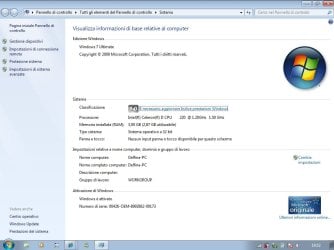
On the keyboard hit the Windows key and Pause key and let us know what you see in the lower right corner.
 

My Computer My Computer

Computer type
PC/Desktop
Computer Manufacturer/Model Number
Home made Desktop
OS
Windows 10 Pro. 64/ version 1709 Windows 7 Pro/64
CPU
Intel i7-6800K @ 4.3
Motherboard
ASUS X-99 Deluxe II
Memory
Corsair Platinum 16 gig @2400
Graphics Card(s)
EVGA GTX 1070 OC
Monitor(s) Displays
Asus 27" LED LCD/VE278Q
Screen Resolution
1920-1080 or 1280-720 HDMI
Hard Drives
INTEL SSD 730-240 Gb Sata 3.0/
PSU
EVGA Platium 1200W
Case
Phanteks Luxe Tempered Glass 8 fans/ one radiator
Cooling
XSPC/ Water Cooled CPU
Keyboard
Das 4 Professional
Mouse
Logitech M705/MX Anywhere 2-S
Internet Speed
100 mbits
Antivirus
Microsoft Security Essentials/ Malwarebytes Premium 3.0/ SAS
Browser
I.E. 11 default/Firefox/ ISP Time Warner Cable/Spectrum
Other Info
LG BluRay Burner/
Sound system-KLipsch-THX/
Icy Dock ssd Hot Swap bays.
You have a huge number (~300) of 'failed' responses in the CBS log dated today - I suspect that this may be due to a pre-existing problem before you installed SP1.

Please try running SFC /SCANNOW - then post a new CBS log
 

My Computer My Computer

Computer type
Laptop
Computer Manufacturer/Model Number
Asus K52F or Lenovo B51-80
OS
Win 7 x64 Home Premium (and x86 VirtualBox VM)/Win10
CPU
i3 370M/i7 6500U
Motherboard
Asus/Lenovo
Memory
8GB - finally :)/8GB
Graphics Card(s)
it's an i3, dude!/dual Intel&nVidia
Sound Card
onboard
Monitor(s) Displays
15.6" built-in
Screen Resolution
1366x768/1920x1080
Hard Drives
750GB Seagate internal
Sundry external drives attached to other computers on the local network
1TB SSD on the Lenovo
PSU
n/a
Internet Speed
as much as I can get - usually on a dongle/phone, so <1MB/s
Antivirus
MSE/Defender
Browser
IE11/12/Edge/Chrome/FF(if I must)
here is the screenshot of win + pause and also attached the log cbs ..... aspect answer on what to do.
 

Attachments

  • win+pause.jpg
    win+pause.jpg
    66.9 KB · Views: 23

My Computer My Computer

OS
windows 7 ultimate 32 bit
Surprisingly, the CBS file is now clear of errors.

I suggest that you now try installing SP1 again.
 

My Computer My Computer

Computer type
Laptop
Computer Manufacturer/Model Number
Asus K52F or Lenovo B51-80
OS
Win 7 x64 Home Premium (and x86 VirtualBox VM)/Win10
CPU
i3 370M/i7 6500U
Motherboard
Asus/Lenovo
Memory
8GB - finally :)/8GB
Graphics Card(s)
it's an i3, dude!/dual Intel&nVidia
Sound Card
onboard
Monitor(s) Displays
15.6" built-in
Screen Resolution
1366x768/1920x1080
Hard Drives
750GB Seagate internal
Sundry external drives attached to other computers on the local network
1TB SSD on the Lenovo
PSU
n/a
Internet Speed
as much as I can get - usually on a dongle/phone, so <1MB/s
Antivirus
MSE/Defender
Browser
IE11/12/Edge/Chrome/FF(if I must)
i have try, but the problem it's present. the same..... i have installed also internet explorer 9 and the installation it's ok. i do?
 

My Computer My Computer

OS
windows 7 ultimate 32 bit

My Computer My Computer

Computer type
Laptop
Computer Manufacturer/Model Number
Asus K52F or Lenovo B51-80
OS
Win 7 x64 Home Premium (and x86 VirtualBox VM)/Win10
CPU
i3 370M/i7 6500U
Motherboard
Asus/Lenovo
Memory
8GB - finally :)/8GB
Graphics Card(s)
it's an i3, dude!/dual Intel&nVidia
Sound Card
onboard
Monitor(s) Displays
15.6" built-in
Screen Resolution
1366x768/1920x1080
Hard Drives
750GB Seagate internal
Sundry external drives attached to other computers on the local network
1TB SSD on the Lenovo
PSU
n/a
Internet Speed
as much as I can get - usually on a dongle/phone, so <1MB/s
Antivirus
MSE/Defender
Browser
IE11/12/Edge/Chrome/FF(if I must)
my problem is that you do not install sp1 on win 32bit ultimate. I did install ie 9 and everything was ok, then after I tried to install sp1 and I install it ok, but when setting up to 30% restarts and I get a black mask. What do I do? i attach a new log. aspect of response to continue
 

My Computer My Computer

OS
windows 7 ultimate 32 bit
SP1 will install on EVERY edition of WIndows 7 -
A black screen can be caused by many things - including a non-genuine installation.

For what version and edition of Windows is your computer licensed, **according to the COA sticker** on the case?

What *EXACTLY* does it say on the sticker? - but do NOT post the actual Key!
 

My Computer My Computer

Computer type
Laptop
Computer Manufacturer/Model Number
Asus K52F or Lenovo B51-80
OS
Win 7 x64 Home Premium (and x86 VirtualBox VM)/Win10
CPU
i3 370M/i7 6500U
Motherboard
Asus/Lenovo
Memory
8GB - finally :)/8GB
Graphics Card(s)
it's an i3, dude!/dual Intel&nVidia
Sound Card
onboard
Monitor(s) Displays
15.6" built-in
Screen Resolution
1366x768/1920x1080
Hard Drives
750GB Seagate internal
Sundry external drives attached to other computers on the local network
1TB SSD on the Lenovo
PSU
n/a
Internet Speed
as much as I can get - usually on a dongle/phone, so <1MB/s
Antivirus
MSE/Defender
Browser
IE11/12/Edge/Chrome/FF(if I must)
i do not know. the label is no longer present. but the product is original, however, does not see the screenshot?
 

My Computer My Computer

OS
windows 7 ultimate 32 bit
Yes, I do - and to an extent, that's what is worrying me.
Genuine ASUS installations have a large ASUS logo on the System page - yours has none
This could be because the logo has been removed retro-activately, but is more likely to be because it's an 'upgrade using non-genuine media.
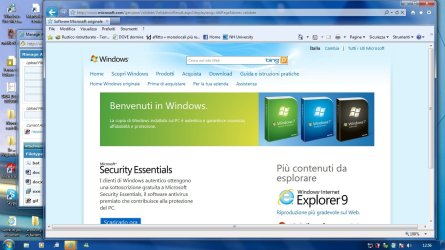
Please go to the Validation site and see what happens - www.microsoft.com/genuine/validate.
 

My Computer My Computer

Computer type
Laptop
Computer Manufacturer/Model Number
Asus K52F or Lenovo B51-80
OS
Win 7 x64 Home Premium (and x86 VirtualBox VM)/Win10
CPU
i3 370M/i7 6500U
Motherboard
Asus/Lenovo
Memory
8GB - finally :)/8GB
Graphics Card(s)
it's an i3, dude!/dual Intel&nVidia
Sound Card
onboard
Monitor(s) Displays
15.6" built-in
Screen Resolution
1366x768/1920x1080
Hard Drives
750GB Seagate internal
Sundry external drives attached to other computers on the local network
1TB SSD on the Lenovo
PSU
n/a
Internet Speed
as much as I can get - usually on a dongle/phone, so <1MB/s
Antivirus
MSE/Defender
Browser
IE11/12/Edge/Chrome/FF(if I must)
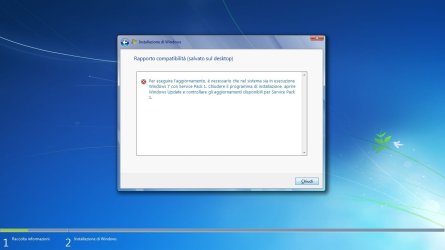
hello, I did the test and the original copy is as attached screenshot. I also tried to install windows 7 from system started with sp1 included and I came this: I enclose.
 

Attachments

My Computer My Computer

OS
windows 7 ultimate 32 bit

My Computer My Computer

Computer type
Laptop
Computer Manufacturer/Model Number
Asus K52F or Lenovo B51-80
OS
Win 7 x64 Home Premium (and x86 VirtualBox VM)/Win10
CPU
i3 370M/i7 6500U
Motherboard
Asus/Lenovo
Memory
8GB - finally :)/8GB
Graphics Card(s)
it's an i3, dude!/dual Intel&nVidia
Sound Card
onboard
Monitor(s) Displays
15.6" built-in
Screen Resolution
1366x768/1920x1080
Hard Drives
750GB Seagate internal
Sundry external drives attached to other computers on the local network
1TB SSD on the Lenovo
PSU
n/a
Internet Speed
as much as I can get - usually on a dongle/phone, so <1MB/s
Antivirus
MSE/Defender
Browser
IE11/12/Edge/Chrome/FF(if I must)
I did what you told me and now I'm posting the logs. why do not I install windows 7 dvd sp integrated?
 

Attachments

My Computer My Computer

OS
windows 7 ultimate 32 bit
A repair install is about the only thing that you can do now, I think. All the usual tools are showing little if any problems, and you've already tried some of the more aggressive tools

If you have an integrated Win7 DVD with SP1, by all means use other, otherwise, use the standard RTM DVD

http://www.sevenforums.com/tutorials/3413-repair-install.html?ltr=R
 

My Computer My Computer

Computer type
Laptop
Computer Manufacturer/Model Number
Asus K52F or Lenovo B51-80
OS
Win 7 x64 Home Premium (and x86 VirtualBox VM)/Win10
CPU
i3 370M/i7 6500U
Motherboard
Asus/Lenovo
Memory
8GB - finally :)/8GB
Graphics Card(s)
it's an i3, dude!/dual Intel&nVidia
Sound Card
onboard
Monitor(s) Displays
15.6" built-in
Screen Resolution
1366x768/1920x1080
Hard Drives
750GB Seagate internal
Sundry external drives attached to other computers on the local network
1TB SSD on the Lenovo
PSU
n/a
Internet Speed
as much as I can get - usually on a dongle/phone, so <1MB/s
Antivirus
MSE/Defender
Browser
IE11/12/Edge/Chrome/FF(if I must)
I have an installation DVD with SP1 integrated. but to upgrade without losing the configuration as I do? I install from system start or boot? Annex I started from system failure, but it asks me to boot from the DVD upgrade. but there is a DVD upgrade?
 

My Computer My Computer

OS
windows 7 ultimate 32 bit
To be able to do an Upgrade/repair install you should boot from a working Windows, not from the DVD.

You will then be offered teh option of a Custom or Upgrade install - read the link in my last post for details of the procedure.
 

My Computer My Computer

Computer type
Laptop
Computer Manufacturer/Model Number
Asus K52F or Lenovo B51-80
OS
Win 7 x64 Home Premium (and x86 VirtualBox VM)/Win10
CPU
i3 370M/i7 6500U
Motherboard
Asus/Lenovo
Memory
8GB - finally :)/8GB
Graphics Card(s)
it's an i3, dude!/dual Intel&nVidia
Sound Card
onboard
Monitor(s) Displays
15.6" built-in
Screen Resolution
1366x768/1920x1080
Hard Drives
750GB Seagate internal
Sundry external drives attached to other computers on the local network
1TB SSD on the Lenovo
PSU
n/a
Internet Speed
as much as I can get - usually on a dongle/phone, so <1MB/s
Antivirus
MSE/Defender
Browser
IE11/12/Edge/Chrome/FF(if I must)
the Upgrade / repair install You Should boot from working in Windows, I did it, but it gives me the error as in the screenshot. give me the steps to do step by step? please ......

and then: into the link it's present only
4. Repair Windows 7 SP1 installation using "retail" Windows 7 with SP1 installation media;
5. Repair Windows 7 SP1 installation using "retail" Windows 7 without SP1 installation media

I would Repair Windows 7 SP1 installation without using "retail" Windows 7 installation media with SP1, is not it?
 

Attachments

  • rapporto.jpg
    rapporto.jpg
    51.9 KB · Views: 4

My Computer My Computer

OS
windows 7 ultimate 32 bit
Back
Top